

Azure Cost Insights in Copilot Cowork: Work IQ Meets a Custom MCP Connector
 Abhinav Yadav
- 9 minutes to read
- 25 Nov, 2026
I wired Azure Cost Management into Copilot Cowork through a small MCP connector and let Work IQ work out who owns the spend. Here is the build, end to end, along with the seven things that broke along the way.
The question I hear most around month-end is simple: “Azure went up, so whose is it?” Cost Management tells me how much. Whose is usually hiding in a budget alert, a Teams chat, or one person’s head. I wanted a single prompt to answer both halves.
This isn’t a product overview. It’s something I actually built and ran in our Foetron tenant, using a small MCP server, a Cowork plugin and Work IQ. I’ve kept the broken bits in, because there were seven of them before the first clean run.
1. Why Cowork for this
Copilot Cowork is the agentic mode of Microsoft 365 Copilot. You describe an outcome, and it plans steps, calls tools, works in the background and asks before it changes anything. Two things made it the right host:
- Work IQ is already there. Cowork grounds itself in your mail, chats, meetings and files. I didn’t have to build the “context” half.
- Plugins accept remote MCP servers. A Cowork plugin bundles skills (Markdown instructions) and connectors (remote MCP servers over Streamable HTTP). Cost data was the missing connector.
2. The goal
One prompt, “Run my weekly Azure cost review… find who owns the top spenders… draft an email to the owners”, should return:
- Month-to-date spend and the projected month-end total for each subscription.
- The top resource groups by cost.
- The owner of each top spender, found by Work IQ in mail and Teams, plus any budget alerts.
- A draft email to those owners that I decide whether to send.
Constraints: read-only, an allow-list of subscriptions, and no secrets inside the plugin.
3. How it fits together
Cowork prompt → Skill (
azure-cost-review/SKILL.md) → Azure Cost MCP connector (Container Apps, Streamable HTTP, Entra token) → Cost Management Query & Forecast APIs and in parallel → Work IQ (mail, Teams, People) → summary table + Outlook draft (approval before send)
Two identities do two different jobs:
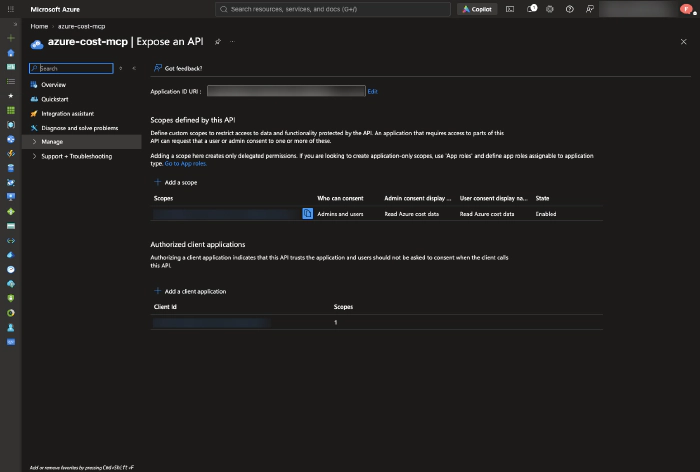
- Inbound (user to server): Cowork gets an Entra token for my API app,
azure-cost-mcp, with aCosts.Readscope, through the plugin vault. The server validates that token. - Outbound (server to Azure): the Container App’s system-assigned managed identity calls Cost Management. It has Cost Management Reader on two subscriptions and nothing else.
4. Building it step by step
4.1 The MCP server (Python, about 200 lines)
Four tools, all read-only: get_costs, get_forecast, top_spenders and list_scopes. They share one helper for Cost Management calls:
API_VERSION = os.getenv("COST_API_VERSION", "2026-06-01")

async def _post(scope: str, op: str, body: dict) -> dict:
    token = (await credential.get_token(f"{ARM}/.default")).token
    url = f"{ARM}{scope}/providers/Microsoft.CostManagement/{op}?api-version={API_VERSION}"
    async with httpx.AsyncClient(timeout=60) as client:
        r = await client.post(url, json=body, headers={"Authorization": f"Bearer {token}"})
        if r.status_code == 429:
            retry = r.headers.get("x-ms-ratelimit-microsoft.costmanagement-qpu-retry-after", "60")
            raise RuntimeError(f"Cost Management throttled this call. Retry after {retry}s.")
        ...
Two details mattered more than I expected:
# Cowork treats tools without annotations as destructive and asks for confirmation.
READ_ONLY = ToolAnnotations(readOnlyHint=True, destructiveHint=False, openWorldHint=False)

@mcp.tool(annotations=READ_ONLY)
async def get_forecast(scope: str | None = None) -> dict:
    """Month-to-date actual cost plus forecast to the end of the current month."""
    ...
    actual   = sum(r["cost"] for r in rows if r.get("CostStatus") == "Actual")
    forecast = sum(r["cost"] for r in rows if r.get("CostStatus") == "Forecast")
    return {"monthToDate": round(actual, 2), "forecastRemaining": round(forecast, 2),
            "projectedMonthTotal": round(actual + forecast, 2), "currency": currency,
            "note": None if forecast else "No forecast rows returned ... projected total equals actual."}
The tool does the arithmetic itself, so the model never adds up raw rows. The note field turned out to be useful, as you’ll see in the results. _scope() rejects any subscription that isn’t in ALLOWED_SCOPES.
4.2 Inbound auth
Cowork connectors don’t support API keys yet, so the server validates an Entra v2 token in a Starlette middleware:
key = jwks.get_signing_key_from_jwt(token).key
jwt.decode(token, key, algorithms=["RS256"],
           audience=AUDIENCE,  # v2 tokens carry the API app's client ID, not api://...
           issuer=f"https://login.microsoftonline.com/{TENANT_ID}/v2.0")
4.3 Deploy
az containerapp up -n azure-cost-mcp -g rg-cowork-demo -l centralindia --source . \
  --ingress external --target-port 8000 --env-vars TENANT_ID=... API_AUDIENCE=... \
  ALLOWED_SCOPES=/subscriptions/<a>,/subscriptions/<b> ALLOWED_HOSTS=<app>.azurecontainerapps.io
az containerapp identity assign -n azure-cost-mcp -g rg-cowork-demo --system-assigned
az role assignment create --assignee-object-id <principalId> --assignee-principal-type ServicePrincipal \
  --role "Cost Management Reader" --scope /subscriptions/<a>
4.4 OAuth registration for the plugin vault
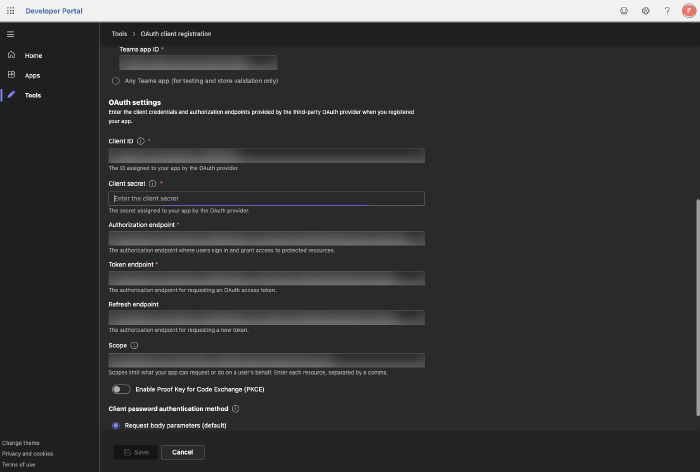
In the Teams Developer Portal (Tools → OAuth client registration), I registered the Entra endpoints, client ID and secret, and the scope api://<app-id>/Costs.Read offline_access. I also added https://teams.microsoft.com/api/platform/v1.0/oAuthRedirect as a redirect URI on the Entra app. The registration ID it generates becomes referenceId in the manifest.
4.5 The plugin package
azure-cost-plugin.zip
├── manifest.json
├── color.png / outline.png
├── skills/azure-cost-review/SKILL.md
└── tools/azure-cost-tools.json      # output of tools/list
"agentSkills": [{ "folder": "./skills/azure-cost-review" }],
"agentConnectors": [{
  "id": "azureCost",
  "displayName": "Azure Cost",
  "toolSource": {
    "remoteMcpServer": {
      "mcpServerUrl": "https://<app>.azurecontainerapps.io/mcp",
      "mcpToolDescription": { "file": "tools/azure-cost-tools.json" },
      "authorization": { "type": "OAuthPluginVault", "referenceId": "<registration-id>" }
    }
  }
}]
The skill is plain Markdown. This is the part that tells Cowork when to switch from cost data to Work IQ:
4. Use Work IQ to find context: search the user's mail and Teams chats from the last 14 days
   for the top resource group names and any "budget" or "cost alert" emails.
   Quote who owns each top spender if you find it.
...
- Never guess numbers. Every figure must come from a tool result.
- Cost data refreshes about every 4 hours and the API is throttled. Don't call the same tool
  twice for the same inputs in one run.
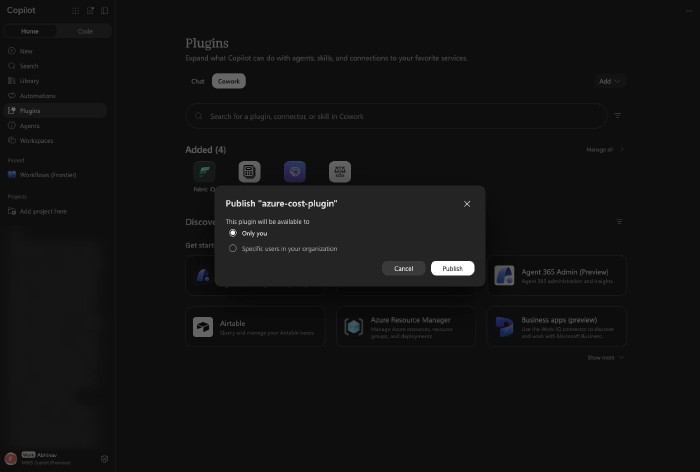
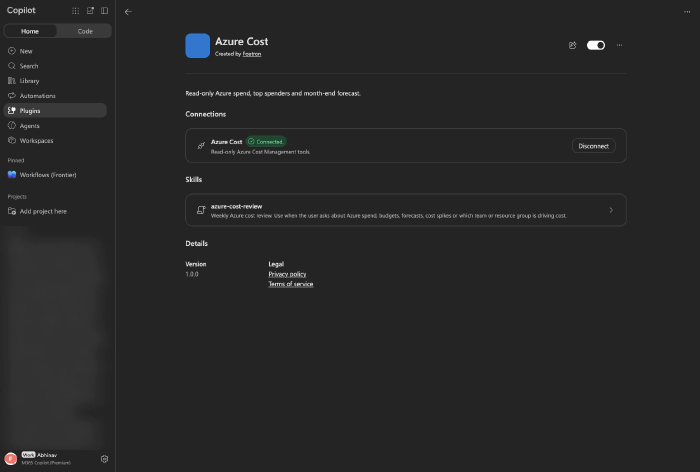
Upload is Plugins → Cowork → Add → Upload, shared with Only you:
4.6 Running it
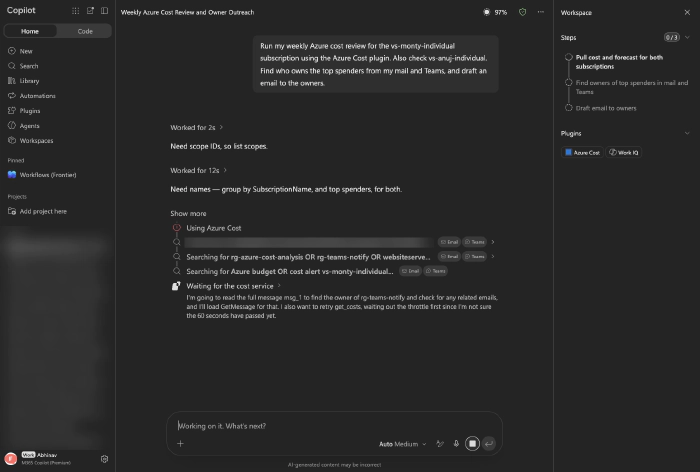
list_scopes, hits the Cost Management throttle, and runs Work IQ searches of my mail and Teams while it waits.
After about a minute and a half:
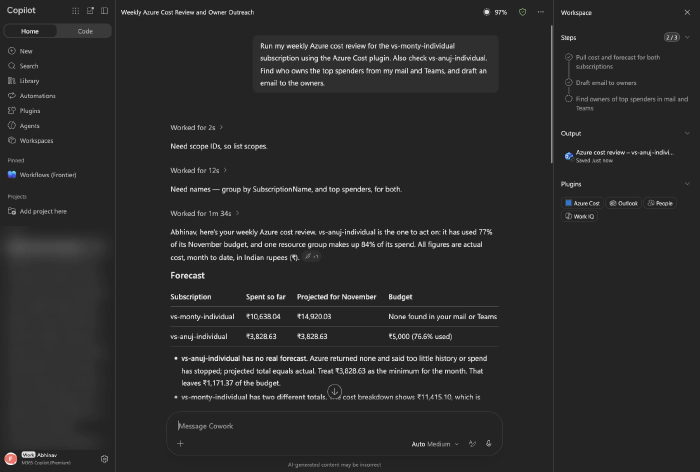
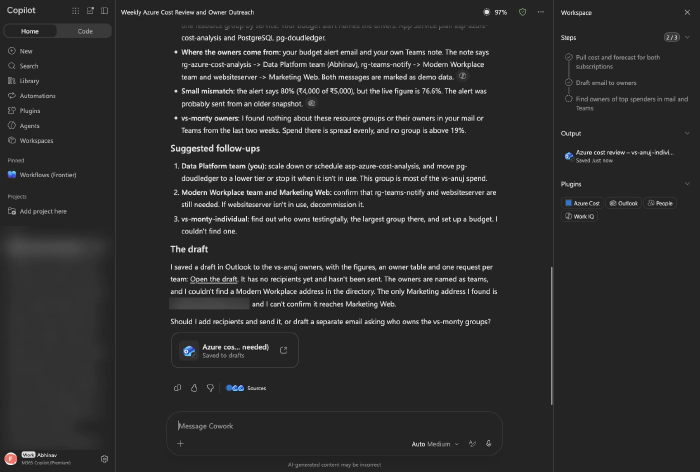
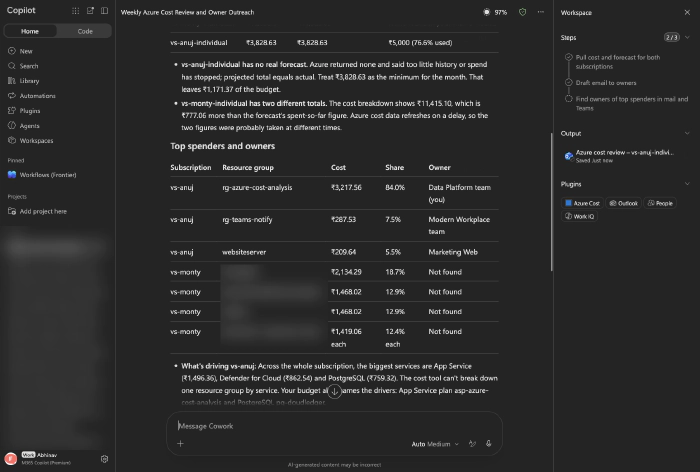
What stood out in that output:
- It used my
notefield. For the cancelled subscription, it said there was “no real forecast” and treated the actual spend as the minimum for the month. It didn’t invent a projection. - It caught a mismatch. The budget email said 80%, but the live figure was 76.6%, and it worked out that the alert was older.
- It noticed a gap in my tool. It said it couldn’t break down one resource group by service, because
get_costshas no filter parameter. That’s going into v2. - It was honest about missing owners. For the second subscription it reported “Not found” instead of guessing.
5. Seven things that broke (and how I fixed them)
Flaw 1: The MCP Python SDK moved under me
My first container crashed on from mcp.server.fastmcp import FastMCP. mcp 2.x renamed it to MCPServer. I pinned mcp>=1.9,<2 for now. If you copy older samples, check the major version first.
Flaw 2: “Invalid Host header” in the cloud
The server worked locally and failed behind Container Apps. The SDK’s DNS-rebinding protection only allows localhost by default. The fix was TransportSecuritySettings(allowed_hosts=[...]), with the public FQDN passed in an env var. Along the way I also found that az containerapp up --env-vars replaces every environment variable instead of adding to them, and the next revision crashed with KeyError: 'TENANT_ID'.
Flaw 3: Cost Management throttles faster than you think
I got a 429 after three manual calls, and Cowork hit the same throttle in the real run (Figure 6). Query cost is metered in QPUs per tenant. My tool reports Retry-After instead of failing silently, and the skill tells Cowork not to repeat calls. Next I’ll add caching.
Flaw 4: The API ignores your aggregation alias
I asked for "totalCost": {"name": "Cost", "function": "Sum"} and got a column called Cost. My first version read totalCost and got nothing. The fix was to normalise the column names.
Flaw 5: The tool-description file was “not found” when it was right there
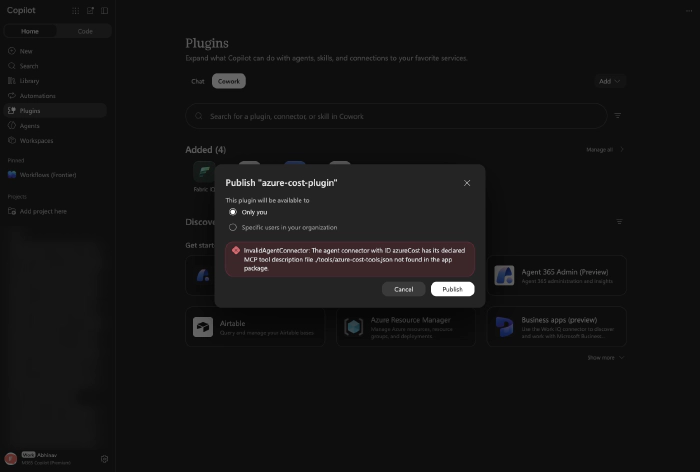
The first upload failed with InvalidAgentConnector: ... MCP tool description file ./tools/azure-cost-tools.json not found in the app package. The file was in the zip. It went through after I changed the path to tools/azure-cost-tools.json (no leading ./) and rebuilt the zip without directory entries.
Flaw 6: “Authentication is still processing” forever
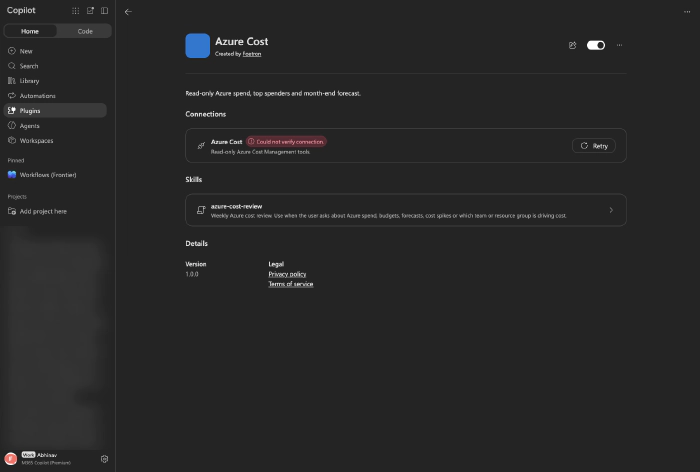
After the upload, the connector showed “Could not verify connection”. Clicking Connect did nothing except leave “Authentication is still processing”. No popup opened and no sign-in reached Entra. The cause was the OAuth registration’s “Restrict usage by app → Existing Teams app ID” setting, which I’d pointed at my manifest ID. Switching it to “Any Teams app” made the real Microsoft sign-in appear straight away. Keep the restriction at the organization level and test before you tighten it.
Flaw 7: Your test subscription can disappear
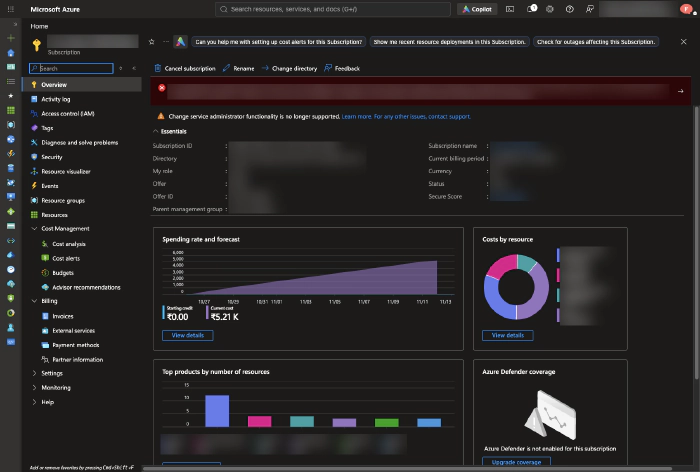
Halfway through, I found that one of the two demo subscriptions had been cancelled. Its cost history could still be queried, but nothing could be deployed into it. Cowork handled it well, because the forecast tool explained why there was no forecast. Even so, check your subscription’s state before you plan a demo around it.
Wrapping up
It works. One read-only MCP server, one skill file and Work IQ replaced my month-end spreadsheet chase with a single Cowork prompt. That prompt pulls live Azure spend, matches it to owners found in mail and Teams, and stops at a draft email that I choose whether to send.
The friction was all at the edges: SDK churn, hosting defaults, a throttled cost API, and plugin packaging and OAuth settings that the docs don’t yet explain well. None of these is a blocker, but each cost me time. Plan for them, and the build itself is small. My next iteration adds a resource-group filter, response caching, and on-behalf-of auth, so each user sees only the subscriptions they can see.
Sample code (MCP server, Dockerfile, plugin package): https://github.com/Yadui/cowork-azure-cost-mcp
References