Copilot Studio samples are now supported in copilot-pro-dev-samples
 Paul Bullock
- 6 minutes to read
- 19 Mar, 2026
Copilot Studio samples are now supported
The PnP copilot-pro-dev-samples repo, started by Bob German, has grown into a community hub for Microsoft 365 Copilot Agents examples, giving “show me how” implementations you can learn from and build on.
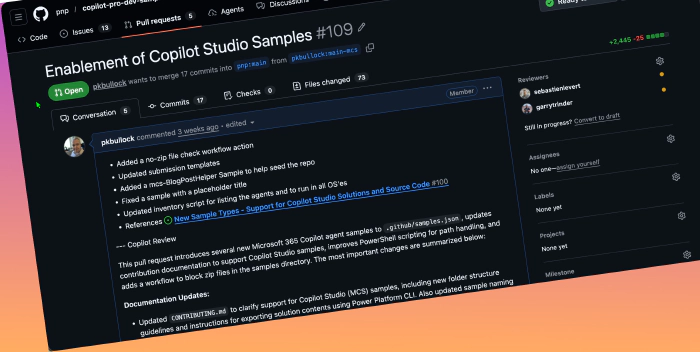
With PR #109 (“Enablement of Copilot Studio Samples”), we’re expanding that mission: Copilot Studio (MCS) samples are now first-class citizens in the repository, alongside existing code-first and toolkit-based samples.
This PR does more than enable Copilot Studio samples, we have improved the submission experience, modernizes a few repo automations, tested the approach(s) for those wanting to install the samples into their environments and makes it easier for contributors to share their work in a consistent, reviewable way.
What’s in the new update?
Here are the highlights included in Enablement of Copilot Studio Samples:
1) Updated contribution guidance (including Copilot Studio / MCS) for those SUBMITTING samples
The repo’s contribution documentation has been updated to clarify that Copilot Studio (MCS) samples are supported, and to describe how they can be exported from your Power Platform Environment. and how the sample is expected to be structured and submitted.
If you’re contributing for the first time, thank you, we hope you found the guidance useful and welcome any feedback if your experience isn’t a smooth one.
2) Submission templates improvements
When creating samples, there is a pattern to follow, to ensure folks can use your sample and integrate into the solution sample gallery. We have expanded the templates and guidance were updated to make it easier to provide the information maintainers and reviewers need (scenario, setup steps, validation, and any special considerations).
3) New example agent to show you want a MCS sample looks like
To help articulate this new sample type, I have created a sample from a Copilot Agent Solution: mcs-BlogPostHelper - this using the Solution Export method.
These have been added to show you want good structure looks like and to help demonstrate the approach and set a baseline for how these submissions should look.
4) Automation: zip files are blocked in samples/**
A new GitHub Action workflow checks PRs to ensure .zip files are not added under the samples/** directory.
How to submit a Copilot Studio sample (step-by-step)
The main type of method to submit Copilot Studio samples: is using the Copilot Studio using Solution Import method.
The repo’s CONTRIBUTING.md shows how to export the agents with either the Power Platform CLI or Power Platform Tools for Visual Studio Code (as this installs the Power Platform CLI as well) extension - both of these scenarios have been catered for.
Step 1: Confirm you can share it
Before you open a PR, make sure you have the rights to publish the sample content (including any organization/client constraints). Once merged into a public repo, it’s public history.
Step 2: Sign the CLA (if prompted)
The PnP org uses a Contributor License Agreement (CLA) workflow. If this is your first contribution, you may be prompted during the PR process.
Step 3: Fork the repo and create a branch
Fork pnp/copilot-pro-dev-samples, then create a feature branch from main in your fork.
Step 4: Create your sample folder under samples/
All samples live under the samples directory, and each sample gets its own folder.
The repo uses prefixes to help quickly identify types of samples. Existing guidance includes prefixes such as:
cea-(custom engine agents that interact via the Azure Bot Framework)da-(declarative agents)msgext-(agents implemented as Microsoft 365 message extensions)mcs-(agents creatd with Microsoft Copilot Studio) <– the NEW ONE
Your sample should follow the naming and structure guidance in CONTRIBUTING.md.
Step 5: Include the required content
To help you create the sample, we have added under templates folder the framework for the sample called mcs-copilot-studio.
At minimum, your sample folder should include:
- your source / exported contents
- an
assets/folder (screenshots) - a
README.mdwith setup + usage instructions, there is guidance in this file to help you
Refer to the mcs-BlogPostHelper - to get an idea of how samples are setup.
Step 6: For security reasons, we cannot accept zip files
PR #109 adds a check to ensure .zip files aren’t included under samples/**.
If your tool exports a zip, extract it and commit the actual files you want reviewed. We have provided guidance in the CONTRIBUTING.md to describe how to do this.
Step 7: Open the PR and fill in the template completely
When you open the PR, use the updated template to include the details of the sample, feel free to use Copilot to help you write the PR. Key files from the template that will need completing:
README.md
- what the sample does (scenario)
- prerequisites
- setup instructions
- how to validate it works
- anything a reviewer/sample user should know (tenant config, required permissions, etc.)
assets/sample.json
- Ensure the contents have been filled out
- Include your github handle to give yourself credit
- Update metadata
Images
- These are optional and does help with context for the sample, but please descirbe how to instructions rather than step by step screenshots, to aid accessibility.
Tips for high-quality submissions (that get merged faster)
A few practical recommendations that align well with the repo’s contributor guidance:
- One sample per PR (unless maintainers request otherwise)
- Provide screenshots in
assets/and reference them in the README - Remove secrets and tenant-specific values
- If something needs customization (IDs, endpoints, environment vars), document it clearly
- If a similar sample exists, consider improving/expanding it instead of duplicating it
Why not use agents exported from Visual Studio Code Extension
There is another method to export samples from Power Platform using the Copilot Studio for Visual Studio Code extension. At the moment, this may not include all the components for agents that utilise other Power Platform features along with the agent. We are not closed to the method, as it improves over time it may support the connected parts as well, but for now, to get started we will support just the pac cli extension method.
Thank you
Id like to credit Garry Trinder and Sébastien Levert for their help in reviewing, adding side quests (lol) and suggesting improvements!
Ready to contribute?
If you’ve built something useful with Microsoft 365 Copilot or Copilot Studio, this our invitation to you to share it. We hope you find the contribution experience simple, but please reach out on our GitHub Issues list if you get stuck.
Main Repo: https://github.com/pnp/copilot-pro-dev-samples
We’re excited to see what you build next.