

Agent Builder, Copilot Studio, or Azure AI Foundry: How We Decide for Every Client
 Elliot Margot
- 7 minutes to read
- 21 May, 2026
Every discovery session I run for enterprise clients hits the same wall: someone has been told that Microsoft now has “three ways to build agents,” and they want to know which one to pick. The answer is never the most powerful tool. It is always the tool that fits the project’s actual constraints.
This post is the framework we use at Witivio to answer that question on every engagement - structured around four evaluation dimensions, with the exact specs you need to make the call.
The Four Questions That Drive the Decision
Before touching any tool, we work through four dimensions:
1. Builder profile - Who is building and owning this agent? A business analyst, a Power Platform maker, or a professional developer? The builder profile alone eliminates at least one option immediately.
2. User surface - Where do end users interact with the agent? Inside Microsoft 365 Copilot Chat, in a Teams tab, on a public website, or embedded in a custom application? Distribution constraints are often the deciding factor.
3. Logic complexity - Does the agent need branching conditions, approval flows, external API calls, scheduled execution, or custom ML inference? The answer maps almost perfectly to tool tier.
4. Post-go-live ownership - Who answers the 2am support call when this breaks? If it is the business team, they need a tool they can maintain. If it is IT or a dev team, you have more options.
With those four answers in hand, the tool choice becomes obvious.
The Three Tools
Agent Builder - No-Code, Inside Copilot Chat
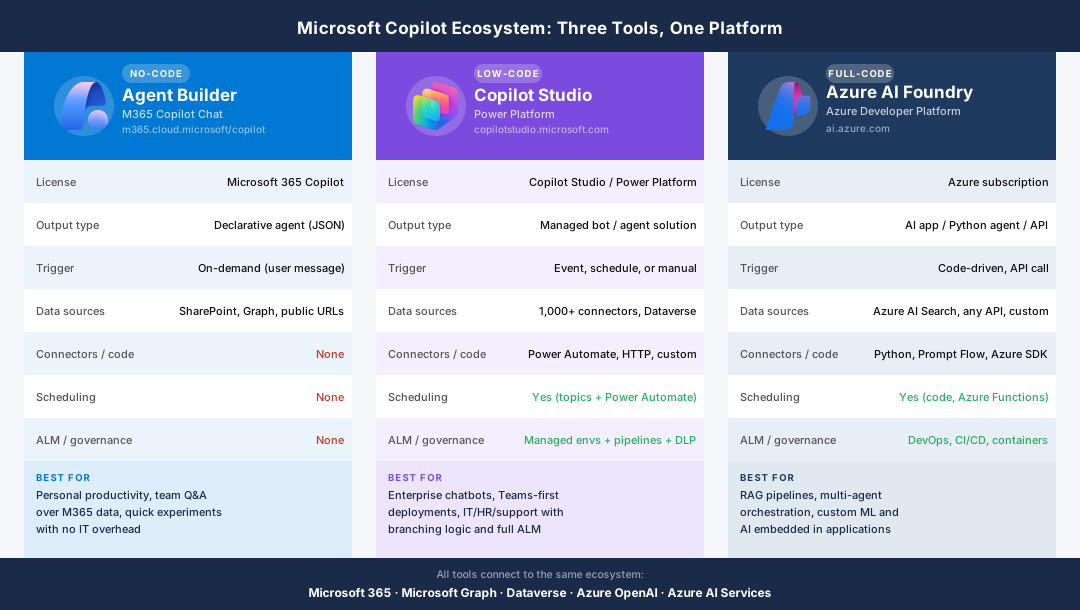
Access: Microsoft 365 Copilot Chat sidebar (“Create an agent”) License required: Microsoft 365 Copilot Output: Declarative agent (JSON-based, no backend compute)
Agent Builder is the fastest path to an agent in the M365 ecosystem. You describe what the agent does, connect it to SharePoint sites or public URLs as knowledge sources, and you are done in under an hour. No portal, no environment, no pipeline.
The key constraint is its ceiling. Agent Builder creates declarative agents - they ground answers in the sources you provide and respond on demand, but they cannot run logic, call external APIs, schedule execution, or integrate with anything outside of what Graph and SharePoint expose. There is also no ALM: no versioning, no governance policies, no environments.
This is not a limitation to apologise for. It is by design. Agent Builder is for bounded, business-owned use cases where the value is speed and the owner is the team using it.
Typical fit: A sales team wants an agent that knows their product catalogue and pricing FAQ. A project manager wants a quick assistant over a SharePoint site. An IT team wants to prototype before committing to a full build.
Common failure mode: Choosing Agent Builder for a use case that requires conditions, external data, or any post-go-live IT support. The agent works in demo, then immediately hits a wall in production.
Copilot Studio - Low-Code, Enterprise Workflows
Access: copilotstudio.microsoft.com License required: Copilot Studio standalone or Power Platform premium Output: Managed bot/agent solution (Power Platform solution artifact)
Copilot Studio is our default recommendation for enterprise agents. It gives you the full low-code toolkit: topics with branching logic, conditions, variables, Power Automate actions, and access to 1,000+ connectors. You can publish to Teams, a website, or as a Copilot extensibility plugin. Managed environments and solution pipelines give you proper ALM, data loss prevention policies, and governance at scale.
The platform has matured significantly. Generative AI orchestration, knowledge sources, authentication flows, and adaptive cards are all first-class citizens now. For the vast majority of enterprise use cases - HR onboarding, IT helpdesk, customer support, internal knowledge assistants - Copilot Studio delivers without requiring a single line of code beyond the occasional Power Fx expression.
Typical fit: An HR team needs an onboarding agent that pulls from Workday, sends Teams messages, and triggers approval flows. An IT team needs a helpdesk bot with ticket routing. A customer-facing support agent needs to authenticate users and access CRM data.
Common failure mode: Underestimating what Copilot Studio can do and escalating to Foundry prematurely. We see this regularly. Teams assume that “complex enough to need an API call” means they need a developer. It does not. If the connector exists or can be built as a custom connector, Copilot Studio handles it.
Azure AI Foundry - Full-Code, Full Control
Access: ai.azure.com License required: Azure subscription (pay-as-you-go for Azure OpenAI, AI Search, etc.) Output: AI application, Python-based agent, or deployed API endpoint
Azure AI Foundry is the platform for professional developers building custom AI solutions. You write Python, use Prompt Flow or the Azure AI SDK, wire up Azure OpenAI and Azure AI Search, and deploy to Azure-managed infrastructure. You have complete control over models, grounding strategy, evaluation pipelines, and deployment targets. Multi-agent orchestration, fine-tuned models, RAG pipelines over proprietary data, AI features embedded in custom applications via API - all of this lives here.
The investment is proportional to the control. Foundry projects require engineering support, longer timelines, and ongoing maintenance by developers. The post-go-live owner is always a tech team.
Typical fit: A consulting firm builds a document analysis tool that processes PDFs, extracts structured data, and feeds a proprietary scoring model. A product team embeds an AI assistant in a customer-facing web app. An enterprise needs a multi-agent pipeline that orchestrates across three backend systems with custom evaluation logic.
Common failure mode: Reaching for Foundry when Copilot Studio would have been sufficient. Premature Foundry adoption is the most expensive mistake we see - it adds months of development time and creates a maintenance burden that business teams cannot carry.
The Full Comparison
| Dimension | Agent Builder | Copilot Studio | Azure AI Foundry |
|---|---|---|---|
| Skill required | No-code | Low-code | Full-code (Python) |
| License | M365 Copilot | Copilot Studio / PP | Azure subscription |
| Output | Declarative agent | Managed bot/solution | AI app / API |
| Trigger | On-demand | Event, schedule, manual | Code-driven |
| Data sources | SharePoint, Graph, URLs | 1,000+ connectors, Dataverse | Azure AI Search, any API |
| External code/APIs | None | Power Automate, HTTP, custom | Python, Prompt Flow, SDK |
| Scheduling | None | Yes | Yes (Azure Functions) |
| ALM / governance | None | Managed envs + DLP | DevOps, CI/CD |
| Time to first value | Hours | Days to weeks | Weeks to months |
Where People Get It Wrong
Three failure patterns come up in almost every audit:
Premature Foundry adoption. A team hears “AI agent” and assumes they need a developer. They budget for Foundry, spend three months building, and end up with something Copilot Studio could have delivered in two weeks. Always ask: does this actually need custom code?
Underestimating Agent Builder’s ceiling. Teams prototype in Agent Builder, users love it, then requirements grow. “Can we add an approval step?” No. “Can we call our CRM?” No. The transition to Copilot Studio mid-project is painful. If the requirements might grow beyond Q&A, start in Copilot Studio.
Ignoring the M365 Copilot distribution channel. Agent Builder agents are natively available to every M365 Copilot user with zero deployment effort. For internal agents with simple requirements and a licensed user base, this distribution advantage often outweighs the feature ceiling.
The Pattern They Share
All three tools connect to the same underlying ecosystem: Microsoft 365, Microsoft Graph, Dataverse, Azure OpenAI, and Azure AI Services. You are not choosing between disconnected products. You are choosing your entry point into the same platform.
In practice, mature organisations end up using all three. Agent Builder for personal productivity and quick wins. Copilot Studio as the enterprise standard for cross-functional agents. Foundry for the custom AI layer where standard connectors fall short.
The question is never which tool is best. It is which tool fits this project, this team, and this moment - and gets the agent into users’ hands before the requirements change again.