

SharePoint Framework Toolkit v4.19.0 minor release
 Adam Wójcik
- 5 minutes to read
- 22 May, 2026
🗒️ Quick intro
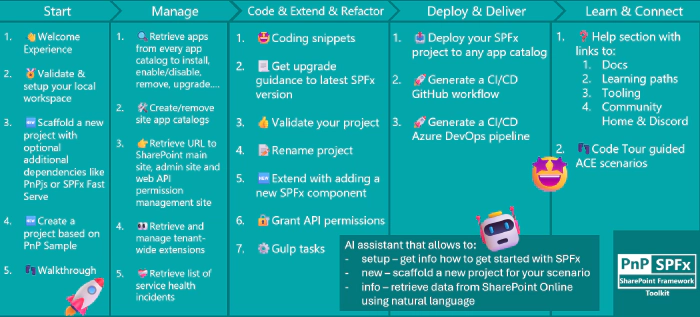
SharePoint Framework Toolkit is a Visual Studio Code extension that aims to boost your productivity in developing and managing SharePoint Framework solutions helping at every stage of your development flow, from setting up your development workspace to deploying a solution straight to your tenant without the need to leave VS Code, it even allows you to create a CI/CD pipeline to introduce automated deployment of your app and also comes along with AI capabilities which will allow you to manage your SharePoint Online tenant straight from GitHub Copilot chat extension.
Just check out the features list 👇 it’s a looot 🤯.
Sounds cool 😎? Let’s see some new enhancements we added in this minor release
Added support for SPFx 1.23
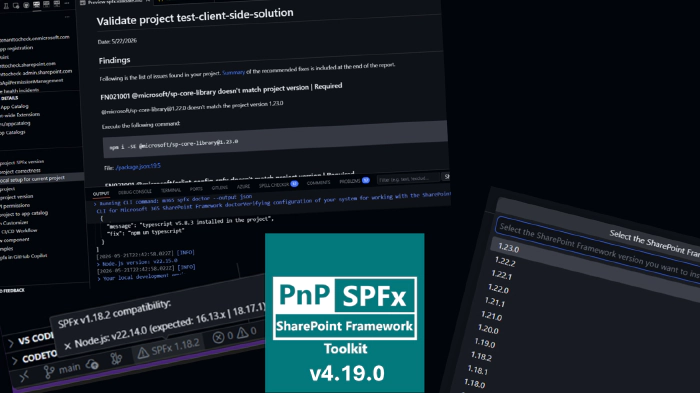
The most important highlight of this release is the addition of support for SharePoint Framework 1.23.0. We’ve extended the compatibility matrix and updated the underlying CLI for Microsoft 365 dependency so that SPFx Toolkit recognizes 1.23 across the board.
This means that the validate and upgrade actions now fully understand SPFx 1.23 projects. You can generate accurate upgrade reports from any older SPFx version to 1.23 and validate the structure and dependencies of your 1.23 projects directly from VS Code.
On top of that, the local environment setup and the validate local setup actions now know exactly which Node.js version and which global npm packages are required to develop with SPFx 1.23. If your local environment doesn’t match, the extension will guide you through getting it ready so you can start (or continue) building with the latest SharePoint Framework version with minimal friction.
Status bar SPFx indicator
We’ve added a brand new SPFx status bar indicator at the bottom of VS Code. Whenever you open an SPFx project, the indicator shows which SharePoint Framework version the project is using and also performs a quick check against your currently active Node.js version.
If your Node.js version is compatible with the project’s SPFx version, the indicator will show a friendly status. If it isn’t, the indicator will clearly highlight the mismatch so you can react before running into cryptic build errors. Clicking the indicator refreshes the check, which is handy if you just switched Node.js versions via NVM or NVS.
It’s a small but very useful addition that gives you immediate visibility into one of the most common sources of issues in SPFx development - the Node.js to SPFx version compatibility.
Shortcut to jump to the SPFx Toolkit view
Based on community feedback, we’ve added a dedicated keyboard shortcut that allows you to quickly jump straight into the SPFx Toolkit activity view. No more reaching for the mouse or hunting through the activity bar - one shortcut Ctrl + Alt + S and you’re right in the extension, ready to manage your tenant, scaffold a project, or trigger any of the available actions.
This is one of those quality-of-life improvements that you’ll appreciate every single day once you get used to it.
👏 You ROCK 🤩
This release would not have been possible without the help of some really awesome folks who stepped in and joined our journey in creating the best-in-class SharePoint Framework tooling in the world. We would like to express our huge gratitude and shout out to:
🗺️ Future roadmap
We don’t plan to stop, we are already thinking of more awesome features we plan to deliver in upcoming releases. Top of our mind currently is:
- Security - we are currently investing many different activities to make SPFx Toolkit even more secure to give you the confidence you need to focus on coding and not on vulnerabilities
- More AI capabilities to help you manage your SharePoint Online tenant even better
If you want to check what we are planning, check out our issues. Feedback is appreciated 👍.
👍 Power of the community
This extension would not have been possible if it hadn’t been for the awesome work done by the Microsoft 365 & Power Platform Community. Each sample gallery: SPFx web parts & extensions, and ACE samples & scenarios, is populated with the contributions made by the community. Many of the functionalities of the extension, like upgrading, validating, and deploying your SPFx project, would not have been possible if it weren’t for the CLI for Microsoft 365 tool. I would like to thank all of our awesome contributors sincerely! Creating this extension would not have been possible if it weren’t for the enormous work done by the community. You all rock 🤩.

If you would like to participate, the community welcomes everybody who wants to build and share feedback around Microsoft 365 & Power Platform. Join one of our community calls to get started, and be sure to visit 👉 https://aka.ms/community/home.
🙋 Wanna help out?
Of course, we are open to contributions. If you would like to participate, do not hesitate to visit our GitHub repo and start a discussion or engage in one of the many issues we have. We have many issues that are just ready to be taken. Please follow our contribution guidelines before you start. Feedback (positive or negative) is also more than welcome.