Using MCP Servers in a React Application — A Real-World Example with Microsoft Graph
 João Mendes
- 12 minutes to read
- 26 Feb, 2026
Introduction
The Model Context Protocol (MCP) is an open protocol introduced by Anthropic that standardises how AI models — and any client application — connect to external tools and data sources. While the protocol gained widespread attention in the AI assistant world, its real power is as a universal, typed, and discoverable API layer that you can call from any front-end application, including React.
In this post I will walk you through a production-grade React component called My Team that uses an MCP server as its sole data source. The server wraps Microsoft Graph API calls and exposes them as typed MCP tools. The React app authenticates with Microsoft Entra ID (via MSAL), acquires a bearer token, connects to the MCP server over HTTP, and calls tools such as get_user, get_manager, and get_direct_reports.
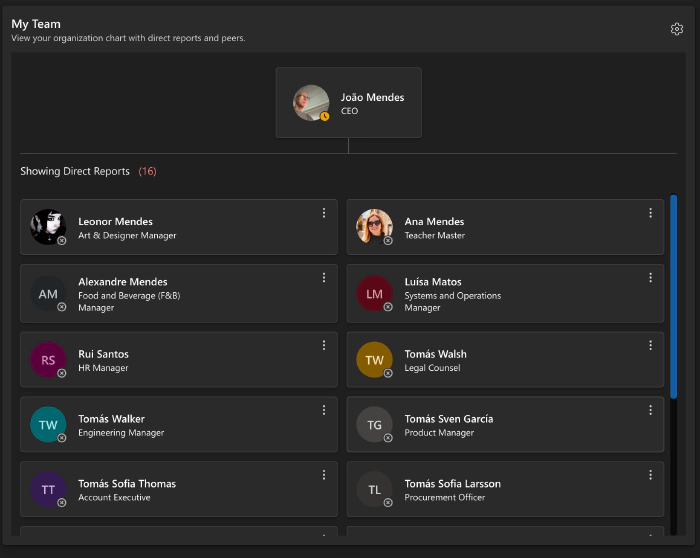
The finished UI looks like this:
By the end of this post you will understand:
- How the MCP client connects to a server from the browser
- How custom React hooks abstract authentication, transport, and logging
- Which React hooks are used and why
- How infinite scroll pagination and dynamic page sizing are implemented
- The full architecture from the browser to Microsoft Graph
Architecture Overview
The diagram below shows every layer of the solution, from the React component tree down to Microsoft 365.
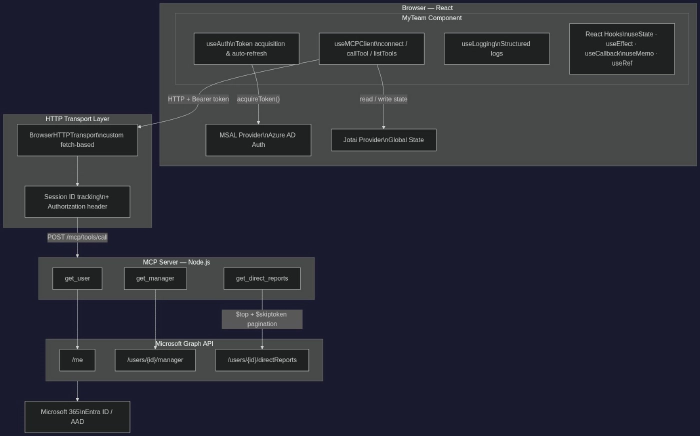
Key insight: The React app never calls Microsoft Graph directly. All data access is delegated to the MCP server. The browser only needs to know the MCP server URL and how to obtain a bearer token — the tool schema, pagination tokens, and Graph API details stay on the server side.
Project Structure
src/
├── atoms/                    # Jotai atoms (global state slices)
│   ├── authStateAtom.ts
│   └── mcpStateAtom.ts
├── config/
│   └── authConfig.ts         # MSAL config & loginRequest scopes
├── hooks/
│   ├── useAuth.ts            # MSAL authentication hook
│   ├── useMCPClient.ts       # MCP client hook
│   ├── useLogging.ts         # Structured logging hook
│   ├── useIndexedDBCache.ts  # IndexedDB caching hook
│   └── BrowserHTTPTransport.ts  # Custom MCP transport
└── components/
    └── myTeam/
        ├── IMyTeamProps.ts   # Props interface
        ├── MyTeam.tsx        # Main component
        ├── MyTeamSkeleton.tsx # Loading skeleton
        ├── useMyTeamStyles.ts # Emotion CSS-in-JS styles
        └── index.ts          # Public exports
Custom Hooks Deep Dive
useMCPClient — The MCP Transport Layer
This is the most important hook in the solution. It wraps the official @modelcontextprotocol/sdk client and exposes a clean API to React components.
import { useCallback, useRef, useEffect } from 'react';
import { useAtom } from 'jotai';
import { Client } from '@modelcontextprotocol/sdk/client/index.js';
import { mcpStateAtom } from '../atoms';
import { useIndexedDBCache } from './useIndexedDBCache';
import { BrowserHTTPTransport } from './BrowserHTTPTransport';

export function useMCPClient(): IUseMCPClientReturn {
  const [mcpState, setMcpState] = useAtom(mcpStateAtom);

  // 1-hour TTL for the tools list (avoids repeated /tools requests)
  const { getData, setData } = useIndexedDBCache<IMCPTool[]>(60 * 60 * 1000);

  // Persist the SDK Client and Transport across re-renders without
  // triggering re-renders when they change
  const clientRef = useRef<Client | null>(null);
  const transportRef = useRef<BrowserHTTPTransport | null>(null);

  // Deduplicate in-flight requests that arrive concurrently
  const pendingRequestsRef = useRef<Map<string, Promise<unknown>>>(new Map());

  const connect = useCallback(async (options: IMCPConnectOptions) => {
    const transport = new BrowserHTTPTransport({
      url: options.url,
      headers: options.headers ?? {},
      timeout: 30_000,
    });

    const client = new Client(
      { name: 'browser-mcp-client', version: '1.0.0' },
      { capabilities: {} }
    );

    transportRef.current = transport;
    clientRef.current = client;

    // Performs the MCP initialisation handshake
    await client.connect(transport);

    setMcpState(prev => ({
      ...prev,
      isConnected: true,
      isConnecting: false,
      sessionId: transport.getSessionId() ?? '',
      baseUrl: options.url,
      headers: options.headers ?? {},
    }));
  }, [setMcpState]);

  const callTool = useCallback(
    async (toolName: string, args: Record<string, unknown>) => {
      if (!clientRef.current) throw new Error('Not connected. Call connect() first.');

      return clientRef.current.callTool({ name: toolName, arguments: args });
    },
    []
  );

  // Clean up the SDK client when the component unmounts
  useEffect(() => {
    return () => {
      clientRef.current?.close();
      transportRef.current?.close();
    };
  }, [disconnect]);

  return { isConnected: mcpState.isConnected, connect, callTool, listTools, disconnect };
}
React hooks used in useMCPClient:
| Hook | Purpose |
|---|---|
useRef | Hold the Client and BrowserHTTPTransport instances without causing re-renders when they are assigned |
useRef (second) | In-memory Map for concurrent request deduplication |
useCallback | Stable references for connect, callTool, disconnect, and listTools so they can safely appear in dependency arrays |
useEffect | Cleanup — close the SDK client and transport when the hook’s owner component unmounts |
useAtom (Jotai) | Read and write the global mcpState (connection status, session ID, tools list, errors) |
useAuth — MSAL Token Acquisition
useAuth wraps @azure/msal-react and adds automatic silent token refresh so the rest of the application never has to think about expiry.
import { useState, useEffect, useCallback, useRef } from 'react';
import { useMsal } from '@azure/msal-react';
import { useAtom } from 'jotai';
import { authStateAtom } from '../atoms';

const TOKEN_EXPIRY_BUFFER = 5 * 60 * 1000; // refresh 5 min before real expiry

export function useAuth(): IUseAuthReturn {
  const { instance, accounts } = useMsal();
  const [authState, setAuthState] = useAtom(authStateAtom);
  const [isLoading, setIsLoading] = useState(false);

  const tokenExpiryRef = useRef<number | null>(null);
  const isRefreshingRef  = useRef(false);

  const acquireToken = useCallback(
    async (request: RedirectRequest): Promise<string | undefined> => {
      const account = accounts[0];
      if (!account) return undefined;

      try {
        // Silent-first: use cached token from MSAL token cache
        const result = await instance.acquireTokenSilent({ ...request, account });
        tokenExpiryRef.current = result.expiresOn?.getTime() ?? null;
        return result.accessToken;
      } catch {
        // Fallback: interactive redirect when silent fails (e.g. consent required)
        await instance.acquireTokenRedirect(request);
      }
    },
    [instance, accounts]
  );

  // Poll every 5 minutes to refresh the token proactively
  useEffect(() => {
    const interval = setInterval(async () => {
      if (!isRefreshingRef.current && isTokenExpiringSoon()) {
        isRefreshingRef.current = true;
        await acquireToken({ scopes: loginRequest.scopes, forceRefresh: true });
        isRefreshingRef.current = false;
      }
    }, TOKEN_EXPIRY_BUFFER);

    return () => clearInterval(interval);
  }, [acquireToken]);

  return { isAuthenticated: !!accounts[0], acquireToken, isLoading, user: authState.user };
}
React hooks used in useAuth:
| Hook | Purpose |
|---|---|
useState | Track the isLoading flag for the login/logout UI |
useRef | Store tokenExpiryRef (expiry timestamp) and isRefreshingRef (guard against parallel refreshes) without triggering renders |
useCallback | Stable references for acquireToken, login, logout, and isTokenExpiringSoon |
useEffect | Start the background interval that proactively refreshes the token; clean up with clearInterval on unmount |
useAtom (Jotai) | Sync authenticated user information into global authStateAtom |
useLogging — Structured Logging
useLogging provides levelled logging (DEBUG, INFO, WARN, ERROR, FATAL), an in-memory log history, and an optional remote endpoint. Every log entry is enriched with a timestamp, function name, and contextual data.
import { useCallback } from 'react';

export function useLogging(config: ILoggingConfig = {}) {
  const logInfo = useCallback(
    (functionName: string, message: string, additionalData?: Record<string, unknown>) => {
      const entry: ILogEntry = {
        timestamp: new Date().toISOString(),
        level: LogLevel.INFO,
        functionName,
        message,
        additionalData,
      };
      console.info(`[INFO] [${functionName}] ${message}`, additionalData ?? '');
      logHistory.push(entry);
    },
    []
  );

  // logDebug / logWarning / logError / logFatal follow the same pattern
  return { logDebug, logInfo, logWarning, logError, logFatal, getLogHistory };
}
React hooks used in useLogging:
| Hook | Purpose |
|---|---|
useCallback | Every logX function is memoised so that components that spread them into dependency arrays do not re-render unnecessarily |
The MyTeam Component
Now that the hooks are clear, let’s look at how they are composed inside a single React component.
Props & State
export interface IMyTeamProps {
  userId?: string; // UPN or object ID of the user to show
}

// Inside the component
const [isLoading, setIsLoading]           = useState<boolean>(true);
const [currentUser, setCurrentUser]       = useState<ITeamMember | null>(null);
const [directReports, setDirectReports]   = useState<ITeamMember[]>([]);
const [skipToken, setSkipToken]           = useState<string | undefined>(undefined);
const [hasNextPage, setHasNextPage]       = useState(false);
const [isLoadingMore, setIsLoadingMore]   = useState(false);
const [isFetching, setIsFetching]         = useState(false);
const [containerHeight, setContainerHeight] = useState(600);
const [error, setError]                   = useState<string>('');
Dynamic Page Size with useMemo
Instead of hard-coding a $top value, the component measures its own height and calculates how many rows are visible:
const ITEM_HEIGHT    = 200; // approximate card height in px
const HEADER_OFFSET  = 250; // space taken by the current-user card + header

const pageSize = useMemo(() => {
  const visibleRows  = Math.floor((containerHeight - HEADER_OFFSET) / ITEM_HEIGHT);
  // Pre-load 2× the visible area for smooth scrolling
  return Math.max(6, visibleRows * 2);
}, [containerHeight]);
useMemo ensures the calculation only runs when containerHeight changes — not on every render.
Observing Container Size with useEffect + ResizeObserver
Because the component can live inside a resizable dashboard tile, it listens to dimension changes:
const containerRef = useRef<HTMLDivElement>(null);

useEffect(() => {
  const container = containerRef.current;
  if (!container) return;

  const observer = new ResizeObserver(entries => {
    for (const entry of entries) {
      const height = entry.contentRect.height;
      if (height > 0) setContainerHeight(height);
    }
  });

  observer.observe(container);

  // Cleanup: always disconnect the observer to avoid memory leaks
  return () => observer.disconnect();
}, []); // Empty array = set up once on mount
Preventing Double-Fetch with useRef
React 18’s Strict Mode mounts components twice in development. A useRef flag guards against fetching twice without introducing complex state:
const hasFetchedRef = useRef(false);

useEffect(() => {
  if (userId && !hasFetchedRef.current) {
    hasFetchedRef.current = true;
    loadTeamData();
  }
}, [userId]);
Initial Data Load — Connecting to the MCP Server
The initial load sequence follows four steps:
const loadTeamData = async (): Promise<void> => {
  setIsLoading(true);

  // 1. Acquire bearer token via MSAL (silent → interactive fallback)
  const token = await acquireToken(loginRequest);

  // 2. Connect to the MCP server, passing the token in the Authorization header
  await connect({
    url: MCP_SERVER_URL,
    headers: { Authorization: `Bearer ${token}` },
  });

  // 3. Call the get_user tool to resolve the current user's details
  const userResult = await callTool('get_user', { userId });
  const { user } = JSON.parse(userResult.content[0].text);
  setCurrentUser(user);

  // 4. Call get_manager (optional — user may be at the top of the org)
  try {
    const managerResult = await callTool('get_manager', { userId });
    const manager = JSON.parse(managerResult.content[0].text);
    // Use manager.id to fetch peers (direct reports of the manager)
    await fetchPeers(manager.id);
  } catch {
    logInfo('loadTeamData', 'No manager found — user is at top level');
  }

  // 5. Fetch first page of direct reports
  await fetchDirectReports();

  setIsLoading(false);
};
Infinite Scroll Pagination
The MCP server returns an OData-style @odata.nextLink or a skipToken property when there are more pages. The component appends pages as the user scrolls:
const handleScroll = useCallback(
  (e: React.UIEvent<HTMLDivElement>) => {
    const { scrollTop, scrollHeight, clientHeight } = e.currentTarget;
    const scrollRatio = (scrollTop + clientHeight) / scrollHeight;

    // Trigger the next page load when 80 % of the content is visible
    if (scrollRatio >= 0.8 && hasNextPage && !isLoadingMore && !isFetching) {
      fetchDirectReports(skipToken, /* isLoadMore */ true);
    }
  },
  [hasNextPage, isLoadingMore, isFetching, skipToken, fetchDirectReports]
);
When isLoadMore is true, new results are appended rather than replacing the list:
if (isLoadMore) {
  setDirectReports(prev => [...prev, ...parseResult.reports]);
} else {
  setDirectReports(parseResult.reports);
}
Loading Skeleton
While the initial fetch is in progress, MyTeamSkeleton renders Fluent UI skeleton cards instead of a spinner, providing a content-aware loading state:
if (isLoading) return <MyTeamSkeleton count={6} />;
MyTeamSkeleton uses the same useMyTeamV2Styles hook so the layout is consistent during and after loading.
All React Hooks at a Glance
| Hook | Where | Purpose |
|---|---|---|
useState | MyTeam | currentUser, directReports, skipToken, hasNextPage, isLoading, isLoadingMore, isFetching, containerHeight, error |
useEffect | MyTeam | Mount the ResizeObserver; trigger initial data load once |
useCallback | MyTeam | Stable references for parseDirectReports, fetchDirectReports, handleLoadMore, handleScroll, and action handlers |
useMemo | MyTeam | Calculate pageSize from containerHeight |
useRef | MyTeam | containerRef (DOM node), hasFetchedRef (double-fetch guard) |
useRef | useMCPClient | clientRef, transportRef, pendingRequestsRef |
useCallback | useMCPClient | connect, disconnect, listTools, callTool, selectTool, clearCache |
useEffect | useMCPClient | Disconnect and clean up on unmount |
useCallback | useAuth | acquireToken, login, logout, isTokenExpiringSoon |
useRef | useAuth | tokenExpiryRef, isRefreshingRef |
useEffect | useAuth | Background token refresh interval |
useCallback | useLogging | All logX functions |
React.memo | MyTeam, MyTeamSkeleton | Skip re-renders when props have not changed |
Setting Up the MCP Client in Your Own React App
Follow these steps to embed an MCP server in a React project:
1. Install the SDK and MSAL
npm install @modelcontextprotocol/sdk @azure/msal-browser @azure/msal-react jotai
2. Configure MSAL
// src/config/authConfig.ts
import { Configuration, LogLevel } from '@azure/msal-browser';

export const msalConfig: Configuration = {
  auth: {
    clientId: '<your-app-client-id>',
    authority: 'https://login.microsoftonline.com/<your-tenant-id>',
    redirectUri: window.location.origin,
  },
  cache: { cacheLocation: 'sessionStorage' },
};

export const loginRequest = {
  scopes: ['api://<your-mcp-server-app-id>/user_impressonation'],
};
3. Implement BrowserHTTPTransport
The official MCP SDK ships a Node.js StreamableHTTPClientTransport. For the browser you need a fetch-based equivalent:
// src/hooks/BrowserHTTPTransport.ts
import type { Transport } from '@modelcontextprotocol/sdk/shared/transport.js';
import type { JSONRPCMessage } from '@modelcontextprotocol/sdk/types.js';

export class BrowserHTTPTransport implements Transport {
  private _url: string;
  private _headers: Record<string, string>;
  private _sessionId?: string;

  constructor(options: { url: string; headers: Record<string, string>; timeout?: number }) {
    this._url = options.url;
    this._headers = options.headers;
  }

  async send(message: JSONRPCMessage): Promise<void> {
    const response = await fetch(this._url, {
      method: 'POST',
      headers: {
        'Content-Type': 'application/json',
        'mcp-session-id': this._sessionId ?? '',
        ...this._headers,
      },
      body: JSON.stringify(message),
    });

    if (response.ok) {
      const sessionHeader = response.headers.get('mcp-session-id');
      if (sessionHeader) this._sessionId = sessionHeader;

      const data = await response.json();
      this.onmessage?.(data);
    }
  }

  getSessionId() { return this._sessionId; }

  onessage?: (message: JSONRPCMessage) => void;
  onerror?:   (error: Error) => void;
  onclose?:   () => void;

  async start() { /* no-op for HTTP */ }
  async close() { this._sessionId = undefined; this.onclose?.(); }
}
4. Create the Jotai Atom
// src/atoms/mcpStateAtom.ts
import { atom } from 'jotai';

export interface IMCPState {
  isConnected: boolean;
  isConnecting: boolean;
  sessionId?:  string;
  tools:       IMCPTool[];
  error?:      string;
  baseUrl?:    string;
  headers?:    Record<string, string>;
}

export const mcpStateAtom = atom<IMCPState>({
  isConnected: false,
  isConnecting: false,
  tools: [],
});
5. Wrap Your Application
// src/index.tsx
import { MsalProvider } from '@azure/msal-react';
import { Provider as JotaiProvider } from 'jotai';
import { PublicClientApplication } from '@azure/msal-browser';
import { msalConfig } from './config/authConfig';

const msalInstance = new PublicClientApplication(msalConfig);

root.render(
  <MsalProvider instance={msalInstance}>
    <JotaiProvider>
      <App />
    </JotaiProvider>
  </MsalProvider>
);
6. Use the Hook
import { useAuth }      from './hooks/useAuth';
import { useMCPClient } from './hooks/useMCPClient';
import { loginRequest } from './config/authConfig';

const MY_MCP_SERVER = 'https://my-mcp-server/mcp';

export const MyComponent: React.FC = () => {
  const { acquireToken } = useAuth();
  const { connect, callTool } = useMCPClient();
  const [data, setData] = useState<unknown>(null);

  useEffect(() => {
    (async () => {
      const token = await acquireToken(loginRequest);
      await connect({ url: MY_MCP_SERVER, headers: { Authorization: `Bearer ${token}` } });

      const result = await callTool('get_user', { userId: 'me' });
      setData(JSON.parse(result.content[0].text));
    })();
  }, []);

  return <pre>{JSON.stringify(data, null, 2)}</pre>;
};
Key Takeaways
- MCP as a universal API layer — your React component never imports any Graph SDK. Tools are discoverable, typed, and versioned on the server.
useReffor mutable values that must not trigger renders — the SDKClientinstance, transport, and request-deduplication map all live in refs.useMemofor derived state — the page size is computed from container dimensions, cached byuseMemo, and passed as a tool argument.useCallbackeverywhere — all async handlers are wrapped inuseCallbackso they can appear inuseEffectdependency arrays without causing infinite loops.ResizeObserverin auseEffect— a clean teardown pattern (return() => observer.disconnect()) prevents memory leaks.React.memo— wrapping bothMyTeamV2andMyTeamSkeletonprevents unnecessary re-renders when parent state changes.- Skeleton loading — matching the layout of real cards during load eliminates Cumulative Layout Shift (CLS).
- IndexedDB caching — the tools list is cached for one hour. The bearer token changes per session; the tool schema does not.
Resources
- Model Context Protocol — Official Documentation
- @modelcontextprotocol/sdk on npm
- MSAL React — Microsoft Authentication Library
- Jotai — Primitive and flexible state management for React
- Fluent UI React Components
- Microsoft Graph API — Users resource type
Have questions or feedback? Drop a comment below or reach out on the PnP Community Discord.