About this sample
The "Document Finder" Declarative Agent is an open-source AI-driven tool designed to assist professionals in their document management. This agent provides personalized suggestions and actionable plans to help users find and organize their documents effectively. By leveraging data such as the user's current role, projects, and document types, the Document Finder offers tailored advice on document retrieval, organization, and sharing. It maintains a professional and supportive tone, ensuring that interactions are contextual and relevant. The agent integrates with OneDrive, SharePoint, and Graph Connectors to enhance its capabilities. Key features include creating detailed document organization plans, performing document searches, recommending document templates, and offering collaboration strategies. This open-source project aims to empower individuals to achieve their document management goals through structured guidance and support. With the declarative agent, you can build a custom version of Copilot that can be used for specific scenarios, such as for specialized knowledge, implementing specific processes, or simply to save time by reusing a set of AI prompts. For example, a grocery shopping Copilot declarative agent can be used to create a grocery list based on a meal plan that you send to Copilot. To run this app template in your local dev machine, you will need Node.js (supported versions: 16, 18), a Microsoft 365 account for development, Teams Toolkit Visual Studio Code Extension version 5.0.0 and higher or Teams Toolkit CLI, and a Microsoft 365 Copilot license. First, select the Teams Toolkit icon on the left in the VS Code toolbar. In the Account section, sign in with your Microsoft 365 account if you haven't already. Create Teams app by clicking `Provision` in "Lifecycle" section. Select `Preview in Copilot (Edge)` or `Preview
- PLATFORM
- Copilot
- LANGUAGE
- JSON
- API-PLUGIN
- No
- GRAPH-CONNECTOR
- No
Setup and usage
Sample documentation
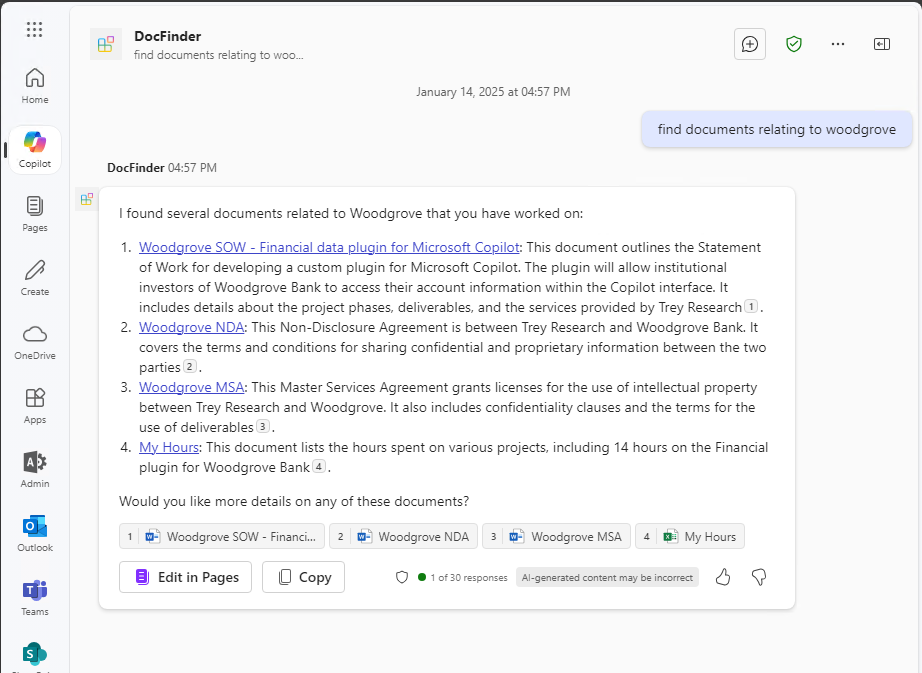
The docfinder declarative agent demonstrates how you users can easily discover documents in SharePoint and OneDrive based on those created, modified or viewed by them. As a agent builder, it illustrates how you can use instructions to steer Copilot to help the user. Take a look at the instructions file to see more.
Minimal path to awesome
Prerequisites
To run this app you will need:
- First, select the Teams Toolkit icon on the left in the VS Code toolbar.
- In the Account section, sign in with your Microsoft 365 account if you haven't already. Ensure that both "Custom App Upload Enabled" and "Copilot Access Enabled" have green checkmarks
- Create and provision the Teams app by clicking
Provision in "Lifecycle" section.
- Select the "Run and Debug" icon in the left sidebar, and then select
Preview in Copilot (Edge) or Preview in Copilot (Chrome) from the launch configuration dropdown.
- Once the Copilot app is loaded in the browser, click on the "…" menu and select "Copilot agents". You will see your declarative agent on the right rail. Clicking on it will change the experience to showcase the logo and name of the declarative agent.
- Ask a question to your declarative agent and it should respond based on the instructions provided.
Addition information and references
Please check out the author's YouTube short where he explains and demos the solution


 Jeremy Thake
