
 Ejaz Hussain

Summary
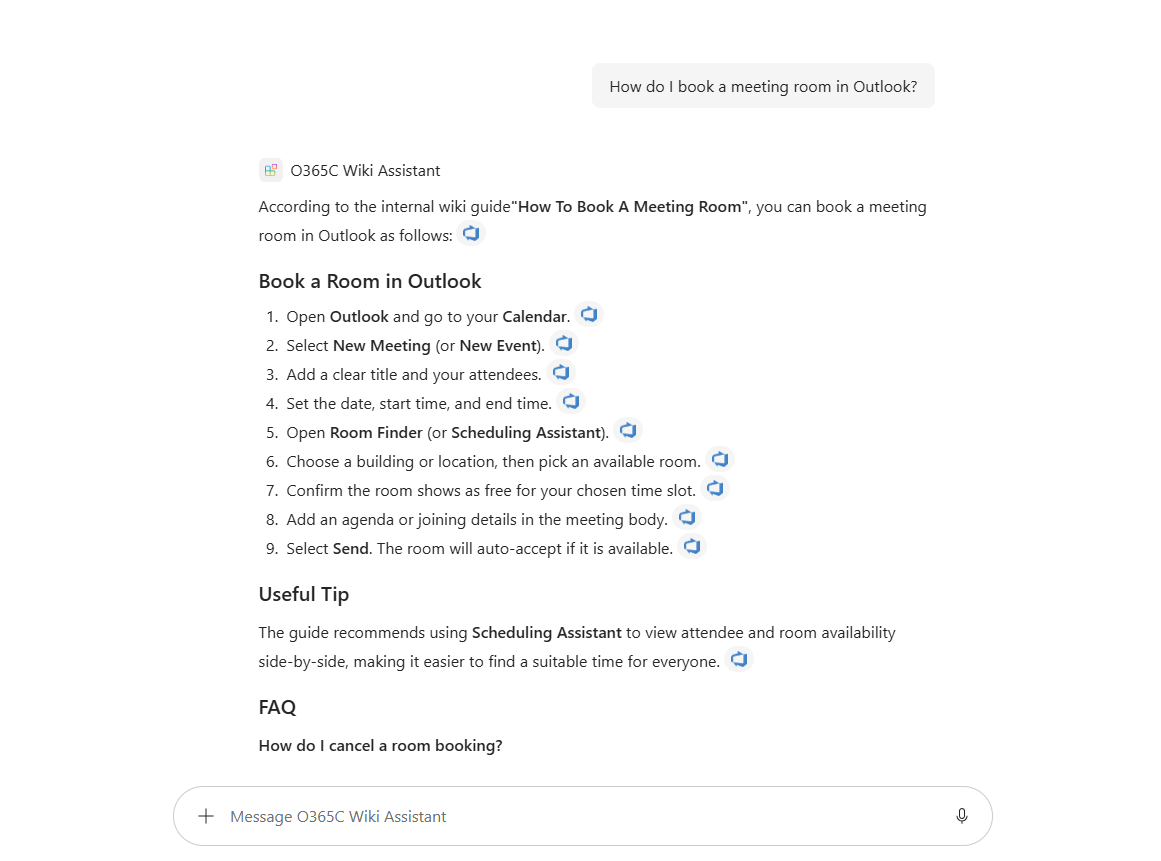
A read-only Microsoft 365 Copilot declarative agent grounded strictly on the Azure DevOps Wiki Copilot connector. It searches your organization's indexed project and code wikis, answers how-to questions, preserves the guide's numbered steps and reference tables, cites the source page, and clearly says when an answer isn't in the wiki instead of guessing.
The key idea this sample demonstrates: a Copilot connector makes your wiki searchable, but it does not make an agent trustworthy. The agent's instruction block is what keeps it grounded — it answers only from retrieved wiki content, never from general knowledge, and admits when it doesn't know.
Built with TypeSpec and the Microsoft 365 Agents Toolkit, so the agent definition lives in source control and retargets to any tenant by changing a single environment variable — no code change.
Contributors
Version history
| Version | Date | Comments |
|---|---|---|
| 1.0 | August 22, 2026 | Initial release |
Prerequisites
- A Microsoft 365 tenant with Microsoft 365 Copilot licensing.
- The Azure DevOps Wiki Copilot connector deployed and in the Ready state. See Deploy the Azure DevOps Wiki connector. The crawl account needs at least Basic access to the Azure DevOps projects (Stakeholder is not sufficient).
- Node.js 18+ (built and tested on Node 22 / npm 10).
- Microsoft 365 Agents Toolkit — the Visual Studio Code extension, or the
atkCLI (npm i -g @microsoft/m365agentstoolkit-cli).
Minimal path to awesome
Clone this repository (or download this solution as a .ZIP file then unzip it).
From a terminal, change to the
samples/da-azure-devops-wikifolder.Find your connector's connection id. The agent binds to the connector by its Microsoft Graph connection
id, which can differ from the display name shown in the admin center. As a tenant admin, in Graph Explorer (scopeExternalConnection.Read.All), run:GET https://graph.microsoft.com/v1.0/external/connections?$select=id,nameCopy the
idof your Azure DevOps Wiki connection.Set your environment values. Open
env/.env.devand setADO_WIKI_CONNECTION_IDto the connectionidfrom the previous step. Leave the toolkit-generated values (such asTEAMS_APP_ID) blank — they are filled in during provisioning.Install and compile to verify the agent definition builds:
npm install npm run generate:env -- dev npm run compilegenerate:envmust run beforecompileon a fresh clone, becausesrc/agent/env.tspis generated (git-ignored) andmain.tspimports it. The Agents Toolkit pipeline does this automatically during provisioning.Provision and preview:
- Visual Studio Code: open the folder, sign in to Microsoft 365 in the Agents Toolkit pane, then use Provision (dev), or run Preview Local in Copilot to sideload the agent.
- CLI:
atk provision --env dev.
Open Microsoft 365 Copilot at m365.cloud.microsoft/chat, open the agents drawer, and select Azure DevOps Wiki Assistant.
Test the grounding with one of the conversation starters (a topic your wiki covers) and confirm the answer includes a citation to the correct wiki page. Then ask something the wiki does not cover and confirm the agent replies that it could not find the answer — rather than answering from general knowledge.
Features
Using this sample you can extend Microsoft 365 Copilot with an agent that:
- Searches, summarizes, and answers from the Azure DevOps Wiki connector, with citations back to the source pages.
- Is strictly grounded — it never uses general world knowledge or web content, and states plainly when an answer is not in the wiki.
- Preserves the wiki guide's structure — numbered steps in order and reference tables (for example access levels or ticket priorities) reproduced when relevant.
- Is permission-aware — because the connector is permission-trimmed, users only see wiki content they already have access to.
- Is read-only by design — it does not create, edit, or delete content, and has no other knowledge sources.
This sample illustrates:
- Defining a declarative agent in TypeSpec with the Microsoft 365 Agents Toolkit.
- Binding an agent to a Copilot connector as its only knowledge source (
AgentCapabilities.CopilotConnectors). - Retargeting tenants through an environment variable (
ADO_WIKI_CONNECTION_ID) instead of editing the agent definition. - Authoring a strict-grounding instruction block and validating it with sample evaluation prompts (
evals/prompts.json).
Help
We do not support samples, but this community is always willing to help, and we want to improve these samples. We use GitHub to track issues, which makes it easy for community members to volunteer their time and help resolve issues.
You can try looking at issues related to this sample to see if anybody else is having the same issues.
If you encounter any issues using this sample, create a new issue.
Finally, if you have an idea for improvement, make a suggestion.
Disclaimer
THIS CODE IS PROVIDED AS IS WITHOUT WARRANTY OF ANY KIND, EITHER EXPRESS OR IMPLIED, INCLUDING ANY IMPLIED WARRANTIES OF FITNESS FOR A PARTICULAR PURPOSE, MERCHANTABILITY, OR NON-INFRINGEMENT.