Overview
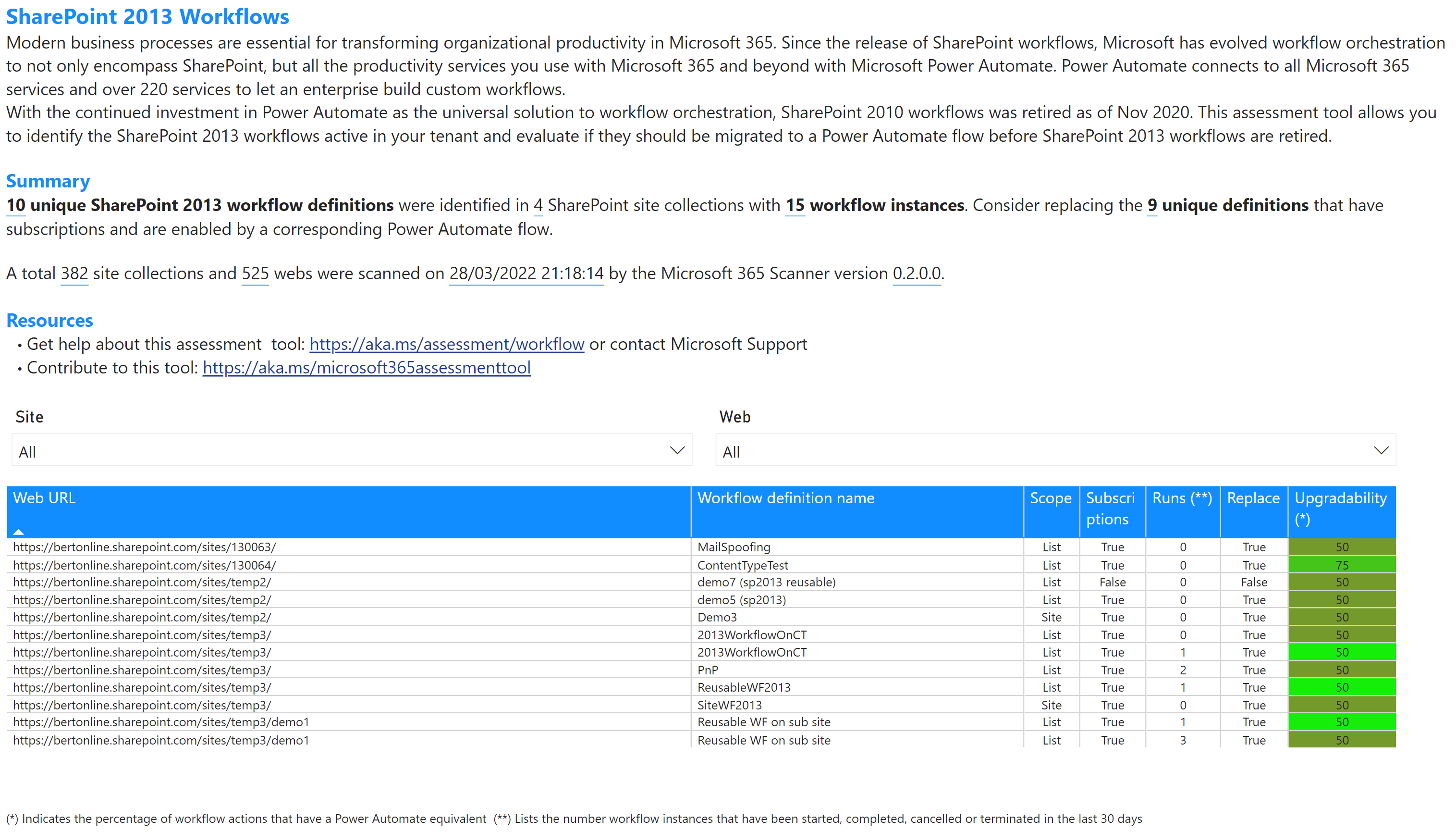
SharePoint 2013 workflows are typically scoped to a list, although that workflows can also be scoped to a site. A workflow consists out of a definition and possible one or more subscriptions of that definition. Workflows having a subscription can be run. This page will help you identify the available workflows allowing you to filter them by site collection or web and providing high level information that will help you assess the need to upgrade this workflow to Power Automate. In the shown table these columns are presented:
| Column name | Description |
|---|---|
| Web URL | The fully qualified URL of the web hosting the workflow |
| Workflow definition name | Definition name of the workflow |
| Scope | Workflow scope, will be List or Site |
| Subscriptions | Does this workflow a subscription? |
| Runs | Lists the number workflow instances that have been started, completed, cancelled or terminated in the last 30 days |
| Replace | Should this workflow be considered for replacement by Power Automate |
| Upgradability | Percentage indication of how good the actions used in this workflow can be upgraded to Power Automate. "Add a Comment", "Log to History List" and "Set Workflow Status" workflow actions are excluded from the calculation as they're not relevant for the Power Automate platform (not available when --workflowanalyze:false was specified) |
Sample page