GitHub Icon Image
GitHub

Ensuring Owners Are Members

Summary

It may happen that owners are not members of the m365 group because of the various methods of managing M365 group permissions, such as through the Teams admin center, Microsoft Teams, SharePoint admin center, SharePoint connected sites, Planner, or scripting using PowerShell. The script will help identify these discrepancies and ensures m365 group owners are also m365 group members.

CLI for Microsoft 365 script sample usage example:
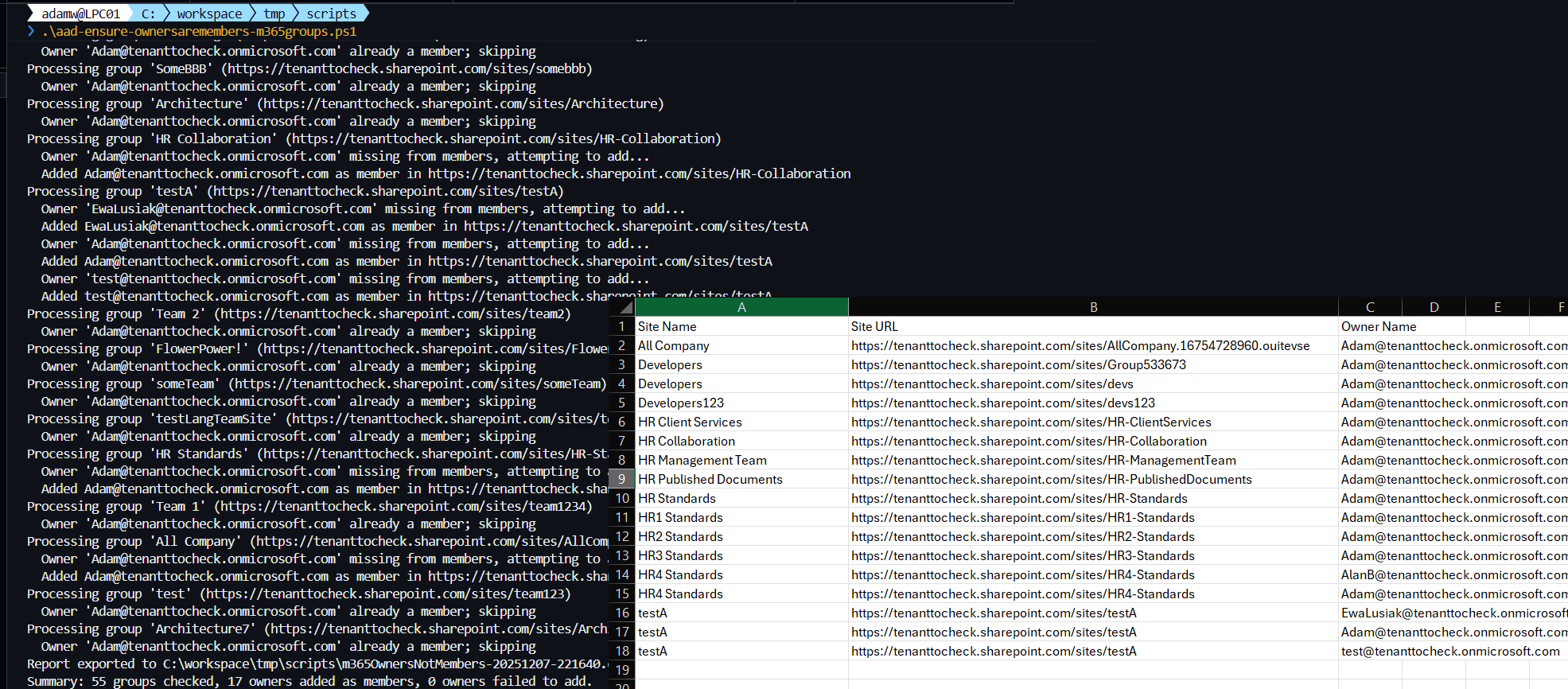
Example Screenshot of CLI for Microsoft 365 sample

  • PnP PowerShell
  • CLI for Microsoft 365

$AdminCenterURL="https://contoso-admin.sharepoint.com/"# Connect to SharePoint Online admin center
Connect-PnPOnline -Url $AdminCenterURL -Interactive
$dateTime = (Get-Date).toString("dd-MM-yyyy")
$invocation = (Get-Variable MyInvocation).Value
$directorypath = Split-Path $invocation.MyCommand.Path
$fileName = "m365OwnersNotMembers-" + $dateTime + ".csv"
$OutPutView = $directorypath + "\" + $fileName
# Array to Hold Result - PSObjects
$m365GroupCollection = @()
#Write-host $"$ownerName not part of member in $siteUrl";
$m365Sites = Get-PnPTenantSite -Detailed | Where-Object { ($_.Template -eq 'GROUP#0') -and $_.Template -ne 'RedirectSite#0' }
$m365Sites | ForEach-Object {   
    $groupId = $_.GroupId;
    $siteUrl = $_.Url;
    $siteName = $_.Title
    #if owner is not part of m365 group member
    (Get-PnPMicrosoft365GroupOwner -Identity $groupId -ErrorAction Ignore) | foreach-object {
        $owner = $_;
        $ownerDisplayName = $owner.DisplayName;
        if (!(Get-PnPMicrosoft365GroupMember -Identity $groupId  -ErrorAction Ignore | Where-Object { $_.DisplayName -eq $owner.DisplayName })) {
            $ExportVw = New-Object PSObject
            $ExportVw | Add-Member -MemberType NoteProperty -name "Site Name" -value $siteName
            $ExportVw | Add-Member -MemberType NoteProperty -name "Site URL" -value $siteUrl
            $ExportVw | Add-Member -MemberType NoteProperty -name "Owner Name" -value $owner.DisplayName
            $m365GroupCollection += $ExportVw
            Add-PnPMicrosoft365GroupMember -Identity $groupId -Users $owner.Email
            Write-host "$ownerDisplayName has been added as member in $siteUrl";
      }
   }
}
# Export the result array to CSV file
$m365GroupCollection | sort-object "Site Name" | Export-CSV $OutPutView -Force -NoTypeInformation

Check out the PnP PowerShell to learn more at: https://aka.ms/pnp/powershell

The way you login into PnP PowerShell has changed please read PnP Management Shell EntraID app is deleted : what should I do ?

[CmdletBinding()]
param(
    [Parameter(HelpMessage = "Directory path where the CSV report will be stored.")]
    [string]$OutputDirectory,

    [Parameter(HelpMessage = "Optional custom file name (with or without .csv) for the owners-not-members report.")]
    [string]$ReportFileName
)

begin {
    m365 login --ensure

    if (-not $OutputDirectory) {
        $OutputDirectory = if ($MyInvocation.MyCommand.Path) {
            Split-Path -Path $MyInvocation.MyCommand.Path
        } else {
            (Get-Location).Path
        }
    }

    if (-not (Test-Path -Path $OutputDirectory -PathType Container)) {
        New-Item -ItemType Directory -Path $OutputDirectory -Force | Out-Null
    }

    if (-not $ReportFileName) {
        $ReportFileName = 'm365OwnersNotMembers-{0}.csv' -f (Get-Date -Format 'yyyyMMdd-HHmmss')
    } elseif (-not $ReportFileName.EndsWith('.csv')) {
        $ReportFileName = "$ReportFileName.csv"
    }

    $script:ReportPath = Join-Path -Path $OutputDirectory -ChildPath $ReportFileName
    $script:ReportItems = [System.Collections.Generic.List[psobject]]::new()
    $script:Summary = [ordered]@{
        GroupsEvaluated = 0
        OwnersAdded     = 0
        OwnersFailed    = 0
    }

    Write-Host "Starting owner membership audit..."
    Write-Host "Report will be saved to $ReportPath"
}

process {
    $sites = m365 spo site list --query "[?Template == 'GROUP#0' && Template != 'RedirectSite#0'].{GroupId:GroupId, Url:Url, Title:Title}" --output json | ConvertFrom-Json

    foreach ($site in $sites) {
        $Summary.GroupsEvaluated++
        Write-Host "Processing group '$($site.Title)' ($($site.Url))"

        $groupId = $site.GroupId -replace "/Guid\((.*)\)/", '$1'
        $owners = m365 entra m365group user list --role Owner --groupId $groupId --output json | ConvertFrom-Json

        foreach ($owner in $owners) {
            $ownerUserPrincipalName = $owner.userPrincipalName
            $isMember = m365 entra m365group user list --role Member --groupId $groupId --query "[?userPrincipalName == '$ownerUserPrincipalName']" --output json | ConvertFrom-Json

            if (-not $isMember) {
                Write-Host "  Owner '$ownerUserPrincipalName' missing from members, attempting to add..."

                $ReportItems.Add([pscustomobject]@{
                    'Site Name'  = $site.Title
                    'Site URL'   = $site.Url
                    'Owner Name' = $ownerUserPrincipalName
                })

                $addResult = m365 entra m365group user add --role Member --groupId $groupId --userNames $ownerUserPrincipalName --output json 2>&1

                if ($LASTEXITCODE -ne 0) {
                    Write-Warning "Failed to add $ownerUserPrincipalName as member in $($site.Url). CLI returned: $addResult"
                    $Summary.OwnersFailed++
                    continue
                }

                Write-Host "  Added $ownerUserPrincipalName as member in $($site.Url)"
                $Summary.OwnersAdded++
            } else {
                Write-Host "  Owner '$ownerUserPrincipalName' already a member; skipping"
            }
        }
    }
}

end {
    if ($ReportItems.Count -gt 0) {
        $ReportItems | Sort-Object 'Site Name' | Export-Csv -Path $ReportPath -NoTypeInformation -Force
        Write-Host "Report exported to $ReportPath"
    } else {
        Write-Host "No discrepancies detected across the evaluated groups."
    }

    Write-Host ("Summary: {0} groups checked, {1} owners added as members, {2} owners failed to add." -f $Summary.GroupsEvaluated, $Summary.OwnersAdded, $Summary.OwnersFailed)
}

Check out the CLI for Microsoft 365 to learn more at: https://aka.ms/cli-m365

Important changes coming to the way you login into CLI for Microsoft 365 (effective 9th September 2024) see Changes in PnP Management Shell registration in Microsoft 365

Source Credit

Sample first appeared on Ensuring Owners Are Members

Contributors

Author(s)
Reshmee Auckloo (Main author)
Michał Kornet (CLI for M365 version)
Adam Wójcik

Disclaimer

THESE SAMPLES ARE PROVIDED AS IS WITHOUT WARRANTY OF ANY KIND, EITHER EXPRESS OR IMPLIED, INCLUDING ANY IMPLIED WARRANTIES OF FITNESS FOR A PARTICULAR PURPOSE, MERCHANTABILITY, OR NON-INFRINGEMENT.

Back to top Script Samples
Generated by DocFX with Material UI