Check Dataverse Security Role Direct vs Group Assignments
Summary
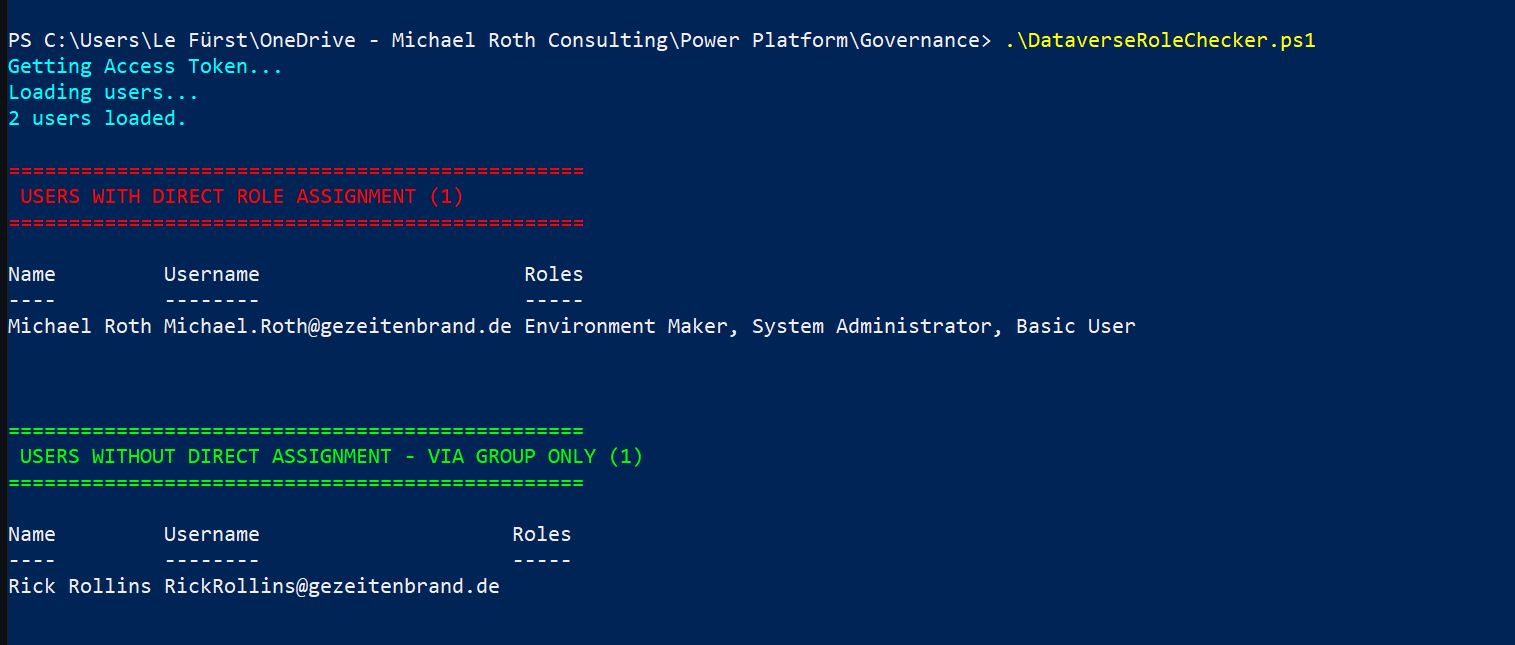
As a Power Platform Admin, you may need to prove to your Security Team that all Dataverse security roles are assigned via Group Teams only, and that no direct role assignments exist. This script queries the Dataverse Web API and outputs two lists: users with direct role assignments, and users without (meaning they receive roles exclusively via Group Teams).
System and service accounts (identified by a leading # in their name) and Microsoft-internal accounts are automatically filtered out, so only real tenant users are shown.
# ============================================================
# Dataverse Security Role Assignment Checker
# ============================================================

# Please update before running:
$orgUrl = "https://YOURORG.crm4.dynamics.com"
$maxUsers = 500

Write-Host "Getting Access Token..." -ForegroundColor Cyan
$tokenObj = Get-AzAccessToken -ResourceUrl $orgUrl
$token = [System.Runtime.InteropServices.Marshal]::PtrToStringAuto(
    [System.Runtime.InteropServices.Marshal]::SecureStringToBSTR($tokenObj.Token)
)

if (-not $token) {
    Write-Error "Could not retrieve token. Please run 'Connect-AzAccount' first."
    exit
}

$headers = @{
    Authorization      = "Bearer $token"
    "OData-MaxVersion" = "4.0"
    "OData-Version"    = "4.0"
    Accept             = "application/json"
}

Write-Host "Loading users..." -ForegroundColor Cyan

$usersUrl = "$orgUrl/api/data/v9.2/systemusers?`$select=fullname,domainname,isdisabled&`$filter=isdisabled eq false and domainname ne ''&`$expand=systemuserroles_association(`$select=name)&`$top=$maxUsers"

try {
    $response = Invoke-RestMethod -Uri $usersUrl -Headers $headers -Method Get
} catch {
    Write-Error "API call failed: $_"
    exit
}

$users = $response.value | Where-Object {
    $_.fullname -notlike "#*" -and
    $_.domainname -notlike "*@microsoft.com"
}

Write-Host "$($users.Count) users loaded." -ForegroundColor Cyan

$directAssignment = @()
$noDirectAssignment = @()

foreach ($user in $users) {
    $roles = $user.systemuserroles_association
    $roleNames = if ($roles -and $roles.Count -gt 0) {
        ($roles | ForEach-Object { $_.name }) -join ", "
    } else { "" }

    $obj = [PSCustomObject]@{
        Name     = $user.fullname
        Username = $user.domainname
        Roles    = $roleNames
    }

    if ($roles -and $roles.Count -gt 0) {
        $directAssignment += $obj
    } else {
        $noDirectAssignment += $obj
    }
}

Write-Host ""
Write-Host "================================================" -ForegroundColor Red
Write-Host " USERS WITH DIRECT ROLE ASSIGNMENT ($($directAssignment.Count))" -ForegroundColor Red
Write-Host "================================================" -ForegroundColor Red
if ($directAssignment.Count -gt 0) {
    $directAssignment | Format-Table
} else {
    Write-Host "No users with direct assignment found." -ForegroundColor Green
}

Write-Host ""
Write-Host "================================================" -ForegroundColor Green
Write-Host " USERS WITHOUT DIRECT ASSIGNMENT - VIA GROUP ONLY ($($noDirectAssignment.Count))" -ForegroundColor Green
Write-Host "================================================" -ForegroundColor Green
$noDirectAssignment | Format-Table
Check out the Microsoft Graph PowerShell SDK to learn more at: https://learn.microsoft.com/powershell/microsoftgraph/get-started
Prerequisites
- Az.Accounts PowerShell module (
Install-Module -Name Az.Accounts -Scope CurrentUser) - PowerShell 5.1 or newer
- Dataverse role: System Administrator or System Customizer
- Run
Connect-AzAccountbefore executing the script
Contributors
| Author(s) |
|---|
| Michael Roth |
Disclaimer
THESE SAMPLES ARE PROVIDED AS IS WITHOUT WARRANTY OF ANY KIND, EITHER EXPRESS OR IMPLIED, INCLUDING ANY IMPLIED WARRANTIES OF FITNESS FOR A PARTICULAR PURPOSE, MERCHANTABILITY, OR NON-INFRINGEMENT.