Export OneDrive Admins
Summary
Have you ever needed to know which Admins have added themselves to which OneDrives? This script exports every OneDrive in the tenant, and the site collection admins of the site. This helps audit which admins have unnecessary access to user OneDrives. Once you have the report, you can identify unnecessary access by filtering in Excel.
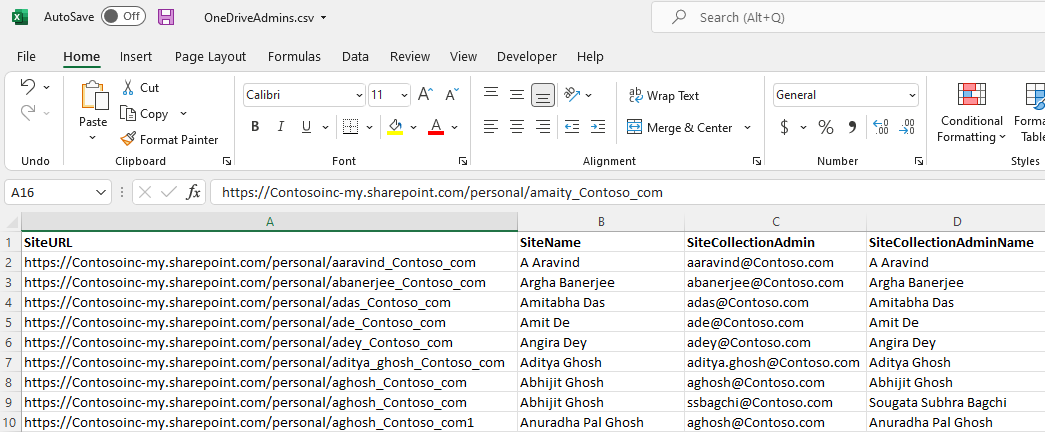
The report produces a csv file with one row per Site Collection Admin and OneDrive. This report has four columns: SiteURL SiteName SiteCollectionAdmin SiteCollectionAdminName
Parameters / Configuration
Customize the following values:
- AdminURL – SharePoint Admin Center URL
- ClientId – Azure AD App Client ID
- Thumbprint – Certificate thumbprint
- Tenant – Tenant domain (e.g., contoso.onmicrosoft.com)
- OutputFile – Path to export the CSV
Output Details
The CSV output file will contain the following values:
- SiteURL – URL of the OneDrive site
- SiteName – Name of the OneDrive site
- SiteCollectionAdmin – Admin email address
- SiteCollectionAdminName – Admin display name
Real-World Scenarios / Use Cases
- Auditing OneDrive admins after an internal restructure or staff departures
- Ensuring compliance and least-privilege access policies
- Preparing for internal or external security audits
Notes / Tips
- For large tenants, consider running in PowerShell 7 for better performance
- CSV can be filtered in Excel to quickly identify unnecessary or excessive access
- The script is read-only; it does not modify permissions
# Parameters
$AdminURL = "https://contoso-admin.sharepoint.com"
$ClientId = "xxxxxxxx-xxxx-xxxx-xxxx-xxxxxxxxxxxx"
$Thumbprint = "XXXXXXXXXXXXXXXXXXXXXXXXXXXXXXXXXXXXXXX"
$Tenant = "contoso.onmicrosoft.com"
$OutputFile = "C:\Reports\OneDriveAdmins.csv"

# Connect to SharePoint Admin Center
Connect-PnPOnline -Url $AdminURL -ClientId $ClientId -Thumbprint $Thumbprint -Tenant $Tenant -ErrorAction Stop

# Get all OneDrive (MySite) sites
$MySites = Get-PnPTenantSite -IncludeOneDriveSites -Filter "Url -like '-my.sharepoint.com/personal/'"

# Initialize results and error logs
$AllAdmins = @()
$ErrorLog = @()

# Process each MySite
foreach ($MySite in $MySites) {
    try {
        Write-Host "Processing: $($MySite.Title)" -ForegroundColor Green

        # Connect to the MySite
        Connect-PnPOnline -Url $MySite.Url -ClientId $ClientId -Thumbprint $Thumbprint -Tenant $Tenant -ErrorAction Stop

        # Get site collection admins
        $Admins = Get-PnPSiteCollectionAdmin -ErrorAction Stop

        foreach ($admin in $Admins) {
            $AllAdmins += [PSCustomObject]@{
                SiteURL                 = $MySite.Url
                SiteName                = $MySite.Title
                SiteCollectionAdmin     = $admin.Email
                SiteCollectionAdminName = $admin.Title
            }
        }
    }
    catch {
        Write-Warning "Error processing site $($MySite.Title): $_"
        $ErrorLog += [PSCustomObject]@{
            SiteURL = $MySite.Url
            SiteName = $MySite.Title
            ErrorMessage = $_.Exception.Message
        }
    }
}

# Export results to CSV
$AllAdmins | Export-Csv -Path $OutputFile -NoTypeInformation -Encoding UTF8

# Export errors if any
if ($ErrorLog.Count -gt 0) {
    $ErrorFile = "C:\Reports\Errors-OneDriveAdmins.csv"
    $ErrorLog | Export-Csv -Path $ErrorFile -NoTypeInformation -Encoding UTF8
    Write-Warning "Errors encountered. See $ErrorFile for details."
}

Write-Host "Script completed successfully!" -ForegroundColor Green
Check out the PnP PowerShell to learn more at: https://aka.ms/pnp/powershell
The way you login into PnP PowerShell has changed please read PnP Management Shell EntraID app is deleted : what should I do ?
Contributors
| Author(s) |
|---|
| Matt Maher |
| Josiah Opiyo |
Disclaimer
THESE SAMPLES ARE PROVIDED AS IS WITHOUT WARRANTY OF ANY KIND, EITHER EXPRESS OR IMPLIED, INCLUDING ANY IMPLIED WARRANTIES OF FITNESS FOR A PARTICULAR PURPOSE, MERCHANTABILITY, OR NON-INFRINGEMENT.