
Grant Managed Identity permissions to audit and cleanup SPFx App Principal permissions
This script can be used to grant System-Managed Identity used by automation (Azure Runbook, Azure Functions) API permissions and access to SPO sites
 Kinga Kazala
Summary
This script can be used to grant System-Managed Identity used by automation (Azure Runbook, Azure Functions) API permissions and access to SPO sites,that are necessary to:
- audit API permissions assigned to the "SharePoint Online Client Extensibility Web Application Principal".
- audit permissions requested by the installed SPFx solutions (tenant-level and site-level app catalogs)
- remove unused permissions.
Set-ManagedIdentityAPIPermissions
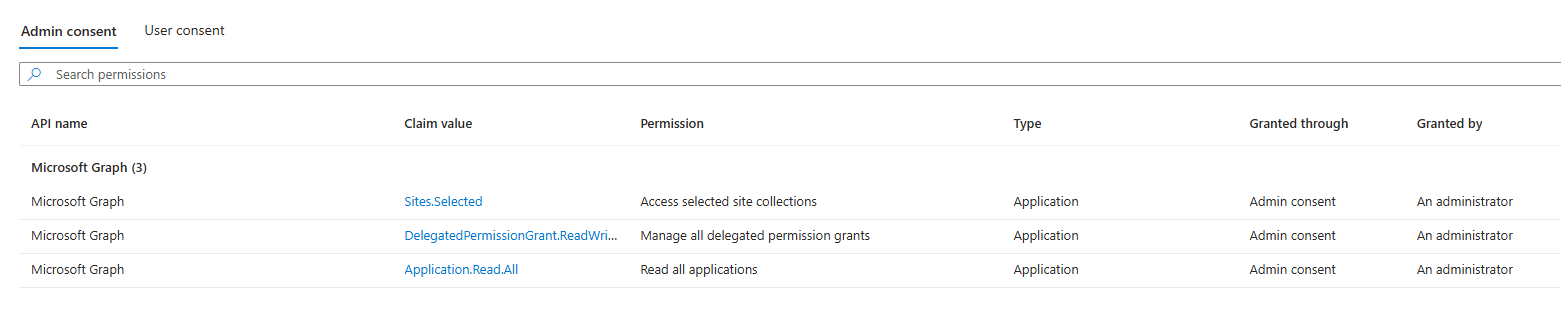
The Set-ManagedIdentityAPIPermissions function grants the following roles to the Managed Identity used for automation:
- Application.Read.All,
- Sites.Selected ,
- DelegatedPermissionGrant.ReadWrite.All
Once the Lists.SelectedOperations.Selected is available productively, the Sites.Selected scope can be replaced.
Set-SiteAppCatalogPermissions
The Set-SiteAppCatalogPermissions function grants the Service Principal read access to
- root level SharePoint Site
- tenant-level app catalog
- sites with site-level app catalog
The script uses Microsoft Graph PowerShell (
Set-ManagedIdentityAPIPermissions) and PnP PowerShell (Set-SiteAppCatalogPermissions)PnP PowerShell requires PowerShell 7.2 or later.
Resources
Overview of Selected permissions in OneDrive and SharePoint: https://learn.microsoft.com/en-us/graph/permissions-selected-overview?tabs=powershell Assigning application permissions to lists, list items, folders, or files breaks inheritance on the assigned resource, so be mindful of service limits for unique permissions in your solution design. Permissions at the site collection level do not break inheritance because this is the root of permission inheritance.
Other useful tools:
- Microsoft Graph Permissions Explorer: https://graphpermissions.merill.net/permission/
- Export-MsIdAppConsentGrantReport https://azuread.github.io/MSIdentityTools/commands/Export-MsIdAppConsentGrantReport
Important
To assign all permissions, please execute both functions:
param(
    [string]$spId,
    [string]$tenantName
)
Set-ManagedIdentityAPIPermissions -spId $spId
Set-SiteAppCatalogPermissions -tenantName $tenantName -spId $spId
The below tabs have different contents:
- PnP PowerShell:
Set-SiteAppCatalogPermissionsfunction . Microsoft Graph PowerShell:Set-ManagedIdentityAPIPermissionsfunction
<#
    .DESCRIPTION
    The Set-SiteAppCatalogPermissions function grants Managed Identity Read acess to the following SPO sites:
    - root site : this is required for the Azure Runbook to connect to SharePoint and request app catalogs
    - tenant level app catalog
    - all detected site level app catalogs
#>
function Set-SiteAppCatalogPermissions {
    param(
        [string]$tenantName,
        [string]$spId
    )
    $adminUrl = "https://$tenantName-admin.sharepoint.com/"

    Import-Module PnP.PowerShell
    Write-Host "Connect to SharePoint Admin site: $adminUrl "
    Connect-PnPOnline -Url $adminUrl -Interactive

    # get Service Principal to retrieve AppId
    $sp = Get-MgServicePrincipal -ServicePrincipalId $spId #script will stop if service principal does not exist

    Get-PnPSiteCollectionAppCatalog -ExcludeDeletedSites -PipelineVariable SiteAppCatalog | ForEach-Object {
        Grant-PnPAzureADAppSitePermission -AppId $sp.AppId -DisplayName $sp.DisplayName -Permissions Read -Site $SiteAppCatalog.SiteID.Guid
    }
    $tenantLevelAppCatalog = Get-PnPTenantAppCatalogUrl
    Grant-PnPAzureADAppSitePermission -AppId $sp.AppId -DisplayName $sp.DisplayName -Permissions Read -Site $tenantLevelAppCatalog
    Grant-PnPAzureADAppSitePermission -AppId $sp.AppId -DisplayName $sp.DisplayName -Permissions Read -Site "https://$tenantName.sharepoint.com/"

}<#
.DESCRIPTION
The Set-ManagedIdentityAPIPermissions function grants the following Microsoft Graph API permissions:
- 'DelegatedPermissionGrant.ReadWrite.All'
- 'Application.Read.All',
- 'Sites.Selected' # once 'Lists.SelectedOperations.Selected' is released, scope can be changed
Other permissions may be added by updating the $permissionMap array.
Use the following commands to retrieve information about additional applications:
Import-Module Microsoft.Graph.Applications
Connect-MgGraph -Scopes 'Application.Read.All'
Get-MgServicePrincipal -Search '"displayName:Team"' -CountVariable CountVar `
-Property "displayName,appId,replyUrls,servicePrincipalType,oauth2PermissionScopes,appRoles,resourceSpecificApplicationPermissions" `
-ConsistencyLevel eventual
See https://learn.microsoft.com/en-us/graph/api/resources/serviceprincipal?view=graph-rest-1.0#properties
for a currnet list of available properties and their descriptions
.NOTES
IMPORTANT: The DelegatedPermissionGrant.ReadWrite.All permission allows an app or a service to manage permission grants
and elevate privileges for any app, user, or group in your organization. Only appropriate users should access apps that
have been granted this permission.
TODO: Once the 'Lists.SelectedOperations.Selected' is available productively (now in beta),
the 'Sites.Selected' can be replaced with 'Lists.SelectedOperations.Selected'
#>
function Set-ManagedIdentityAPIPermissions {
param(
[string]$spId
)
$permissionMap = @{
'00000003-0000-0000-c000-000000000000' = @( # Microsoft Graph
'Application.Read.All',
'DelegatedPermissionGrant.ReadWrite.All',
'Sites.Selected' # once 'Lists.SelectedOperations.Selected' is released, scope can be changed
)
}
Import-Module Microsoft.Graph.Authentication
Import-Module Microsoft.Graph.Applications
Connect-MgGraph -Scopes "AppRoleAssignment.ReadWrite.All" , 'Application.Read.All'
Get-MgServicePrincipal -All | Where-Object { $_.AppId -in $permissionMap.Keys } -PipelineVariable SP | ForEach-Object {
$SP.AppRoles | Where-Object { $_.Value -in $permissionMap[$SP.AppId] -and $_.AllowedMemberTypes -contains "Application" } -PipelineVariable AppRole | ForEach-Object {
try {
$params = @{
principalId = $spId
resourceId = $SP.Id
appRoleId = $AppRole.Id
}
New-MgServicePrincipalAppRoleAssignment -ServicePrincipalId $spId -BodyParameter $params -ErrorAction:SilentlyContinue
}
catch {
throw $_.Exception
}
}
}
}Contributors
| Author(s) |
|---|
| Kinga Kazala |
Disclaimer
THESE SAMPLES ARE PROVIDED AS IS WITHOUT WARRANTY OF ANY KIND, EITHER EXPRESS OR IMPLIED, INCLUDING ANY IMPLIED WARRANTIES OF FITNESS FOR A PARTICULAR PURPOSE, MERCHANTABILITY, OR NON-INFRINGEMENT.
Tool documentation & references
- Want to learn more about PnP PowerShell and the cmdlets
Check out the PnP PowerShell site to get started and for the reference to the cmdlets.
