
Get data from OpenAI deployment/model
This sample shows how to use both OpenAI and document intelligene studio to process and extract data in a json format
 Divya Akula
Summary
This sample script integrates Azure's Document Intelligence and OpenAI services to extract from either images or pdfs or embedded images from any unstructured data and to use this script for any other purpose. Please change the system prompt in the script.
Functionality
- Text Extraction: Utilizes Azure's Document Intelligence Read OCR model to extract text from documents, including PDFs and images.
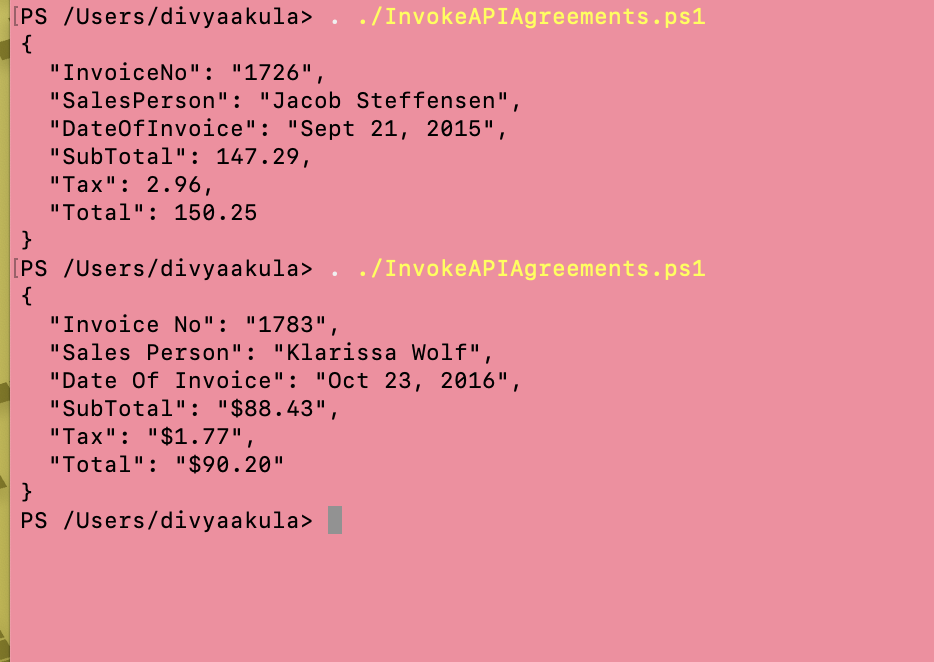
- Data Processing: Employs Azure OpenAI's GPT models to analyze the extracted text and identify key invoice details, such as Invoice Number, Sales Person, Date of Invoice, SubTotal, Tax, and Total.
- JSON Output: Structures the identified information into a JSON format for streamlined data handling and integration.
Prerequisites
- OpenAI API Key: Create an account here to obtain the API key.
- Document Intelligence API Key: Create a key in the Document Intelligence Studio.
- Settings: The settings of the script are part of set Settings-Agreements.json. Ensure that the script and its settings file are in the same location.
Settings
{
  "APIKeys": {
    "OpenAI": "<OCRKeyFromAzureOpenAI>",
    "DocumentIntelligence": "<OCRKeyFromADocumentIntelligence>"
  },
  "Endpoints": {
    "OpenAI": "https://<openaiendpoint>.openai.azure.com/openai/deployments/gpt-4o/chat/completions?api-version=2024-08-01-preview",
    "DocumentIntelligence": "https://<docintelligendeendpoint>.cognitiveservices.azure.com"
  },
  "FilePath": "/Users/divyaakula/Documents/VidesoReview/SyntexDemo/AI Builder Document Processing Sample Data/Invoices/Adatum/Train/Adatum 1.pdf",
  "Base64String": null,
  "OCRVersion": "2024-07-31-preview",
  "ChunkSize": 4194304
}
Example Screenshot
# A PowerShell script to extract invoice details using Azure OCR and OpenAI.

# Path to your config file
$configFilePath = "Settings-Agreements.json"
if (-not (Test-Path $configFilePath)) {
    throw "Configuration file not found at $configFilePath"
}

# Load configuration from JSON file
$Config = Get-Content -Path $configFilePath | ConvertFrom-Json

# Extract Values from Config
$OpenAI_Key = $Config.APIKeys.OpenAI
$OCR_Key = $Config.APIKeys.DocumentIntelligence
$OCR_Endpoint = $Config.Endpoints.DocumentIntelligence
$OpenAI_Endpoint = $Config.Endpoints.OpenAI
$OCR_Version = $Config.OCRVersion
$FilePath = $Config.FilePath
$Base64String = $Config.Base64String

# Function to Extract Text from PDF/Image Using Azure OCR
function Get-TextFromDocument($Base64String) {
    # Convert Base64 to binary
    $BinaryData = [Convert]::FromBase64String($Base64String)

    # Set OCR request headers
    $Headers = @{
        "Ocp-Apim-Subscription-Key" = $OCR_Key
        "Content-Type" = "application/pdf"  # Change to "image/jpeg" for images
    }

    # Send file to Azure Document Intelligence OCR API
    Invoke-RestMethod -Uri "$OCR_Endpoint/documentintelligence/documentModels/prebuilt-read:analyze?api-version=$OCR_Version" `
                      -Headers $Headers -Method Post -ResponseHeadersVariable HeaderInfo -Body $BinaryData

    if (-not $HeaderInfo) {
        throw "Failed to start OCR process."
    }

    # Extract operation URL
    $OperationUrl = ($HeaderInfo."Operation-Location")[0]

    # Poll for result
    Start-Sleep -Seconds 5  # Wait before checking status
    do {
        $Result = Invoke-RestMethod -Uri $OperationUrl -Headers @{ "Ocp-Apim-Subscription-Key" = $OCR_Key }
        $Status = $Result.status
        Start-Sleep -Seconds 2
    } while ($Status -ne "succeeded")

    # Extract recognized text
    $ExtractedText = ($Result.analyzeResult.pages.lines.content) -join " "
    return $ExtractedText
}

# Function to Extract Names Using Azure OpenAI
function Get-Inputs($ExtractedText) {
    # OpenAI Request Payload
    $OpenAI_Request = @{
        messages = @(
            @{ role = "system"; content = "Extract Invoice No, Sales Person, Date Of Invoice, SubTotal, Tax and Total and return in plain json format" }
            @{ role = "user"; content = "Text: $ExtractedText" }
        )
    } | ConvertTo-Json -Depth 3

    # OpenAI Headers
    $OpenAI_Headers = @{
        "api-key" = $OpenAI_Key
        "Content-Type" = "application/json"
    }

    # Call OpenAI API
    $OpenAI_Response = Invoke-RestMethod -Uri "$OpenAI_Endpoint" `
                                         -Method Post -Headers $OpenAI_Headers -Body $OpenAI_Request

    # Extract Names from Response
    $responseContent = $OpenAI_Response.choices[0].message.content
    # Remove leading and trailing triple backticks and 'json' label
    $jsonString = $responseContent -replace '^```json\s*', '' -replace '\s*```$', ''
    return $jsonString
}

# Function to Process Base64 Document Input
function Get-Data($Base64String) {
    try {
        # Step 1: Extract text using OCR
        $ExtractedText = Get-TextFromDocument -Base64String $Base64String

        # Step 2: Extract Names using OpenAI
        $Names = Get-Inputs -ExtractedText $ExtractedText

        # Step 3: Return as JSON
        return $Names
    }
    catch {
        return @{ "error" = $_.Exception.Message } | ConvertTo-Json
    }
}

# Function to convert file to Base64 string
function Convert-Base64String($path) {
    $Base64Input = [Convert]::ToBase64String([IO.File]::ReadAllBytes($path))
    return $Base64Input
}


# Example Usage: Provide a Base64 String of a PDF or Image
$Base64Input = Convert-Base64String $FilePath

# Call the Function
$Result = Get-Data -Base64String $Base64Input
Write-Output $Result
Contributors
| Author(s) | Author(s) |
|---|---|
| Divya Akula | https://www.linkedin.com/in/ms-divya-akula/ |
| Christian Veenhuis | https://github.com/ChVeen |
Disclaimer
THESE SAMPLES ARE PROVIDED AS IS WITHOUT WARRANTY OF ANY KIND, EITHER EXPRESS OR IMPLIED, INCLUDING ANY IMPLIED WARRANTIES OF FITNESS FOR A PARTICULAR PURPOSE, MERCHANTABILITY, OR NON-INFRINGEMENT.
Tool documentation & references
- Want to learn more about Azure OpenAI AI Deployments
If you're interested in learning more about OpenAI API and its capabilities, this link provides a list of resources and tools to help you get started. Whether you're a developer looking to integrate Open AI into your applications or a researcher exploring the latest advances in artificial intelligence, this guide offers a range of helpful resources, including documentation, tutorials, and community forums.
- Create and Configure an Azure OpenAI Resource
Learn to create and configure an Azure OpenAI resource using the Azure portal for seamless AI integration.
