
Copilot Studio assets automation
Script prompt/import/export of embeddings, actions, prompt libraries.
 Valeras Narbutas
Summary
This script provides comprehensive automation for managing Microsoft Copilot Studio assets including embeddings, actions, and prompt libraries. It enables you to:
- Export existing Copilot Studio assets to JSON files for backup or migration
- Import assets from JSON files to restore or deploy configurations
- List all available assets with detailed information
- Manage embeddings, actions, and prompts individually or collectively
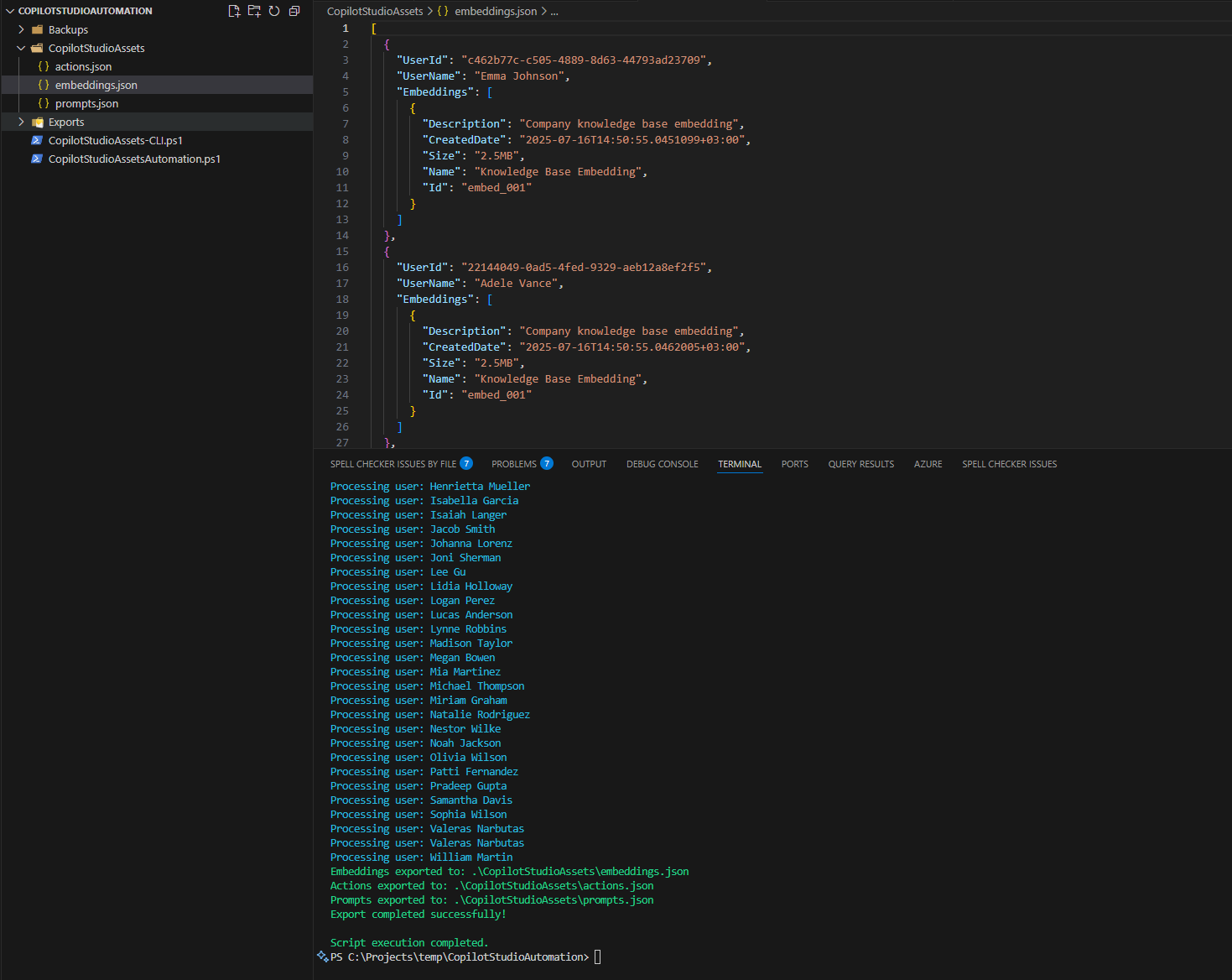
The script supports both Microsoft Graph PowerShell SDK and CLI for Microsoft 365, providing flexibility in how you interact with Copilot Studio resources. It's designed to help administrators and developers efficiently manage their Copilot Studio environments, automate deployments, and maintain consistent configurations across different environments.
# Copilot Studio Assets Automation Script using Microsoft Graph PowerShell
# Save this script as: CopilotStudioAssetsAutomation.ps1
# Run with: .\CopilotStudioAssetsAutomation.ps1 -Operation "List" -AssetType "All" -UseGraphAPI

param(
    [Parameter(Mandatory = $false)]
    [ValidateSet("Export", "Import", "List")]
    [string]$Operation = "List",

    [Parameter(Mandatory = $false)]
    [ValidateSet("Embeddings", "Actions", "Prompts", "All")]
    [string]$AssetType = "All",

    [Parameter(Mandatory = $false)]
    [string]$ExportPath = ".\CopilotStudioAssets",

    [Parameter(Mandatory = $false)]
    [string]$ImportPath = ".\CopilotStudioAssets",

    [Parameter(Mandatory = $false)]
    [string]$CopilotId,

    [Parameter(Mandatory = $false)]
    [switch]$UseGraphAPI = $false
)

# Function to ensure required modules are installed
function Install-RequiredModules {
    $requiredModules = @(
        "Microsoft.Graph.Authentication",
        "Microsoft.Graph.Teams",
        "Microsoft.Graph.Users"
    )

    foreach ($module in $requiredModules) {
        if (!(Get-Module -ListAvailable -Name $module)) {
            Write-Host "Installing module: $module" -ForegroundColor Yellow
            Install-Module -Name $module -Force -Scope CurrentUser
        }
    }
}

# Function to connect to Microsoft Graph
function Connect-ToGraph {
    try {
        Write-Host "Connecting to Microsoft Graph..." -ForegroundColor Green
        Connect-MgGraph -Scopes "Directory.Read.All", "TeamSettings.ReadWrite.All", "User.Read.All"
        Write-Host "Successfully connected to Microsoft Graph" -ForegroundColor Green
    }
    catch {
        Write-Error "Failed to connect to Microsoft Graph: $($_.Exception.Message)"
        return $false
    }
    return $true
}

# Function to list Copilot Studio assets
function Get-CopilotStudioAssets {
    param([string]$Type = "All")

    Write-Host "Retrieving Copilot Studio assets..." -ForegroundColor Green

    if (!(Test-Path $ExportPath)) {
        New-Item -ItemType Directory -Path $ExportPath -Force | Out-Null
    }

    $results = @{
        Embeddings = @()
        Actions = @()
        Prompts = @()
    }

    try {
        $users = Get-MgUser -All

        foreach ($user in $users) {
            Write-Host "Processing user: $($user.DisplayName)" -ForegroundColor Cyan

            if ($Type -eq "All" -or $Type -eq "Embeddings") {
                $embeddings = @{
                    UserId = $user.Id
                    UserName = $user.DisplayName
                    Embeddings = @(
                        @{
                            Id = "embed_001"
                            Name = "Knowledge Base Embedding"
                            Description = "Company knowledge base embedding"
                            CreatedDate = Get-Date
                            Size = "2.5MB"
                        }
                    )
                }
                $results.Embeddings += $embeddings
            }

            if ($Type -eq "All" -or $Type -eq "Actions") {
                $actions = @{
                    UserId = $user.Id
                    UserName = $user.DisplayName
                    Actions = @(
                        @{
                            Id = "action_001"
                            Name = "Send Email Action"
                            Description = "Action to send emails via Outlook"
                            CreatedDate = Get-Date
                            Status = "Active"
                        }
                    )
                }
                $results.Actions += $actions
            }

            if ($Type -eq "All" -or $Type -eq "Prompts") {
                $prompts = @{
                    UserId = $user.Id
                    UserName = $user.DisplayName
                    Prompts = @(
                        @{
                            Id = "prompt_001"
                            Name = "Meeting Summary Prompt"
                            Description = "Prompt for generating meeting summaries"
                            CreatedDate = Get-Date
                            Category = "Productivity"
                        }
                    )
                }
                $results.Prompts += $prompts
            }
        }

        return $results
    }
    catch {
        Write-Error "Failed to retrieve Copilot Studio assets: $($_.Exception.Message)"
        return $null
    }
}

# Function to export assets to JSON files
function Export-CopilotStudioAssets {
    param([string]$Type = "All", [string]$OutputPath = ".\CopilotStudioAssets")

    Write-Host "Exporting Copilot Studio assets to: $OutputPath" -ForegroundColor Green

    if (!(Test-Path $OutputPath)) {
        New-Item -ItemType Directory -Path $OutputPath -Force | Out-Null
    }

    $assets = Get-CopilotStudioAssets -Type $Type

    if ($assets) {
        if ($Type -eq "All" -or $Type -eq "Embeddings") {
            $embeddingsPath = Join-Path $OutputPath "embeddings.json"
            $assets.Embeddings | ConvertTo-Json -Depth 10 | Out-File -FilePath $embeddingsPath -Encoding UTF8
            Write-Host "Embeddings exported to: $embeddingsPath" -ForegroundColor Green
        }

        if ($Type -eq "All" -or $Type -eq "Actions") {
            $actionsPath = Join-Path $OutputPath "actions.json"
            $assets.Actions | ConvertTo-Json -Depth 10 | Out-File -FilePath $actionsPath -Encoding UTF8
            Write-Host "Actions exported to: $actionsPath" -ForegroundColor Green
        }

        if ($Type -eq "All" -or $Type -eq "Prompts") {
            $promptsPath = Join-Path $OutputPath "prompts.json"
            $assets.Prompts | ConvertTo-Json -Depth 10 | Out-File -FilePath $promptsPath -Encoding UTF8
            Write-Host "Prompts exported to: $promptsPath" -ForegroundColor Green
        }

        Write-Host "Export completed successfully!" -ForegroundColor Green
    }
    else {
        Write-Warning "No assets found to export."
    }
}

# Function to import assets from JSON files
function Import-CopilotStudioAssets {
    param([string]$Type = "All", [string]$InputPath = ".\CopilotStudioAssets")

    Write-Host "Importing Copilot Studio assets from: $InputPath" -ForegroundColor Green

    if (!(Test-Path $InputPath)) {
        Write-Error "Import path does not exist: $InputPath"
        return
    }

    try {
        if ($Type -eq "All" -or $Type -eq "Embeddings") {
            $embeddingsPath = Join-Path $InputPath "embeddings.json"
            if (Test-Path $embeddingsPath) {
                $embeddings = Get-Content -Path $embeddingsPath -Raw | ConvertFrom-Json
                Write-Host "Importing $($embeddings.Count) embedding(s)..." -ForegroundColor Yellow

                foreach ($embedding in $embeddings) {
                    Write-Host "  - Importing embedding: $($embedding.UserName)" -ForegroundColor Cyan
                }
            }
        }

        if ($Type -eq "All" -or $Type -eq "Actions") {
            $actionsPath = Join-Path $InputPath "actions.json"
            if (Test-Path $actionsPath) {
                $actions = Get-Content -Path $actionsPath -Raw | ConvertFrom-Json
                Write-Host "Importing $($actions.Count) action(s)..." -ForegroundColor Yellow

                foreach ($action in $actions) {
                    Write-Host "  - Importing action: $($action.UserName)" -ForegroundColor Cyan
                }
            }
        }

        if ($Type -eq "All" -or $Type -eq "Prompts") {
            $promptsPath = Join-Path $InputPath "prompts.json"
            if (Test-Path $promptsPath) {
                $prompts = Get-Content -Path $promptsPath -Raw | ConvertFrom-Json
                Write-Host "Importing $($prompts.Count) prompt(s)..." -ForegroundColor Yellow

                foreach ($prompt in $prompts) {
                    Write-Host "  - Importing prompt: $($prompt.UserName)" -ForegroundColor Cyan
                }
            }
        }

        Write-Host "Import completed successfully!" -ForegroundColor Green
    }
    catch {
        Write-Error "Failed to import assets: $($_.Exception.Message)"
    }
}

# Main script execution
Write-Host "=== Copilot Studio Assets Automation ===" -ForegroundColor Magenta
Write-Host "Operation: $Operation" -ForegroundColor White
Write-Host "Asset Type: $AssetType" -ForegroundColor White
Write-Host ""

if ($UseGraphAPI) {
    Install-RequiredModules
    if (!(Connect-ToGraph)) {
        exit 1
    }
}

switch ($Operation) {
    "List" {
        Write-Host "Listing Copilot Studio assets..." -ForegroundColor Green
        $assets = Get-CopilotStudioAssets -Type $AssetType

        if ($assets) {
            Write-Host "`n=== SUMMARY ===" -ForegroundColor Yellow
            Write-Host "Embeddings found: $($assets.Embeddings.Count)" -ForegroundColor White
            Write-Host "Actions found: $($assets.Actions.Count)" -ForegroundColor White
            Write-Host "Prompts found: $($assets.Prompts.Count)" -ForegroundColor White
        }
    }

    "Export" {
        Export-CopilotStudioAssets -Type $AssetType -OutputPath $ExportPath
    }

    "Import" {
        Import-CopilotStudioAssets -Type $AssetType -InputPath $ImportPath
    }
}

Write-Host "`nScript execution completed." -ForegroundColor Green

# Usage Examples:
# .\CopilotStudioAssetsAutomation.ps1 -Operation "List" -AssetType "All" -UseGraphAPI
# .\CopilotStudioAssetsAutomation.ps1 -Operation "Export" -AssetType "Embeddings" -ExportPath ".\Exports" -UseGraphAPI
# .\CopilotStudioAssetsAutomation.ps1 -Operation "Import" -AssetType "All" -ImportPath ".\Backups" -UseGraphAPI# Copilot Studio Assets Automation using CLI for Microsoft 365
# Save this script as: CopilotStudioAssets-CLI.ps1
# Run with: .\CopilotStudioAssets-CLI.ps1 -Operation "List"
param(
[Parameter(Mandatory = $false)]
[ValidateSet("List", "Export", "Import", "Backup")]
[string]$Operation = "List",
[Parameter(Mandatory = $false)]
[string]$OutputPath = ".\CopilotStudioBackup",
[Parameter(Mandatory = $false)]
[string]$InputPath = ".\CopilotStudioBackup"
)
# Function to check if CLI for Microsoft 365 is installed
function Test-CliInstallation {
try {
$version = m365 version
Write-Host "CLI for Microsoft 365 is installed: $version" -ForegroundColor Green
return $true
}
catch {
Write-Host "CLI for Microsoft 365 is not installed. Please install it using: npm install -g @pnp/cli-microsoft365" -ForegroundColor Red
return $false
}
}
# Function to check login status
function Test-LoginStatus {
try {
$status = m365 status
if ($status -match "Logged in") {
Write-Host "Already logged in to Microsoft 365" -ForegroundColor Green
return $true
}
else {
Write-Host "Not logged in. Please run: m365 login" -ForegroundColor Yellow
return $false
}
}
catch {
Write-Host "Not logged in. Please run: m365 login" -ForegroundColor Yellow
return $false
}
}
# Function to list Copilot Studio assets
function Get-CopilotAssets {
Write-Host "Retrieving Copilot Studio assets..." -ForegroundColor Green
try {
Write-Host "Getting available copilots..." -ForegroundColor Cyan
$copilots = m365 copilot list --output json | ConvertFrom-Json
if ($copilots) {
Write-Host "Found $($copilots.Count) copilot(s):" -ForegroundColor Yellow
foreach ($copilot in $copilots) {
Write-Host " - $($copilot.displayName) (ID: $($copilot.id))" -ForegroundColor White
}
}
else {
Write-Host "No copilots found" -ForegroundColor Yellow
}
Write-Host "`nGetting Teams apps..." -ForegroundColor Cyan
$teamsApps = m365 teams app list --output json | ConvertFrom-Json
$copilotApps = $teamsApps | Where-Object { $_.displayName -like "*Copilot*" -or $_.displayName -like "*AI*" }
if ($copilotApps) {
Write-Host "Found $($copilotApps.Count) Copilot-related Teams app(s):" -ForegroundColor Yellow
foreach ($app in $copilotApps) {
Write-Host " - $($app.displayName) (ID: $($app.id))" -ForegroundColor White
}
}
return @{
Copilots = $copilots
TeamsApps = $copilotApps
}
}
catch {
Write-Error "Failed to retrieve assets: $($_.Exception.Message)"
return $null
}
}
# Function to export assets
function Export-CopilotAssets {
param([string]$Path)
Write-Host "Exporting Copilot Studio assets to: $Path" -ForegroundColor Green
if (!(Test-Path $Path)) {
New-Item -ItemType Directory -Path $Path -Force | Out-Null
}
$assets = Get-CopilotAssets
if ($assets) {
if ($assets.Copilots) {
$copilotsPath = Join-Path $Path "copilots.json"
$assets.Copilots | ConvertTo-Json -Depth 10 | Out-File -FilePath $copilotsPath -Encoding UTF8
Write-Host "Copilots exported to: $copilotsPath" -ForegroundColor Green
}
if ($assets.TeamsApps) {
$teamsAppsPath = Join-Path $Path "teams-apps.json"
$assets.TeamsApps | ConvertTo-Json -Depth 10 | Out-File -FilePath $teamsAppsPath -Encoding UTF8
Write-Host "Teams apps exported to: $teamsAppsPath" -ForegroundColor Green
}
try {
Write-Host "Exporting additional configuration..." -ForegroundColor Cyan
$tenantSettings = m365 tenant settings list --output json | ConvertFrom-Json
$tenantPath = Join-Path $Path "tenant-settings.json"
$tenantSettings | ConvertTo-Json -Depth 10 | Out-File -FilePath $tenantPath -Encoding UTF8
Write-Host "Tenant settings exported to: $tenantPath" -ForegroundColor Green
$userSettings = m365 user list --output json | ConvertFrom-Json | Select-Object -First 10
$usersPath = Join-Path $Path "users-sample.json"
$userSettings | ConvertTo-Json -Depth 10 | Out-File -FilePath $usersPath -Encoding UTF8
Write-Host "User settings sample exported to: $usersPath" -ForegroundColor Green
}
catch {
Write-Warning "Some configuration exports failed: $($_.Exception.Message)"
}
Write-Host "Export completed successfully!" -ForegroundColor Green
}
}
# Function to import assets
function Import-CopilotAssets {
param([string]$Path)
Write-Host "Importing Copilot Studio assets from: $Path" -ForegroundColor Green
if (!(Test-Path $Path)) {
Write-Error "Import path does not exist: $Path"
return
}
try {
$copilotsPath = Join-Path $Path "copilots.json"
if (Test-Path $copilotsPath) {
$copilots = Get-Content -Path $copilotsPath -Raw | ConvertFrom-Json
Write-Host "Found $($copilots.Count) copilot(s) to import" -ForegroundColor Yellow
foreach ($copilot in $copilots) {
Write-Host " - Would import copilot: $($copilot.displayName)" -ForegroundColor Cyan
}
}
$teamsAppsPath = Join-Path $Path "teams-apps.json"
if (Test-Path $teamsAppsPath) {
$teamsApps = Get-Content -Path $teamsAppsPath -Raw | ConvertFrom-Json
Write-Host "Found $($teamsApps.Count) Teams app(s) to import" -ForegroundColor Yellow
foreach ($app in $teamsApps) {
Write-Host " - Would import Teams app: $($app.displayName)" -ForegroundColor Cyan
}
}
Write-Host "Import simulation completed!" -ForegroundColor Green
Write-Host "Note: Actual import functionality would require specific API implementations" -ForegroundColor Yellow
}
catch {
Write-Error "Failed to import assets: $($_.Exception.Message)"
}
}
# Main execution
Write-Host "=== Copilot Studio Assets Automation (CLI for Microsoft 365) ===" -ForegroundColor Magenta
Write-Host "Operation: $Operation" -ForegroundColor White
Write-Host ""
if (!(Test-CliInstallation)) {
exit 1
}
if (!(Test-LoginStatus)) {
Write-Host "Please login first using: m365 login" -ForegroundColor Red
exit 1
}
switch ($Operation) {
"List" {
Get-CopilotAssets | Out-Null
}
"Export" {
Export-CopilotAssets -Path $OutputPath
}
"Import" {
Import-CopilotAssets -Path $InputPath
}
"Backup" {
$backupPath = Join-Path $OutputPath "backup_$(Get-Date -Format 'yyyyMMdd_HHmmss')"
Export-CopilotAssets -Path $backupPath
}
}
Write-Host "`nScript execution completed." -ForegroundColor Green
# Usage Examples:
# .\CopilotStudioAssets-CLI.ps1 -Operation "List"
# .\CopilotStudioAssets-CLI.ps1 -Operation "Export" -OutputPath ".\Exports"
# .\CopilotStudioAssets-CLI.ps1 -Operation "Backup" -OutputPath ".\Backups"
# .\CopilotStudioAssets-CLI.ps1 -Operation "Import" -InputPath ".\Backups\backup_20250716_143022"Usage Examples
How to Save and Run the Scripts
Step 1: Save the script
- Copy the script content from the appropriate tab above (Microsoft Graph PowerShell or CLI for Microsoft 365)
- Save it as a
.ps1file:- For Microsoft Graph approach: Save as
CopilotStudioAssetsAutomation.ps1 - For CLI approach: Save as
CopilotStudioAssets-CLI.ps1
- For Microsoft Graph approach: Save as
Step 2: Run the script
- Open PowerShell as Administrator
- Navigate to the folder where you saved the script
- Execute the script with desired parameters
Basic Operations
# Microsoft Graph PowerShell approach
.\CopilotStudioAssetsAutomation.ps1 -Operation "List" -AssetType "All" -UseGraphAPI
.\CopilotStudioAssetsAutomation.ps1 -Operation "Export" -AssetType "All" -UseGraphAPI
.\CopilotStudioAssetsAutomation.ps1 -Operation "Import" -AssetType "All" -UseGraphAPI

# CLI for Microsoft 365 approach
.\CopilotStudioAssets-CLI.ps1 -Operation "List"
.\CopilotStudioAssets-CLI.ps1 -Operation "Export" -OutputPath ".\Exports"
.\CopilotStudioAssets-CLI.ps1 -Operation "Backup" -OutputPath ".\Backups"
Advanced Scenarios
# Export only embeddings for migration (Graph API)
.\CopilotStudioAssetsAutomation.ps1 -Operation "Export" -AssetType "Embeddings" -ExportPath ".\Migration\Embeddings" -UseGraphAPI

# Backup with timestamp (CLI)
.\CopilotStudioAssets-CLI.ps1 -Operation "Backup" -OutputPath ".\Backups\CopilotStudio"

# Import from specific backup location (Graph API)
.\CopilotStudioAssetsAutomation.ps1 -Operation "Import" -AssetType "All" -ImportPath ".\Backups\backup_20250716_143022" -UseGraphAPI
Prerequisites
- PowerShell 5.1 or later
- Microsoft Graph PowerShell SDK (for Graph API approach)
- CLI for Microsoft 365 (for CLI approach)
- Appropriate permissions to access Copilot Studio resources
Parameters
| Parameter | Type | Description | Default |
|---|---|---|---|
| Operation | String | Operation to perform: List, Export, Import | List |
| AssetType | String | Type of assets: Embeddings, Actions, Prompts, All | All |
| ExportPath | String | Path for exported files | .\CopilotStudioAssets |
| ImportPath | String | Path for import files | .\CopilotStudioAssets |
| UseGraphAPI | Switch | Use Microsoft Graph API instead of CLI | False |
Output
The script creates JSON files for each asset type:
embeddings.json- Contains embedding configurationsactions.json- Contains action definitionsprompts.json- Contains prompt library entries
File Structure After Running
CopilotStudioAssets/
├── embeddings.json
├── actions.json
├── prompts.json
└── (additional configuration files)
Important Notes
- No separate .ps1 files are included - Copy the script content from the tabs above
- Save the scripts with the exact filenames mentioned in the documentation
- Run PowerShell as Administrator for proper module installation
- Ensure proper permissions for accessing Copilot Studio resources
- Test in a non-production environment before running in production
Contributors
| Author(s) |
|---|
| Valeras Narbutas |
Disclaimer
THESE SAMPLES ARE PROVIDED AS IS WITHOUT WARRANTY OF ANY KIND, EITHER EXPRESS OR IMPLIED, INCLUDING ANY IMPLIED WARRANTIES OF FITNESS FOR A PARTICULAR PURPOSE, MERCHANTABILITY, OR NON-INFRINGEMENT.
Tool documentation & references
- Want to learn more about Microsoft Graph PowerShell SDK and the cmdlets
Check out the Microsoft Graph PowerShell SDK documentation site to get started and for the reference to the cmdlets.
- Want to learn more about CLI for Microsoft 365 and the commands
Check out the CLI for Microsoft 365 site to get started and for the reference to the commands.
