
Flows runs day summary
This script creates a report of all flow runs from current day and sends the report as an adaptive card to the provided url
 Leon Armston
Summary
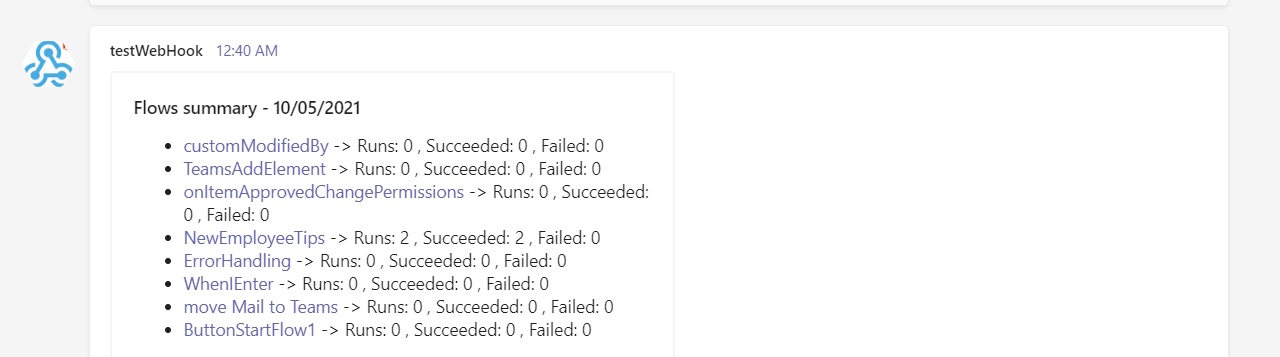
Powershell scripts using CLI for M365 and PnP PowerShell that could run once a day and sends a summary (for example adaptive card in teams) with list of all flows runs with total runs count for current day, number of times the flow succeeded and number of times the flow failed
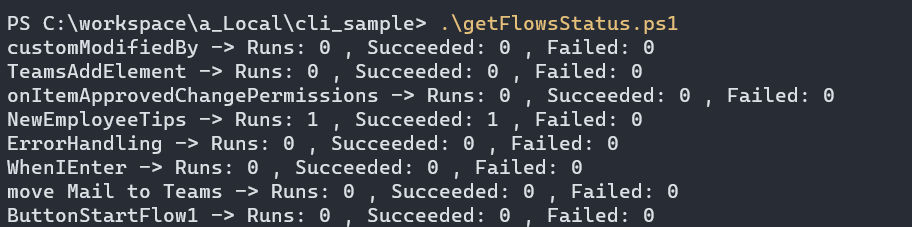
result in console (CLI)
result as adaptive card in teams
Both CLI and PnP PowerShell solutions require a Microsoft Teams channel to be configured with a webhook to accept incoming messages. Follow instructions on Adam the Automators blog here (Setting up a Webhook Connector in Microsoft Teams)
Connect-PnPOnline -Url https://contoso-admin.sharepoint.com -Interactive

$environment = 'Default-d2af3166-e76b-4d03-9942-fbc79d6b69f9' #Change to your Power Automate environment

#Setup an incoming webhook to a Microsoft Team channel and replace $webhook variable
#https://adamtheautomator.com/teams-webhooks/#Setting_up_a_Webhook_Connector_in_Microsoft_Teams
$webhook = 'https://leonarmstondev.webhook.office.com/webhookb2/908a4576-7946-405d-b373-0ff49b7244e1@d2af3166-e76b-4d03-9942-fbc79d6b69f9/IncomingWebhook/27f804496eb749158838186717fef3c0/08a5b26d-e908-49af-b8c6-e84d06beda87'


$currentDayDate = Get-Date
$previousDayDate = (Get-Date).AddDays(-1)
$adaptiveCardDescription = ""

$flows = Get-PnPFlow -Environment $environment
foreach ($flow in $flows)
{
    $flowRuns = Get-PnPFlowRun -Environment $environment -Flow $flow.Name

    $displayName = $flow.Properties.DisplayName
    $id = $flow.name

    $todayRuns = $flowRuns.Where({[DateTime]$_.Properties.EndTime -le $currentDayDate -and [DateTime]$_.Properties.EndTime -gt $previousDayDate})

    $todayRunsCount = 0
    $todaySuccessRunsCount = 0
    $todayFailedRunsCount = 0
    if($todayRuns.Count -gt 0)
    {
        $todaySuccessRuns = $todayRuns.Where({$_.Properties.Status -eq 'Succeeded'})
        $todaySuccessRunsCount = $todaySuccessRuns.Count

        $todayFailedRuns = $todayRuns.Where({$_.Properties.Status -eq 'Failed'})
        $todayFailedRunsCount = $todayFailedRuns.Count

        $todayRunsCount = $todayRuns.Count
    }

    Write-Host "$displayName -> Runs: $todayRunsCount , Succeeded: $todaySuccessRunsCount , Failed: $todayFailedRunsCount"
    $adaptiveCardDescription = $adaptiveCardDescription + "\r- [$displayName](https://us.flow.microsoft.com/manage/environments/$environment/flows/$id/details) -> Runs: $todayRunsCount , Succeeded: $todaySuccessRunsCount , Failed: $todayFailedRunsCount"
}
$today = Get-Date -Format "dd/MM/yyyy"

$JSON = [Ordered]@{
  "type"       = "message"
  "attachments" = @(
    @{
      "contentType" = 'application/vnd.microsoft.card.adaptive'
      "content"     = [Ordered]@{
        '$schema' = "<http://adaptivecards.io/schemas/adaptive-card.json>"
        "type"    = "AdaptiveCard"
        "version" = "1.3"
        "body"    = @(
          [Ordered]@{
            "type"  = "Container"
            "items" = @(
              @{
			    "type"= "TextBlock"
			    "size"= "Medium"
			    "weight"= "Bolder"
			    "text"= "Today's Power Automate Flow Summary - $today"
              }
              @{
			    "type"= "TextBlock"
			    "text"= "${adaptiveCardDescription}"
			    "wrap"= $true
              }
            )
          }
        )
      }
    }
  )
} | ConvertTo-JSON -Depth 20

$Params = @{
  "URI"         = $webhook
  "Method"      = 'POST'
  "Body"        = [string]$json.replace("\\","\");
  "ContentType" = 'application/json'
}

Invoke-RestMethod @ParamsContributors
| Author(s) |
|---|
| Leon Armston |
Disclaimer
THESE SAMPLES ARE PROVIDED AS IS WITHOUT WARRANTY OF ANY KIND, EITHER EXPRESS OR IMPLIED, INCLUDING ANY IMPLIED WARRANTIES OF FITNESS FOR A PARTICULAR PURPOSE, MERCHANTABILITY, OR NON-INFRINGEMENT.
Tool documentation & references
- Want to learn more about PnP PowerShell and the cmdlets
Check out the PnP PowerShell site to get started and for the reference to the cmdlets.
