
Microsoft 365 License Monitoring and Alert Script
This script is designed to help administrators monitor the availability of Microsoft 365 licenses for specific SKUs
 Eilaf Barmare
Summary
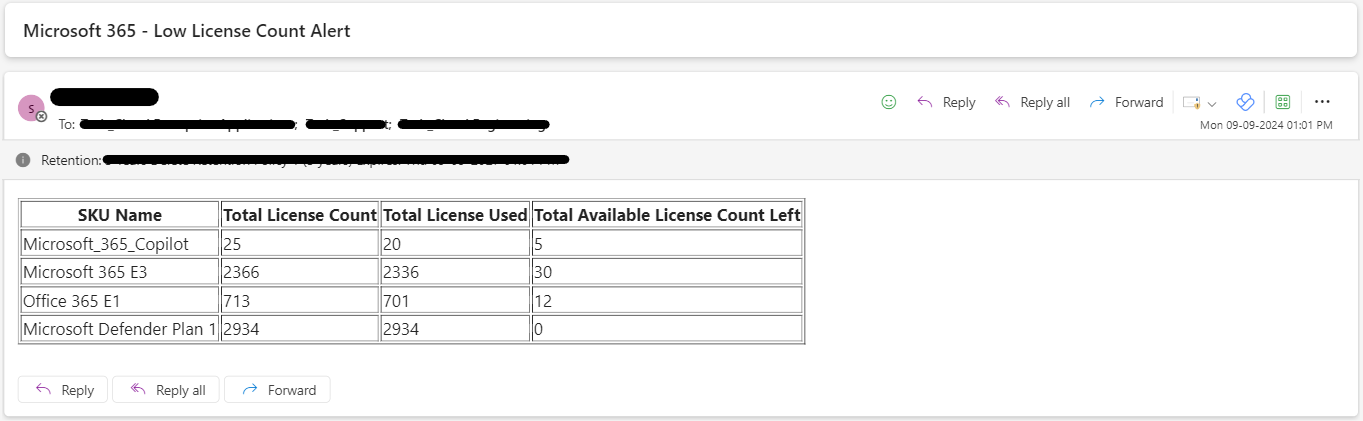
This script is designed to help administrators monitor the availability of Microsoft 365 licenses for specific SKUs, including Microsoft Copilot, Microsoft 365 E3, Office 365 E1, and Microsoft Defender Plan 1. It retrieves the current license counts using the Microsoft Graph API and sends an email alert if any SKU has fewer than 5 licenses remaining. The script includes error handling for API calls and module imports, and formats the email body as an HTML table for clear presentation of the license data.
To use this script, you need to:
- Register an Application in Azure AD/Entra ID to generate a Client ID and Secret for authentication.
- Provide the application with the “Directory.Read.All” and “Mail.Send” permissions (from API Permission > Application) to get license details and send notification emails using Graph API calls through MSAL.
- Use the Client ID and Secret values of the registered application in the script.
- Optional: Host the script on Azure/AWS/Server machine to run weekly or biweekly to send automated alerts
Screenshot of the script execution output is below.
# Uncomment and install MSAL.PS and Microsoft.Graph PowerShell modules, skip if already installed
# Install-Module -Name MSAL.PS
# Install-Module -Name Microsoft.Graph

Import-Module Microsoft.Graph.Users
Import-Module MSAL.PS

# Set variables
$tenantId = "replace_with_value"
$clientId = "replace_with_value"
$clientSecret = "replace_with_value"
$emailSender = "sharedmailbox@contoso.com"
$emailRecipients = @("user1@contoso.com", "user2@contoso.com", "DL.Name@contoso.com")
$emailSubject = "Microsoft 365 - Low License Alert"

# Convert client secret to secure string
$clientSecretSecure = ConvertTo-SecureString -String $clientSecret -AsPlainText -Force

# Use the secure string in Get-MsalToken
$tokenResponse = Get-MsalToken -ClientId $clientId -ClientSecret $clientSecretSecure -TenantId $tenantId -Scopes "https://graph.microsoft.com/.default"

# Get an OAuth 2.0 token
$accessToken = $tokenResponse.AccessToken

# Get the list of SKUs with less than 5 licenses left for specified SKUs
$uri = "https://graph.microsoft.com/v1.0/subscribedSkus"
$response = Invoke-RestMethod -Uri $uri -Method GET -Headers @{ Authorization = "Bearer $accessToken" }

$copilot = $response.value | Where-Object {($_.skuPartNumber -eq "Microsoft_365_Copilot")}
$e3 = $response.value | Where-Object {($_.skuPartNumber -eq "SPE_E3")}
$e1 = $response.value | Where-Object {($_.skuPartNumber -eq "STANDARDPACK")}
$defender1 = $response.value | Where-Object {($_.skuPartNumber -eq "ATP_ENTERPRISE")}

$copilotAvailableUnits = $copilot.prepaidUnits.enabled - $copilot.consumedUnits
$e3AvailableUnits = $e3.prepaidUnits.enabled - $e3.consumedUnits
$e1AvailableUnits = $e1.prepaidUnits.enabled - $e1.consumedUnits
$defender1AvailableUnits = $defender1.prepaidUnits.enabled - $defender1.consumedUnits

# If there are SKUs with less than 5 licenses left, send an email
if (($copilotAvailableUnits -le 5) -or ($e3AvailableUnits -le 5) -or ($e1AvailableUnits -le 5) -or ($defender1AvailableUnits -le 5)) {
    $emailBody = "<html><body><table border='1'><tr><th>SKU Name</th><th>Total License Count</th><th>Total License Used</th><th>Total Available License Count Left</th></tr>"
    $emailBody += "<tr><td>Microsoft_365_Copilot</td><td>$($copilot.prepaidUnits.enabled)</td><td>$($copilot.consumedUnits)</td><td>$($copilotAvailableUnits)</td></tr>"
    $emailBody += "<tr><td>Microsoft 365 E3</td><td>$($e3.prepaidUnits.enabled)</td><td>$($e3.consumedUnits)</td><td>$($e3AvailableUnits)</td></tr>"
    $emailBody += "<tr><td>Office 365 E1</td><td>$($e1.prepaidUnits.enabled)</td><td>$($e1.consumedUnits)</td><td>$($e1AvailableUnits)</td></tr>"
    $emailBody += "<tr><td>Microsoft Defender Plan 1</td><td>$($defender1.prepaidUnits.enabled)</td><td>$($defender1.consumedUnits)</td><td>$($defender1AvailableUnits)</td></tr>"
    $emailBody += "</table></body></html>"

    # Create the email message
    $emailMessage = @{
        Message = @{
            Subject = $emailSubject
            Body = @{
                Content = $emailBody
                ContentType = "HTML"
            }
            ToRecipients = @(
                $emailRecipients | ForEach-Object {
                    @{
                        EmailAddress = @{
                            Address = $_
                        }
                    }
                }
            )
        }
        SaveToSentItems = "true"
    }

    # Send the email
    $response = Invoke-RestMethod -Uri "https://graph.microsoft.com/v1.0/users/$emailSender/sendMail" `
                                  -Method POST `
                                  -Headers @{ Authorization = "Bearer $accessToken" } `
                                  -Body (ConvertTo-Json $emailMessage -Depth 100) `
                                  -ContentType "application/json"

    Write-Output "Email sent successfully"
}
else {
    Write-Output "No SKUs with less than 5 licenses left"
}
Contributors
| Author(s) |
|---|
| Eilaf Barmare |
Disclaimer
THESE SAMPLES ARE PROVIDED AS IS WITHOUT WARRANTY OF ANY KIND, EITHER EXPRESS OR IMPLIED, INCLUDING ANY IMPLIED WARRANTIES OF FITNESS FOR A PARTICULAR PURPOSE, MERCHANTABILITY, OR NON-INFRINGEMENT.
Tool documentation & references
- Want to learn more about Microsoft Graph PowerShell SDK and the cmdlets
Check out the Microsoft Graph PowerShell SDK documentation site to get started and for the reference to the cmdlets.
