
Export all PowerApps details and its Role assignments from Tenant in CSV format
This script sample how to export all the PowerApps details and its role assignment in csv format
 Valeras Narbutas
 Siddharth Vaghasia
Summary
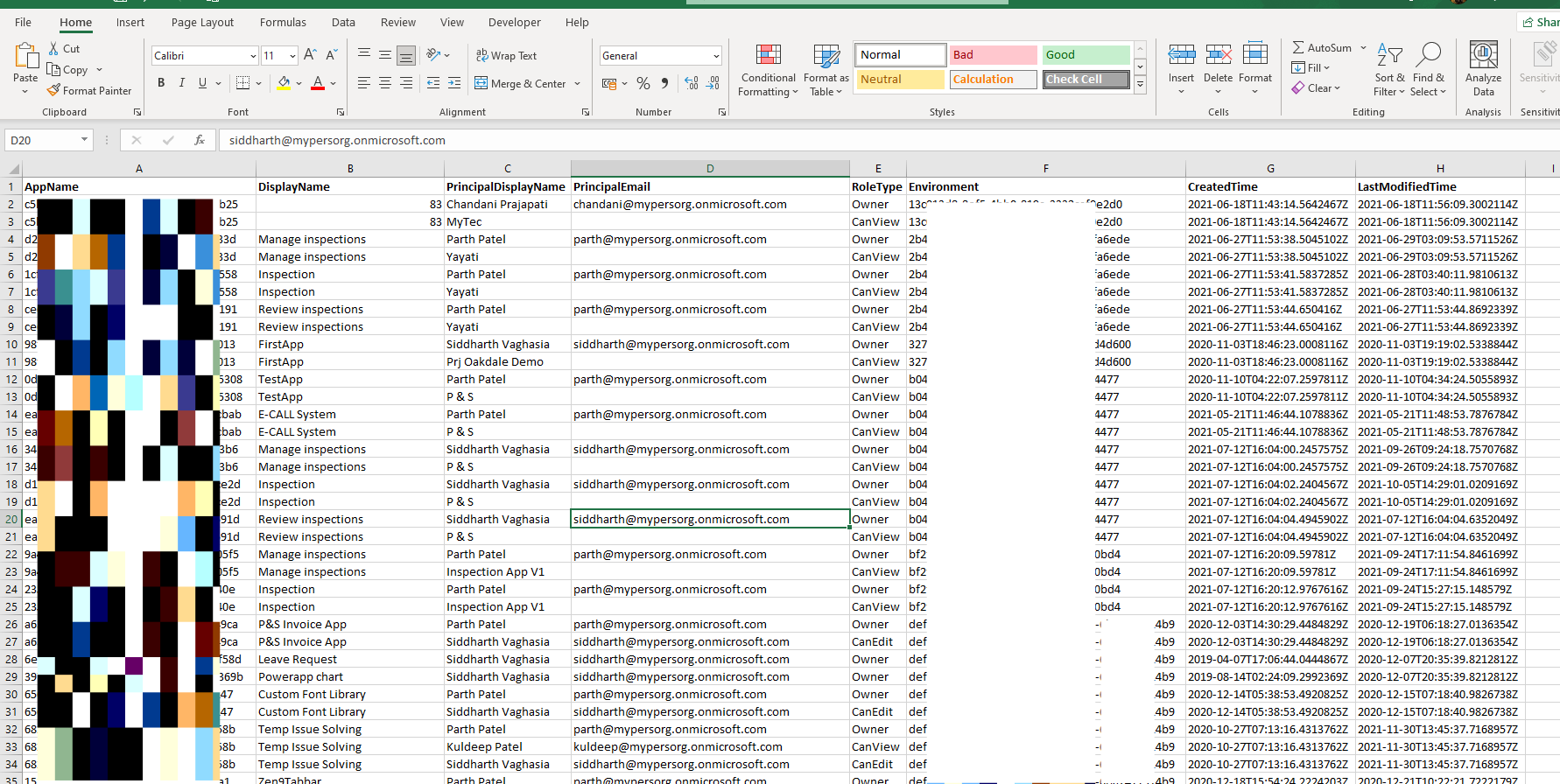
This powershell script will export all the powerapps in a particular tenant and all its environment and its role assignments in csv format.
Script will export AppID, AppDisplay Name, User Display name, User Email, Role Type(Owner/CanView/CanEdit), Environment, App Created Time, App Modified Time. Also some internal properties like description, appUris, createdTime, lastModifiedTime, sharedGroupsCount, sharedUsersCount, appOpenProtocolUri, appOpenUri, appPlayUri, appPlayEmbeddedUri, appPlayTeamsUri, connectionReferences, userAppMetadata, isFeaturedApp, bypassConsent, isHeroApp, environment, almMode, performanceOptimizationEnabled, unauthenticatedWebPackageHint, canConsumeAppPass, enableModernRuntimeMode, executionRestrictions, appPlanClassification, usesPremiumApi, usesOnlyGrandfatheredPremiumApis, usesCustomApi, usesOnPremiseGateway, usesPcfExternalServiceUsage, isCustomizable, chatPaneCopilotEnabled, draftingCopilotEnabled.
Note: This uses a pre-release version of the PowerApps PowerShell cmdlets. The cmdlets are subject to change.
Implementation
- Open Windows PowerShell ISE
- Create a new file
- Save the file and run it
- Make sure you are PowerApps admin to so that you have access to all the apps
#Modules for PowerApps Powershell Commands
Install-Module -Name Microsoft.PowerApps.Administration.PowerShell
Install-Module -Name Microsoft.PowerApps.PowerShell -AllowClobber

#PowerApps Connection
Add-PowerAppsAccount

$currentTime=$(get-date).ToString("yyyyMMddHHmmss");
$outputFilePath="D:\SP\repos\PowerAppsInventory-"+$currentTime+".csv"
$resultColl=@()

write-host -ForegroundColor Magenta "Getting all the PowerApp Details..."

# Get all the PowerApps
$apps=Get-AdminPowerApp
foreach($app in $apps)
{

   foreach($user in Get-PowerAppRoleAssignment -Appname $app.Appname)
   {
    $result = New-Object PSObject
    $result | Add-Member -MemberType NoteProperty -name "AppName" -value $app.AppName -Force
    $result | Add-Member -MemberType NoteProperty -name "DisplayName" -value $app.DisplayName  -Force
    $result | Add-Member -MemberType NoteProperty -name "PrincipalDisplayName" -value $user.PrincipalDisplayName-Force
    $result | Add-Member -MemberType NoteProperty -name "PrincipalEmail" -value $user.PrincipalEmail-Force
    $result | Add-Member -MemberType NoteProperty -name "RoleType" -value $user.RoleType-Force
    $result | Add-Member -MemberType NoteProperty -name "Environment" -value $app.EnvironmentName -Force
    $result | Add-Member -MemberType NoteProperty -Name "CreatedTime" -value $app.CreatedTime  -Force
    $result | Add-Member -MemberType NoteProperty -Name "LastModifiedTime" -value $app.LastModifiedTime  -Force

    # Getting more details about the app
   #  displayName, description, appUris, createdTime, lastModifiedTime, sharedGroupsCount, sharedUsersCount, appOpenProtocolUri, appOpenUri, appPlayUri, appPlayEmbeddedUri, appPlayTeamsUri, connectionReferences, userAppMetadata, isFeaturedApp, bypassConsent, isHeroApp, environment, almMode, performanceOptimizationEnabled, unauthenticatedWebPackageHint, canConsumeAppPass, enableModernRuntimeMode, executionRestrictions, appPlanClassification, usesPremiumApi, usesOnlyGrandfatheredPremiumApis, usesCustomApi, usesOnPremiseGateway, usesPcfExternalServiceUsage, isCustomizable, chatPaneCopilotEnabled, draftingCopilotEnabled

   $propertyNames = @(
    "displayName",
    "description",
    "appUris",
    "createdTime",
    "lastModifiedTime",
    "sharedGroupsCount",
    "sharedUsersCount",
    "appOpenProtocolUri",
    "appOpenUri",
    "appPlayUri",
    "appPlayEmbeddedUri",
    "appPlayTeamsUri",
    "connectionReferences",
    "userAppMetadata",
    "isFeaturedApp",
    "bypassConsent",
    "isHeroApp",
    "environment",
    "almMode",
    "performanceOptimizationEnabled",
    "unauthenticatedWebPackageHint",
    "canConsumeAppPass",
    "enableModernRuntimeMode",
    "executionRestrictions",
    "appPlanClassification",
    "usesPremiumApi",
    "usesOnlyGrandfatheredPremiumApis",
    "usesCustomApi",
    "usesOnPremiseGateway",
    "usesPcfExternalServiceUsage",
    "isCustomizable",
    "chatPaneCopilotEnabled",
    "draftingCopilotEnabled"
)

# You can now use $propertyNames as an array of these properties
 foreach($appProp in $app | select -ExpandProperty Internal | select -ExpandProperty Properties)
    {
      foreach($propName in $propertyNames){
         $result | Add-Member -MemberType NoteProperty -name $propName -value $appProp.$propName -Force
      }
    }

    $resultColl += $result
   }
}

#Export the result Array to CSV file
$resultColl | Export-Csv $outputFilePath -NoTypeInformation

write-host -ForegroundColor Magenta "Successful!!"
Contributors
| Author(s) |
|---|
| Valeras Narbutas |
| Siddharth Vaghasia |
Disclaimer
THESE SAMPLES ARE PROVIDED AS IS WITHOUT WARRANTY OF ANY KIND, EITHER EXPRESS OR IMPLIED, INCLUDING ANY IMPLIED WARRANTIES OF FITNESS FOR A PARTICULAR PURPOSE, MERCHANTABILITY, OR NON-INFRINGEMENT.
Tool documentation & references
- Want to learn more about Power Apps PowerShell and the cmdlets
Check out the Power Apps PowerShell documentation site to get started and for the reference to the cmdlets.
