
Report of Private Teams channels to Excel
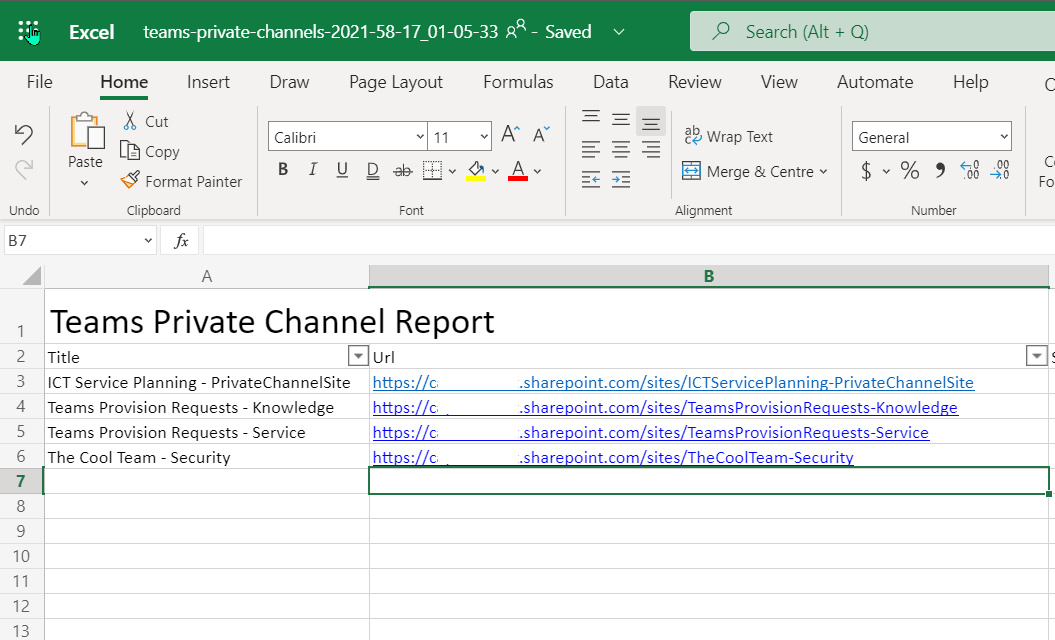
Gathers all of the teams private channels in your tenant and produces an Excel file
 Adam Wójcik
 Paul Bullock
Summary
This sample gathers all of the teams private channels in your tenant and produces an Excel file which is then uploaded to a SharePoint Site. Two connections are used, one for the Admin Center and the other to upload the file to the "Documents" location in the root site.
Write-Host "Running Script..."

# Connect to the standard SharePoint Site
$siteConn = Connect-PnPOnline -Url "https://contoso.sharepoint.com" -Interactive -ReturnConnection

# Connect to the SharePoint Online Admin Service
$adminSiteConn = Connect-PnPOnline -Url "https://contoso-admin.sharepoint.com" -Interactive -ReturnConnection

# SharePointy Adminy Stuff here
Write-Host "Connected to SharePoint Online Admin Center"

#-----------------
# Gather Reporting Data
#-----------------

# Gets all Team Private Channels based on the template
$teamPrivateChannels = Get-PnPTenantSite -Template "TEAMCHANNEL#0" -Connection $adminSiteConn

#-----------------
# Produce and Save Reporting Data
#-----------------
$now = [System.DateTime]::Now.ToString("yyyy-mm-dd_hh-MM-ss")
$reportFileName = "teams-private-channels-$($now).xlsx"

$ExcelReportSettings = @{
    Path          = $reportFileName
    Title         = "Teams Private Channel Report"
    WorksheetName = "Teams Private Channels"
    AutoFilter    = $true
    AutoSize      = $true
}

Write-Host "Creating Excel File $reportFileName"
$teamPrivateChannels | Select-Object Title, Url, StorageUsage, Owner, SiteDefinedSharingCapability `
| Export-Excel @ExcelReportSettings

# Save to SharePoint
$file = Add-PnPFile -Path $reportFileName -Folder "Shared Documents" -Connection $siteConn

Write-Host "Uploaded Excel File to SharePoint"
Write-Host "Running Script..."

# Ensure login
$m365Status = m365 status
if ($m365Status -match "Logged Out") {
m365 login
}

#-----------------
# Gather Reporting Data
#-----------------

# Gets all Team Private Channels based on the template
$teamPrivateChannels = m365 spo site classic list --webTemplate "TEAMCHANNEL#0"
$teamPrivateChannels = $teamPrivateChannels | ConvertFrom-Json

#-----------------
# Produce and Save Reporting Data
#-----------------
$now = [System.DateTime]::Now.ToString("yyyy-mm-dd_hh-MM-ss")
$reportFileName = "teams-private-channels-$($now).xlsx"

$ExcelReportSettings = @{
    Path          = $reportFileName
    Title         = "Teams Private Channel Report"
    WorksheetName = "Teams Private Channels"
    AutoFilter    = $true
    AutoSize      = $true
}

Write-Host "Creating Excel File $reportFileName"
$teamPrivateChannels | Select-Object Title, Url, StorageUsage, Owner, SiteDefinedSharingCapability `
| Export-Excel @ExcelReportSettings

# Save to SharePoint
m365 spo file add --webUrl "https://contoso.sharepoint.com" --folder 'Shared Documents' --path $reportFileName

Write-Host "Uploaded Excel File to SharePoint"
Source Credit
Sample first appeared on Azure Automation to the Rescue – Session at Scottish Summit 2021 | CaPa Creative Ltd
Contributors
| Author(s) |
|---|
| Paul Bullock |
| Adam Wójcik |
Disclaimer
THESE SAMPLES ARE PROVIDED AS IS WITHOUT WARRANTY OF ANY KIND, EITHER EXPRESS OR IMPLIED, INCLUDING ANY IMPLIED WARRANTIES OF FITNESS FOR A PARTICULAR PURPOSE, MERCHANTABILITY, OR NON-INFRINGEMENT.
Tool documentation & references
- Want to learn more about PnP PowerShell and the cmdlets
Check out the PnP PowerShell site to get started and for the reference to the cmdlets.
- Want to learn more about CLI for Microsoft 365 and the commands
Check out the CLI for Microsoft 365 site to get started and for the reference to the commands.
