
Add App Catalog to SharePoint site
Deploy certain SharePoint solution to a specific site
 Chandani Prajapati
 Paul Bullock
 Ganesh Sanap
Summary
When you just want to deploy certain SharePoint solution to a specific site, it's required to create an app catalog for that site. The below script will create it for the site. In the article referenced above you can check where you can use App catalog for the site instead of global app catalog.
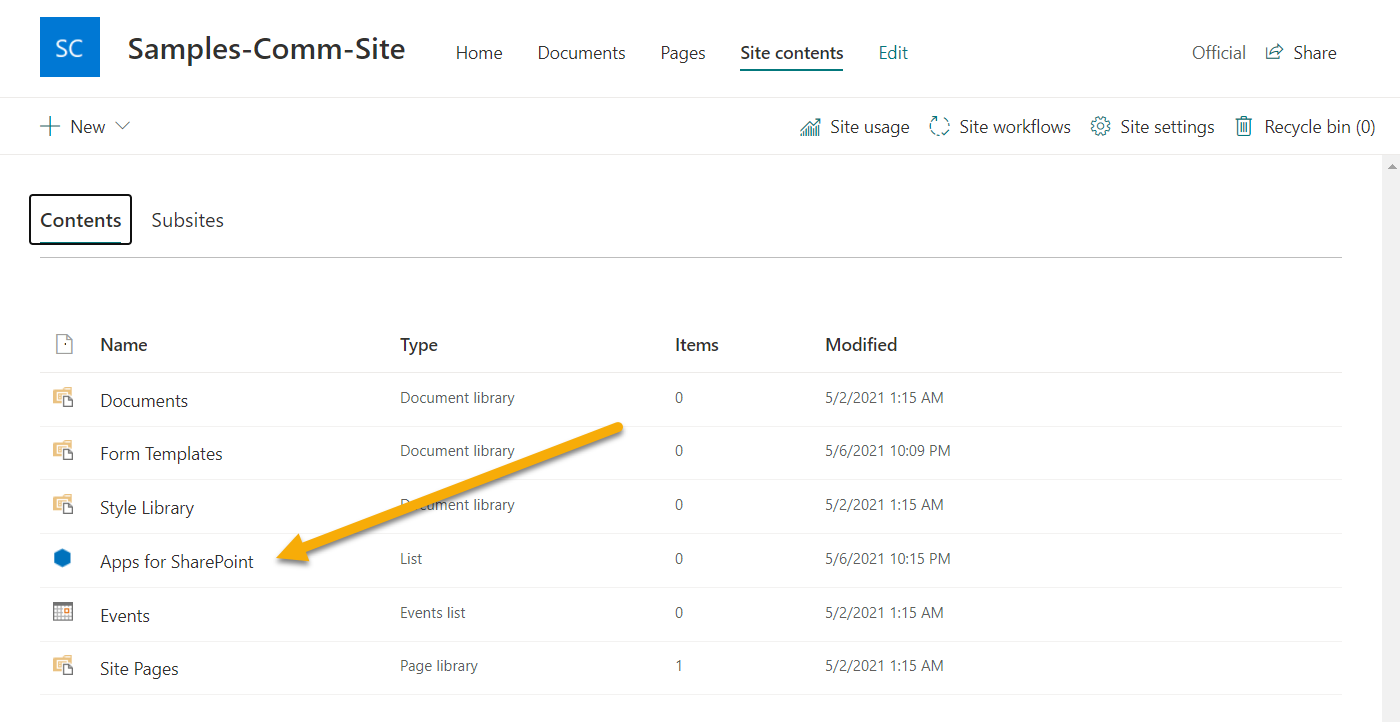
$site = "https://contoso.sharepoint.com/sites/site"
Connect-PnPOnline $site
Add-PnPSiteCollectionAppCatalog -Site $site
Write-output "App Catalog Created on " $site
$AdminSiteURL = "https://domain-admin.sharepoint.com"
$Username = "chandani@domain.onmicrosoft.com"
$Password = "******"
$SecureStringPwd = $Password | ConvertTo-SecureString -AsPlainText -Force
$Cred = New-Object System.Management.Automation.PSCredential -ArgumentList $Username, $SecureStringPwd

Function Login() {
    [cmdletbinding()]
    param([parameter(Mandatory = $true, ValueFromPipeline = $true)] $creds)
    Write-Host "Connecting to Tenant Admin Site '$($AdminSiteURL)'" -f Yellow
    Connect-SPOService -url $AdminCenterURL -Credential $Cred
    Write-Host "Connection Successfull" -f Green
}

Function AddAppCatalogToSiteCollection {
    $SiteURL = Read-Host "Enter Site URL"
    $Site = Get-SPOSite $SiteURL
    Write-Host "Adding SharePoint site collection app catalog..." -f Yellow
    Add-SPOSiteCollectionAppCatalog -Site $Site
    Write-Host "Added SharePoint site collection app catalog successfully..." -f Green
}

Function StartProcessing {
    Login($Cred);
    AddAppCatalogToSiteCollection
}

StartProcessing
# SharePoint online site URL
$siteUrl = "https://contoso.sharepoint.com/sites/SPConnect"

# Get Credentials to connect
$m365Status = m365 status
if ($m365Status -match "Logged Out") {
   m365 login
}

# Add site collection app catalog
m365 spo site appcatalog add --siteUrl $siteUrl
Contributors
| Author(s) |
|---|
| Paul Bullock |
| Chandani Prajapati |
| Ganesh Sanap |
Disclaimer
THESE SAMPLES ARE PROVIDED AS IS WITHOUT WARRANTY OF ANY KIND, EITHER EXPRESS OR IMPLIED, INCLUDING ANY IMPLIED WARRANTIES OF FITNESS FOR A PARTICULAR PURPOSE, MERCHANTABILITY, OR NON-INFRINGEMENT.
Tool documentation & references
- Introduction to the SharePoint Online Management Shell
Check out the SPO Management Shell documentation site to get started and for the reference to the cmdlets.
- Want to learn more about PnP PowerShell and the cmdlets
Check out the PnP PowerShell site to get started and for the reference to the cmdlets.
- Want to learn more about CLI for Microsoft 365 and the commands
Check out the CLI for Microsoft 365 site to get started and for the reference to the commands.
