
Add bulk users to SharePoint site groups from CSV.
Add bulk users to SharePoint site groups from CSV.
 Ganesh Sanap
 Chandani Prajapati
Summary
This sample shows how to add bulk users to SharePoint site groups from CSV.
Bulk Users CSV
| SiteURL | GroupName | Users |
|---|---|---|
| https://domain.sharepoint.com/sites/SPFxLearning/ | SPFx Users | user2@domain.onmicrosoft.com |
| https://domain.sharepoint.com/sites/PowerShellLearning/ | PowerShell Users | chandani@domain.onmicrosoft.com |
| https://domain.sharepoint.com/sites/PowerPlatformLearning/ | Power Users | chandani@domain.onmicrosoft.com |
You can download input CSV reference file at here.
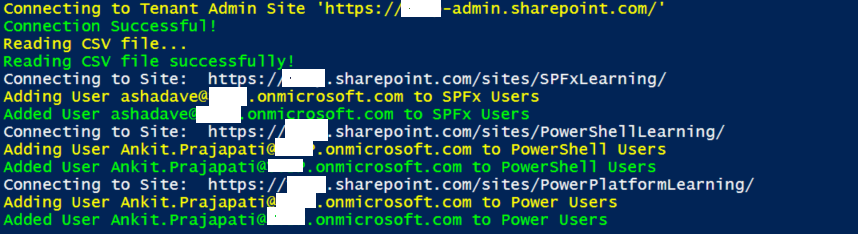
Implementation
- Open Windows PowerShell ISE
- Create a new file and write a script
- Now we will see all the steps which are required to achieve the solution:
- Create a function to read a CSV file and store it in a global variable.
- Create a function to connect the M365 admin site.
- Create a function to add users to a group, in this first we will be looping all elements and connecting to the particular site. After that, we will check if the current user exists in the current group. If not exists then we will add it.
$AdminSiteURL = "https://domain-admin.sharepoint.com/"
$Username = "chandani@domain.onmicrosoft.com"
$Password = "********"
$SecureStringPwd = $password | ConvertTo-SecureString -AsPlainText -Force
$Creds = New-Object System.Management.Automation.PSCredential -ArgumentList $username, $secureStringPwd
$CSVPath = "E:\Contribution\PnP-Scripts\bulk-add-users-to-group\SP-Usres.csv"
$global:CSVData = @()

Function Login() {
    [cmdletbinding()]
    param([parameter(Mandatory = $true, ValueFromPipeline = $true)] $Creds)
    Write-Host "Connecting to Tenant Admin Site '$($AdminSiteURL)'" -ForegroundColor Yellow
    Connect-PnPOnline -Url $AdminSiteURL -Credentials $Creds
    Write-Host "Connection Successful!" -ForegroundColor Green
    ReadCSVFile
}

Function ReadCSVFile() {
    Write-Host "Reading CSV file..." -ForegroundColor Yellow
    $global:CSVData = Import-Csv $CSVPath
    Write-Host "Reading CSV file successfully!" -ForegroundColor Green
    AddUsersToGroups
}

Function AddUsersToGroups() {
    ForEach ($CurrentItem in $CSVData) {
        Try {
            #Connect to SharePoint Online Site
            Write-host "Connecting to Site: "$CurrentItem.SiteURL
            Connect-PnPOnline -Url $CurrentItem.SiteURL -Credentials $Creds

            #Get the group
            $Group = Get-PnPGroup -Identity $CurrentItem.GroupName

            #Get group members
            $GroupMembers = Get-PnPGroupMembers -Identity $Group | select Email

            #Check if user is exists in a group or not
            $IsUserExists = $GroupMembers -match $CurrentItem.Users
            if ($IsUserExists.Length) {
                Write-Host "User $($CurrentItem.Users) is already exists in $($Group.Title)" -ForegroundColor Yellow
            }
            else {
                Write-Host "Adding User $($CurrentItem.Users) to $($Group.Title)" -ForegroundColor Yellow
                Add-PnPGroupMember -LoginName $CurrentItem.Users -Identity $Group
                Write-host "Added User $($CurrentItem.Users) to $($Group.Title)" -ForegroundColor Green
            }
        }
        Catch {
            write-host "Error Adding User to Group:" $_.Exception.Message -ForegroundColor Red
        }
    }
}

Function StartProcessing {
    Login($Creds);
}

StartProcessing$AdminSiteURL = "https://domain-admin.sharepoint.com/"
$Username = "chandani@domain.onmicrosoft.com"
$Password = "********"
$SecureStringPwd = $password | ConvertTo-SecureString -AsPlainText -Force
$Creds = New-Object System.Management.Automation.PSCredential -ArgumentList $username, $secureStringPwd
$CSVPath = "E:\Contribution\PnP-Scripts\bulk-add-users-to-group\SP_Dummy_Users.csv"
$global:CSVData = @()
Function Login() {
[cmdletbinding()]
param([parameter(Mandatory = $true, ValueFromPipeline = $true)] $Creds)
Write-Host "Connecting to Tenant Admin Site '$($AdminSiteURL)'" -f Yellow
Connect-SPOService -Url $AdminSiteURL -Credential $Creds
Write-Host "Connection Successful!" -f Green
ReadCSVFile
}
Function ReadCSVFile() {
Write-Host "Reading CSV file..." -ForegroundColor Yellow
$global:CSVData = Import-Csv $CSVPath
Write-Host "Reading CSV file successfully!" -ForegroundColor Green
AddUsersToGroups
}
Function AddUsersToGroups() {
ForEach ($CurrentItem in $CSVData) {
Try {
#Connect to SharePoint Online Site
Write-host "Connecting to Site: "$CurrentItem.SiteURL
$Site = Get-SPOSite -Identity $CurrentItem.SiteURL
#Get group members
$GroupMembers = Get-SPOUser -Site $CurrentItem.SiteURL -Group $CurrentItem.GroupName | select Email
$IsUserExists = $GroupMembers -match $CurrentItem.Users
if ($IsUserExists.Length) {
Write-Host "User $($CurrentItem.Users) is already exists in $($Group.Title)" -ForegroundColor Yellow
}
else {
Write-Host "Adding User $($CurrentItem.Users) to $($CurrentItem.GroupName)" -ForegroundColor Yellow
Add-SPOUser -LoginName $CurrentItem.Users -Group $CurrentItem.GroupName -Site $CurrentItem.SiteURL
Write-host "Added User $($CurrentItem.Users) to $($CurrentItem.GroupName)" -ForegroundColor Green
}
}
Catch {
write-host -f Red "Error Adding User to Group:" $_.Exception.Message
}
}
}
Function StartProcessing {
Login($Creds);
}
StartProcessing# Get Credentials to connect
$m365Status = m365 status
if ($m365Status -match "Logged Out") {
m365 login
}
Write-Host "Reading CSV file..." -ForegroundColor Yellow
$CSVPath = "E:\Contribution\PnP-Scripts\bulk-add-users-to-group\SP-Users.csv"
$CSVData = Import-Csv $CSVPath
Write-Host "Read CSV file successfully!" -ForegroundColor Green
ForEach ($CurrentItem in $CSVData) {
Try {
# Get the SharePoint group
$Group = m365 spo group get --webUrl $CurrentItem.SiteURL --name $CurrentItem.GroupName | ConvertFrom-Json
# Get SharePoint group members
$GroupMembers = m365 spo group member list --webUrl $CurrentItem.SiteURL --groupName $CurrentItem.GroupName | ConvertFrom-Json | select Email
# Check if user exists in SharePoint group or not
$IsUserExists = $GroupMembers -match $CurrentItem.Users
if ($IsUserExists.Length) {
# User already exists in SharePoint group
Write-Host "User $($CurrentItem.Users) already exists in $($Group.Title)" -ForegroundColor Yellow
}
else {
# Add user to SharePoint group
Write-Host "Adding User $($CurrentItem.Users) to $($Group.Title)" -ForegroundColor Yellow
m365 spo group member add --webUrl $CurrentItem.SiteURL --groupName $CurrentItem.GroupName --emails $CurrentItem.Users
Write-host "Added User $($CurrentItem.Users) to $($Group.Title)" -ForegroundColor Green
}
}
Catch {
write-host "Error Adding User to Group:" $_.Exception.Message -ForegroundColor Red
}
}
# Disconnect SharePoint online connection
m365 logoutContributors
| Author(s) |
|---|
| Chandani Prajapati |
| Ganesh Sanap |
Disclaimer
THESE SAMPLES ARE PROVIDED AS IS WITHOUT WARRANTY OF ANY KIND, EITHER EXPRESS OR IMPLIED, INCLUDING ANY IMPLIED WARRANTIES OF FITNESS FOR A PARTICULAR PURPOSE, MERCHANTABILITY, OR NON-INFRINGEMENT.
Tool documentation & references
- Want to learn more about PnP PowerShell and the cmdlets
Check out the PnP PowerShell site to get started and for the reference to the cmdlets.
- Introduction to the SharePoint Online Management Shell
Check out the SPO Management Shell documentation site to get started and for the reference to the cmdlets.
- Want to learn more about CLI for Microsoft 365 and the commands
Check out the CLI for Microsoft 365 site to get started and for the reference to the commands.
