
Creates multiple document libraries by applying custom list template
Script that creates multiple libraries by applying custom list template with custom document library, site columns and site content types
 Reshmee Auckloo
Summary
Creating custom list templates is now possible to create both custom document libraries and lists although official microsoft documentation has not specified anything about supporting custom document library templates. This script will create multiple instances of document library by applying custom list template. Please refer to Create and add list template to SharePoint site with content types,site columns and list views to add a custom list template. However there are some limitations with the list design to set permissions, apply versionings, create indexed columns , etc.. The script calls the cmdlet Invoke-SPOListDesign iteratively and amends the document library url and display name before applying versioning settings and creating indexed columns.
More about list template https://learn.microsoft.com/sharepoint/lists-custom-template
[CmdletBinding()]
    Param(
    [Parameter(Mandatory=$false,  Position=0)]
    [String]$adminSiteUrl = "https://<tenant>-admin.sharepoint.com",
    [Parameter(Mandatory=$false,  Position=1)]
    [String]$siteUrl =  "https://<tenant>.sharepoint.com/sites/investment",
    [Parameter(Mandatory=$false,  Position=2)]
    [String]$librariesCSV =  "C:\Scripts\DocumentLibraryTemplate\libraries.csv",

    [Parameter(Mandatory=$false,  Position=4)]
    [String]$listDesignId = "5b38e500-0fab-4da7-b011-ad7113228920" # use Get-SPOListDesign to find the Id of the list design containing the document library template
  )
#creating indexed columns might help with performance of large libraries, i.e. >5000 files
function Create-Index ($list, $targetFieldName)
{
  $targetField = Get-PnPField -List $list -Identity $targetFieldName
  $targetField.Indexed = 1;
  $targetField.Update();
  $list.Context.ExecuteQuery();
}

# log file will be saved in same directory script was started from
$currentTime= $(get-date).ToString("yyyyMMddHHmmss")
$logFilePath=".\log-"+$currentTime+".log"


## Start the Transcript
Start-Transcript -Path $logFilePath

Connect-SPOService $adminSiteUrl
Connect-PnPOnline -Url $siteUrl -Interactive
Import-Csv $librariesCSV | ForEach-Object {
Invoke-SPOListDesign -Identity $listDesignId -WebUrl $siteUrl
#Get library just created and update Internal name and display name, replace <listName> with the name specified in the custom list template
$lib = Get-PnPList -Identity "<listName>" -Includes RootFolder
#wait until document library has been created
while(!$lib)
{
 $lib = Get-PnPList -Identity "<listName>" -Includes RootFolder
 sleep -second 5
}
if($lib)
{
    $lib.Rootfolder.MoveTo($($_.InternalName))
    Invoke-PnPQuery
    #this will change library title
    Set-PnPList -Identity $lib.Id -Title $($_.DisplayName)
    #add document library to quick launch
    Add-PnPNavigationNode -Title $_.DisplayName -Url $($_.InternalName + "/") -Location "QuickLaunch"
    #enable versioning on the library
    Set-PnPList -Identity $lib.Id -EnableVersioning $True -EnableMinorVersions $True -MajorVersions 500 -MinorVersions 10
    Write-host "`tSetting versioning to major/minor to :"$_.DisplayName
    Create-Index $lib "Created By"
    Create-Index $lib "Modified"
 }
}


## Disconnect the context
Disconnect-PnPOnline

## Stop Transcript
Stop-Transcript
InternalName,DisplayName
AR,Annual Reports
CR,Credit Risk
Audit,Audit
PO,Purchase Orders
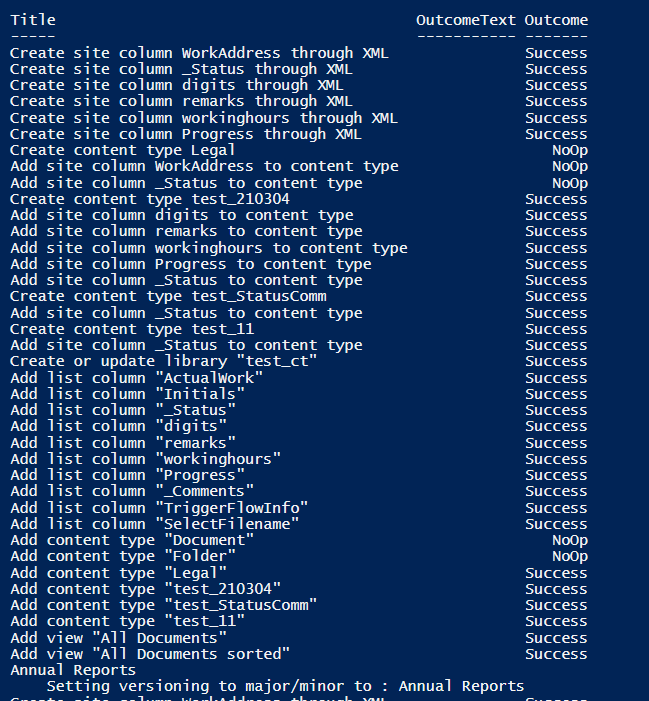
Results running the script
Source Credit
Inspired by Invoke-SPOListDesign to create instances of lists/libraires
Contributors
| Author(s) |
|---|
| Reshmee Auckloo |
Disclaimer
THESE SAMPLES ARE PROVIDED AS IS WITHOUT WARRANTY OF ANY KIND, EITHER EXPRESS OR IMPLIED, INCLUDING ANY IMPLIED WARRANTIES OF FITNESS FOR A PARTICULAR PURPOSE, MERCHANTABILITY, OR NON-INFRINGEMENT.
Tool documentation & references
- Want to learn more about PnP PowerShell and the cmdlets
Check out the PnP PowerShell site to get started and for the reference to the cmdlets.
