
Add Page template to Site
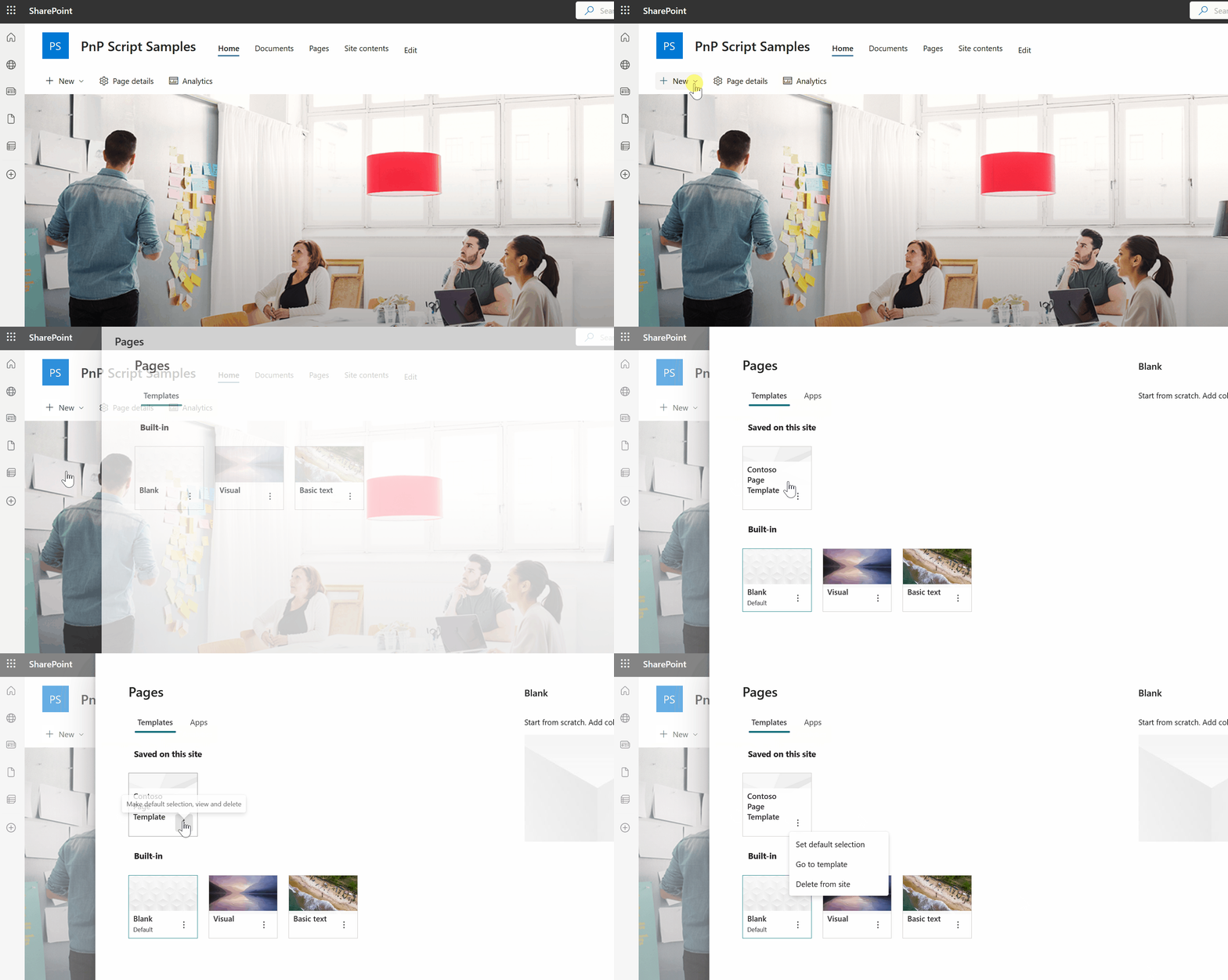
This sample script shows how to add a page template to a SharePoint Online site collection
 Ganesh Sanap
 Dennis Goedegebuure
Summary
This sample script shows how to add a page template to a SharePoint Online site collection using PnP PowerShell and CLI for Microsoft 365.
Implementation
- Open Visual Studio Code
- Create a new ps1 file
- Write a script as below
- Run the script like in the .Example of the Synopsis
<# .SYNOPSIS
    Provision a page templates.

.DESCRIPTION
    You need to have the latest version of PnP PowerShell

    Provision a single page template to a SharePoint Online site collection.

.PARAMETER SiteCollection
    Specifies the URL of the SharePoint Online Site Collection.

.PARAMETER PageName
    Specifies the name of the new page template.

.EXAMPLE
    PS> .\add_spopagetemplate.ps1 -SiteCollection "https://contoso.sharepoint.com" -PageName "Contoso Page Template"

#>

param ([Parameter(Mandatory)]$SiteCollection,[Parameter(Mandatory)]$PageName)

# Variables
$LogFileName = "add_spopagetemplates_" + $(get-date -f filedatetime) + ".txt"

#####################
Start-Transcript -Path .\logs\$LogFileName -NoClobber

Connect-PnPOnline -Url $SiteCollection -Interactive

Add-PnPPage -Name $PageName -HeaderLayoutType FullWidthImage -PromoteAs Template -Publish

Disconnect-PnPOnline

#####################
Stop-Transcript
# SharePoint online site URL
$siteUrl = "https://contoso.sharepoint.com/sites/SPConnect"

# Name of page template to add
$pageTemplateName = "pagetemplate.aspx"

# Get Credentials to connect
$m365Status = m365 status
if ($m365Status -match "Logged Out") {
   m365 login
}

# Add page template to SharePoint online site
m365 spo page add --name $pageTemplateName --webUrl $siteUrl --promoteAs Template
Contributors
| Author(s) |
|---|
| @Expiscornovus |
| Ganesh Sanap |
Disclaimer
THESE SAMPLES ARE PROVIDED AS IS WITHOUT WARRANTY OF ANY KIND, EITHER EXPRESS OR IMPLIED, INCLUDING ANY IMPLIED WARRANTIES OF FITNESS FOR A PARTICULAR PURPOSE, MERCHANTABILITY, OR NON-INFRINGEMENT.
Tool documentation & references
- Want to learn more about PnP PowerShell and the cmdlets
Check out the PnP PowerShell site to get started and for the reference to the cmdlets.
- Want to learn more about CLI for Microsoft 365 and the commands
Check out the CLI for Microsoft 365 site to get started and for the reference to the commands.
