
Using a PnP Site Template including files and list items
Sometime you are required to create a site including some specific files and/or list items. You can do this in servaral ways, but in this sample we are using the PnP Provisioning Engine
 Kasper Larsen
Summary
Sometimes you are required to create a site including some specific files and/or list items. You can do this in several ways, but in this sample, we are using the PnP Provisioning Engine
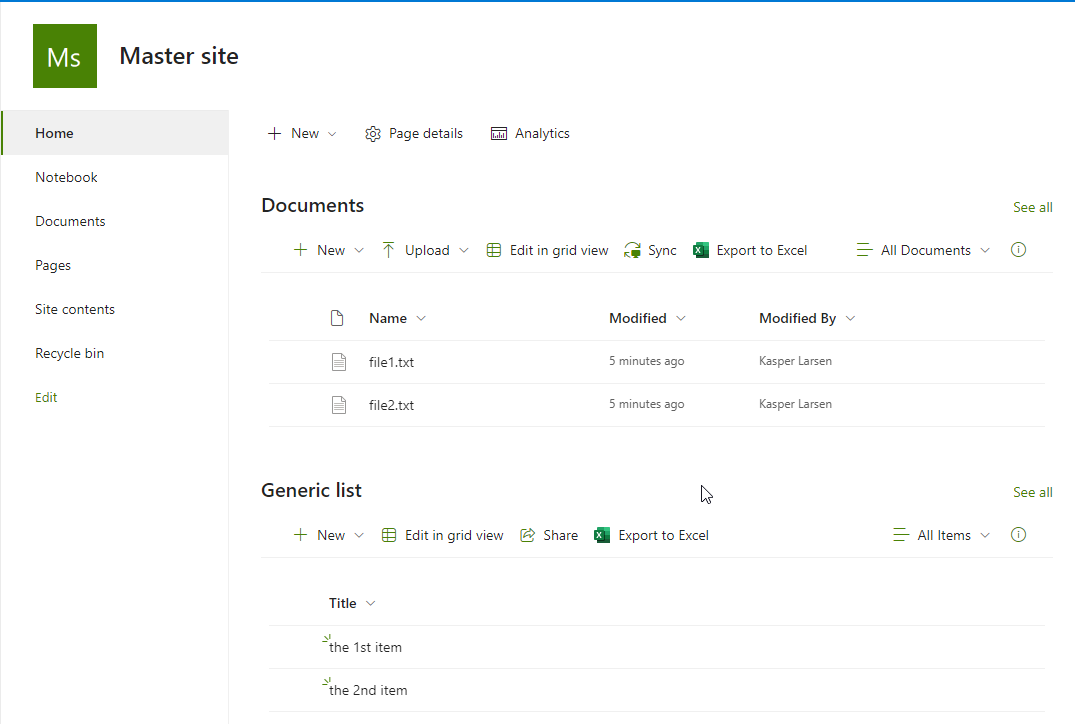
The files and list items are "embedded" in the .pnp file and thus portable.
# Extract PnP Provisioning template including documents and listitems  , using PS7.3 and PnP.Powershell 1.12*
# Kasper Larsen, Fellowmind DK


#Creating the Master site, which will serve as a template for any new site
$tenantName = "[Contoso]"  #Change this
$tenantBaseUrl = "https://"+$tenantName+".sharepoint.com"
$serverrelativeUrl = "/sites/testA"  #Change THIS
$masterSiteUrl = $tenantBaseUrl + $serverrelativeUrl
$owner =  "Admin@Consoso.onmicrosoft.com" #Change THIS

$SharePointAdminUrl =  "https://" +$tenantName+ "-admin.sharepoint.com/"
$adminConn = Connect-PnPOnline -Url $SharePointAdminUrl -Interactive -ReturnConnection
$res = New-PnPTenantSite -Title "Master site " -Url $masterSiteUrl -Owner $owner -TimeZone 3 -Connection $adminConn -Template "STS#3"
Start-Sleep -Seconds 60
$mastersiteConn = Connect-PnPOnline -Url $masterSiteUrl -Interactive -ReturnConnection
New-PnPList -Title "Generic list" -Template GenericList -Url "Generic" -Connection $mastersiteConn
Add-PnPListItem -List "Generic list" -Values @{"Title" = "the 1st item"} -Connection $mastersiteConn
Add-PnPListItem -List "Generic list" -Values @{"Title" = "the 2nd item"} -Connection $mastersiteConn

#copy a few preexisting file to the document library
Copy-PnPFile -SourceUrl "$serverrelativeUrl/SitePages/Home.aspx" -TargetUrl "$serverrelativeUrl/Shared Documents/file1.txt" -Overwrite -Force -Connection $mastersiteConn
Copy-PnPFile -SourceUrl "$serverrelativeUrl/SitePages/Home.aspx" -TargetUrl "$serverrelativeUrl/Shared Documents/file2.txt" -Overwrite -Force -Connection $mastersiteConn

#Now we are gone creating the master site, time to create the pnp template and add some files
$path = "C:\temp\PnPProvisioningIncludingFilesAndListItems.pnp"
$dummy = Get-PnPSiteTemplate -Out $path -Schema V202103 -Connection $mastersiteConn -force -ExcludeHandlers Navigation, SiteSecurity
Add-PnPFileToSiteTemplate -Path $path -SourceUrl "$tenantBaseUrl$serverrelativeUrl/Shared%20Documents/file1.txt" -Container "Shared Documents" -FileOverwrite  -Connection $mastersiteConn
Add-PnPFileToSiteTemplate -Path $path -SourceUrl "$tenantBaseUrl$serverrelativeUrl/Shared%20Documents/file2.txt"  -Container "Shared Documents" -FileOverwrite  -Connection $mastersiteConn

#and add the items from the generic list
$query = "<Query><Where><Gt><FieldRef Name='ID' /><Value Type=’Counter’>0</Value></Gt></Where></Query>"
Add-PnPDataRowsToSiteTemplate -Path $path -List "Generic list" -Query $query -Connection $mastersiteConn


# connect to the target site
$provisionTargetSite = "https://"+$tenantName+".sharepoint.com/sites/thenewsite"  #Change THIS
Connect-PnPOnline -Url $provisionTargetSite -Interactive
Invoke-PnPSiteTemplate -Path $path
write-host "Done :-)"
Contributors
| Author(s) |
|---|
| Kasper Larsen |
Disclaimer
THESE SAMPLES ARE PROVIDED AS IS WITHOUT WARRANTY OF ANY KIND, EITHER EXPRESS OR IMPLIED, INCLUDING ANY IMPLIED WARRANTIES OF FITNESS FOR A PARTICULAR PURPOSE, MERCHANTABILITY, OR NON-INFRINGEMENT.
Tool documentation & references
- Want to learn more about PnP PowerShell and the cmdlets
Check out the PnP PowerShell site to get started and for the reference to the cmdlets.
