
Create Colored Folder
This sample code creates a Colored Folder in a SharePoint document library.
 Ganesh Sanap
 Tetsuya Kawahara
Summary
Colored Folders can be created in OneDrive for Business and SharePoint document libraries.
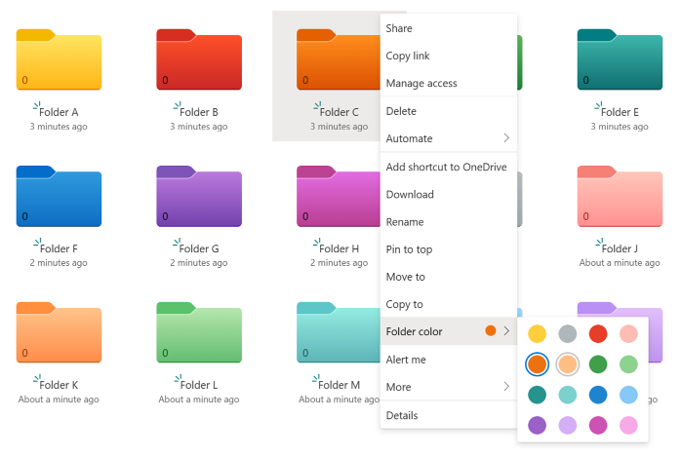
The folder's color setting information is stored in the _ColorHex column. This _ColorHex column is then set to the numeric value corresponding to each color. The following is a table of the numerical values corresponding to each color:
| Color | _ColorHex value |
|---|---|
| Yellow | Empty or 0 |
| Dark red | 1 |
| Dark orange | 2 |
| Dark green | 3 |
| Dark teal | 4 |
| Dark blue | 5 |
| Dark purple | 6 |
| Dark pink | 7 |
| Grey | 8 |
| Light red | 9 |
| Light orange | 10 |
| Light green | 11 |
| Light teal | 12 |
| Light blue | 13 |
| Light purple | 14 |
| Light pink | 15 |
This sample code creates a new folder in the SharePoint document library, sets the value of the _ColorHex column of the created folder, and changes the folder's color.
# Set Variables
$siteUrl = "https://contoso.sharepoint.com/sites/Marketing"
$documentLibrary = "Documents"
$folderName = "FolderA"
$folderColor = 3

try {
    # Connect to SharePoint site
    Connect-PnPOnline -Url $siteUrl -Interactive -ErrorAction Stop

    # Create the folder
    $newFolder = Add-PnPFolder -Name $folderName -Folder $documentLibrary -ErrorAction Stop

    # Get the created folder item
    $newFolderItem = Get-PnPListItem -List $documentLibrary -UniqueId $newFolder.UniqueId -ErrorAction Stop

    # Change the value of the _ColorHex column of the created folder to change the color
    Set-PnPListItem -List $documentLibrary -Identity $newFolderItem.Id -Values @{"_ColorHex" = $folderColor } -ErrorAction Stop

    Write-Host "Folder created and color changed successfully." -ForegroundColor Green
    Write-Host "Folder URL: $siteUrl/$documentLibrary/$folderName" -ForegroundColor Green
}
catch {
    Write-Host "An error occurred: $_" -ForegroundColor Red
}
finally {
    # Disconnect from SharePoint site
    Disconnect-PnPOnline
}
# Set Variables
$siteUrl = "https://contoso.sharepoint.com/sites/Marketing"
$relativeUrlOfParentFolder = "/Shared Documents"
$documentLibraryDisplayName = "Documents"
$folderName = "FolderA"
$folderColor = 3

try {
    # Get Credentials to connect to SharePoint Online site
    $m365Status = m365 status
    if ($m365Status -match "Logged Out") {
        m365 login
    }

    # Create the folder
    $newFolder = m365 spo folder add --webUrl $siteUrl --parentFolderUrl $relativeUrlOfParentFolder --name $folderName | ConvertFrom-Json

    # Get the created folder item
    $newFolderItem = m365 spo listitem get --webUrl $siteUrl --listTitle $documentLibraryDisplayName --uniqueId $newFolder.UniqueId | ConvertFrom-Json

    # Change the value of the _ColorHex column of the created folder to change the color
    m365 spo listitem set --webUrl $siteUrl --listTitle $documentLibraryDisplayName --id $newFolderItem.Id --_ColorHex $folderColor

    Write-Host "Folder created and color changed successfully." -ForegroundColor Green
    Write-Host "Folder URL: $siteUrl/$relativeUrlOfParentFolder/$folderName" -ForegroundColor Green
}
catch {
    Write-Host "An error occurred: $_" -ForegroundColor Red
}
finally {
    # Disconnect from SharePoint site
    m365 logout
}
Contributors
| Author(s) |
|---|
| Tetsuya Kawahara |
| Ganesh Sanap |
Disclaimer
THESE SAMPLES ARE PROVIDED AS IS WITHOUT WARRANTY OF ANY KIND, EITHER EXPRESS OR IMPLIED, INCLUDING ANY IMPLIED WARRANTIES OF FITNESS FOR A PARTICULAR PURPOSE, MERCHANTABILITY, OR NON-INFRINGEMENT.
Tool documentation & references
- Want to learn more about PnP PowerShell and the cmdlets
Check out the PnP PowerShell site to get started and for the reference to the cmdlets.
- Want to learn more about CLI for Microsoft 365 and the commands
Check out the CLI for Microsoft 365 site to get started and for the reference to the commands.
