
Export of the Hierarchy of Hub Sites
This script exports the SharePoint site hierarchy into a Markdown file to visualize the hub sites and its associated sites.
 Ganesh Sanap
 Tetsuya Kawahara
Summary
SharePoint allows to associate a hub site with another hub site. This script exports the SharePoint site hierarchy into a Markdown file to visualize the hub sites and its associated sites. It helps to understand the structure of SharePoint.
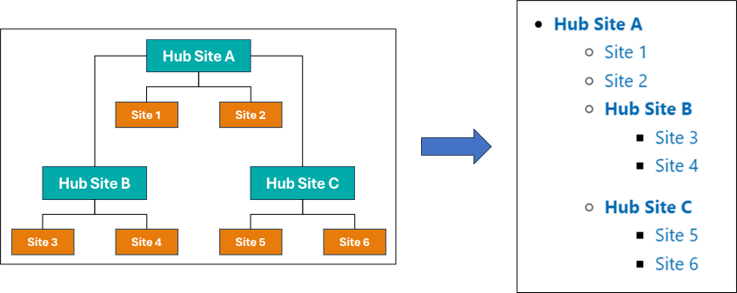
The following is a sample of the output markdown:
# SharePoint Sites in tenant [contoso]

## Hub Sites and Sites Associated with Hub Sites

Here are the hub sites and the sites associated with the hub sites. Hub sites are shown in bold.

- **[Hub Site A](https://contoso.sharepoint.com/sites/HubSiteA)**
  - [Site 1](https://contoso.sharepoint.com/sites/Site1)
  - [Site 2](https://contoso.sharepoint.com/sites/Site2)
  - **[Hub Site B](https://contoso.sharepoint.com/sites/HubSiteB)**
    - [Site 3](https://contoso.sharepoint.com/sites/Site3)
    - [Site 4](https://contoso.sharepoint.com/sites/Site4)
  - **[Hub Site C](https://contoso.sharepoint.com/sites/HubSiteC)**
    - [Site 5](https://contoso.sharepoint.com/sites/Site5)
    - [Site 6](https://contoso.sharepoint.com/sites/Site6)

- **[Hub Site D](https://contoso.sharepoint.com/sites/HubSiteA)**
  - [Site 7](https://contoso.sharepoint.com/sites/Site7)
  - [Site 8](https://contoso.sharepoint.com/sites/Site8)

## Sites that are not Hub Sites and are not Associated with any Hub Site

Here are the sites that are not hub sites and are not associated with any hub site.

- [Site 9](https://contoso.sharepoint.com/sites/Site9)
- [Site 10](https://contoso.sharepoint.com/sites/Site10)
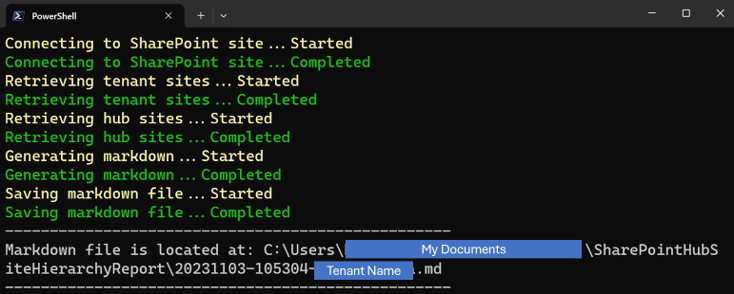
The markdown file is created in the "SharePointHubSiteHierarchyReport" folder in MyDocuments.
# Target tenant name
$tenantName = '<Tenant Name>' # e.g. contoso

# Constants
$noHubSiteId = '00000000-0000-0000-0000-000000000000'
$adminUrl = "https://$tenantName-admin.sharepoint.com/"
$exportFolderName = 'SharePointHubSiteHierarchyReport'
$exportFolderPath = Join-Path ([Environment]::GetFolderPath('MyDocuments')) $exportFolderName
$timeStamp = (Get-Date).ToString('yyyyMMdd-HHmmss')
$markdownFilePath = Join-Path $exportFolderPath "$timeStamp-$tenantName.md"

# Function: Generate Markdown
function GenerateMarkdownForHubSite {
    param (
        $hubSite,
        $level,
        $hubSites,
        $tenantSites
    )

    $indent = "  " * ($level - 1)
    $hubSiteInfo = $tenantSites | Where-Object { $_.Url -eq $hubSite.SiteUrl }
    $hubTitle = $hubSiteInfo.Title ? $hubSiteInfo.Title : $hubSiteInfo.Url
    $markdown = "$indent- **[$hubTitle]($($hubSiteInfo.Url))**`r`n"

    $childSites = $tenantSites | Where-Object { $_.HubSiteId -eq $hubSite.SiteId -and $_.Url -ne $hubSite.SiteUrl }
    foreach ($childSite in $childSites) {
        $title = $childSite.Title ? $childSite.Title : $childSite.Url
        $markdown += "$indent  - [$title]($($childSite.Url))`r`n"
    }

    $childHubSites = $hubSites | Where-Object { $_.ParentHubSiteId -eq $hubSite.SiteId }
    foreach ($childHubSite in $childHubSites) {
        $markdown += (GenerateMarkdownForHubSite $childHubSite ($level + 1) $hubSites $tenantSites)
    }

    return $markdown
}

try {
    # Create the Data Export Folder
    if (-not (Test-Path $exportFolderPath -PathType Container)) {
        Write-Host "Creating Data Export Folder...Started" -ForegroundColor Yellow
        New-Item -Path $exportFolderPath -ItemType Directory -Force -ErrorAction Stop
        Write-Host "Creating Data Export Folder...Completed" -ForegroundColor Green
    }

    # Connect to SharePoint site
    Write-Host "Connecting to SharePoint site...Started" -ForegroundColor Yellow
    Connect-PnPOnline -Url $adminUrl -Interactive -ErrorAction Stop
    Write-Host "Connecting to SharePoint site...Completed" -ForegroundColor Green

    # Get tenant sites
    Write-Host "Retrieving tenant sites...Started" -ForegroundColor Yellow
    $tenantSites = Get-PnPTenantSite -ErrorAction Stop
    Write-Host "Retrieving tenant sites...Completed" -ForegroundColor Green

    # Get hub sites
    Write-Host "Retrieving hub sites...Started" -ForegroundColor Yellow
    $hubSites = Get-PnPHubSite -ErrorAction Stop
    Write-Host "Retrieving hub sites...Completed" -ForegroundColor Green

    # Generate Markdown
    Write-Host "Generating markdown...Started" -ForegroundColor Yellow
    $markdownText = @()
    $markdownText += "# SharePoint Sites in tenant [$($tenantName)]`r`n"

    # Hub Sites and Sites Associated with Hub Sites
    $markdownText += "## Hub Sites and Sites Associated with Hub Sites`r`n"
    $markdownText += "Here are the hub sites and the sites associated with the hub sites. Hub sites are shown in bold.`r`n"
    $parentHubSites = $hubSites | Where-Object { $_.ParentHubSiteId -eq $noHubSiteId }
    foreach ($parentHubSite in $parentHubSites) {
        $markdownText += (GenerateMarkdownForHubSite $parentHubSite 1 $hubSites $tenantSites)
    }

    # Hub Sites and Sites Associated with Hub Sites
    $markdownText += "## Sites that are not Hub Sites and are not Associated with any Hub Site`r`n"
    $markdownText += "Here are the sites that are not hub sites and are not associated with any hub site.`r`n"
    $standaloneSites = $tenantSites | Where-Object { $_.HubSiteId -eq $noHubSiteId }
    foreach ($standaloneSite in $standaloneSites) {
        $title = if ($standaloneSite.Title) { $standaloneSite.Title } else { $standaloneSite.Url }
        $markdownText += "- [$title]($($standaloneSite.Url))"
    }
    Write-Host "Generating markdown...Completed" -ForegroundColor Green

    # Save the Markdown file
    Write-Host "Saving markdown file...Started" -ForegroundColor Yellow
    $markdownText -join "`r`n" | Out-File -FilePath $markdownFilePath -Encoding UTF8 -ErrorAction Stop
    Write-Host "Saving markdown file...Completed" -ForegroundColor Green

    # Display successful file save message
    Write-Host "-".PadRight(50, "-")
    Write-Host "Markdown file is located at: $markdownFilePath"
    Write-Host "-".PadRight(50, "-")
}
catch {
    Write-Error "Error message: $($_.Exception.Message)"
}
finally {
    Disconnect-PnPOnline
}# Target tenant name
$tenantName = '<Tenant Name>' # e.g. contoso
# Constants
$noHubSiteId = '00000000-0000-0000-0000-000000000000'
$exportFolderName = 'SharePointHubSiteHierarchyReport'
$exportFolderPath = Join-Path ([Environment]::GetFolderPath('MyDocuments')) $exportFolderName
$timeStamp = (Get-Date).ToString('yyyyMMdd-HHmmss')
$markdownFilePath = Join-Path $exportFolderPath "$timeStamp-$tenantName.md"
# Function: Generate Markdown
function GenerateMarkdownForHubSite {
param (
$hubSite,
$level,
$hubSites,
$tenantSites
)
$indent = " " * ($level - 1)
$hubSiteInfo = $tenantSites | Where-Object { $_.Url -eq $hubSite.SiteUrl }
$hubTitle = $hubSiteInfo.Title ? $hubSiteInfo.Title : $hubSiteInfo.Url
$markdown = "$indent- **[$hubTitle]($($hubSiteInfo.Url))**`r`n"
$childSites = $hubSite.AssociatedSites
foreach ($childSite in $childSites) {
$title = $childSite.Title ? $childSite.Title : $childSite.Url
$markdown += "$indent - [$title]($($childSite.SiteUrl))`r`n"
}
$childHubSites = $hubSites | Where-Object { $_.ParentHubSiteId -eq $hubSite.SiteId }
foreach ($childHubSite in $childHubSites) {
$markdown += (GenerateMarkdownForHubSite $childHubSite ($level + 1) $hubSites $tenantSites)
}
return $markdown
}
try {
# Create the Data Export Folder
if (-not (Test-Path $exportFolderPath -PathType Container)) {
Write-Host "Creating Data Export Folder...Started" -ForegroundColor Yellow
New-Item -Path $exportFolderPath -ItemType Directory -Force -ErrorAction Stop
Write-Host "Creating Data Export Folder...Completed" -ForegroundColor Green
}
# Connect to SharePoint tenant
Write-Host "Connecting to SharePoint tenant...Started" -ForegroundColor Yellow
$m365Status = m365 status
if ($m365Status -match "Logged Out") {
m365 login
}
Write-Host "Connecting to SharePoint tenant...Completed" -ForegroundColor Green
# Get tenant sites
Write-Host "Retrieving tenant sites...Started" -ForegroundColor Yellow
$tenantSites = m365 spo site list | ConvertFrom-Json -ErrorAction Stop
Write-Host "Retrieving tenant sites...Completed" -ForegroundColor Green
# Get hub sites
Write-Host "Retrieving hub sites...Started" -ForegroundColor Yellow
$hubSites = m365 spo hubsite list --includeAssociatedSites | ConvertFrom-Json -ErrorAction Stop
Write-Host "Retrieving hub sites...Completed" -ForegroundColor Green
# Generate Markdown
Write-Host "Generating markdown...Started" -ForegroundColor Yellow
$markdownText = @()
$markdownText += "# SharePoint Sites in tenant [$($tenantName)]`r`n"
# Hub Sites and Sites Associated with Hub Sites
$markdownText += "## Hub Sites and Sites Associated with Hub Sites`r`n"
$markdownText += "Here are the hub sites and the sites associated with the hub sites. Hub sites are shown in bold.`r`n"
$parentHubSites = $hubSites | Where-Object { $_.ParentHubSiteId -eq $noHubSiteId }
foreach ($parentHubSite in $parentHubSites) {
$markdownText += (GenerateMarkdownForHubSite $parentHubSite 1 $hubSites $tenantSites)
}
# Hub Sites and Sites Associated with Hub Sites
$markdownText += "## Sites that are not Hub Sites and are not Associated with any Hub Site`r`n"
$markdownText += "Here are the sites that are not hub sites and are not associated with any hub site.`r`n"
$standaloneSites = $tenantSites | Where-Object { $_.HubSiteId -eq "/Guid(00000000-0000-0000-0000-000000000000)/" }
foreach ($standaloneSite in $standaloneSites) {
$title = if ($standaloneSite.Title) { $standaloneSite.Title } else { $standaloneSite.Url }
$markdownText += "- [$title]($($standaloneSite.Url))"
}
Write-Host "Generating markdown...Completed" -ForegroundColor Green
# Save the Markdown file
Write-Host "Saving markdown file...Started" -ForegroundColor Yellow
$markdownText -join "`r`n" | Out-File -FilePath $markdownFilePath -Encoding UTF8 -ErrorAction Stop
Write-Host "Saving markdown file...Completed" -ForegroundColor Green
# Display successful file save message
Write-Host "-".PadRight(50, "-")
Write-Host "Markdown file is located at: $markdownFilePath"
Write-Host "-".PadRight(50, "-")
}
catch {
Write-Error "Error message: $($_.Exception.Message)"
}
finally {
# Disconnect SharePoint online connection
m365 logout
}Contributors
| Author(s) |
|---|
| Tetsuya Kawahara |
| Ganesh Sanap |
Disclaimer
THESE SAMPLES ARE PROVIDED AS IS WITHOUT WARRANTY OF ANY KIND, EITHER EXPRESS OR IMPLIED, INCLUDING ANY IMPLIED WARRANTIES OF FITNESS FOR A PARTICULAR PURPOSE, MERCHANTABILITY, OR NON-INFRINGEMENT.
Tool documentation & references
- Want to learn more about PnP PowerShell and the cmdlets
Check out the PnP PowerShell site to get started and for the reference to the cmdlets.
- Want to learn more about CLI for Microsoft 365 and the commands
Check out the CLI for Microsoft 365 site to get started and for the reference to the commands.
