
Hide people who have lists open
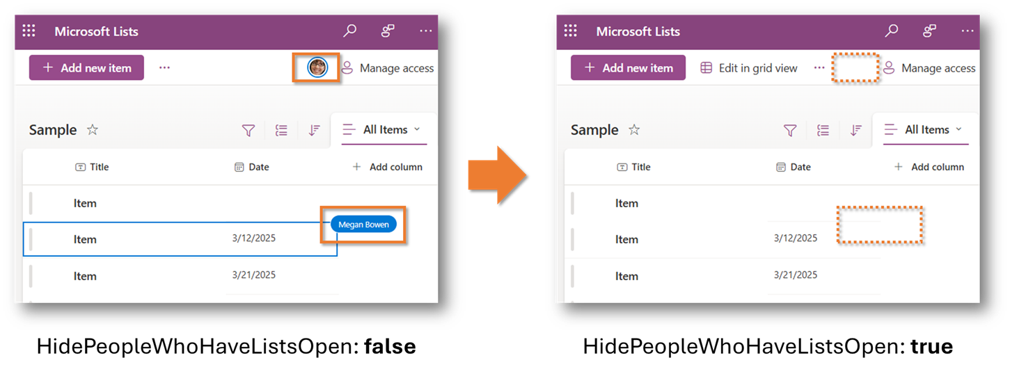
This sample script demonstrates how to hide real-time viewing information in Microsoft Lists.
 Tetsuya Kawahara
Summary
In Microsoft Lists, you can see in real time who is viewing the currently open list or list items. However, for privacy and other reasons, you may want to hide this information.
This sample script demonstrates how to hide real-time viewing information for a specific site.
$adminCenterUrl = "https://{tenantName}-admin.sharepoint.com/"
$targetSiteUrl = "https://{tenantName}.sharepoint.com/sites/{siteName}"

# Connect to SharePoint Admin Center
Connect-SPOService -Url $adminCenterUrl

# Hide people who have lists open on the target site
Set-SPOSite -Identity $targetSiteUrl -HidePeopleWhoHaveListsOpen $true

# Disconnect from the SharePoint Admin Center
Disconnect-SPOServiceAdditional Notes
- This setting change is applied at the site level, not at the list level. Please keep that in mind.
- As of March 12, 2025, I am not aware of a way to change this setting at the list level.
References
Contributors
| Author(s) |
|---|
| Tetsuya Kawahara |
Disclaimer
THESE SAMPLES ARE PROVIDED AS IS WITHOUT WARRANTY OF ANY KIND, EITHER EXPRESS OR IMPLIED, INCLUDING ANY IMPLIED WARRANTIES OF FITNESS FOR A PARTICULAR PURPOSE, MERCHANTABILITY, OR NON-INFRINGEMENT.
Tool documentation & references
- Introduction to the SharePoint Online Management Shell
Check out the SPO Management Shell documentation site to get started and for the reference to the cmdlets.
