
Export / Import list formatting
SharePoint Online provides user interface for defining column and view formatting and forms
 Kinga Kazala
Summary
SharePoint Online provides user interface for defining column and view formatting and forms configuration:
- Use view formatting to customize SharePoint,
- Show or hide columns in a list or library form and
- Configure the list form.
However, the Get-PnPSiteTemplate -Handlers Lists command does not include these customizations. These scripts bridge this gap.
The Get-ListFormatting script exports:
- form customizers
- list views
- list views formatting
- columns formatting
to a set of json, csv and xml files. The Set-SPOListFormatting applies the exported customizations to an existing list.
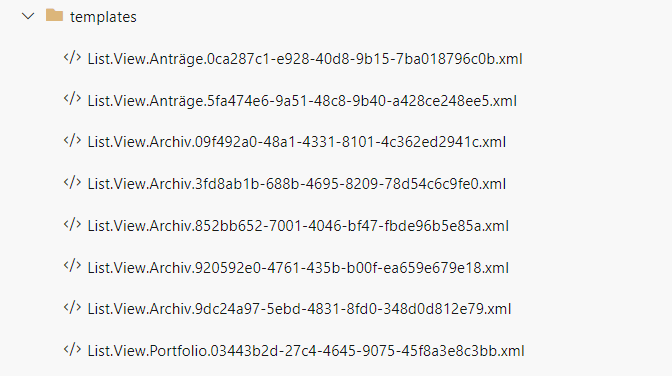
Use it with Get-PnPSiteTemplate and Invoke-PnPSiteTemplate for a full export / import capabilities.
function Get-ListFormatting {
    [CmdletBinding()]
    param (
        [Parameter()]
        [string]
        $listName,
        [string]
        $folderPath
    )

    $clientContext = Get-PnPContext
    $list = Get-PnPList $listName -Includes SchemaXml

    # Currently only Item content type is supported. The script may be easily adapted to enumerate through all the available content types
    $contentType = Get-PnPContentType -List $listName | Where-Object { $_.Name -eq "Item"}
    $clientContext.Load($list.Views)
    $clientContext.Load($contentType)
    $clientContext.Load($contentType.FieldLinks)
    $clientContext.ExecuteQuery()

    # 1. Get form customizer
    $contentType.ClientFormCustomFormatter | Out-File "$folderPath\ListFormatting.Form.$listName.json"
    # 2.Get fieldLinks settings
    $contentType.FieldLinks | Select-Object Name, Hidden, Id |  Export-Csv  "$folderPath\ListFormatting.ColumnOrder.$listName.csv" -NoTypeInformation

    # 3. Get list views
    $listUrl=$list.RootFolder.ServerRelativeUrl+"/"
    $list.Views | Where-Object { $_.PersonalView -eq $false } | Select-Object Title, Id, @{name = "Url"; expression = { $_.ServerRelativeUrl.Replace($listUrl,"").Replace(".aspx","") } } | Export-Csv  "$folderPath\List.Views.$listName.csv" -NoTypeInformation
    $list.Views | ForEach-Object {
        $v = Get-PnPView -List $list -Identity $_.Id -Includes HtmlSchemaXml
        $v.HtmlSchemaXml |  Out-File "$folderPath\List.View.$listName.$($_.Id).xml"
    }

    #get list views formatting
    $views = $list.Views | Where-Object { $null -ne $_.CustomFormatter }
    if($null -ne $views){
        $views | Select-Object Title, Id | Export-Csv  "$folderPath\ListFormatting.Views.$listName.csv" -NoTypeInformation
        $views | ForEach-Object {
            $_.CustomFormatter | Out-File "$folderPath\ListFormatting.View.$listName.$($_.Id).json"
        }
    }

    #get columns formatting
    $columns= Get-PnPField -List $listName | Where-Object {$null -ne $_.CustomFormatter }
    if($null -ne $columns){
        $columns | Select-Object InternalName | Export-Csv   "$folderPath\ListFormatting.Columns.$listName.csv" -NoTypeInformation
        $columns | ForEach-Object {
            $_.CustomFormatter | Out-File "$folderPath\ListFormatting.Column.$listName.$($_.InternalName).json"
        }
    }
}

function Set-ListFormatting {
    [CmdletBinding()]
    param (
        [Parameter()]
        [string]
        $listName,
        [string]
        $folderPath
    )
    if (Test-Path -Path $folderPath){

        Write-Host "LIST $listName "
        $clientContext = Get-PnPContext
        $list = Get-PnPList $listName

        #Get Content Type
        $contentType = Get-PnPContentType -List $listName | Where-Object { $_.Name -eq "Item" -or $_.Name -eq "Element" }
        $clientContext.Load($contentType)
        $clientContext.Load($contentType.FieldLinks)
        $clientContext.ExecuteQuery()

        # 1. Set form customizers
        if ($t=Test-Path -Path "$folderPath\ListFormatting.Form.$listName.json" -PathType leaf){
            Write-Host "Setting form customizers from $folderPath\ListFormatting.Form.$listName.json"
            $contentType.ClientFormCustomFormatter = (Get-Content -Raw -Path "$folderPath\ListFormatting.Form.$listName.json").ToString()
            Write-Host "...done"
        }
        # 2.a Set fieldLinks order
        if ($t=Test-Path -Path "$folderPath\ListFormatting.ColumnOrder.$listName.csv" -PathType leaf) {
            Write-Host "Setting fields order from $folderPath\ListFormatting.ColumnOrder.$listName.csv"

            $ColumnOrder = (Import-Csv "$folderPath\ListFormatting.ColumnOrder.$listName.csv").Name
            $contentType.FieldLinks.Reorder($ColumnOrder)
            Write-Host "...done"
        }
        # 2.b Set fieldLinks.Hidden
        if ($t = Test-Path -Path "$folderPath\ListFormatting.ColumnOrder.$listName.csv" -PathType leaf) {
            Write-Host "Setting hidden fields from $folderPath\ListFormatting.ColumnOrder.$listName.csv"

            Import-Csv "$folderPath\ListFormatting.ColumnOrder.$listName.csv" | ForEach-Object{
                $contentType.FieldLinks.GetById($_.Id).Hidden = [System.Convert]::ToBoolean($_.Hidden)
            }
            Write-Host "...done"
        }
        $contentType.Update(0)
        $clientContext.ExecuteQuery()

        # 3. Set list views
        if ($t = Test-Path -Path  "$folderPath\List.Views.$listName.csv" -PathType leaf) {
            Write-Host "Setting views"

            #Get All List Views
            $clientContext.Load($list.Views)
            $clientContext.ExecuteQuery()
            $listUrl=$list.RootFolder.ServerRelativeUrl+"/"
            $views = $list.Views | Select-Object Title, @{name = "Url"; expression = { $_.ServerRelativeUrl.Replace($listUrl, "").Replace(".aspx", "")}}

            Import-Csv "$folderPath\List.Views.$listName.csv" | ForEach-Object {

                $xml = [xml]( Get-Content "$folderPath\List.View.$listName.$($_.Id).xml" -Raw)
                $isDefault = [boolean]$xml.View.DefaultView
                $fields =  $xml.View.ViewFields.FieldRef.Name
                $query = $xml.View.Query.InnerXml
                $aggregations = $xml.View.Aggregations.InnerXml
                $viewType2 = $xml.View.ViewType2

                $url = $_.Url
                $viewTitle = ($views | Where-Object { $_.Url -eq $url } ).Title

                if($null -ne $viewTitle){
                    Write-Host "Updating view $viewTitle to $($_.Title)"
                    $v = Set-PnPView -List $listName -Identity $viewTitle -Fields $fields -Values @{Title = $_.Title; ViewQuery = $query; ViewType2 = $viewType2 } -Aggregations $aggregations
                }
                else{
                    Write-Host "Creating view $($_.Title)"
                    #cannot set view url when creating the list. the following workaroud required
                    $v = Add-PnPView -List $listName -Title $_.Url  -SetAsDefault:$isDefault -Fields $fields -Query $query -Aggregations $aggregations
                    $v = Set-PnPView -List $listName -Identity $_.Url -Values @{Title = $_.Title ; ViewType2 = $viewType2}
                }
            }
        }

        #Set list views formatting
        if ($t=Test-Path -Path "$folderPath\ListFormatting.Views.$listName.csv" -PathType leaf){
            Write-Host "Setting  list views formatting"

            #Get All List Views
            $clientContext.Load($list.Views)
            $clientContext.ExecuteQuery()
            $views = $list.Views.Title

            #Get exported Views Info (Title & Id)
            Import-Csv "$folderPath\ListFormatting.Views.$listName.csv" | ForEach-Object{
                #If target list contains the view and the file exists
                if ($views.Contains($_.Title) ) {
                    # Update the List View Formatting Definition
                    $listViewFormattingJSON = Get-Content -Raw -Path "$folderPath\ListFormatting.View.$listName.$($_.Id).json";
                    $listViewColumnDefinition = Get-PnPView -List $listName -Identity $_.Title
                    $listViewColumnDefinition | Set-PnPView -Values  @{CustomFormatter = $listViewFormattingJSON.ToString() }
                }
            }
        }
        #Set columns formatting
        if ($t=Test-Path -Path "$folderPath\ListFormatting.Columns.$listName.csv" -PathType leaf) {
            Write-Host "Setting columns formatting"

            #Get All List Columns
            $clientContext.Load($list.Fields)
            $clientContext.ExecuteQuery()
            $columns = $list.Fields.InternalName

            Import-Csv "$folderPath\ListFormatting.Columns.$listName.csv"  | ForEach-Object { #$columns.Contains($_.InternalName)
                if ($columns.Contains($_.InternalName)){
                    Write-Host "Setting formatter for $($_.InternalName)"
                    $ColumnFormattingJSON = Get-Content -Raw -Path "$folderPath\ListFormatting.Column.$listName.$($_.InternalName).json";
                    $listColumnDefinition = Get-PnPField -List $listName -Identity $_.InternalName
                    $listColumnDefinition | Set-PnPField -Values @{CustomFormatter = $ColumnFormattingJSON.ToString() }
                }
            }
        }

    }
}


### Example usage
$list1= "MyList1"
$folderPath= "C:\SPO\Templates"

Connect-PnPOnline -Credentials $PSCredentials -Url $siteUrl

##Export
Get-PnPSiteTemplate  -Out "$folderPath/ListTemplates.xml" -ListsToExtract $list1 -Handlers Lists
Get-ListFormatting -folderPath $folderPath -listName $list1

##Import
Invoke-PnPSiteTemplate -Path "$folderPath/ListTemplates.xml"
Set-ListFormatting -folderPath $folderPath -listName $list1
Contributors
| Author(s) |
|---|
| Kinga Kazala |
Disclaimer
THESE SAMPLES ARE PROVIDED AS IS WITHOUT WARRANTY OF ANY KIND, EITHER EXPRESS OR IMPLIED, INCLUDING ANY IMPLIED WARRANTIES OF FITNESS FOR A PARTICULAR PURPOSE, MERCHANTABILITY, OR NON-INFRINGEMENT.
Tool documentation & references
- Want to learn more about PnP PowerShell and the cmdlets
Check out the PnP PowerShell site to get started and for the reference to the cmdlets.
