
SharePoint Modern Page Publishing Report
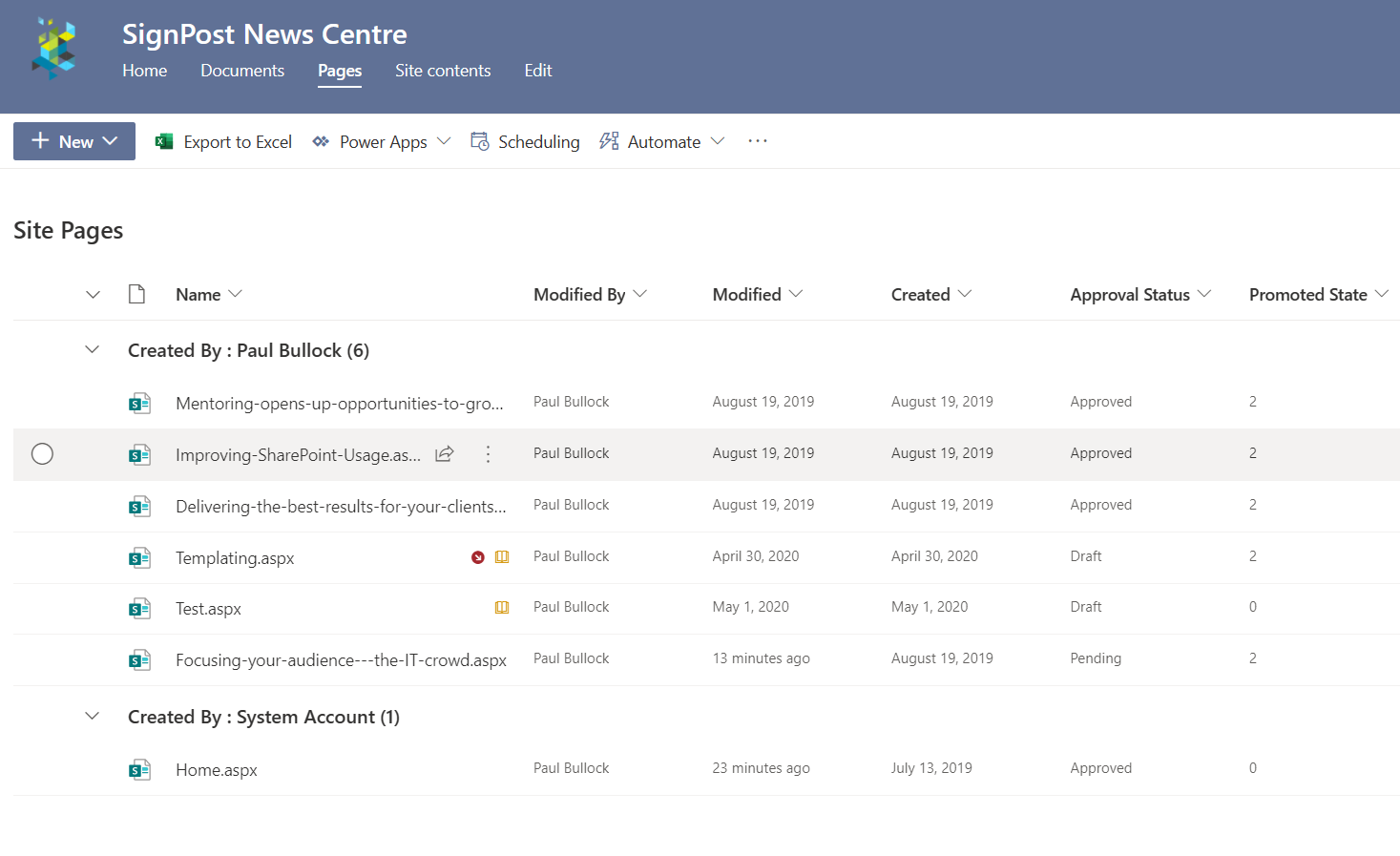
Scan through modern pages within a site and reports out the publishing status of the pages
 Nanddeep Nachan
 Paul Bullock
Summary
This script will go through all the pages in a modern site and report publishing status of the pages. This is useful for scenarios where you are either about to launch an Intranet or want regular reports on page drafts.
The output includes:
- Site Title
- Site Url
- Page FileName
- Scheduled Date - if Page Scheduling is enabled
- Is News - using the promoted state to determine if it a news page
- Approval Status - if you have enabled Content Approval on the page library
- Version - if versions are not whole numbers, they are drafts (for those without content approval enabled)
# Example: .\Get-PagesReportDraft.ps1 -PartTenant "Contoso" -SourceSitePartUrl "SignPost-News"
[CmdletBinding()]
param (
    [Parameter(Mandatory = $true, HelpMessage = "Source e.g. Intranet-Archive")]
    [string]$SourceSitePartUrl,
    [Parameter(Mandatory = $false, HelpMessage = "Organisation Url Fragment e.g. contoso ")]
    [string]$PartTenant,
    [string]$ReportName = "Page-Status-Report.csv"
)
begin{

    $baseUrl = "https://$($PartTenant).sharepoint.com"
    $sourceSiteUrl = "$($baseUrl)/sites/$($SourceSitePartUrl)"

    Write-Host "Connecting to " $sourceSiteUrl

    # For MFA Tenants - Interactive opens a browser window
    $sourceConnection = Connect-PnPOnline -Url $sourceSiteUrl  -ReturnConnection -Interactive
    $filter = '<View>' +
                '<Query>' +
                    '<Where>' +
                        '<And>' +
                            '<Eq>'+
                                '<FieldRef Name="FSObjType" />'+
                                '<Value Type="Integer">0</Value>'+
                            '</Eq>'+
                            '<Neq>'+
                                '<FieldRef Name="_SPSitePageFlags" />'+
                                '<Value Type="Text">{Template}}</Value>'+
                            '</Neq>'+
                        '</And>' +
                    '</Where>' +
                '</Query>' +
            '</View>'

    $loc = Get-Location
    $reportPath = "$($loc)\$($ReportName)"

    '"Site Title","Site Url","Page FileName","Scheduled Date","IsNews","Approval Status","Version"' | Out-File $reportPath
}
process{

    Write-Host "Reading pages in site..."

    $web = Get-PnPWeb -Includes Title,Url
    $webTitle = $web.Title
    $webUrl = $web.Url

    $pages = Get-PnPListItem -List "SitePages" -Connection $sourceConnection -Query $filter

    Foreach($page in $pages){

        $file = $page.FieldValues["FileLeafRef"]
        $scheduled = $page.FieldValues["_PublishStartDate"]
        $promotedState = $page.FieldValues["PromotedState"]
        $ModerationStatus = $page.FieldValues["_ModerationStatus"]
        $version = $page.FieldValues["_UIVersionString"]
        $ModerationStatusDesc = ""
        $promotedLevel = ""

        Write-Host " Processing Page $($file)" -ForegroundColor Cyan

        switch ($promotedState) {
            0 { $promotedLevel = "Page" }
            1 { $promotedLevel = "News" }
            2 { $promotedLevel = "News" }
            Default {}
        }

        switch ($ModerationStatus) {
            0 { $ModerationStatusDesc = "Approved" }
            1 { $ModerationStatusDesc = "Denied Approval" }
            2 { $ModerationStatusDesc = "Pending Approval" }
            3 { $ModerationStatusDesc = "Draft" }
            4 { $ModerationStatusDesc = "Scheduled Approval" }
        }

        $line = '"' + $webTitle + '","' + `
            $webUrl + '","' + `
            $file + '","' + `
            $scheduled  + '","' + `
            $promotedLevel + '","' + `
            $ModerationStatusDesc + '","' + `
            $version + '"'

        $line | Out-File $reportPath -Append

    }
}
[CmdletBinding()]
param (
    [Parameter(Mandatory = $true, HelpMessage = "Please enter Site URL, e.g. https://contoso.sharepoint.com/sites/Intranet")]
    [string]$SiteUrl
)
begin {
    #Log in to Microsoft 365
    Write-Host "Connecting to Tenant" -f Yellow

    $m365Status = m365 status
    if ($m365Status -match "Logged Out") {
        m365 login
    }

    Write-Host "Connection Successful!" -f Green
}
process {
    # Get information about the specific site collection
    $web = m365 spo web get -u $SiteUrl | ConvertFrom-Json

    # Get all modern pages in the given site
    # Avoid error: Cannot convert the JSON string because a dictionary that was converted from the string contains the duplicated keys 'Id' and 'ID'
    $modernPages = m365 spo page list --webUrl $SiteUrl | ForEach-Object { $_.replace("Id", "_Id") } | ConvertFrom-Json

    $resultColl = @()

    ForEach ($modernPage in $modernPages) {
        $moderationStatusString = ""
        $promotedLevel = ""

        Write-Host " Processing page $($modernPage.ServerRelativeUrl)" -ForegroundColor Cyan

        switch ($modernPage.ListItemAllFields.PromotedState) {
            0 { $promotedLevel = "Page" }
            1 { $promotedLevel = "News" }
            2 { $promotedLevel = "News" }
            Default {}
        }

        switch ($modernPage.ListItemAllFields.OData__ModerationStatus) {
            0 { $moderationStatusString = "Approved" }
            1 { $moderationStatusString = "Denied Approval" }
            2 { $moderationStatusString = "Pending Approval" }
            3 { $moderationStatusString = "Draft" }
            4 { $moderationStatusString = "Scheduled Approval" }
            Default {}
        }

        $result = New-Object PSObject -Property ([ordered]@{
                "Site Title"        = $web.Title
                "Site URL"          = $web.Url
                "Page FileName"     = $modernPage.Name
                "Page Relative URL" = $modernPage.ServerRelativeUrl
                "Scheduled Date"    = $modernPage.ListItemAllFields.OData__PublishStartDate
                "IsNews"            = $promotedLevel
                "Approval Status"   = $moderationStatusString
                "Version"           = $modernPage.UIVersionLabel
            })

        $resultColl += $result
    }

    $resultColl | ConvertTo-Csv -NoTypeInformation | Out-File -FilePath "Page-Status-Report.csv"
}
end {
    Write-Host "Finished"
}
Contributors
| Author(s) |
|---|
| Paul Bullock |
| Nanddeep Nachan |
Disclaimer
THESE SAMPLES ARE PROVIDED AS IS WITHOUT WARRANTY OF ANY KIND, EITHER EXPRESS OR IMPLIED, INCLUDING ANY IMPLIED WARRANTIES OF FITNESS FOR A PARTICULAR PURPOSE, MERCHANTABILITY, OR NON-INFRINGEMENT.
Tool documentation & references
- Want to learn more about PnP PowerShell and the cmdlets
Check out the PnP PowerShell site to get started and for the reference to the cmdlets.
- Want to learn more about CLI for Microsoft 365 and the commands
Check out the CLI for Microsoft 365 site to get started and for the reference to the commands.
