
SharePoint Modern Page URL Report
Scan through modern pages and reports out the URLs in the quick links web parts
 Paul Bullock
Summary
This report will go through all the pages in a modern site and report on the URLs within each Quick Links Web Part. This is useful for migration and new content scenarios to ensure that any placeholder or temporary links within a page are listed in a report.
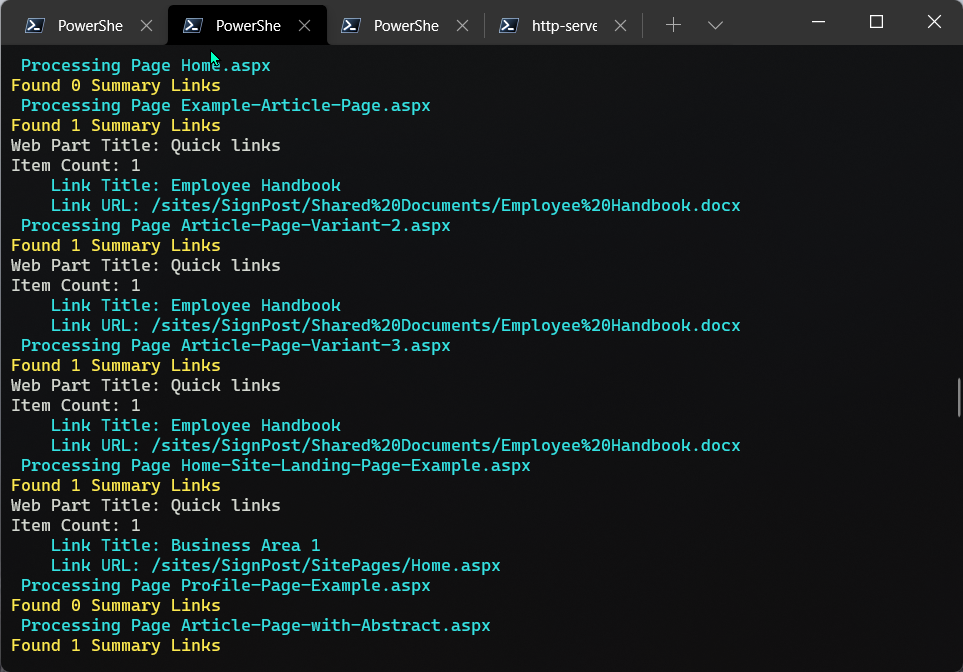
This script does have scope for the future to include other web part types e.g. Image Web Parts, Hero where user/provisioning has specified the link.
# Example: .\List-UrlsInPage.ps1 -SourceSitePartUrl "SiteA" -PartTenant "contoso"
[CmdletBinding()]
param (
    [Parameter(Mandatory = $true, HelpMessage = "Source e.g. Intranet-Archive")]
    [string]$SourceSitePartUrl,
    [Parameter(Mandatory = $false, HelpMessage = "Organisation Url Fragment e.g. contoso ")]
    [string]$PartTenant,
    [string]$ReportName = "URL-Report.csv"
)
begin{

    $baseUrl = "https://$($PartTenant).sharepoint.com"
    $sourceSiteUrl = "$($baseUrl)/sites/$($SourceSitePartUrl)"

    Write-Host "Connecting to " $sourceSiteUrl

    # For MFA Tenants - Interactive opens a browser window
    Connect-PnPOnline -Url $sourceSiteUrl -Interactive
    $filter = '<View>' +
                '<Query>' +
                    '<Where>' +
                        '<And>' +
                            '<Eq>'+
                                '<FieldRef Name="FSObjType" />'+
                                '<Value Type="Integer">0</Value>'+
                            '</Eq>'+
                            '<Neq>'+
                                '<FieldRef Name="_SPSitePageFlags" />'+
                                '<Value Type="Text">{Template}}</Value>'+
                            '</Neq>'+
                        '</And>' +
                    '</Where>' +
                '</Query>' +
            '</View>'

    $loc = Get-Location
    $reportPath = "$($loc)\$($ReportName)"

    '"WebTitle","WebUrl","PageFileName","WebPartTitle","LinkTitle","LinkUrl"' | Out-File $reportPath
}
process{

    Write-Host "Reading pages in site..."

    $web = Get-PnPWeb -Includes Title,Url
    $webTitle = $web.Title
    $webUrl = $web.Url

    $pages = Get-PnPListItem -List "SitePages" -Query $filter

    Foreach($page in $pages){

        $file = $page.FieldValues["FileLeafRef"]

        Write-Host " Processing Page $($file)" -ForegroundColor Cyan

        $components = Get-PnPPageComponent -Page $file

        # To find the Web Part ID:
        # Get-PnPPageComponent -Page "MyPage.aspx" -ListAvailable

        # You can filter based on type of web part
        # c70391ea-0b10-4ee9-b2b4-006d3fcad0cd QuickLinksWebPart
        $summaryLinks = $components | Where-Object { $_.WebPartId -eq 'c70391ea-0b10-4ee9-b2b4-006d3fcad0cd'}
        Write-Host "Found $($summaryLinks.Count) Summary Links" -ForegroundColor Yellow

        $summaryLinks | Foreach-Object{

            $wpTitle = $_.title
            Write-Host "Web Part Title: $($wpTitle)"

            $serverContent = $_.ServerProcessedContent | ConvertFrom-Json -AsHashTable
            $itemCount = $serverContent.links.Count

            #{htmlStrings, searchablePlainTexts, imageSources, links...}
            Write-Host "Item Count: $($itemCount)"

            For($i = 0; $i -lt $itemCount; $i++){

                $titlePath = "items[$($i)].title"
                $urlPath = "items[$($i)].sourceItem.url"

                $lnkTitle = $serverContent.searchablePlainTexts.$titlePath
                $lnkUrl = $serverContent.links.$urlPath

                if($lnkTitle -and $lnkUrl){

                    Write-Host "    Link Title: $($lnkTitle)" -ForegroundColor Cyan
                    Write-Host "    Link URL: $($lnkUrl)" -ForegroundColor Cyan

                    $line = '"' + $webTitle + '","' + `
                        $webUrl + '","' + `
                        $file + '","' + `
                        $wpTitle  + '","' + `
                        $lnkTitle + '","' + `
                        $lnkUrl + '"'

                    $line | Out-File $reportPath -Append

                }
            }

        }
    }
}
Contributors
| Author(s) |
|---|
| Paul Bullock |
Disclaimer
THESE SAMPLES ARE PROVIDED AS IS WITHOUT WARRANTY OF ANY KIND, EITHER EXPRESS OR IMPLIED, INCLUDING ANY IMPLIED WARRANTIES OF FITNESS FOR A PARTICULAR PURPOSE, MERCHANTABILITY, OR NON-INFRINGEMENT.
Tool documentation & references
- Want to learn more about PnP PowerShell and the cmdlets
Check out the PnP PowerShell site to get started and for the reference to the cmdlets.
