
Pins Fields to the Filter Pane in SharePoint Libraries
Pinning Fields to the Filter Pane in SharePoint Libraries.
 Reshmee Auckloo
Summary
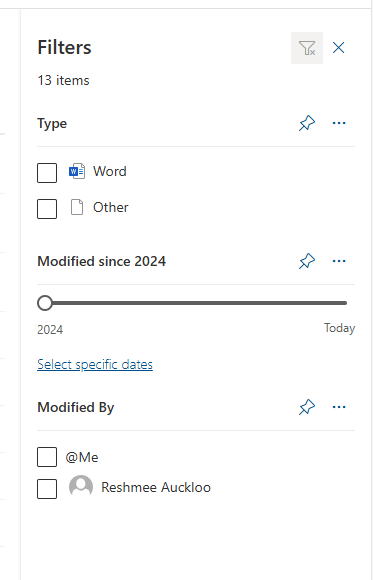
The filter pane allows users to quickly filter and find relevant data in libraries and lists. However, by default, not all fields are visible in the filter pane. To enhance usability, specific fields can be pinned to the top of the filter pane.
Prerequisites
- The user account that runs the script must have access to the SharePoint Online site.
# This script updates a field within a SharePoint Online library to pin it to the top of the filters pane.

# Parameters
function Pin-FieldsInList() {
    param (
        [string]$SiteUrl,
        [string]$ListTitle,
        [string[]]$FieldNames
    )

    # Connect to SharePoint Online
    Connect-PnPOnline -Url $SiteUrl

    # Loop through each field to update its properties
    foreach ($FieldName in $FieldNames) {
        Write-Host "Updating field '$FieldName' in library '$ListTitle'..."

        # Get the field
        $Field = Get-PnPField -List $ListTitle -Identity $FieldName

        if ($Field) {
            # Update the field to show in the filters pane
            Set-PnPField -List $ListTitle -Identity $FieldName -Values @{ShowInFiltersPane = 1}
            Write-Host "Field '$FieldName' has been pinned to the filters pane."
        } else {
            Write-Host "Field '$FieldName' not found in library '$ListTitle'."
        }
    }
}

# Example how to call the function Pin-FieldsInList
Pin-FieldsInList -SiteUrl "https://contoso.sharepoint.com/teams/TestMultipleLibraries" -ListTitle "amberlib" -FieldNames @("Modified", "Type")Source Credit
Sample first appeared on Pinning Fields to the Filter Pane in SharePoint Libraries Using PowerShell
Contributors
| Author(s) |
|---|
| Reshmee Auckloo |
Disclaimer
THESE SAMPLES ARE PROVIDED AS IS WITHOUT WARRANTY OF ANY KIND, EITHER EXPRESS OR IMPLIED, INCLUDING ANY IMPLIED WARRANTIES OF FITNESS FOR A PARTICULAR PURPOSE, MERCHANTABILITY, OR NON-INFRINGEMENT.
Tool documentation & references
- Want to learn more about PnP PowerShell and the cmdlets
Check out the PnP PowerShell site to get started and for the reference to the cmdlets.
