
Audit Service Principal Access to SharePoint Sites with Sites.Selected Permissions
This script identifies the SharePoint sites that a Service Principal can access when the sites.selected API permission is granted.
 Reshmee Auckloo
Summary
Ensuring the security and compliance of your SharePoint environment is crucial, especially when dealing with service principals. These entities often have elevated permissions that, if mismanaged, can lead to unauthorized access and potential data breaches. Regularly auditing these permissions is a best practice for maintaining a secure and compliant SharePoint environment.
The Sites.Selected API permission needs to be granted to the service principal.
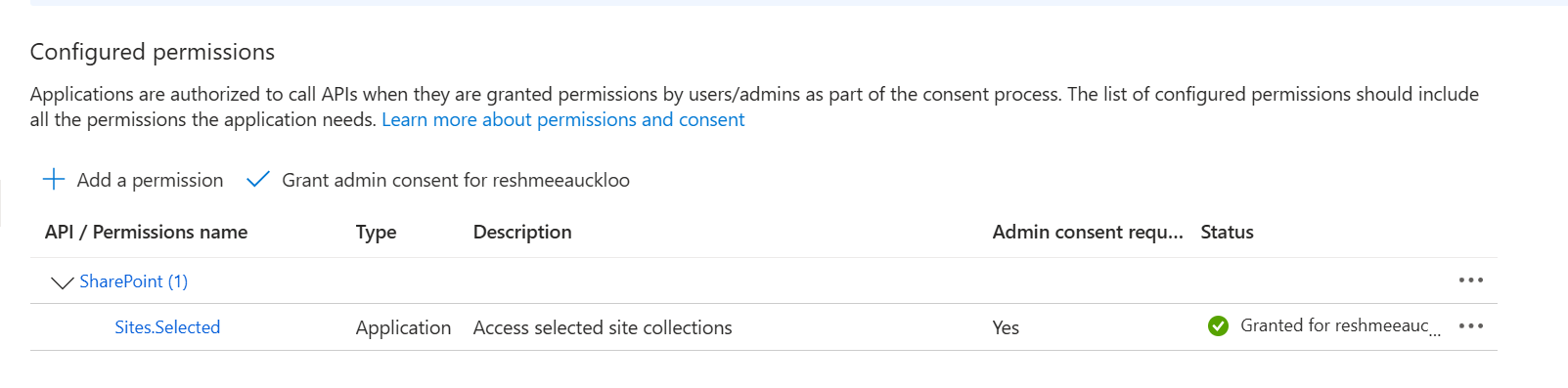
The Service Principal is granted access to the SharePoint site(s) using the cmdlet:
grant-PnPAzureADAppSitePermission -AppId 27f0f80f-4c32-4e49-a3ce-377fff559532 -DisplayName p-m365 -Permissions FullControlThe script will scan any permissions granted to service principals across the tenant.
param (
    [Parameter(Mandatory = $true)]
    [string] $domain
)

$adminSiteURL = "https://$domain-Admin.SharePoint.com"
$TenantURL = "https://$domain.sharepoint.com"
$dateTime = "_{0:MM_dd_yy}_{0:HH_mm_ss}" -f (Get-Date)
$invocation = (Get-Variable MyInvocation).Value

$directorypath = Split-Path $invocation.MyCommand.Path
$fileName = "entraid_site_permissions" + $dateTime + ".csv"
$outputPath = $directorypath + "\"+ $fileName

if (-not (Test-Path $outputPath)) {
    New-Item -ItemType File -Path $outputPath
}
     Connect-PnPOnline -Url $adminSiteURL -Interactive -WarningAction SilentlyContinue
        Write-Host "Getting entra id permissions..." -ForegroundColor Yellow
        $report = Get-PnPTenantSite -Filter "Url -like '$TenantURL'"| Where-Object { $_.Template -ne 'RedirectSite#0' }  | foreach-object {
        $siteUrl = $_.Url
        connect-PnPOnline -Url $siteUrl -interactive -WarningAction SilentlyContinue
        Get-PnPAzureADAppSitePermission | ForEach-Object {
        [PSCustomObject]@{
            ##add the properties from the $sharingsetting object
            Id = $_.Id
            Url = $siteUrl
            Roles = $_.Roles -join ","
            Apps = $_.Apps -join ","
        }
    }
}

$report |select * |Export-Csv $outputPath -NoTypeInformation -AppendSource Credit
The script first appeared "Audit Service Principal Access to SharePoint Sites with Sites.Selected Permissions".
Contributors
| Author(s) |
|---|
| Reshmee Auckloo |
Disclaimer
THESE SAMPLES ARE PROVIDED AS IS WITHOUT WARRANTY OF ANY KIND, EITHER EXPRESS OR IMPLIED, INCLUDING ANY IMPLIED WARRANTIES OF FITNESS FOR A PARTICULAR PURPOSE, MERCHANTABILITY, OR NON-INFRINGEMENT.
Tool documentation & references
- Want to learn more about PnP PowerShell and the cmdlets
Check out the PnP PowerShell site to get started and for the reference to the cmdlets.
