Install SharePoint Framework Development Environment
Summary
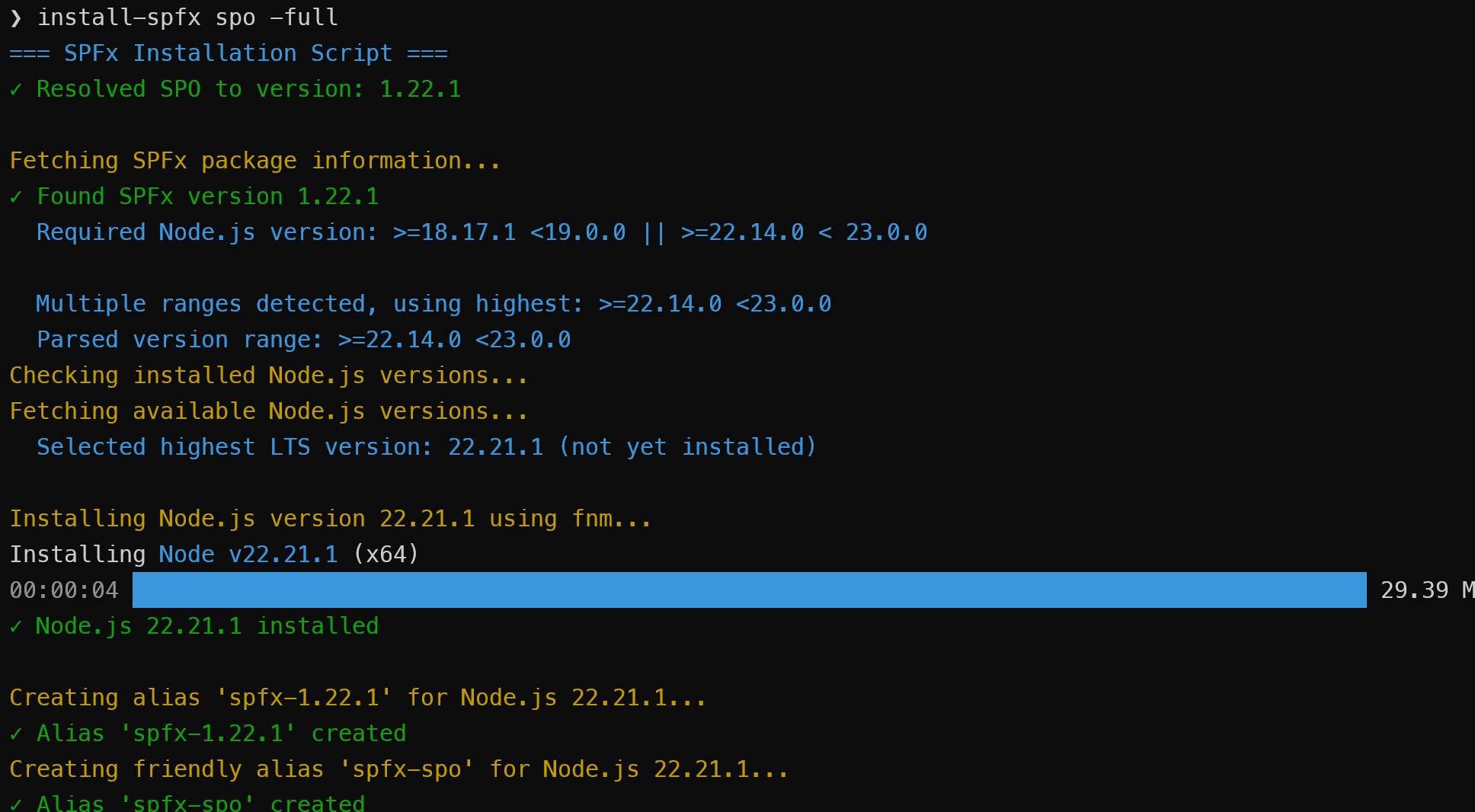
This Node.js script automates the installation and configuration of SharePoint Framework (SPFx) development environments with the correct Node.js versions and build tools. It uses fnm (Fast Node Manager) for Node.js version management and ensures compatibility between SPFx versions and Node.js versions based on the engines field published with each SPFx release, with a fallback compatibility matrix for older versions.
Because the script determines the correct versions and tools automatically, it should work without modification for future versions of SPFx unless the toolchain changes.
The script supports installing specific SPFx versions or using special aliases for common scenarios:
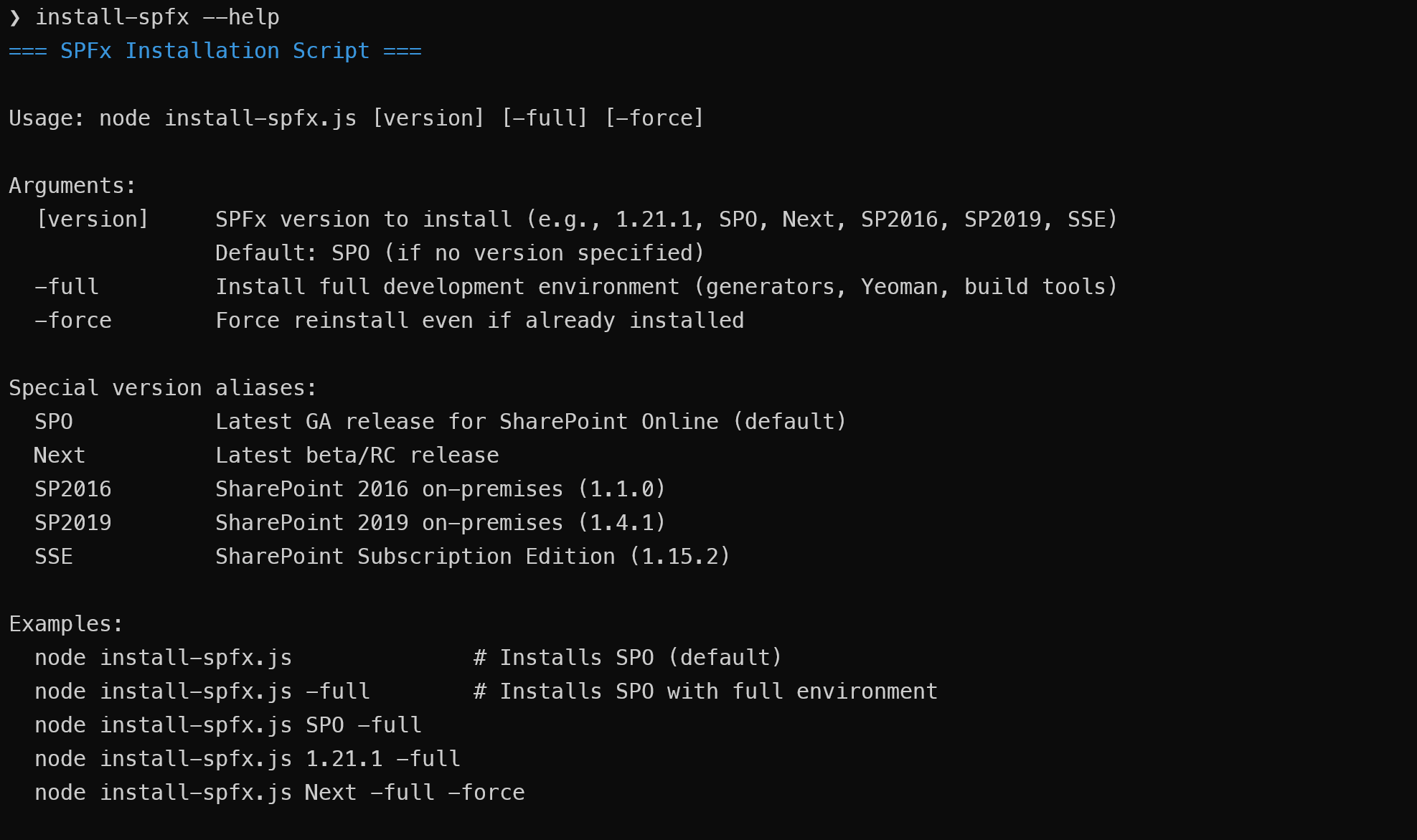
- SPO - Latest GA release for SharePoint Online (default)
- Next - Latest beta/RC release
- SP2016 - SharePoint 2016 on-premises (1.1.0)
- SP2019 - SharePoint 2019 on-premises (1.4.1)
- SPSE - SharePoint Subscription Edition (1.5.1)
Key features:
- Automatically resolves the correct Node.js version for any SPFx version from the
enginesrange published on npm, including||alternatives, with a fallback compatibility matrix for older versions. - Creates fnm aliases for easy version switching (e.g.,
spfx-spo,spfx-1.21.1), and rebuilds aliases whose Node.js version has since been removed. - Installs the right task runner for the version (gulp-cli, or @rushstack/heft where the SPFx package metadata calls for it).
- With
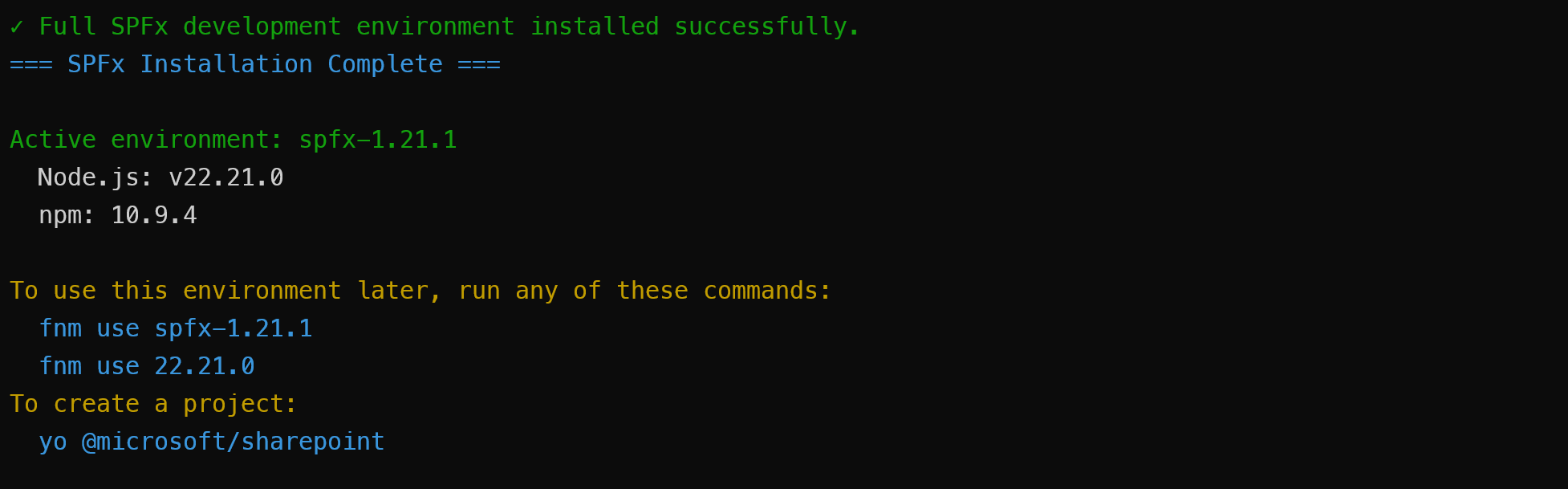
-full, also installs the scaffolding tools (Yeoman + @microsoft/generator-sharepoint) on a dedicated Node.js version, since those tools are pinned to a single SPFx version. - Without
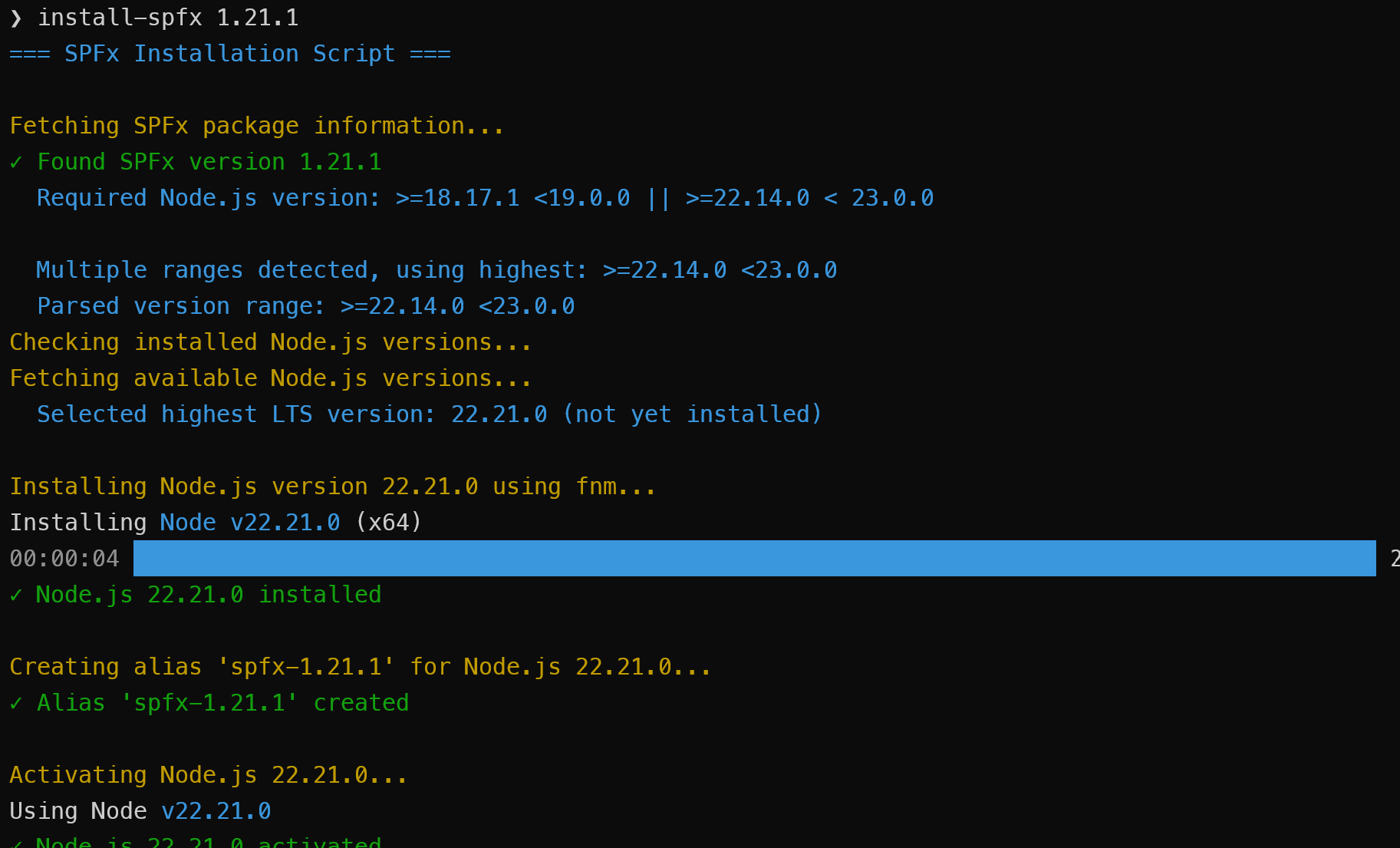
-full, reuses an already-installed Node.js version that satisfies the engine range instead of installing another. Node.js installs that carry scaffolding tools are never shared. - Optionally installs pnpm (
-pnpm) and yarn (-yarn) globally, resolved to versions compatible with the target Node.js. -forcereinstalls and also refreshes packages already present for the target Node.js version.- Global tooling is always installed into the target Node.js version's own tree using that version's npm, so nothing leaks into whichever Node.js happens to be active in your shell.
- Whenever the target is Node.js 6 (required by SPFx 1.0 through 1.3 and 1.4.0, including the SP2016 alias), replaces the bundled npm 3 with npm 6 so scoped packages can be installed.
- Registry lookups use abbreviated manifests with a timeout and in-process cache, so repeated runs are fast and a flaky network fails clearly rather than hanging.
- Built-in help (
-help).
Arguments
| Argument | Description |
|---|---|
[version] |
SPFx version to install (e.g., 1.21.1) or one of the aliases above. Default: SPO. |
-full |
Also install the scaffolding tools (Yeoman + SPFx generator) on a dedicated Node.js version. |
-force |
Force reinstall even if already installed; also refreshes existing global packages. |
-pnpm |
Also install pnpm globally (latest compatible with the target Node.js). |
-yarn |
Also install yarn globally (latest compatible with the target Node.js). |
-help |
Show usage. |
Examples:
node install-spfx.js                    # SPO (default), task runner only
node install-spfx.js -full              # SPO with full scaffolding environment
node install-spfx.js 1.21.1 -full
node install-spfx.js Next -full -force
node install-spfx.js SPO -full -pnpm -yarn
Prerequisites
Node.js 14 or later - Required to run this installation script itself (it uses optional chaining and other syntax unavailable in older versions). The Node.js versions it installs for SPFx are managed separately by fnm.
fnm (Fast Node Manager) - Required for Node.js version management
- Windows:
winget install Schniz.fnmorchoco install fnmorscoop install fnm - Linux/macOS:
curl -fsSL https://fnm.vercel.app/install | bashorbrew install fnm - More info: https://github.com/Schniz/fnm
- Windows:
Setup as a Command
You can set up this script to run as a simple command like install-spfx instead of typing node /path/to/install-spfx.js every time.
Linux/macOS (bash/zsh):
# Navigate to script directory and make script executable
cd /path/to/install-spfx.js
chmod +x install-spfx.js

# Add to PATH in ~/.bashrc (or ~/.zshrc if using zsh)
echo 'export PATH="$PATH:$PWD"' >> ~/.bashrc
source ~/.bashrc
Windows (PowerShell):
# Edit PowerShell profile
notepad $PROFILE

# Add this line:
function install-spfx { node C:\path\to\install-spfx.js $args }

# Reload profile
. $PROFILE
Screenshots
Help Output
Installing SPO with Full Environment
Installing a Specific Version (task runner only, reusing an installed Node.js)
Installation Complete with Usage Instructions
#!/usr/bin/env node
/**
* SPFx Installation Script
* Automates SPFx development environment setup with correct Node.js versions and build tools
* Uses fnm (Fast Node Manager) for Node.js version management
*/
const { execSync } = require("child_process");
const https = require("https");
const fs = require("fs");
const path = require("path");
const os = require("os");
// ---------------------------------------------------------------------------
// Terminal colour
// ---------------------------------------------------------------------------
// Colour only when a person is looking: a pipe or a redirect gets plain text, NO_COLOR
// (https://no-color.org) turns it off on a terminal, and FORCE_COLOR turns it back on for
// a pager or a capture that renders escapes.
const useColor = process.env.FORCE_COLOR
? true
: Boolean(process.stdout.isTTY) && !process.env.NO_COLOR;
const colors = {
reset: "\x1b[0m",
cyan: "\x1b[36m",
green: "\x1b[32m",
yellow: "\x1b[33m",
red: "\x1b[31m",
gray: "\x1b[90m",
white: "\x1b[37m",
magenta: "\x1b[95m",
};
function colorize(text, color) {
if (!useColor) return String(text);
return `${colors[color]}${text}${colors.reset}`;
}
// ---------------------------------------------------------------------------
// SPFx facts
// ---------------------------------------------------------------------------
const ALIAS_PREFIX = "spfx-";
// spfx-<semver> aliases carry the SPFx version; friendly ones (spfx-spo, spfx-next) do not.
const SPFX_VERSION_ALIAS = new RegExp(`^${ALIAS_PREFIX}(\\d+\\.\\d+\\.\\d+.*)$`);
function getSpfxVersionFromAlias(alias) {
const match = alias.match(SPFX_VERSION_ALIAS);
return match ? match[1] : null;
}
// SPFx to Node.js compatibility matrix for the releases that never declared an engines
// range in the registry (everything before 1.12.1-rc.1), taken from the "SPFx development
// environment compatibility" table at
// https://learn.microsoft.com/sharepoint/dev/spfx/compatibility. Entries are keyed by
// major.minor; an exact version entry overrides its minor where one patch differs.
const COMPATIBILITY_MATRIX = {
"1.0": ">=6.9.1 <7.0.0",
"1.1": ">=6.9.1 <7.0.0",
"1.2": ">=6.9.1 <7.0.0",
"1.3": ">=6.9.1 <7.0.0",
"1.4.0": ">=6.9.1 <7.0.0",
"1.4": ">=6.9.1 <7.0.0 || >=8.9.4 <9.0.0",
"1.5": ">=6.9.1 <7.0.0 || >=8.9.4 <9.0.0",
"1.6": ">=6.9.1 <7.0.0 || >=8.9.4 <9.0.0",
"1.7": ">=8.9.4 <9.0.0",
"1.8.0": ">=8.9.4 <9.0.0",
"1.8.1": ">=8.9.4 <9.0.0",
"1.8": ">=8.9.4 <9.0.0 || >=10.13.0 <11.0.0",
"1.9": ">=8.9.4 <9.0.0 || >=10.13.0 <11.0.0",
"1.10": ">=8.9.4 <9.0.0 || >=10.13.0 <11.0.0",
"1.11": ">=10.13.0 <11.0.0",
"1.12": ">=10.13.0 <11.0.0 || >=12.13.0 <13.0.0",
};
// The matrix range for a version: an entry for the exact version wins (so one release can
// pin a single Node.js version, e.g. "1.1.1": "6.10.3"), then its major.minor, else null.
function matrixEngineRange(version) {
const exact = COMPATIBILITY_MATRIX[version];
if (exact) return exact;
const match = String(version).match(/^(\d+)\.(\d+)/);
return match ? COMPATIBILITY_MATRIX[`${match[1]}.${match[2]}`] || null : null;
}
// ---------------------------------------------------------------------------
// npm registry
// ---------------------------------------------------------------------------
const REGISTRY_URL = "https://registry.npmjs.org";
// Registry documents are large and a run asks for the same ones more than once, so each
// request is made at most once per run. The key carries the options as well as the URL:
// the abbreviated document is a different representation, and allowNotFound changes what a
// 404 resolves to, so callers asking differently must not share a response.
const registryCache = new Map();
function registryCacheKey(url, abbreviated, allowNotFound) {
return `${url}|${abbreviated ? "abbreviated" : "full"}|${allowNotFound ? "404-null" : "404-error"}`;
}
const HTTP_TIMEOUT_MS = 60 * 1000;
// The registry's abbreviated document format: dist-tags plus, per version, dependencies,
// devDependencies, engines and dist. Everything these scripts read, at roughly half the
// size of the full document. Only whole-package documents support it; /pkg/version
// returns 406.
const ABBREVIATED_ACCEPT = "application/vnd.npm.install-v1+json";
// HTTP GET request helper. Rejects on a non-200 status rather than parsing the error body
// as a package document, and on a stalled connection rather than waiting forever.
// `abbreviated` asks for the slim document; `allowNotFound` resolves null on a 404.
function httpGet(url, { abbreviated = false, allowNotFound = false } = {}) {
const key = registryCacheKey(url, abbreviated, allowNotFound);
if (registryCache.has(key)) return registryCache.get(key);
const headers = abbreviated ? { Accept: ABBREVIATED_ACCEPT } : {};
const request = new Promise((resolve, reject) => {
const req = https.get(url, { headers }, (res) => {
if (res.statusCode === 404 && allowNotFound) {
res.resume();
resolve(null);
return;
}
if (res.statusCode !== 200) {
res.resume();
reject(
new Error(`${url} returned HTTP ${res.statusCode}`),
);
return;
}
res.setEncoding("utf8");
let data = "";
res.on("data", (chunk) => (data += chunk));
res.on("end", () => {
try {
resolve(JSON.parse(data));
} catch (e) {
reject(new Error(`${url} returned a malformed response`));
}
});
});
req.on("error", reject);
req.setTimeout(HTTP_TIMEOUT_MS, () => {
req.destroy(new Error(`${url} timed out after ${HTTP_TIMEOUT_MS}ms`));
});
});
// A failed lookup must not be replayed to every later caller from cache.
registryCache.set(key, request);
request.catch(() => registryCache.delete(key));
return request;
}
// Stream a URL to a file, rejecting on a non-200 status or a stalled connection. Registry
// tarball URLs do not redirect.
function downloadFile(url, dest) {
return new Promise((resolve, reject) => {
const req = https.get(url, (res) => {
if (res.statusCode !== 200) {
res.resume();
reject(new Error(`${url} returned HTTP ${res.statusCode}`));
return;
}
const out = fs.createWriteStream(dest);
res.pipe(out);
out.on("finish", () => out.close(resolve));
out.on("error", reject);
res.on("error", reject);
});
req.on("error", reject);
req.setTimeout(HTTP_TIMEOUT_MS, () => {
req.destroy(new Error(`${url} timed out after ${HTTP_TIMEOUT_MS}ms`));
});
});
}
// Whole-package document for a (possibly scoped) package name.
function packageUrl(packageName) {
return `${REGISTRY_URL}/${packageName.replace("/", "%2f")}`;
}
// One version's manifest (engines, dependencies, devDependencies) by version or dist-tag,
// or null when the registry has no such version. A few KB, against hundreds for the
// whole package document.
function fetchVersionManifest(packageName, versionOrTag) {
return httpGet(`${REGISTRY_URL}/${packageName}/${versionOrTag}`, {
allowNotFound: true,
});
}
// ---------------------------------------------------------------------------
// Commands
// ---------------------------------------------------------------------------
// Capped so a wedged npm fails instead of hanging the run. Callers may override `timeout`.
const DEFAULT_COMMAND_TIMEOUT_MS = 15 * 60 * 1000;
// Runs a command and reports {success, output, exitCode} rather than throwing. `silent`
// captures output instead of streaming it; the remaining options go to execSync as-is.
function execCommand(command, { silent = false, ...execOptions } = {}) {
try {
const result = execSync(command, {
encoding: "utf8",
stdio: silent ? "pipe" : "inherit",
timeout: DEFAULT_COMMAND_TIMEOUT_MS,
...execOptions,
});
return { success: true, output: result, exitCode: 0 };
} catch (error) {
return {
success: false,
output: error.stdout || "",
exitCode: error.status || 1,
};
}
}
// ---------------------------------------------------------------------------
// fnm
// ---------------------------------------------------------------------------
function checkFnmInstalled() {
const result = execCommand("fnm --version", { silent: true });
return result.success;
}
function showFnmInstallInstructions() {
console.log(colorize("ERROR: fnm is not installed!", "red"));
console.log("");
console.log(colorize("Please install fnm first:", "yellow"));
console.log("");
if (process.platform === "win32") {
console.log(colorize("Windows Installation Options:", "cyan"));
console.log(colorize(" 1. Using winget:", "white"));
console.log(colorize(" winget install Schniz.fnm", "gray"));
console.log("");
console.log(colorize(" 2. Using Chocolatey:", "white"));
console.log(colorize(" choco install fnm", "gray"));
console.log("");
console.log(colorize(" 3. Using Scoop:", "white"));
console.log(colorize(" scoop install fnm", "gray"));
} else {
console.log(colorize("Linux/macOS Installation Options:", "cyan"));
console.log(colorize(" 1. Using curl:", "white"));
console.log(
colorize(" curl -fsSL https://fnm.vercel.app/install | bash", "gray"),
);
console.log("");
console.log(colorize(" 2. Using Homebrew (macOS):", "white"));
console.log(colorize(" brew install fnm", "gray"));
}
console.log("");
console.log(colorize("More info: https://github.com/Schniz/fnm", "cyan"));
}
// Ask fnm rather than guess: a machine that has moved its fnm data leaves the old tree in
// place, and a stale copy is indistinguishable from the live one on disk.
let cachedFnmDir = null;
function resolveFnmDir() {
if (cachedFnmDir) return cachedFnmDir;
const shell = process.platform === "win32" ? "cmd" : "bash";
const reported = execCommand(`fnm env --shell ${shell}`, { silent: true });
if (reported.success && reported.output) {
const match = reported.output.match(/FNM_DIR[="\s]+([^"\r\n]+)/);
if (match) {
// cmd renders the path bare; POSIX shells escape backslashes for the quoted form.
cachedFnmDir = match[1].replace(/\\\\/g, "\\").trim();
return cachedFnmDir;
}
}
// fnm unavailable or unparseable: fall back to its documented default locations.
const fallback = path.join(os.homedir(), ".fnm");
const candidates =
process.platform === "win32"
? [
process.env.FNM_DIR,
path.join(process.env.APPDATA || "", "fnm"),
path.join(process.env.LOCALAPPDATA || "", "fnm"),
fallback,
]
: [
process.env.FNM_DIR,
path.join(os.homedir(), "Library", "Application Support", "fnm"),
path.join(os.homedir(), ".local", "share", "fnm"),
fallback,
];
cachedFnmDir =
candidates.find((dir) => dir && fs.existsSync(dir)) || fallback;
return cachedFnmDir;
}
// Node version an alias resolves to, or null when the alias is broken. The link target
// names the version, so a process spawn is only needed for an alias fnm made some other
// way. realpath follows alias->alias chains (e.g. default -> lts-latest).
function getNodeVersionForAlias(aliasName) {
const fnmDir = resolveFnmDir();
const aliasPath = path.join(fnmDir, "aliases", aliasName);
try {
const resolved = fs.realpathSync(aliasPath);
const match = resolved.match(/node-versions[\\/]v(\d+\.\d+\.\d+)/);
if (match) return match[1];
} catch (e) {
return null; // dangling link
}
const nodeExe = path.join(aliasPath, "node.exe");
const nodeUnix = path.join(aliasPath, "bin", "node");
const exe = fs.existsSync(nodeExe) ? nodeExe : nodeUnix;
const result = execCommand(`"${exe}" --version`, { silent: true });
return result.success ? result.output.trim().replace(/^v/, "") : null;
}
// Every fnm alias as { name, version }; version is null for a broken alias.
function listAliases() {
const fnmDir = resolveFnmDir();
const aliasesDir = path.join(fnmDir, "aliases");
if (!fs.existsSync(aliasesDir)) return [];
return fs
.readdirSync(aliasesDir)
.map((name) => ({ name, version: getNodeVersionForAlias(name) }));
}
// Global node_modules directory of an fnm-installed Node version.
// Windows: <installation>/node_modules, Linux/macOS: <installation>/lib/node_modules
function getGlobalModulesDir(nodeVersion) {
const fnmDir = resolveFnmDir();
const installation = path.join(
fnmDir,
"node-versions",
`v${nodeVersion}`,
"installation",
);
const candidates = [
path.join(installation, "lib", "node_modules"),
path.join(installation, "node_modules"),
];
return candidates.find((dir) => fs.existsSync(dir)) || null;
}
// ---------------------------------------------------------------------------
// Numeric versions
// ---------------------------------------------------------------------------
// Widen a possibly-partial numeric version ("22.13", "18") to a full [major, minor, patch].
// Anything non-numeric, including a range operator, yields null: callers that read engine
// ranges strip the operator first (see tokenizeComparatorSet in install-spfx.js).
function parseVersionParts(text) {
const parts = text.split(".").map(Number);
if (parts.some((n) => !Number.isInteger(n))) return null;
while (parts.length < 3) parts.push(0);
return parts.slice(0, 3);
}
function compareVersions(a, b) {
for (let i = 0; i < 3; i++) {
if (a[i] !== b[i]) return a[i] - b[i];
}
return 0;
}
// Version strings ordered newest first. Unparseable entries sort last rather than
// throwing, so one malformed registry key cannot break a whole listing.
function sortVersionsDescending(versions) {
return [...versions].sort((a, b) =>
compareVersions(
parseVersionParts(b) || [0, 0, 0],
parseVersionParts(a) || [0, 0, 0],
),
);
}
function parseArgs() {
const args = process.argv.slice(2);
const params = {
version: null,
full: false,
force: false,
help: false,
pnpm: false,
yarn: false,
};
for (let i = 0; i < args.length; i++) {
const arg = args[i].toLowerCase();
if (arg === "-full" || arg === "--full") {
params.full = true;
} else if (arg === "-force" || arg === "--force") {
params.force = true;
} else if (arg === "-pnpm" || arg === "--pnpm") {
params.pnpm = true;
} else if (arg === "-yarn" || arg === "--yarn") {
params.yarn = true;
} else if (arg === "-h" || arg === "--help" || arg === "-help") {
params.help = true;
} else if (arg.startsWith("-")) {
// A mistyped flag must not be looked up in the registry as an SPFx version.
console.log(colorize(`ERROR: Unknown option '${args[i]}'`, "red"));
console.log("");
showHelp();
process.exit(1);
} else if (!params.version) {
params.version = args[i];
}
}
if (!params.version && !params.help) {
const detectedVersion = detectSpfxVersionFromPackageJson();
if (detectedVersion) {
params.version = detectedVersion;
} else {
params.version = "SPO";
}
}
return params;
}
function showHelp() {
console.log(colorize("=== SPFx Installation Script ===", "cyan"));
console.log("");
console.log(
"Usage: node install-spfx.js [version] [-full] [-force] [-pnpm] [-yarn]",
);
console.log("");
console.log("Arguments:");
console.log(
" [version] SPFx version to install (e.g., 1.21.1, SPO, Next, SPSE, SP2019, SP2016)",
);
console.log(" Default: SPO (if no version specified)");
console.log(
" -full Also install the scaffolding tools (yo + SPFx generator). The task",
);
console.log(
" runner (gulp-cli or Heft) is installed regardless.",
);
console.log(
" Gets a dedicated Node.js version, since the scaffolding tools are",
);
console.log(" pinned to one SPFx version.");
console.log(
" Without -full, only a task runner is installed, so the highest",
);
console.log(
" already-installed Node.js version satisfying the engine range is",
);
console.log(
" reused. Installs carrying scaffolding tools are never shared; a new",
);
console.log(
" Node.js version is installed only if no shareable one matches.",
);
console.log(" -force Force reinstall even if already installed");
console.log(" -pnpm Also install pnpm globally (latest)");
console.log(" -yarn Also install yarn globally (latest)");
console.log("");
console.log("Special version aliases:");
console.log(
" SPO Latest GA release for SharePoint Online (default)",
);
console.log(" Next Latest beta/RC release");
console.log(" SPSE SharePoint Subscription Edition (SPFx v1.5.1)");
console.log(" SP2019 SharePoint 2019 on-premises (SPFx v1.4.1)");
console.log(" SP2016 SharePoint 2016 on-premises (SPFx v1.1.0)");
console.log("");
console.log("Examples:");
console.log(" node install-spfx.js # Installs SPO (default)");
console.log(
" node install-spfx.js -full # Installs SPO with full environment",
);
console.log(" node install-spfx.js SPO -full");
console.log(" node install-spfx.js 1.21.1 -full");
console.log(" node install-spfx.js Next -full -force");
console.log(" node install-spfx.js SPO -full -pnpm");
console.log(" node install-spfx.js SPO -full -pnpm -yarn");
console.log("");
console.log(colorize("Run as a command:", "cyan"));
console.log(" PowerShell ($PROFILE): function Install-SPFx { node \"$HOME\\path\\to\\install-spfx.js\" @args }");
console.log(" bash/zsh (~/.zshrc): install-spfx() { node ~/path/to/install-spfx.js \"$@\"; }");
}
// A Node download on a slow link can outlast the default.
const FNM_INSTALL_TIMEOUT_MS = 30 * 60 * 1000;
function detectSpfxVersionFromPackageJson() {
try {
const packageJsonPath = path.join(process.cwd(), "package.json");
if (!fs.existsSync(packageJsonPath)) {
return null;
}
const packageJson = JSON.parse(fs.readFileSync(packageJsonPath, "utf8"));
const dependencies = {
...packageJson.dependencies,
...packageJson.devDependencies,
...packageJson.peerDependencies,
};
// Every SPFx project type depends on sp-core-library; library components and some
// extensions lack sp-component-base.
const versionStr =
dependencies["@microsoft/sp-core-library"] ||
dependencies["@microsoft/sp-component-base"];
if (versionStr) {
// Keep any prerelease suffix: a Next project pins e.g. 1.24.0-beta.3, and the bare
// 1.24.0 may not exist in the registry.
const match = versionStr.match(/\d+\.\d+\.\d+(?:-[0-9A-Za-z.]+)?/);
return match ? match[0] : null;
}
} catch (error) {
}
return null;
}
// The package whose registry entry defines what an SPFx version is: the generator is what
// gets installed, and its version list is exactly the installable set (it has patch
// releases sp-core-library never shipped, and none of that package's plusbeta builds).
const SPFX_PACKAGE = "@microsoft/generator-sharepoint";
// The registry's own dist-tags name the current GA and prerelease; sorting version keys by
// hand would keep picking a prerelease after its GA shipped.
async function fetchSpfxDistTags() {
const [latest, next] = await Promise.all([
fetchVersionManifest(SPFX_PACKAGE, "latest"),
fetchVersionManifest(SPFX_PACKAGE, "next"),
]);
if (!latest) {
throw new Error(`${SPFX_PACKAGE} has no 'latest' dist-tag`);
}
return { latest: latest.version, next: next ? next.version : null };
}
// The version Next resolves to. The next tag lags once its prerelease goes GA, so a newer
// latest wins; `fellBack` says which happened so the caller can word its message.
function pickNextVersion(latest, next) {
const nextIsNewer =
Boolean(next) &&
compareVersions(
parseVersionParts(next.replace(/-.*/, "")) || [0, 0, 0],
parseVersionParts(latest) || [0, 0, 0],
) > 0;
return nextIsNewer
? { version: next, fellBack: false }
: { version: latest, fellBack: true };
}
// dist-tags for a registry-resolved alias, or exit: nothing can proceed without them.
async function fetchSpfxDistTagsOrExit(label) {
try {
return await fetchSpfxDistTags();
} catch (error) {
console.log(
colorize(`ERROR: Failed to resolve ${label} version from npm registry`, "red"),
);
console.log(colorize(`Error details: ${error.message}`, "red"));
process.exit(1);
}
}
async function resolveSpecialVersionAlias(version) {
const versionLower = version.toLowerCase();
let specialAlias = null;
switch (versionLower) {
case "spo": {
specialAlias = "spo";
console.log(
colorize("Resolving SPO (latest GA for SharePoint Online)...", "yellow"),
);
const { latest } = await fetchSpfxDistTagsOrExit("SPO");
console.log(colorize(`✓ Resolved SPO to version: ${latest}`, "green"));
return { version: latest, specialAlias };
}
case "next": {
specialAlias = "next";
console.log(colorize("Resolving Next (latest beta/RC)...", "yellow"));
const { latest, next } = await fetchSpfxDistTagsOrExit("Next");
const picked = pickNextVersion(latest, next);
if (picked.fellBack) {
console.log(
colorize(
"No prerelease newer than the latest GA. Falling back to latest stable GA...",
"yellow",
),
);
console.log(
colorize(`✓ Resolved Next to stable version: ${picked.version}`, "green"),
);
} else {
console.log(
colorize(`✓ Resolved Next to version: ${picked.version}`, "green"),
);
}
return { version: picked.version, specialAlias };
}
case "sp2016":
specialAlias = "sp2016";
console.log(
colorize("Resolving SP2016 (SharePoint 2016 on-premises)...", "yellow"),
);
console.log(colorize("✓ Resolved SP2016 to version: 1.1.0", "green"));
return { version: "1.1.0", specialAlias };
case "sp2019":
specialAlias = "sp2019";
console.log(
colorize("Resolving SP2019 (SharePoint 2019 on-premises)...", "yellow"),
);
console.log(colorize("✓ Resolved SP2019 to version: 1.4.1", "green"));
return { version: "1.4.1", specialAlias };
case "spse":
specialAlias = "spse";
console.log(
colorize(
"Resolving SPSE (SharePoint Subscription Edition)...",
"yellow",
),
);
console.log(colorize("✓ Resolved SPSE to version: 1.5.1", "green"));
return { version: "1.5.1", specialAlias };
default:
return { version, specialAlias };
}
}
// The npm this run installs global packages with: the target Node version's own, set once
// that version is known (see resolveTargetNpm). Never the npm on PATH, which would put the
// packages into whichever Node the shell happens to have active.
let targetNpm = null;
function targetNpmCommand() {
if (!targetNpm) throw new Error("no target npm resolved before a global npm operation");
return targetNpm;
}
// Root of an fnm-installed Node version: <fnm dir>/node-versions/v<version>/installation
function installationDir(nodeVersion) {
return path.join(
resolveFnmDir(),
"node-versions",
`v${nodeVersion}`,
"installation",
);
}
// List the target's global packages with its real installation path as the root. npm
// otherwise prints the root it derives from the node binary's location, which under fnm on
// Windows is the per-shell multishell junction rather than the versioned directory.
function listGlobalPackages(nodeVersion) {
console.log("");
console.log(colorize("Globally installed packages:", "yellow"));
execCommand(
`${targetNpmCommand()} ls -g --depth=0 --prefix "${installationDir(nodeVersion)}"`,
);
}
// The npm of a specific Node version, run by that version's own node binary. `fnm use`
// cannot switch a shell that has not evaluated `fnm env`, and a bare `npm install -g`
// would then land in the previous Node's tree. Calling the version's npm launcher is not
// enough either: on Linux/macOS it is `#!/usr/bin/env node`, so it runs under whatever
// node is on PATH and inherits that Node's global prefix. Naming the binary pins both.
function npmForVersion(nodeVersion) {
const installation = path.join(
resolveFnmDir(),
"node-versions",
`v${nodeVersion}`,
"installation",
);
const [node, npmCli] =
process.platform === "win32"
? [
path.join(installation, "node.exe"),
path.join(installation, "node_modules", "npm", "bin", "npm-cli.js"),
]
: [
path.join(installation, "bin", "node"),
path.join(installation, "lib", "node_modules", "npm", "bin", "npm-cli.js"),
];
return fs.existsSync(node) && fs.existsSync(npmCli)
? `"${node}" "${npmCli}"`
: null;
}
// The target's npm command, or exit: falling back to the npm on PATH would install into
// another Node's tree and report success.
function resolveTargetNpm(nodeVersion) {
const npm = npmForVersion(nodeVersion);
if (npm) return npm;
const installation = path.join(
resolveFnmDir(),
"node-versions",
`v${nodeVersion}`,
"installation",
);
console.log(
colorize(`ERROR: Node.js ${nodeVersion} has no usable npm under ${installation}`, "red"),
);
process.exit(1);
}
// Node.js 6 ships npm 3, which fails in node_modules/.staging (ENOTDIR/ENOENT) on the first
// scoped package it unpacks, and every scaffolding package pulls one in. `npm install -g npm`
// hits the same wall (npm 6 depends on @iarna/cli), but npm's tarball bundles all of its
// dependencies, so unpacking it over the shipped copy needs no working npm at all. 6.14.18
// is the last npm that supports Node.js 6.
const NODE6_NPM_VERSION = "6.14.18";
const NODE6_NPM_TARBALL = `${REGISTRY_URL}/npm/-/npm-${NODE6_NPM_VERSION}.tgz`;
// Global node_modules directory of a Node version, whether or not it exists yet: a target
// whose npm went missing has no node_modules to find, but the platform layout is known.
function globalModulesDirFor(nodeVersion) {
const existing = getGlobalModulesDir(nodeVersion);
if (existing) return existing;
const installation = path.join(
resolveFnmDir(),
"node-versions",
`v${nodeVersion}`,
"installation",
);
return process.platform === "win32"
? path.join(installation, "node_modules")
: path.join(installation, "lib", "node_modules");
}
// The version its own npm reports, or null when the target has no working npm.
function installedNpmVersion(nodeVersion) {
const npm = npmForVersion(nodeVersion);
if (!npm) return null; // launcher or CLI missing
const result = execCommand(`${npm} --version`, { silent: true });
return result.success ? result.output.trim() : null;
}
// Give a Node.js 6 installation an npm that can install scoped packages. Other Node
// versions, and a Node.js 6 already carrying npm 6, are left alone. Exits on failure: no
// global install below could succeed with npm 3 in place.
async function ensureModernNpm(nodeVersion) {
const major = Number(nodeVersion.replace(/^v/, "").split(".")[0]);
if (major !== 6) return;
const modulesDir = globalModulesDirFor(nodeVersion);
const npmDir = path.join(modulesDir, "npm");
const retired = `${npmDir}.old`;
// A run that stopped between the two renames below left the working copy in npm.old and
// nothing at npm; put it back before deciding anything.
if (!fs.existsSync(npmDir) && fs.existsSync(retired)) {
fs.renameSync(retired, npmDir);
}
// Only npm 6 both runs on Node.js 6 and installs scoped packages; anything else, or no npm
// at all, gets replaced.
const current = installedNpmVersion(nodeVersion);
if (current && Number(current.split(".")[0]) === 6) return;
console.log(
colorize(
`Node.js ${nodeVersion} has npm ${current || "missing"}, which cannot install scoped packages.`,
"yellow",
),
);
console.log(colorize(`Replacing it with npm ${NODE6_NPM_VERSION} ...`, "yellow"));
// Stage inside the modules directory so promotion is a rename on one filesystem, and so
// no recursive copy is needed from whichever Node runs this script.
fs.mkdirSync(modulesDir, { recursive: true });
const workDir = fs.mkdtempSync(path.join(modulesDir, ".npm-staging-"));
let failure = null;
try {
const tarball = path.join(workDir, "npm.tgz");
await downloadFile(NODE6_NPM_TARBALL, tarball);
// tar ships with Windows 10 1803+ as well as every Linux and macOS
const extracted = execCommand(`tar -xzf "${tarball}" -C "${workDir}"`, { silent: true });
if (!extracted.success) throw new Error(`tar failed: ${extracted.output}`);
const unpacked = path.join(workDir, "package");
if (!fs.existsSync(path.join(unpacked, "bin", "npm-cli.js"))) {
throw new Error("the npm tarball did not contain bin/npm-cli.js");
}
// Swap by rename: retire the live copy (if there is one), promote the unpacked one, and
// put the old copy back if promotion or the check fails, so no failure leaves the Node
// without an npm. The backup goes only once the new npm has answered --version.
fs.rmSync(retired, { recursive: true, force: true });
const hadNpm = fs.existsSync(npmDir);
if (hadNpm) fs.renameSync(npmDir, retired);
const restore = () => {
fs.rmSync(npmDir, { recursive: true, force: true });
if (hadNpm) fs.renameSync(retired, npmDir);
};
try {
fs.renameSync(unpacked, npmDir);
} catch (error) {
restore();
throw error;
}
const now = installedNpmVersion(nodeVersion);
if (now !== NODE6_NPM_VERSION) {
restore();
throw new Error(`the new npm reported ${now || "nothing"} instead of ${NODE6_NPM_VERSION}`);
}
fs.rmSync(retired, { recursive: true, force: true });
} catch (error) {
failure = error;
} finally {
// Runs before any exit below, so a failed download or extraction leaves no staging dir.
fs.rmSync(workDir, { recursive: true, force: true });
}
if (failure) {
console.log(colorize(`ERROR: Could not replace npm: ${failure.message}`, "red"));
process.exit(1);
}
globalPackagesCache.clear();
console.log(colorize(`✓ npm ${NODE6_NPM_VERSION} installed into Node.js ${nodeVersion}`, "green"));
console.log("");
}
// lstat, not existsSync: a dangling link is still an alias that must be replaced, and
// existsSync follows the link and reports it absent.
function checkAliasExists(aliasName) {
const fnmDir = resolveFnmDir();
const aliasPath = path.join(fnmDir, "aliases", aliasName);
try {
fs.lstatSync(aliasPath);
return true;
} catch (e) {
return false;
}
}
function removeAlias(aliasName) {
const fnmDir = resolveFnmDir();
const aliasPath = path.join(fnmDir, "aliases", aliasName);
// force: true makes a missing path a no-op and removes a dangling link outright.
fs.rmSync(aliasPath, { recursive: true, force: true });
}
// Create an fnm alias as a directory junction on Windows (no admin/dev mode needed) or a
// symlink on Linux/macOS. Falls back to `fnm alias` if the link cannot be created.
function createAlias(nodeVersion, aliasName) {
const fnmDir = resolveFnmDir();
const aliasPath = path.join(fnmDir, "aliases", aliasName);
const targetPath = path.join(
fnmDir,
"node-versions",
`v${nodeVersion}`,
"installation",
);
if (!fs.existsSync(targetPath)) {
// Target not in node-versions; fall back to fnm alias
return execCommand(`fnm alias ${nodeVersion} ${aliasName}`, {
silent: true,
});
}
removeAlias(aliasName);
try {
fs.mkdirSync(path.dirname(aliasPath), { recursive: true });
fs.symlinkSync(
targetPath,
aliasPath,
process.platform === "win32" ? "junction" : "dir",
);
return { success: true };
} catch (error) {
return execCommand(`fnm alias ${nodeVersion} ${aliasName}`, {
silent: true,
});
}
}
// Create an alias or stop: continuing without it would print activation instructions for
// an alias that does not exist. Nothing needs undoing at this point.
function createAliasOrExit(nodeVersion, aliasName) {
const result = createAlias(nodeVersion, aliasName);
if (result.success) return;
console.log(
colorize(`ERROR: Could not create alias '${aliasName}' for Node.js ${nodeVersion}`, "red"),
);
if (result.output) console.log(colorize(` ${result.output.trim()}`, "red"));
process.exit(1);
}
// Pinned per SPFx version, so an installation carrying these must keep exactly one SPFx
// alias. The task runner is not pinned and is safe to share.
const SCAFFOLDING_PACKAGES = ["yo", "@microsoft/generator-sharepoint"];
// Scaffolding tools installed globally in a given Node version, inspected on disk so
// versions other than the active one can be checked.
function getScaffoldingToolsForVersion(nodeVersion) {
const modulesDir = getGlobalModulesDir(nodeVersion);
if (!modulesDir) return [];
return SCAFFOLDING_PACKAGES.filter((pkg) =>
fs.existsSync(path.join(modulesDir, ...pkg.split("/"))),
);
}
// SPFx aliases pointing at a Node version, ignoring the ones this run owns. spfx-<version>
// and its friendly alias (spfx-spo) are one SPFx version, so pass both in ownAliases.
function getSpfxAliasesForVersion(nodeVersion, ownAliases = []) {
const owned = ownAliases.map((a) => a.toLowerCase());
return listAliases()
.filter((a) => a.version === nodeVersion)
.map((a) => a.name)
.filter((name) => name.toLowerCase().startsWith(ALIAS_PREFIX))
.filter((name) => !owned.includes(name.toLowerCase()));
}
// Global packages of the npm currently targeted, listed once per npm binary and read back for
// every package check. `npm ls` exits non-zero for any tree "problem" while still printing the
// JSON, so stdout is parsed regardless of exit status. Cleared after each global install.
const globalPackagesCache = new Map();
function getGlobalPackages() {
const npm = targetNpmCommand();
if (globalPackagesCache.has(npm)) return globalPackagesCache.get(npm);
let packages = {};
const result = execCommand(`${npm} ls -g --depth=0 --json`, {
silent: true,
});
if (result.output) {
try {
packages = JSON.parse(result.output).dependencies || {};
} catch (e) {}
}
globalPackagesCache.set(npm, packages);
return packages;
}
function checkGlobalPackage(packageName) {
const version = getGlobalPackages()[packageName]?.version;
return version ? { installed: true, version } : { installed: false };
}
// Run `npm install -g <spec>` against the target npm and drop the cached listing on success.
function installGlobalPackage(spec, force) {
const forceFlag = force ? " --force" : "";
const npm = targetNpmCommand();
const result = execCommand(`${npm} install -g ${spec}${forceFlag}`);
if (result.success) globalPackagesCache.delete(npm);
return result;
}
// Which task runner an SPFx release builds with, read from the generator's own manifest:
// no @rushstack/heft devDependency or a 0.x pin means the gulp toolchain (SPFx 1.0 to
// 1.21.1 and the 1.22.0 betas); a 1.x or later pin means Heft, installed at that pin.
function taskRunnerFor(manifest) {
const heftVersion = manifest?.devDependencies?.["@rushstack/heft"] || null;
if (!heftVersion) return { useHeft: false, heftVersion: null };
const heftMajor = parseInt(heftVersion.replace(/[\^~>=<]/g, "").split(".")[0], 10);
return heftMajor >= 1
? { useHeft: true, heftVersion }
: { useHeft: false, heftVersion };
}
// Decide the task runner for a release, or exit: defaulting to gulp when the registry
// cannot be read would install the wrong toolchain for a Heft release and call it ready.
async function determineTaskRunner(version) {
let manifest;
try {
manifest = await fetchVersionManifest(SPFX_PACKAGE, version);
} catch (error) {
console.log(
colorize(
`ERROR: Could not determine the task runner for SPFx ${version}: ${error.message}`,
"red",
),
);
process.exit(1);
}
if (!manifest) {
console.log(
colorize(
`ERROR: Could not determine the task runner for SPFx ${version}: not in the registry`,
"red",
),
);
process.exit(1);
}
const runner = taskRunnerFor(manifest);
if (runner.useHeft) {
console.log(
colorize(`SPFx ${version} uses Heft (Heft version ${runner.heftVersion})`, "cyan"),
);
} else if (runner.heftVersion) {
console.log(
colorize(
`SPFx ${version} uses Gulp (Heft version ${runner.heftVersion} is pre-1.0)`,
"cyan",
),
);
}
return { useHeft: runner.useHeft, heftVersion: runner.useHeft ? runner.heftVersion : null };
}
// Any "||" alternative may match; within one alternative every comparator must.
function testNodeEngineCompatibility(engineRange, nodeVersion) {
if (!engineRange) return true;
const alternatives = engineRange.split("||");
return alternatives.some((alt) =>
testComparatorSet(alt.trim(), nodeVersion),
);
}
// Split into {operator, version, specified} triples. An operator may be separated from its
// version by whitespace — SPFx ships ">=22.14.0 < 23.0.0" — so the two must be matched
// together. `specified` is how many numeric parts were written: npm reads a bare "18" as
// 18.x.x, so a partial version is a range while a full one is exact. Wildcard parts (x, X,
// *) end the numeric prefix, as in ">=18.*". A set that is only "*" or "x" (or empty)
// means anything and yields []. Syntax this parser does not model, such as a hyphen range,
// yields null.
function tokenizeComparatorSet(range) {
const trimmed = range.trim();
if (trimmed === "" || trimmed === "*" || trimmed === "x" || trimmed === "X") return [];
const tokens = [];
const pattern = /(>=|<=|>|<|\^|~)?\s*(\d+(?:\.\d+){0,2})(?:\.[xX*])*/g;
let match;
let consumed = 0;
while ((match = pattern.exec(trimmed)) !== null) {
// Anything skipped between matches is syntax this parser does not model.
if (trimmed.slice(consumed, match.index).trim()) return null;
consumed = match.index + match[0].length;
const version = parseVersionParts(match[2]);
if (!version) return null;
tokens.push({
operator: match[1] || "=",
version,
specified: match[2].split(".").length,
});
}
if (trimmed.slice(consumed).trim()) return null;
return tokens.length > 0 ? tokens : null;
}
// The {min, max} window one comparator allows: min inclusive, max exclusive, either null
// when open. Follows npm's rules for partial versions ("18" is 18.x.x, so ">18" starts at
// 19.0.0) and for zero majors ("^0.14.0" stops at 0.15.0, "^0.0.3" at 0.0.4).
function comparatorWindow({ operator, version, specified }) {
const [major, minor, patch] = version;
const nextMajor = [major + 1, 0, 0];
const nextMinor = [major, minor + 1, 0];
const nextPatch = [major, minor, patch + 1];
// Exclusive upper bound of the version as written: 18 -> 19.0.0, 18.1 -> 18.2.0, 18.1.3 -> 18.1.4
const above = specified === 3 ? nextPatch : specified === 2 ? nextMinor : nextMajor;
switch (operator) {
case ">=":
return { min: version, max: null };
case ">":
return { min: above, max: null };
case "<":
return { min: null, max: version };
case "<=":
return { min: null, max: above };
case "^":
if (major > 0 || specified === 1) return { min: version, max: nextMajor };
if (minor > 0 || specified === 2) return { min: version, max: nextMinor };
return { min: version, max: nextPatch };
case "~":
return { min: version, max: specified === 1 ? nextMajor : nextMinor };
default:
return { min: version, max: above };
}
}
// Test a single comparator set (no "||") against a Node version: every comparator's
// window must contain it. Returns false for a range this parser cannot read, so
// unrecognized syntax never reads as "compatible".
function testComparatorSet(range, nodeVersion) {
const tokens = tokenizeComparatorSet(range);
if (!tokens) return false;
return tokens.every((token) => {
const { min, max } = comparatorWindow(token);
return (
(!min || compareVersions(nodeVersion, min) >= 0) &&
(!max || compareVersions(nodeVersion, max) < 0)
);
});
}
// The {min, max} window used to pick a Node version, taking the newest alternative. An
// alternative is the intersection of its comparators' windows; one with no lower bound
// starts at 0.0.0. Null when the range cannot be read, so the caller reports it rather
// than guessing.
function parseEngineRange(engineRange) {
if (!engineRange) return null;
const windows = engineRange
.split("||")
.map((alternative) => {
const tokens = tokenizeComparatorSet(alternative);
if (!tokens) return null;
let min = null;
let max = null;
for (const token of tokens) {
const window = comparatorWindow(token);
if (window.min && (!min || compareVersions(window.min, min) > 0)) min = window.min;
if (window.max && (!max || compareVersions(window.max, max) < 0)) max = window.max;
}
return { min: min || [0, 0, 0], max };
})
.filter(Boolean);
if (windows.length === 0) return null;
windows.sort((a, b) => compareVersions(b.min, a.min));
const { min, max } = windows[0];
const lower = compareVersions(min, [0, 0, 0]) === 0 ? "" : `>=${min.join(".")}`;
const upper = max ? `<${max.join(".")}` : "";
return {
min,
max,
label: [lower, upper].filter(Boolean).join(" ") || "*",
alternatives: windows.length,
};
}
async function determineYeomanVersion(nodeVersion) {
// yo 1.8.5 is the release known to work with the Node.js 6 era generators (SPFx 1.0 to
// 1.2). Resolving by engines would pick yo 2.x, which is unverified with them.
if (Number(nodeVersion.replace(/^v/, "").split(".")[0]) === 6) {
return "1.8.5";
}
return determineCompatibleVersion("yo", nodeVersion);
}
// The dist-tag latest wins whenever the target Node can run it, since the highest version
// number is not always the current one: yarn 2.4.3 sorts above 1.22.22 but is a deprecated
// shim. Otherwise the highest non-prerelease version that runs there, or null when none does.
// A version that declares no engines is taken to run anywhere.
function pickCompatibleVersion(data, nodeVersionParts) {
const runsOnTarget = (version) => {
const engines = data.versions[version]?.engines?.node;
if (!engines) return true;
return testNodeEngineCompatibility(engines, nodeVersionParts);
};
const latest = data["dist-tags"]?.latest;
if (latest && data.versions[latest] && runsOnTarget(latest)) {
return latest;
}
const candidates = sortVersionsDescending(
Object.keys(data.versions).filter(
(v) => !v.includes("-") && runsOnTarget(v),
),
);
return candidates.length > 0 ? candidates[0] : null;
}
// The version of a package to install on the target Node, or exit. Installing a release
// whose engines exclude the target, or guessing when the registry cannot be read, would
// report an environment as ready when it is not.
async function determineCompatibleVersion(packageName, nodeVersion) {
const nodeVersionParts = nodeVersion
.replace(/^v/, "")
.split(".")
.map(Number);
let data;
try {
data = await httpGet(packageUrl(packageName), { abbreviated: true });
} catch (error) {
console.log(
colorize(
`ERROR: Could not read ${packageName} from the registry: ${error.message}`,
"red",
),
);
process.exit(1);
}
const selected = pickCompatibleVersion(data, nodeVersionParts);
if (!selected) {
console.log(
colorize(
`ERROR: No release of ${packageName} supports Node.js ${nodeVersion}`,
"red",
),
);
process.exit(1);
}
return selected;
}
async function installTaskRunnerTool(version, force, nodeVersion) {
console.log(colorize("Installing task runner tool...", "yellow"));
const { useHeft, heftVersion } = await determineTaskRunner(version);
if (!useHeft) {
const gulpCli = checkGlobalPackage("gulp-cli");
if (!force && gulpCli.installed) {
console.log(
colorize(
"✓ gulp-cli already installed; skipping (use -force to update)",
"green",
),
);
} else {
const msg = force
? "Force (re)installing gulp-cli"
: "Installing Gulp CLI";
console.log(colorize(`${msg}...`, "yellow"));
const gulpCliVersion = await determineCompatibleVersion(
"gulp-cli",
nodeVersion,
);
console.log(colorize(` Using gulp-cli@${gulpCliVersion}`, "cyan"));
const result = installGlobalPackage(`gulp-cli@${gulpCliVersion}`, force);
if (!result.success) {
console.log(colorize("ERROR: Failed to install Gulp CLI", "red"));
process.exit(1);
}
console.log(colorize("✓ Gulp CLI installed", "green"));
}
} else {
const heft = checkGlobalPackage("@rushstack/heft");
// Several SPFx versions may share one Node installation and so one global Heft, while
// each pins its own version. Presence alone is not enough.
const heftSatisfiesPin =
heft.installed &&
(!heftVersion ||
testNodeEngineCompatibility(
heftVersion,
heft.version.split(".").map(Number),
));
if (!force && heftSatisfiesPin) {
console.log(
colorize(
`✓ @rushstack/heft ${heft.version} already installed; skipping (use -force to update)`,
"green",
),
);
} else {
if (heft.installed && !heftSatisfiesPin) {
console.log(
colorize(
` Installed @rushstack/heft ${heft.version} does not satisfy ${heftVersion}; replacing`,
"yellow",
),
);
}
const msg = force
? "Force (re)installing @rushstack/heft"
: "Installing @rushstack/heft";
const pkg = heftVersion
? `@rushstack/heft@${heftVersion}`
: "@rushstack/heft";
console.log(
colorize(
`${msg} ${heftVersion ? heftVersion : "(latest)"}...`,
"yellow",
),
);
const result = installGlobalPackage(pkg, force);
if (!result.success) {
console.log(colorize("ERROR: Failed to install Heft", "red"));
process.exit(1);
}
console.log(colorize("✓ @rushstack/heft installed", "green"));
}
}
console.log("");
}
async function installPackageManager(name, force, nodeVersion) {
const installed = checkGlobalPackage(name);
if (!force && installed.installed) {
console.log(
colorize(
`✓ ${name} ${installed.version} already installed; skipping (use -force to update)`,
"green",
),
);
} else {
const msg = force ? `Force (re)installing ${name}` : `Installing ${name}`;
console.log(colorize(`${msg}...`, "yellow"));
const selected = await determineCompatibleVersion(name, nodeVersion);
console.log(colorize(` Using ${name}@${selected}`, "cyan"));
const result = installGlobalPackage(`${name}@${selected}`, force);
if (!result.success) {
console.log(colorize(`ERROR: Failed to install ${name}`, "red"));
process.exit(1);
}
console.log(colorize(`✓ ${name} installed`, "green"));
}
console.log("");
}
async function installGenerators(version, force, nodeVersion) {
// Yeoman first: the generator is the largest install and the likeliest to fail, so a
// failure there leaves everything else already in place.
const yoSelectedVersion = await determineYeomanVersion(nodeVersion);
const yo = checkGlobalPackage("yo");
if (!force && yo.installed && yo.version === yoSelectedVersion) {
console.log(
colorize(
`✓ Yeoman ${yo.version} already installed; skipping (use -force to update)`,
"green",
),
);
} else {
const msg = force
? `Force (re)installing Yeoman ${yoSelectedVersion}`
: `Installing Yeoman version ${yoSelectedVersion}`;
console.log(colorize(`${msg}...`, "yellow"));
const result = installGlobalPackage(`yo@${yoSelectedVersion}`, force);
if (!result.success) {
console.log(
colorize(`ERROR: Failed to install Yeoman ${yoSelectedVersion}`, "red"),
);
process.exit(1);
}
console.log(colorize(`✓ Yeoman ${yoSelectedVersion} installed`, "green"));
}
console.log("");
const generator = checkGlobalPackage("@microsoft/generator-sharepoint");
const generatorInstalled =
generator.installed && generator.version === version;
if (!force && generatorInstalled) {
console.log(
colorize(
`✓ SPFx generator ${version} already installed; skipping (use -force to update)`,
"green",
),
);
} else {
const msg = force
? `Force (re)installing SPFx generator version ${version}`
: `Installing SPFx generator version ${version}`;
console.log(colorize(`${msg} ...`, "yellow"));
const result = installGlobalPackage(
`@microsoft/generator-sharepoint@${version}`,
force,
);
if (!result.success) {
console.log(colorize("ERROR: Failed to install SPFx generator", "red"));
process.exit(1);
}
console.log(colorize("✓ SPFx generator installed", "green"));
}
console.log("");
console.log(
colorize(
"✓ Full SPFx development environment installed successfully.",
"green",
),
);
}
async function main() {
const params = parseArgs();
if (params.help) {
showHelp();
process.exit(0);
}
console.log(colorize("=== SPFx Installation Script ===", "cyan"));
// Check fnm
if (!checkFnmInstalled()) {
showFnmInstallInstructions();
process.exit(1);
}
// Every alias and version lookup reads this tree, so name it up front: a machine with a
// leftover fnm directory would otherwise give no clue which one is in play.
console.log(colorize(`fnm directory: ${resolveFnmDir()}`, "gray"));
// Show which Node the shell is currently on, by fnm alias or, failing that, by binary.
const fnmCurrent = execCommand("fnm current", { silent: true });
if (fnmCurrent.success && fnmCurrent.output.trim()) {
console.log(
colorize(`Using fnm alias: ${fnmCurrent.output.trim()}`, "cyan"),
);
} else {
const whereCmd = process.platform === "win32" ? "where node" : "which node";
const nodeWhich = execCommand(whereCmd, { silent: true });
const first = nodeWhich.output.split(/\r?\n/)[0].trim();
if (nodeWhich.success && first) {
console.log(colorize(`Node binary: ${first}`, "cyan"));
}
}
const { version, specialAlias } = await resolveSpecialVersionAlias(
params.version,
);
console.log("");
const aliasName = `spfx-${version}`;
let aliasExists = checkAliasExists(aliasName);
// Asking the alias's node binary costs a process spawn, so ask once.
const aliasNodeVersion = aliasExists ? getNodeVersionForAlias(aliasName) : null;
// An alias whose Node no longer answers (target uninstalled by hand, dangling link)
// cannot be activated or installed into. Drop it and let the new-installation path
// rebuild it rather than silently targeting whatever Node is on PATH.
if (aliasExists && !aliasNodeVersion) {
console.log(
colorize(
`! Alias '${aliasName}' exists but its Node.js does not run; removing and reinstalling.`,
"yellow",
),
);
removeAlias(aliasName);
aliasExists = false;
console.log("");
}
// -full pins the Node installation to this SPFx version, which would also pin any other
// SPFx aliases sharing it. Drop the alias so the new-installation path gives it its own.
if (aliasExists && params.full) {
const ownAliases = [aliasName];
if (specialAlias) ownAliases.push(`spfx-${specialAlias}`);
const sharedWith = getSpfxAliasesForVersion(aliasNodeVersion, ownAliases);
if (sharedWith.length > 0) {
console.log(
colorize(
`Node.js ${aliasNodeVersion} is shared with: ${sharedWith.join(", ")}`,
"yellow",
),
);
console.log(
colorize(
" -full pins scaffolding tools to a single SPFx version, so this version",
"yellow",
),
);
console.log(colorize(" needs its own Node.js installation.", "yellow"));
console.log(
colorize(
` Re-pointing alias '${aliasName}' to a dedicated installation...`,
"yellow",
),
);
removeAlias(aliasName);
aliasExists = false;
console.log("");
}
}
if (aliasExists) {
console.log(
colorize(`✓ Alias '${aliasName}' found. Activating...`, "green"),
);
// Create or update friendly alias if needed
if (specialAlias) {
const friendlyAlias = `spfx-${specialAlias}`;
const currentNodeVer = checkAliasExists(friendlyAlias)
? getNodeVersionForAlias(friendlyAlias)
: null;
if (!currentNodeVer) {
console.log(
colorize(`Creating friendly alias '${friendlyAlias}'...`, "yellow"),
);
createAliasOrExit(aliasNodeVersion, friendlyAlias);
console.log(colorize(`✓ Alias '${friendlyAlias}' created`, "green"));
} else if (currentNodeVer !== aliasNodeVersion) {
console.log(
colorize(
`Updating friendly alias '${friendlyAlias}' from v${currentNodeVer} to v${aliasNodeVersion}...`,
"yellow",
),
);
createAliasOrExit(aliasNodeVersion, friendlyAlias);
console.log(colorize(`✓ Alias '${friendlyAlias}' updated`, "green"));
}
}
// Target the alias's own npm, so the checks and installs below read and write the same
// tree whether or not `fnm use` can switch this shell. A Node.js 6 target may need its
// npm replaced first, so resolve the command only after that has run.
await ensureModernNpm(aliasNodeVersion);
targetNpm = resolveTargetNpm(aliasNodeVersion);
// Activate alias. Only a shell that has evaluated `fnm env` can be switched; say so
// rather than claim success, as the new-installation path does.
const activation = execCommand(`fnm use ${aliasName}`, { silent: true });
const nodeVersionActual = aliasNodeVersion;
if (activation.success) {
console.log(
colorize(
`✓ Switched to SPFx ${version} (v${nodeVersionActual})`,
"green",
),
);
} else {
console.log(
colorize(
`! Could not switch this shell to SPFx ${version} (v${nodeVersionActual})`,
"yellow",
),
);
console.log(
colorize(
` (this shell has not evaluated \`fnm env\`; run \`fnm use ${aliasName}\` in your own shell)`,
"white",
),
);
}
// Ensure it on every run, as a new installation does — otherwise an alias created
// without a task runner never gets one. Already-satisfied installs are skipped inside.
console.log("");
await installTaskRunnerTool(version, params.force, nodeVersionActual);
// With -force, also refresh packages that are present for this Node version but that
// no flag on this run would otherwise touch. Other flags still install when missing.
const refreshGenerators =
params.force &&
(checkGlobalPackage("@microsoft/generator-sharepoint").installed ||
checkGlobalPackage("yo").installed);
const refreshPnpm = params.force && checkGlobalPackage("pnpm").installed;
const refreshYarn = params.force && checkGlobalPackage("yarn").installed;
if (params.pnpm || refreshPnpm) {
console.log("");
await installPackageManager("pnpm", params.force, nodeVersionActual);
}
if (params.yarn || refreshYarn) {
console.log("");
await installPackageManager("yarn", params.force, nodeVersionActual);
}
if (params.full || refreshGenerators) {
console.log("");
await installGenerators(version, params.force, nodeVersionActual);
} else {
console.log(
colorize(`✓ Node.js environment ready for SPFx ${version}`, "green"),
);
console.log(
colorize(
" (task runner installed; use -full to add the scaffolding tools)",
"white",
),
);
}
listGlobalPackages(nodeVersionActual);
return;
}
// New installation
console.log(colorize("Fetching SPFx package information...", "yellow"));
try {
const versionData = await fetchVersionManifest(SPFX_PACKAGE, version);
if (!versionData) {
console.log(
colorize(
`ERROR: SPFx version ${version} not found in npm registry!`,
"red",
),
);
process.exit(1);
}
let nodeVersion = versionData.engines?.node;
console.log(colorize(`✓ Found SPFx version ${version}`, "green"));
if (!nodeVersion) {
// Try compatibility matrix fallback
if (matrixEngineRange(version)) {
nodeVersion = matrixEngineRange(version);
console.log(
colorize(
` Required Node.js version: ${nodeVersion} (from compatibility matrix)`,
"cyan",
),
);
} else {
console.log(
colorize(
" Required Node.js version: (none specified in engines)",
"yellow",
),
);
console.log(
colorize(
" ERROR: Could not determine Node.js version requirement",
"red",
),
);
console.log(
colorize(
" This version is not in the compatibility matrix. Please specify manually.",
"red",
),
);
process.exit(1);
}
} else {
console.log(
colorize(` Required Node.js version: ${nodeVersion}`, "cyan"),
);
}
console.log("");
// Parse Node version range
const engineWindow = parseEngineRange(nodeVersion);
if (!engineWindow) {
console.log(
colorize(
`ERROR: Failed to parse Node.js version requirement: ${nodeVersion}`,
"red",
),
);
process.exit(1);
}
const { label: rangeLabel } = engineWindow;
if (engineWindow.alternatives > 1) {
console.log(
colorize(` Multiple ranges detected, using highest: ${rangeLabel}`, "cyan"),
);
}
console.log(
colorize(
` Parsed version range: ${rangeLabel}${engineWindow.max ? "" : " (no upper limit)"}`,
"cyan",
),
);
// min inclusive, max exclusive; shared by every candidate list below.
const inRange = (parts) =>
compareVersions(parts, engineWindow.min) >= 0 &&
(!engineWindow.max || compareVersions(parts, engineWindow.max) < 0);
const newestFirst = (a, b) => compareVersions(b.versionParts, a.versionParts);
// Get installed Node versions
console.log(colorize("Checking installed Node.js versions...", "yellow"));
const installedResult = execCommand("fnm list", { silent: true });
const installedVersions = new Set(
installedResult.success
? [...installedResult.output.matchAll(/v(\d+\.\d+\.\d+)/g)].map(
(m) => m[1],
)
: [],
);
// Already-installed versions satisfying the engine range, highest first
const compatibleInstalled = [...installedVersions]
.map((v) => ({ version: v, versionParts: v.split(".").map(Number) }))
.filter((v) => inRange(v.versionParts))
.sort(newestFirst);
// An installation carrying scaffolding tools belongs to one SPFx version and must not
// pick up a second alias.
const dedicatedInstalled = [];
const shareableInstalled = [];
for (const candidate of compatibleInstalled) {
(getScaffoldingToolsForVersion(candidate.version).length > 0
? dedicatedInstalled
: shareableInstalled
).push(candidate);
}
// Aliases this run owns; spfx-<version> and its friendly alias denote the same
// SPFx version, so an installation holding only these is not shared.
const ownAliases = [aliasName];
if (specialAlias) ownAliases.push(`spfx-${specialAlias}`);
// -full pins scaffolding tools to this SPFx version, so it may only claim an
// installation no other SPFx alias points at.
const claimableInstalled = shareableInstalled.filter(
(v) => getSpfxAliasesForVersion(v.version, ownAliases).length === 0,
);
let nodeVersionSelected = null;
let reusedInstalled = false;
// Without -full only a task runner is added, so alias a compatible existing Node
// rather than installing another. With -full the pinned tools need their own.
if (!params.full && shareableInstalled.length > 0) {
nodeVersionSelected = shareableInstalled[0].version;
reusedInstalled = true;
console.log(
colorize(
` Reusing installed Node.js ${nodeVersionSelected} (satisfies ${rangeLabel})`,
"green",
),
);
if (shareableInstalled.length > 1) {
console.log(
colorize(
` Other shareable installed versions: ${shareableInstalled
.slice(1)
.map((v) => v.version)
.join(", ")}`,
"gray",
),
);
}
if (dedicatedInstalled.length > 0) {
console.log(
colorize(
` Skipped (dedicated to another SPFx version): ${dedicatedInstalled
.map((v) => v.version)
.join(", ")}`,
"gray",
),
);
}
console.log(
colorize(
" (Use -full to install a dedicated Node.js version instead)",
"white",
),
);
}
if (!nodeVersionSelected) {
if (!params.full) {
if (dedicatedInstalled.length > 0) {
console.log(
colorize(
` Installed versions satisfying ${rangeLabel} are dedicated to another SPFx version: ${dedicatedInstalled
.map((v) => v.version)
.join(", ")}`,
"yellow",
),
);
} else {
console.log(
colorize(
` No installed Node.js version satisfies ${rangeLabel}`,
"yellow",
),
);
}
}
// Get available versions
console.log(colorize("Fetching available Node.js versions...", "yellow"));
const availableResult = execCommand("fnm list-remote", { silent: true });
const allVersionsWithLTS = [];
if (availableResult.success) {
const lines = availableResult.output.split("\n");
for (const line of lines) {
const match = line.match(/v(\d+\.\d+\.\d+)/);
if (match) {
const ver = match[1];
// LTS versions have a codename in parentheses, e.g., "v22.21.0 (Jod)"
const isLTS = /\([A-Z][a-z]+\)/.test(line);
allVersionsWithLTS.push({
version: ver,
isLTS,
versionParts: ver.split(".").map(Number),
});
}
}
}
// Remote versions in range and not yet installed, highest first; LTS preferred.
const installable = allVersionsWithLTS
.filter(
(v) => !installedVersions.has(v.version) && inRange(v.versionParts),
)
.sort(newestFirst);
const eligibleVersions = installable.filter((v) => v.isLTS);
if (eligibleVersions.length > 0) {
nodeVersionSelected = eligibleVersions[0].version;
console.log(
colorize(
` Selected highest LTS version: ${nodeVersionSelected} (not yet installed)`,
"cyan",
),
);
} else {
console.log(
colorize(
" No LTS versions found matching requirements. Checking all versions...",
"yellow",
),
);
if (installable.length > 0) {
nodeVersionSelected = installable[0].version;
console.log(
colorize(
` Selected highest non-LTS version meeting requirements: ${nodeVersionSelected}`,
"yellow",
),
);
} else {
// Every in-range version is already installed, so reuse rather than fail: -full
// needs an unclaimed installation, a plain run one without scaffolding tools.
const fallbackPool = params.full
? claimableInstalled
: shareableInstalled;
if (fallbackPool.length > 0) {
nodeVersionSelected = fallbackPool[0].version;
reusedInstalled = true;
console.log(
colorize(
` No uninstalled version left in range; reusing installed Node.js ${nodeVersionSelected}`,
"yellow",
),
);
} else if (compatibleInstalled.length > 0) {
// Only installations already claimed by another SPFx version remain.
nodeVersionSelected = compatibleInstalled[0].version;
reusedInstalled = true;
console.log(
colorize(
` No unclaimed version left in range; reusing Node.js ${nodeVersionSelected}`,
"yellow",
),
);
console.log(
colorize(
` WARNING: Node.js ${nodeVersionSelected} is already claimed by another SPFx version; its global tools will be shared.`,
"yellow",
),
);
} else {
console.log(
colorize("ERROR: No suitable Node.js version found!", "red"),
);
process.exit(1);
}
}
}
}
console.log("");
// Install Node (skipped when an already-installed version is being reused)
if (reusedInstalled) {
console.log(
colorize(
`Using already-installed Node.js ${nodeVersionSelected}`,
"cyan",
),
);
} else {
console.log(
colorize(
`Installing Node.js version ${nodeVersionSelected} using fnm...`,
"yellow",
),
);
const installResult = execCommand(`fnm install ${nodeVersionSelected}`, {
timeout: FNM_INSTALL_TIMEOUT_MS,
});
if (!installResult.success) {
console.log(
colorize(
`ERROR: Failed to install Node.js version ${nodeVersionSelected}`,
"red",
),
);
process.exit(1);
}
console.log(
colorize(`✓ Node.js ${nodeVersionSelected} installed`, "green"),
);
}
console.log("");
// Create aliases
console.log(
colorize(
`Creating alias '${aliasName}' for Node.js ${nodeVersionSelected}...`,
"yellow",
),
);
createAliasOrExit(nodeVersionSelected, aliasName);
console.log(colorize(`✓ Alias '${aliasName}' created`, "green"));
if (specialAlias) {
const friendlyAlias = `spfx-${specialAlias}`;
console.log(
colorize(
`Creating friendly alias '${friendlyAlias}' for Node.js ${nodeVersionSelected}...`,
"yellow",
),
);
createAliasOrExit(nodeVersionSelected, friendlyAlias);
console.log(colorize(`✓ Alias '${friendlyAlias}' created`, "green"));
}
console.log("");
// Point every subsequent global install at the version just installed, before
// attempting activation — the installs must not depend on activation succeeding. A
// Node.js 6 target may need its npm replaced first, so resolve the command after that.
await ensureModernNpm(nodeVersionSelected);
targetNpm = resolveTargetNpm(nodeVersionSelected);
// Activate Node. This only works in a shell that has evaluated `fnm env`; report the
// failure honestly rather than claiming success, since PATH still holds the old Node.
console.log(
colorize(`Activating Node.js ${nodeVersionSelected}...`, "yellow"),
);
const activation = execCommand(`fnm use ${nodeVersionSelected}`);
if (activation.success) {
console.log(
colorize(`✓ Node.js ${nodeVersionSelected} activated`, "green"),
);
} else {
console.log(
colorize(
`! Could not switch this shell to Node.js ${nodeVersionSelected}`,
"yellow",
),
);
console.log(
colorize(
` (this shell has not evaluated \`fnm env\`; run \`fnm use ${aliasName}\` in your own shell)`,
"white",
),
);
}
console.log("");
const npmVersionTarget = execCommand(`${targetNpmCommand()} --version`, {
silent: true,
}).output.trim();
console.log(colorize(`Target Node.js: v${nodeVersionSelected}`, "cyan"));
console.log(colorize(`Target npm: ${npmVersionTarget}`, "cyan"));
console.log("");
// Install build tools (always). Pass the *selected* version, not whatever Node the
// shell happens to be on — the gulp-cli/Yeoman engine checks must match the target.
await installTaskRunnerTool(version, params.force, nodeVersionSelected);
// Before the scaffolding tools deliberately: that step is the most failure-prone, and
// an install failure exits the process, forfeiting anything sequenced after it.
if (params.pnpm) {
await installPackageManager("pnpm", params.force, nodeVersionSelected);
}
if (params.yarn) {
await installPackageManager("yarn", params.force, nodeVersionSelected);
}
// Install full environment if requested
if (params.full) {
await installGenerators(version, params.force, nodeVersionSelected);
} else {
console.log(
colorize(`✓ Node.js environment ready for SPFx ${version}`, "green"),
);
console.log(
colorize(
" (task runner installed; use -full to add the scaffolding tools)",
"white",
),
);
}
listGlobalPackages(nodeVersionSelected);
console.log("");
console.log(colorize("=== Installation Complete ===", "cyan"));
console.log("");
// Show usage instructions
console.log(colorize("To use this SPFx version:", "yellow"));
const allAliases = [];
if (specialAlias) allAliases.push(`spfx-${specialAlias}`);
allAliases.push(aliasName);
console.log(
colorize(` 1. Run: fnm use ${allAliases.join(" or fnm use ")}`, "cyan"),
);
console.log(colorize(` Or: fnm use ${nodeVersionSelected}`, "cyan"));
if (params.full) {
console.log(
colorize(" 2. Create a new project: yo @microsoft/sharepoint", "cyan"),
);
}
let stepNum = params.full ? 3 : 2;
if (params.pnpm) {
console.log(
colorize(
` ${stepNum}. Use 'pnpm install' inside SPFx projects`,
"cyan",
),
);
stepNum++;
}
if (params.yarn) {
console.log(
colorize(
` ${stepNum}. Use 'yarn install' inside SPFx projects`,
"cyan",
),
);
}
console.log("");
} catch (error) {
// This guards the whole installation, not just the registry lookup that opens it, so
// report what actually failed rather than naming a cause this cannot know.
console.log(colorize(`ERROR: Installation failed: ${error.message}`, "red"));
process.exit(1);
}
}
// Run only when invoked directly; scripts/test requires this file for its pure helpers.
if (require.main === module) {
main().catch((error) => {
console.error(colorize("Unexpected error:", "red"), error);
process.exit(1);
});
}
// Exported for scripts/test only.
module.exports = {
ALIAS_PREFIX,
COMPATIBILITY_MATRIX,
matrixEngineRange,
REGISTRY_URL,
checkFnmInstalled,
colorize,
colors,
compareVersions,
downloadFile,
execCommand,
fetchVersionManifest,
getGlobalModulesDir,
getNodeVersionForAlias,
getSpfxVersionFromAlias,
httpGet,
listAliases,
packageUrl,
parseVersionParts,
resolveFnmDir,
showFnmInstallInstructions,
sortVersionsDescending,
useColor,
createAlias,
comparatorWindow,
parseEngineRange,
pickCompatibleVersion,
pickNextVersion,
taskRunnerFor,
testNodeEngineCompatibility,
tokenizeComparatorSet,
};
Version history
| Version | Date | Comments |
|---|---|---|
| 1.0 | Dec 20, 2025 | Initial release |
| 2.0 | Oct 1, 2026 | Node.js reuse without -full; dedicated Node.js per scaffolding install; -pnpm/-yarn flags; -force refreshes existing packages; SSE alias renamed SPSE (1.5.1); SPO/Next resolved from npm dist-tags; \|\| engine ranges honoured; global tools installed with the target Node.js's own npm; npm 6 on Node.js 6 for scoped packages; registry fetches cached with timeout; aliases pointing at removed Node.js versions rebuilt; claimed Node.js reused (with warning) when no unclaimed version is left in range; global package list shows the versioned install path; help and error output clarified |
Contributors
| Author(s) |
|---|
| Don Kirkham |
Disclaimer
THESE SAMPLES ARE PROVIDED AS IS WITHOUT WARRANTY OF ANY KIND, EITHER EXPRESS OR IMPLIED, INCLUDING ANY IMPLIED WARRANTIES OF FITNESS FOR A PARTICULAR PURPOSE, MERCHANTABILITY, OR NON-INFRINGEMENT.