Find Teams, Channels, Hub Site associated with a SharePoint site
Summary
This script finds the associated Microsoft Teams and Channel associated with SharePoint site. It also retrieves the associated Hub Site Url information. The script reads site URLs from a CSV file, connects to each site, and determines whether the site is a teams site or a channel site.
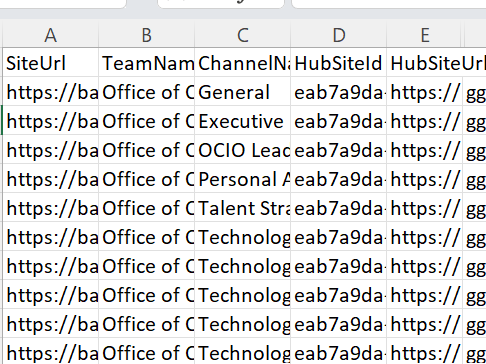
cls

# Connection variables
$invocation = (Get-Variable MyInvocation).Value
$directorypath = Split-Path $invocation.MyCommand.Path
$csvPath = Join-Path $directorypath 'Sites.csv' # CSV should have a column 'SiteUrl'
$clientId = 'xxxxxxxxxx'
$domain = 'contoso'
$adminSiteURL = "https://$domain.sharepoint.com"

# Read sites from CSV
$sites = Import-Csv -Path $csvPath

foreach ($s in $sites) {
    $siteUrl = $s.SiteUrl
    Write-Host "Connecting to site: $siteUrl"

    $siteconn = Connect-PnPOnline -Url $siteUrl -ClientId $clientId -ReturnConnection
    $site = Get-PnPSite -Includes GroupId, RelatedGroupId, RootWeb.Title, HubSiteId -Connection $siteconn

    $TeamName = ''
    $ChannelName = ''
    $HubSiteId = ''
    $HubSiteUrl = ''

    if ($site.GroupId -ne [Guid]::Empty) {
        # Team root site
        $TeamName = $site.RootWeb.Title
        $ChannelName = 'General'
        $HubSiteId = $siteInfo.HubSiteId
        $HubSiteUrl = (HubSiteId.Guid | Get-PnPHubSite).SiteUrl
    }
    elseif ($site.RelatedGroupId) {
        # Channel or connected site
        $TeamName = (Get-PnPMicrosoft365Group -Identity $site.RelatedGroupId).DisplayName
        $ChannelName = $site.RootWeb.Title -Replace "$TeamName-", ''
        $HubSiteId = $siteInfo.HubSiteId
        $HubSiteUrl = (HubSiteId.Guid | Get-PnPHubSite).SiteUrl
    }

    # Add to results array
    $results += [PSCustomObject]@{
        SiteUrl     = $siteUrl
        TeamName    = $TeamName
        ChannelName = $ChannelName
        HubSiteId = $HubSiteId
        HubSiteUrl  = $HubSiteUrl
    }
}

$results | Export-Csv -Path ($directorypath + "\TeamsChannelsExport.csv") -NoTypeInformation -Encoding UTF8
Check out the PnP PowerShell to learn more at: https://aka.ms/pnp/powershell
The way you login into PnP PowerShell has changed please read PnP Management Shell EntraID app is deleted : what should I do ?
Source Credit
Sample first appeared on Find Teams, Channels, Hub Site associated with a SharePoint URL
Contributors
| Author(s) |
|---|
| Reshmee Auckloo |
Disclaimer
THESE SAMPLES ARE PROVIDED AS IS WITHOUT WARRANTY OF ANY KIND, EITHER EXPRESS OR IMPLIED, INCLUDING ANY IMPLIED WARRANTIES OF FITNESS FOR A PARTICULAR PURPOSE, MERCHANTABILITY, OR NON-INFRINGEMENT.