Migrate Teams Channel Messages
Summary
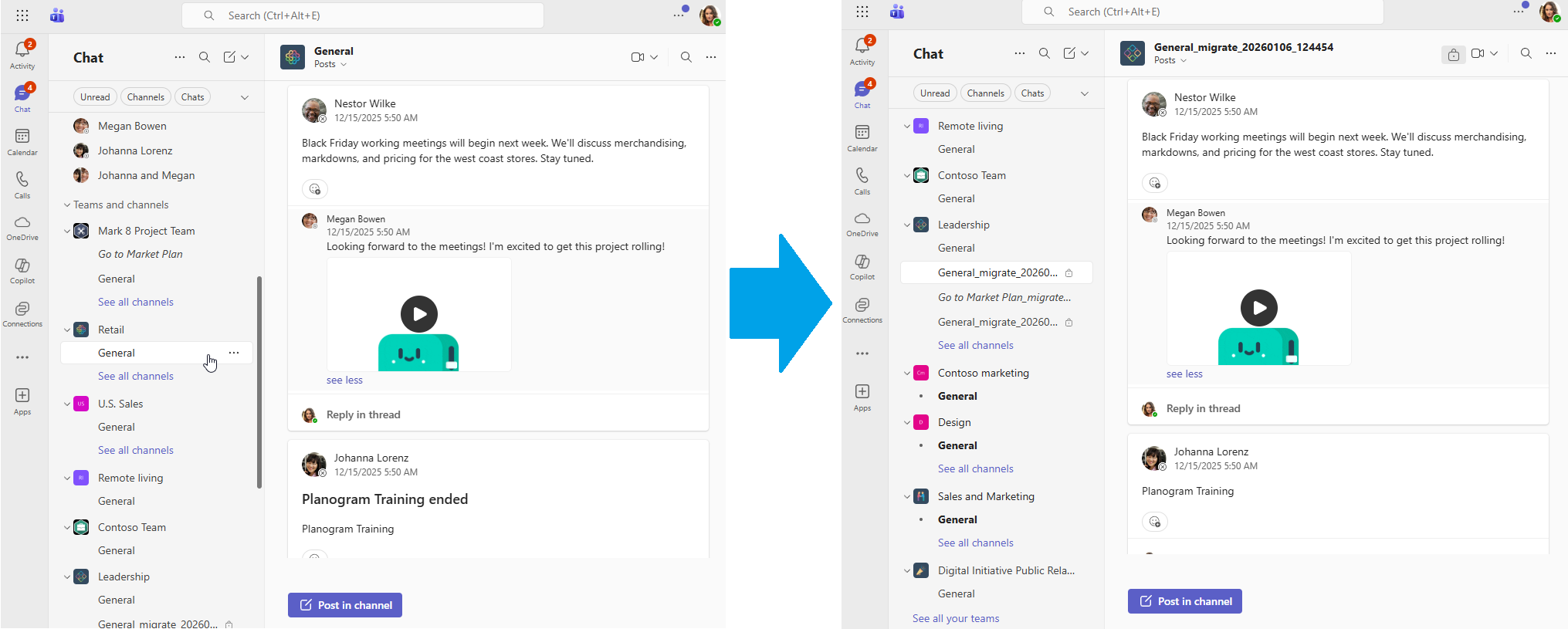
This script provides a solution for migrating Teams channel content using the Microsoft Graph API with certificate-based authentication. It creates a new channel in the destination Team and migrates all messages, replies, and files while maintaining the original conversation structure and timestamps. This can also upgrade Standard Channels to Shared or Private Channels.
The script follows these steps:
- Authenticates to Graph API using certificate-based authentication
- Looks up team IDs from source and destination team names
- Looks up source channel ID from channel name
- Validates channel type and owner requirements for Private and Shared Channels
- Retrieves source channel information including Title and Description
- Creates new channel with timestamped name (e.g., "General_migrate_20260107_143052")
- Starts migration mode on the new channel
- Copies all files from source channel's SharePoint folder (with retry logic for private/shared channels)
- Retrieves all messages including replies from source channel
- Migrates messages with preserved authorship and timestamps
- Finalizes migration mode
Features
What Gets Migrated
- All files in the channel's SharePoint folder (recursively copied)
- All channel messages with original timestamps preserved
- All replies to messages with conversation threading intact
- Message formatting and @mentions
- Inline images (hostedContents)
- File attachments
- Original message authors (or uses fallback user for deleted accounts)
What Doesn't Get Migrated
- Deleted messages (cannot be retrieved from API)
- System messages (without user information)
- Reactions (likes, hearts, etc.)
- Non-Unicode Chars (Some Emojis are non unicode)
- Messages with missing/empty content
- Emojis and certain Unicode characters (automatically removed to prevent API errors)
Prerequisites
Required Microsoft Graph Application Permissions
Your Azure AD application must have the following Application permissions (not Delegated):
Teamwork.Migrate.All- CRITICAL for message migration with historical timestampsUser.ReadBasic.All- To look up user informationChannelMessage.Read.All- To read messages from source channelChannel.ReadBasic.All- To read channel informationChannel.Create- To create destination channelTeam.ReadBasic.All- To read team informationFiles.ReadWrite.All- To copy channel files from SharePoint
Usage
Basic Migration (Standard Channel)
.\teams-migrate-channelmessages.ps1 `
    -SourceTeamName "Sales Team" `
    -SourceChannelName "General" `
    -DestinationTeamName "Archive Team" `
    -TenantId "34120a19-2a32-48c7-834a-87218704e000" `
    -ClientId "bb1b1d44-41c4-4d56-a68f-f8a0920000a1" `
    -CertificateThumbprint "751B60033CFD0B9F3FCAE0B4D0C8B0B00F09A24E"
Migration with Fallback User
For handling messages from deleted users, bots, and apps:
.\teams-migrate-channelmessages.ps1 `
    -SourceTeamName "Sales Team" `
    -SourceChannelName "Sales Team" `
    -DestinationTeamName "Archive Team" `
    -TenantId "34120a19-2a32-48c7-834a-87218704e000" `
    -ClientId "bb1b1d44-41c4-4d56-a68f-f8a0920000a1" `
    -CertificateThumbprint "751B60033CFD0B9F3FCAE0B4D0C8B0B00F09A24E" `
    -FallbackUserUPN "admin@contoso.com" `
    -FallbackUserDisplayName "Migration Bot"
Migrate to a Private Channel
.\teams-migrate-channelmessages.ps1 `
    -SourceTeamName "Sales Team" `
    -SourceChannelName "Confidential Deals" `
    -DestinationTeamName "Archive Team" `
    -ChannelType "Private" `
    -ChannelOwnerUPN "admin@contoso.com" `
    -TenantId "34120a19-2a32-48c7-834a-87218704e000" `
    -ClientId "bb1b1d44-41c4-4d56-a68f-f8a0920000a1" `
    -CertificateThumbprint "751B60033CFD0B9F3FCAE0B4D0C8B0B00F09A24E"
<#
.SYNOPSIS
Migrates all messages and files from a Teams channel to a new channel in a different team.
.DESCRIPTION
This script performs a complete migration of a Teams channel including:
- All channel files from SharePoint (documents, images, etc.)
- All channel messages with preserved authorship and timestamps
- Conversation threading (replies to messages)
- Inline images and attachments
- Support for messages from deleted users (using fallback user)
Uses certificate-based authentication for Microsoft Graph API access.
The new channel is created with a timestamped name and can be configured as Standard, Private, or Shared.
IMPORTANT: Requires the following Microsoft Graph Application permissions:
- Teamwork.Migrate.All
- User.ReadBasic.All
- ChannelMessage.Read.All
- Channel.ReadBasic.All
- Channel.Create
- Team.ReadBasic.All
- Files.ReadWrite.All
.PARAMETER SourceTeamName
The display name of the source team containing the channel to migrate.
The script will automatically look up the team ID from the name.
.PARAMETER SourceChannelName
The display name of the channel to migrate from (e.g., "General", "Sales").
The script will automatically look up the channel ID from the name.
.PARAMETER DestinationTeamName
The display name of the destination team where the new channel and content will be created.
The script will automatically look up the team ID from the name.
.PARAMETER TenantId
The Azure AD Tenant ID (GUID).
Found in Azure Portal > Azure Active Directory > Properties > Tenant ID.
.PARAMETER ClientId
The Azure AD Application (Client) ID (GUID).
Found in Azure Portal > Azure Active Directory > App registrations > Your App > Application ID.
.PARAMETER CertificateThumbprint
The thumbprint of the certificate used for authentication.
The certificate must be uploaded to the Azure AD application and installed in the certificate store.
.PARAMETER FallbackUserUPN
Optional. The User Principal Name (email address) to use as the author for messages from deleted users, bots, and apps.
When a message author no longer exists in the tenant, or when the message is from a bot/app,
the message will be attributed to this user with the original author/source noted in the message content.
Example: "MigrationBot1@demo.netwoven.com"
.PARAMETER FallbackUserDisplayName
Optional. The display name for the fallback user (shown in migrated messages).
Default: "Former Team Member"
Example: "Migration Bot" or "Archive Service"
.PARAMETER ChannelType
Optional. The type of channel to create in the destination team.
Valid values: "Standard", "Private", "Shared"
Default: "Standard"
Note: For Private and Shared channels, you must provide ChannelOwnerUPN.
.PARAMETER ChannelOwnerUPN
Required when ChannelType is "Private" or "Shared". The User Principal Name (email) of the user who will be the owner of the new channel.
This user must be a member of the destination team.
Example: "admin@contoso.com"
.PARAMETER LogFilePath
Optional. Path to the log file where detailed migration information will be written.
Default: "TeamsMigration_<timestamp>.log" in the current directory.
.EXAMPLE
# Basic migration using team and channel names
.\Migrate-TeamChannelMessages.ps1 `
-SourceTeamName "Sales Team" `
-SourceChannelName "General" `
-DestinationTeamName "Archive Team" `
-TenantId "34120a19-2a32-48c7-834a-87218704e000" `
-ClientId "bb1b1d44-41c4-4d56-a68f-f8a0920000a1" `
-CertificateThumbprint "751B60033CFD0B9F3FCAE0B4D0C8B0B00F09A24E"
.EXAMPLE
# Migration with fallback user for deleted accounts
.\Migrate-TeamChannelMessages.ps1 `
-SourceTeamName "Sales Team" `
-SourceChannelName "Sales Team" `
-DestinationTeamName "Archive Team" `
-TenantId "34120a19-2a32-48c7-834a-87218704e000" `
-ClientId "bb1b1d44-41c4-4d56-a68f-f8a0920000a1" `
-CertificateThumbprint "751B60033CFD0B9F3FCAE0B4D0C8B0B00F09A24E" `
-FallbackUserUPN "MigrationBot@contoso.com" `
-FallbackUserDisplayName "Migration Bot"
.EXAMPLE
# Migration creating a private channel
.\Migrate-TeamChannelMessages.ps1 `
-SourceTeamName "Sales Team" `
-SourceChannelName "Confidential Deals" `
-DestinationTeamName "Archive Team" `
-ChannelType "Private" `
-ChannelOwnerUPN "admin@contoso.com" `
-TenantId "34120a19-2a32-48c7-834a-87218704e000" `
-ClientId "bb1b1d44-41c4-4d56-a68f-f8a0920000a1" `
-CertificateThumbprint "751B60033CFD0B9F3FCAE0B4D0C8B0B00F09A24E"
.NOTES
Author: Matt Maher
Version: 4.2
PowerShell: 7.0+
Migration Process:
1. Authenticates using certificate-based authentication
2. Looks up source and destination team IDs from team names
3. Looks up source channel ID from channel name
4. Validates channel type and owner requirements
5. Retrieves source channel information
6. Creates new channel with timestamped name (Standard/Private/Shared)
7. Starts migration mode on new channel
8. Copies all files from source channel's SharePoint folder
- For Private/Shared channels: Includes automatic retry logic (up to 10 retries, 30 sec intervals)
to wait for backend storage provisioning
9. Retrieves all messages and replies from source channel
10. Migrates messages with preserved authorship and timestamps
- Automatically removes unsupported Unicode characters (emojis) that cause API errors
11. Finalizes migration mode
What Gets Migrated:
- All files in the channel's SharePoint folder (recursively)
- All channel messages with original timestamps
- All replies to messages (conversation threading)
- Message formatting and mentions
- Inline images (hostedContents)
- File attachments
- Original message authors (or fallback user if author deleted)
What Doesn't Get Migrated:
- Deleted messages
- System messages (without user information)
- Messages with missing/empty content
- Emojis and certain Unicode characters (automatically removed to prevent API errors)
#>
[CmdletBinding()]
param(
[Parameter(Mandatory = $true, HelpMessage = "Source Team Name")]
[ValidateNotNullOrEmpty()]
[string]$SourceTeamName,
[Parameter(Mandatory = $true, HelpMessage = "Source Channel Name")]
[ValidateNotNullOrEmpty()]
[string]$SourceChannelName,
[Parameter(Mandatory = $true, HelpMessage = "Destination Team Name")]
[ValidateNotNullOrEmpty()]
[string]$DestinationTeamName,
[Parameter(Mandatory = $true, HelpMessage = "Azure AD Tenant ID")]
[ValidateNotNullOrEmpty()]
[string]$TenantId,
[Parameter(Mandatory = $true, HelpMessage = "Azure AD Client ID")]
[ValidateNotNullOrEmpty()]
[string]$ClientId,
[Parameter(Mandatory = $true, HelpMessage = "Certificate Thumbprint")]
[ValidateNotNullOrEmpty()]
[string]$CertificateThumbprint,
[Parameter(Mandatory = $false, HelpMessage = "Fallback User UPN (email) for messages from deleted users, bots, and apps")]
[string]$FallbackUserUPN = $null,
[Parameter(Mandatory = $false, HelpMessage = "Fallback User Display Name")]
[string]$FallbackUserDisplayName = "Former Team Member",
[Parameter(Mandatory = $false, HelpMessage = "Channel Type (Standard, Private, or Shared)")]
[ValidateSet('Standard', 'Private', 'Shared')]
[string]$ChannelType = "Standard",
[Parameter(Mandatory = $false, HelpMessage = "Channel Owner UPN (required for Private and Shared channels)")]
[string]$ChannelOwnerUPN = $null,
[Parameter(Mandatory = $false, HelpMessage = "Log file path")]
[string]$LogFilePath = "TeamsMigration_$(Get-Date -Format 'yyyyMMdd_HHmmss').log"
)
#region Helper Functions
function Write-Log {
param(
[Parameter(Mandatory = $true)]
[string]$Message,
[Parameter(Mandatory = $false)]
[ValidateSet('Info', 'Success', 'Warning', 'Error')]
[string]$Level = 'Info'
)
$timestamp = Get-Date -Format 'yyyy-MM-dd HH:mm:ss'
$logMessage = "[$timestamp] [$Level] $Message"
# Color mapping
$color = switch ($Level) {
'Success' { 'Green' }
'Warning' { 'Yellow' }
'Error' { 'Red' }
default { 'White' }
}
Write-Host $logMessage -ForegroundColor $color
Add-Content -Path $LogFilePath -Value $logMessage
}
function Get-GraphAccessToken {
param(
[Parameter(Mandatory = $true)]
[string]$TenantId,
[Parameter(Mandatory = $true)]
[string]$ClientId,
[Parameter(Mandatory = $true)]
[string]$CertificateThumbprint
)
try {
Write-Log "Acquiring Graph API access token..."
# Get certificate from store using .NET API
$cert = $null
$store = [System.Security.Cryptography.X509Certificates.X509Store]::new("My", "CurrentUser")
$store.Open([System.Security.Cryptography.X509Certificates.OpenFlags]::ReadOnly)
$cert = $store.Certificates | Where-Object { $_.Thumbprint -eq $CertificateThumbprint }
$store.Close()
if (-not $cert) {
$store = [System.Security.Cryptography.X509Certificates.X509Store]::new("My", "LocalMachine")
$store.Open([System.Security.Cryptography.X509Certificates.OpenFlags]::ReadOnly)
$cert = $store.Certificates | Where-Object { $_.Thumbprint -eq $CertificateThumbprint }
$store.Close()
}
if (-not $cert) {
throw "Certificate not found with thumbprint: $CertificateThumbprint"
}
if (-not $cert.HasPrivateKey) {
throw "Certificate does not have a private key"
}
Write-Log "Certificate found: $($cert.Subject)"
# Build JWT token for authentication
$scope = "https://graph.microsoft.com/.default"
$tokenEndpoint = "https://login.microsoftonline.com/$TenantId/oauth2/v2.0/token"
$now = [Math]::Floor([DateTime]::UtcNow.Subtract([DateTime]::Parse("1970-01-01")).TotalSeconds)
$exp = $now + 300
# Create JWT header
$certHash = $cert.GetCertHash()
$x5t = [Convert]::ToBase64String($certHash).TrimEnd('=').Replace('+', '-').Replace('/', '_')
$header = @{
alg = "RS256"
typ = "JWT"
x5t = $x5t
} | ConvertTo-Json -Compress
# Create JWT payload
$payload = @{
aud = $tokenEndpoint
exp = $exp
iss = $ClientId
jti = [Guid]::NewGuid().ToString()
nbf = $now
sub = $ClientId
} | ConvertTo-Json -Compress
# Base64URL encode
$headerEncoded = [Convert]::ToBase64String([System.Text.Encoding]::UTF8.GetBytes($header)).TrimEnd('=').Replace('+', '-').Replace('/', '_')
$payloadEncoded = [Convert]::ToBase64String([System.Text.Encoding]::UTF8.GetBytes($payload)).TrimEnd('=').Replace('+', '-').Replace('/', '_')
# Sign the JWT
$jwtToken = "$headerEncoded.$payloadEncoded"
$dataToSign = [System.Text.Encoding]::UTF8.GetBytes($jwtToken)
$rsa = [System.Security.Cryptography.X509Certificates.RSACertificateExtensions]::GetRSAPrivateKey($cert)
$signature = $rsa.SignData($dataToSign, [System.Security.Cryptography.HashAlgorithmName]::SHA256, [System.Security.Cryptography.RSASignaturePadding]::Pkcs1)
$signatureEncoded = [Convert]::ToBase64String($signature).TrimEnd('=').Replace('+', '-').Replace('/', '_')
$clientAssertion = "$jwtToken.$signatureEncoded"
# Request access token
$body = @{
client_id = $ClientId
client_assertion_type = "urn:ietf:params:oauth:client-assertion-type:jwt-bearer"
client_assertion = $clientAssertion
scope = $scope
grant_type = "client_credentials"
}
$response = Invoke-RestMethod -Method Post -Uri $tokenEndpoint -Body $body -ContentType "application/x-www-form-urlencoded"
Write-Log "Access token acquired successfully" -Level Success
return $response.access_token
} catch {
Write-Log "Failed to acquire access token: $($_.Exception.Message)" -Level Error
throw
}
}
function Invoke-GraphApiRequest {
param(
[Parameter(Mandatory = $true)]
[string]$Uri,
[Parameter(Mandatory = $true)]
[string]$AccessToken,
[Parameter(Mandatory = $false)]
[ValidateSet('GET', 'POST', 'PATCH', 'DELETE')]
[string]$Method = 'GET',
[Parameter(Mandatory = $false)]
[object]$Body = $null
)
try {
$headers = @{
'Authorization' = "Bearer $AccessToken"
'Content-Type' = 'application/json'
}
$params = @{
Uri = $Uri
Headers = $headers
Method = $Method
ResponseHeadersVariable = 'responseHeaders'
}
if ($Body -and $Method -ne 'GET') {
$params.Body = ($Body | ConvertTo-Json -Depth 10 -Compress)
}
$result = Invoke-RestMethod @params
return $result
} catch {
$errorMessage = $_.Exception.Message
$fullResponseInfo = @{
StatusCode = $null
StatusDescription = $null
Headers = @{}
Body = $null
}
# Capture full response details
if ($_.Exception.Response) {
$response = $_.Exception.Response
$fullResponseInfo.StatusCode = [int]$response.StatusCode
$fullResponseInfo.StatusDescription = $response.StatusDescription
# Capture all headers
foreach ($header in $response.Headers) {
$fullResponseInfo.Headers[$header.Key] = $header.Value -join ', '
}
}
# Capture response body
if ($_.ErrorDetails.Message) {
$fullResponseInfo.Body = $_.ErrorDetails.Message
$errorDetails = $_.ErrorDetails.Message | ConvertFrom-Json
$errorMessage += " - $($errorDetails.error.message)"
}
# Build detailed error message with full response
if($Debug){
$errorMessage += "`n`n === FULL HTTP RESPONSE ==="
$errorMessage += "`n Status: $($fullResponseInfo.StatusCode) $($fullResponseInfo.StatusDescription)"
$errorMessage += "`n`n Response Headers:"
foreach ($key in $fullResponseInfo.Headers.Keys | Sort-Object) {
$errorMessage += "`n $key`: $($fullResponseInfo.Headers[$key])"
}
$errorMessage += "`n`n Response Body:"
if ($fullResponseInfo.Body) {
$errorMessage += "`n$($fullResponseInfo.Body)"
} else {
$errorMessage += "`n (empty)"
}
$errorMessage += "`n ==========================="
}
throw $errorMessage
}
}
function Get-AllMessages {
param(
[Parameter(Mandatory = $true)]
[string]$TeamId,
[Parameter(Mandatory = $true)]
[string]$ChannelId,
[Parameter(Mandatory = $true)]
[string]$AccessToken
)
$allMessages = @()
# Attachments and hostedContents are included by default in the beta API
$uri = "https://graph.microsoft.com/beta/teams/$TeamId/channels/$ChannelId/messages"
do {
$response = Invoke-GraphApiRequest -Uri $uri -AccessToken $AccessToken -Method GET
if ($response.value) {
$allMessages += $response.value
}
$uri = $response.'@odata.nextLink'
} while ($uri)
return $allMessages
}
function Get-MessageReplies {
param(
[Parameter(Mandatory = $true)]
[string]$TeamId,
[Parameter(Mandatory = $true)]
[string]$ChannelId,
[Parameter(Mandatory = $true)]
[string]$MessageId,
[Parameter(Mandatory = $true)]
[string]$AccessToken
)
$allReplies = @()
# Attachments and hostedContents are included by default in the beta API
$uri = "https://graph.microsoft.com/beta/teams/$TeamId/channels/$ChannelId/messages/$MessageId/replies"
try {
do {
$response = Invoke-GraphApiRequest -Uri $uri -AccessToken $AccessToken -Method GET
if ($response.value) {
$allReplies += $response.value
}
$uri = $response.'@odata.nextLink'
} while ($uri)
} catch {
Write-Log "Warning: Could not retrieve replies for message $MessageId" -Level Warning
}
return $allReplies
}
function Remove-UnsupportedUnicodeCharacters {
param(
[Parameter(Mandatory = $true)]
[string]$Content
)
if ([string]::IsNullOrEmpty($Content)) {
return $Content
}
# Remove or replace unsupported Unicode characters
# This includes emojis and other characters outside the Basic Multilingual Plane (BMP)
# Characters with code points above U+FFFF (supplementary characters)
$sanitized = $Content
# Remove characters outside BMP (surrogate pairs and supplementary characters)
# These are typically emojis and special symbols
$sanitized = [regex]::Replace($sanitized, '[\uD800-\uDFFF]', '')
# Remove specific problematic Unicode ranges
# Emoticons: U+1F600-U+1F64F
# Transport symbols: U+1F680-U+1F6FF
# Misc symbols: U+1F700-U+1F77F
# And other common emoji ranges
# Since .NET regex doesn't handle surrogate pairs well, we'll iterate through chars
$chars = [System.Collections.Generic.List[char]]::new()
$i = 0
while ($i -lt $sanitized.Length) {
$char = $sanitized[$i]
# Check if this is a high surrogate (start of a surrogate pair)
if ([char]::IsHighSurrogate($char)) {
# Skip this character and the next one (the low surrogate)
if ($i + 1 -lt $sanitized.Length -and [char]::IsLowSurrogate($sanitized[$i + 1])) {
# Get the full Unicode code point
$codePoint = [char]::ConvertToUtf32($char, $sanitized[$i + 1])
# Skip emoji ranges and other problematic characters
# Common emoji ranges: 0x1F300-0x1F9FF
if ($codePoint -ge 0x1F300 -and $codePoint -le 0x1F9FF) {
# Skip both characters of the surrogate pair
$i += 2
continue
} elseif ($codePoint -ge 0x2600 -and $codePoint -le 0x26FF) {
# Misc symbols
$i += 2
continue
} elseif ($codePoint -ge 0x2700 -and $codePoint -le 0x27BF) {
# Dingbats
$i += 2
continue
}
# Keep the character pair
$chars.Add($char)
$i++
if ($i -lt $sanitized.Length) {
$chars.Add($sanitized[$i])
}
}
$i++
} else {
# Regular character, keep it
$chars.Add($char)
$i++
}
}
return [string]::new($chars.ToArray())
}
function New-MigratedMessage {
param(
[Parameter(Mandatory = $true)]
[object]$SourceMessage,
[Parameter(Mandatory = $true)]
[string]$DestinationTeamId,
[Parameter(Mandatory = $true)]
[string]$DestinationChannelId,
[Parameter(Mandatory = $true)]
[string]$AccessToken,
[Parameter(Mandatory = $false)]
[string]$ParentMessageId = $null,
[Parameter(Mandatory = $false)]
[string]$FallbackUserId = $null,
[Parameter(Mandatory = $false)]
[string]$FallbackUserDisplayName = "Former Team Member"
)
# Prepare message content and handle inline images
$originalAuthor = $null
$isBotOrApp = $false
$botOrAppName = "Unknown Bot/App"
if ($SourceMessage.from -and $SourceMessage.from.user) {
$originalAuthor = $SourceMessage.from.user.displayName
$originalUserId = $SourceMessage.from.user.id
} elseif ($SourceMessage.from) {
# This is a bot or app message
$isBotOrApp = $true
if ($SourceMessage.from.application) {
$botOrAppName = $SourceMessage.from.application.displayName
} elseif ($SourceMessage.from.device) {
$botOrAppName = $SourceMessage.from.device.displayName
}
}
# Copy hosted contents (inline images) if present
$hostedContentResult = Copy-HostedContents -SourceMessage $SourceMessage `
-DestinationTeamId $DestinationTeamId `
-DestinationChannelId $DestinationChannelId `
-AccessToken $AccessToken `
-ParentMessageId $ParentMessageId
# Prepare message content
$messageContent = $hostedContentResult.updatedContent
# Remove unsupported Unicode characters (emojis, etc.) that cause 400 errors
$messageContent = Remove-UnsupportedUnicodeCharacters -Content $messageContent
# If this is a bot/app message and we have a fallback user, add attribution
if ($isBotOrApp -and $FallbackUserId) {
$attributionHeader = "<p><em>[Originally posted by bot/app: <strong>$botOrAppName</strong>]</em></p><hr/>"
if ($SourceMessage.body.contentType -eq "html") {
$messageContent = $attributionHeader + $messageContent
} else {
$messageContent = "[Originally posted by bot/app: $botOrAppName]`n`n" + $messageContent
}
}
# Build message body for migration
$messageBody = @{
body = @{
content = $messageContent
contentType = $SourceMessage.body.contentType
}
}
# Add created timestamp (required for migration)
if ($SourceMessage.createdDateTime) {
$messageBody.createdDateTime = $SourceMessage.createdDateTime
}
# Add author information (required for migration)
if ($SourceMessage.from -and $SourceMessage.from.user) {
# Regular user message
$messageBody.from = @{
user = @{
id = $SourceMessage.from.user.id
displayName = $SourceMessage.from.user.displayName
userIdentityType = "aadUser"
}
}
} elseif ($isBotOrApp -and $FallbackUserId) {
# Bot/app message - use fallback user
$messageBody.from = @{
user = @{
id = $FallbackUserId
displayName = $FallbackUserDisplayName
userIdentityType = "aadUser"
}
}
}
# Add subject if present
if ($SourceMessage.subject) {
$messageBody.subject = $SourceMessage.subject
}
# Add importance
if ($SourceMessage.importance) {
$messageBody.importance = $SourceMessage.importance
}
# Add mentions if present
if ($SourceMessage.mentions -and $SourceMessage.mentions.Count -gt 0) {
$messageBody.mentions = $SourceMessage.mentions
}
# Add attachments if present (file references)
if ($SourceMessage.attachments -and $SourceMessage.attachments.Count -gt 0) {
$messageBody.attachments = $SourceMessage.attachments
}
# Add hosted contents (inline images) if we successfully copied them
if ($hostedContentResult.hostedContents -and $hostedContentResult.hostedContents.Count -gt 0) {
$messageBody.hostedContents = $hostedContentResult.hostedContents
}
# Determine the endpoint
if ($ParentMessageId) {
# This is a reply
$uri = "https://graph.microsoft.com/beta/teams/$DestinationTeamId/channels/$DestinationChannelId/messages/$ParentMessageId/replies"
} else {
# This is a top-level message
$uri = "https://graph.microsoft.com/beta/teams/$DestinationTeamId/channels/$DestinationChannelId/messages"
}
# Try to post the message
try {
return Invoke-GraphApiRequest -Uri $uri -AccessToken $AccessToken -Method POST -Body $messageBody
} catch {
# Check if error is "user not found" and we have a fallback user
if ($_.Exception.Message -match "could not be found in the tenant" -and $FallbackUserId) {
Write-Host " Original author not found, using fallback user..." -ForegroundColor Yellow
# Prepend original author attribution to message content
$attributionHeader = "<p><em>[Originally posted by: <strong>$originalAuthor</strong>]</em></p><hr/>"
if ($messageBody.body.contentType -eq "html") {
$messageBody.body.content = $attributionHeader + $messageBody.body.content
} else {
$messageBody.body.content = "[Originally posted by: $originalAuthor]`n`n" + $messageBody.body.content
}
# Replace author with fallback user
$messageBody.from = @{
user = @{
id = $FallbackUserId
displayName = $FallbackUserDisplayName
userIdentityType = "aadUser"
}
}
# Retry with fallback user
return Invoke-GraphApiRequest -Uri $uri -AccessToken $AccessToken -Method POST -Body $messageBody
} else {
# Re-throw if it's a different error or no fallback configured
throw
}
}
}
function Copy-HostedContents {
param(
[Parameter(Mandatory = $true)]
[object]$SourceMessage,
[Parameter(Mandatory = $true)]
[string]$DestinationTeamId,
[Parameter(Mandatory = $true)]
[string]$DestinationChannelId,
[Parameter(Mandatory = $true)]
[string]$AccessToken,
[Parameter(Mandatory = $false)]
[string]$ParentMessageId = $null
)
if (-not $SourceMessage.hostedContents -or $SourceMessage.hostedContents.Count -eq 0) {
return @{
hostedContents = @()
updatedContent = $SourceMessage.body.content
}
}
$newHostedContents = @()
$updatedContent = $SourceMessage.body.content
foreach ($hostedContent in $SourceMessage.hostedContents) {
try {
# Create new hosted content with the same data
$newHostedContent = @{
"@microsoft.graph.temporaryId" = $hostedContent.id
contentBytes = $hostedContent.contentBytes
contentType = $hostedContent.contentType
}
$newHostedContents += $newHostedContent
# Update references in the message body if needed
# The contentUrl format is: ../hostedContents/{id}/$value
if ($updatedContent -match $hostedContent.id) {
# References will be updated automatically by Teams using the temporaryId
}
} catch {
Write-Log "Warning: Could not copy hosted content $($hostedContent.id): $($_.Exception.Message)" -Level Warning
}
}
return @{
hostedContents = $newHostedContents
updatedContent = $updatedContent
}
}
function Copy-ChannelFiles {
param(
[Parameter(Mandatory = $true)]
[string]$SourceTeamId,
[Parameter(Mandatory = $true)]
[string]$SourceChannelId,
[Parameter(Mandatory = $true)]
[string]$DestinationTeamId,
[Parameter(Mandatory = $true)]
[string]$DestinationChannelId,
[Parameter(Mandatory = $true)]
[string]$AccessToken
)
try {
Write-Log "Retrieving source channel files folder..." -Level Info
# Get source channel's files folder
$sourceFolderUri = "https://graph.microsoft.com/v1.0/teams/$SourceTeamId/channels/$SourceChannelId/filesFolder"
$sourceFolder = Invoke-GraphApiRequest -Uri $sourceFolderUri -AccessToken $AccessToken -Method GET
Write-Log "Source folder: $($sourceFolder.webUrl)" -Level Info
# Get destination channel's files folder with retry logic
# Private and Shared channels may take time for backend storage to be provisioned
$destFolderUri = "https://graph.microsoft.com/v1.0/teams/$DestinationTeamId/channels/$DestinationChannelId/filesFolder"
$destFolder = $null
$maxRetries = 10
$retryDelaySeconds = 30
$currentRetry = 0
while ($currentRetry -lt $maxRetries) {
try {
$destFolder = Invoke-GraphApiRequest -Uri $destFolderUri -AccessToken $AccessToken -Method GET
Write-Log "Destination folder: $($destFolder.webUrl)" -Level Success
break
} catch {
$errorMessage = $_.Exception.Message
# Check if this is the "not ready yet" error
if ($errorMessage -match "not ready yet|please try again later") {
$currentRetry++
if ($currentRetry -lt $maxRetries) {
Write-Log "Destination channel folder not ready yet. Waiting $retryDelaySeconds seconds before retry $currentRetry/$maxRetries..." -Level Warning
Start-Sleep -Seconds $retryDelaySeconds
} else {
throw "Destination channel folder did not become ready after $maxRetries attempts. Error: $errorMessage"
}
} else {
# Different error, don't retry
throw
}
}
}
if (-not $destFolder) {
throw "Failed to retrieve destination channel files folder after $maxRetries retries"
}
# Get all files from source folder recursively
$allFiles = Get-FolderFilesRecursive -DriveId $sourceFolder.parentReference.driveId -FolderId $sourceFolder.id -AccessToken $AccessToken
if ($allFiles.Count -eq 0) {
Write-Log "No files found in source channel" -Level Warning
return @{ Copied = 0; Failed = 0 }
}
Write-Log "Found $($allFiles.Count) files to copy" -Level Success
Write-Host ""
$copiedCount = 0
$failedCount = 0
foreach ($file in $allFiles) {
try {
Write-Log " Copying: $($file.name)" -Level Info
# Copy the file to destination
$copyUri = "https://graph.microsoft.com/v1.0/drives/$($sourceFolder.parentReference.driveId)/items/$($file.id)/copy"
$copyBody = @{
parentReference = @{
driveId = $destFolder.parentReference.driveId
id = $destFolder.id
}
name = $file.name
}
# The copy operation is asynchronous - it returns a location header to monitor progress
$copyResponse = Invoke-GraphApiRequest -Uri $copyUri -AccessToken $AccessToken -Method POST -Body $copyBody
$copiedCount++
Write-Log " ✓ Copied successfully" -Level Success
} catch {
$failedCount++
Write-Log " ✗ Failed to copy: $($_.Exception.Message)" -Level Error
}
}
Write-Host ""
Write-Log "File copy summary: $copiedCount copied, $failedCount failed" -Level Info
return @{ Copied = $copiedCount; Failed = $failedCount }
} catch {
Write-Log "Error copying channel files: $($_.Exception.Message)" -Level Error
return @{ Copied = 0; Failed = 0 }
}
}
function Get-FolderFilesRecursive {
param(
[Parameter(Mandatory = $true)]
[string]$DriveId,
[Parameter(Mandatory = $true)]
[string]$FolderId,
[Parameter(Mandatory = $true)]
[string]$AccessToken
)
$allFiles = @()
try {
# Get items in current folder
$itemsUri = "https://graph.microsoft.com/v1.0/drives/$DriveId/items/$FolderId/children"
do {
$response = Invoke-GraphApiRequest -Uri $itemsUri -AccessToken $AccessToken -Method GET
if ($response.value) {
foreach ($item in $response.value) {
if ($item.folder) {
# Recursively get files from subfolders
$subFiles = Get-FolderFilesRecursive -DriveId $DriveId -FolderId $item.id -AccessToken $AccessToken
$allFiles += $subFiles
} else {
# Add file to list
$allFiles += $item
}
}
}
$itemsUri = $response.'@odata.nextLink'
} while ($itemsUri)
} catch {
Write-Log "Warning: Could not retrieve files from folder $FolderId : $($_.Exception.Message)" -Level Warning
}
return $allFiles
}
function Get-UserIdByUPN {
param(
[Parameter(Mandatory = $true)]
[string]$UserPrincipalName,
[Parameter(Mandatory = $true)]
[string]$AccessToken
)
try {
$userUri = "https://graph.microsoft.com/v1.0/users/$UserPrincipalName"
$user = Invoke-GraphApiRequest -Uri $userUri -AccessToken $AccessToken -Method GET
return $user.id
} catch {
throw "Failed to find user with UPN '$UserPrincipalName': $($_.Exception.Message)"
}
}
function Get-ChannelIdByName {
param(
[Parameter(Mandatory = $true)]
[string]$TeamId,
[Parameter(Mandatory = $true)]
[string]$ChannelName,
[Parameter(Mandatory = $true)]
[string]$AccessToken
)
try {
$channelsUri = "https://graph.microsoft.com/v1.0/teams/$TeamId/channels"
$response = Invoke-GraphApiRequest -Uri $channelsUri -AccessToken $AccessToken -Method GET
$channel = $response.value | Where-Object { $_.displayName -eq $ChannelName }
if (-not $channel) {
throw "Channel '$ChannelName' not found in team $TeamId"
}
if ($channel.Count -gt 1) {
Write-Log "Warning: Multiple channels found with name '$ChannelName'. Using the first one." -Level Warning
return $channel[0].id
}
return $channel.id
} catch {
throw "Failed to find channel '$ChannelName': $($_.Exception.Message)"
}
}
function Get-TeamIdByName {
param(
[Parameter(Mandatory = $true)]
[string]$TeamName,
[Parameter(Mandatory = $true)]
[string]$AccessToken
)
try {
$teamsUri = "https://graph.microsoft.com/v1.0/teams?`$select=id,displayName&`$filter=displayName eq '$TeamName'"
$allTeams = @()
do {
$response = Invoke-GraphApiRequest -Uri $teamsUri -AccessToken $AccessToken -Method GET
if ($response.value) {
$allTeams += $response.value
}
$teamsUri = $response.'@odata.nextLink'
} while ($teamsUri)
$team = $allTeams | Where-Object { $_.displayName -eq $TeamName }
if (-not $team) {
throw "Team '$TeamName' not found in tenant"
}
if ($team.Count -gt 1) {
Write-Log "Warning: Multiple teams found with name '$TeamName'. Using the first one." -Level Warning
return $team[0].id
}
return $team.id
} catch {
throw "Failed to find team '$TeamName': $($_.Exception.Message)"
}
}
#endregion
#region Main Script
try {
Write-Log "========================================" -Level Info
Write-Log "Teams Channel Message Migration Script" -Level Info
Write-Log "========================================" -Level Info
Write-Log "PowerShell Version: $($PSVersionTable.PSVersion)"
Write-Log "Source Team: $SourceTeamName"
Write-Log "Source Channel: $SourceChannelName"
Write-Log "Destination Team: $DestinationTeamName"
Write-Log "Log File: $LogFilePath"
Write-Host ""
# Step 1: Authenticate
Write-Log "[Step 1/8] Authenticating..." -Level Info
$accessToken = Get-GraphAccessToken -TenantId $TenantId -ClientId $ClientId -CertificateThumbprint $CertificateThumbprint
Write-Host ""
# Step 1.5: Lookup team IDs from names
Write-Log "[Step 1.5/8] Looking up team IDs..." -Level Info
Write-Log "Looking up source team ID from name: $SourceTeamName" -Level Info
$SourceTeamId = Get-TeamIdByName -TeamName $SourceTeamName -AccessToken $accessToken
Write-Log "Found source team ID: $SourceTeamId" -Level Success
Write-Log "Looking up destination team ID from name: $DestinationTeamName" -Level Info
$DestinationTeamId = Get-TeamIdByName -TeamName $DestinationTeamName -AccessToken $accessToken
Write-Log "Found destination team ID: $DestinationTeamId" -Level Success
Write-Host ""
# Step 1.6: Lookup source channel ID from name
Write-Log "[Step 1.6/8] Looking up source channel ID..." -Level Info
$SourceChannelId = Get-ChannelIdByName -TeamId $SourceTeamId -ChannelName $SourceChannelName -AccessToken $accessToken
Write-Log "Found channel ID: $SourceChannelId" -Level Success
Write-Host ""
# Step 1.7: Configure fallback user for deleted user accounts, bots, and apps
$FallbackUserId = $null
if (-not $FallbackUserUPN) {
Write-Log "No fallback user specified. Messages from deleted users, bots, and apps will fail to migrate." -Level Warning
Write-Log "Tip: Provide -FallbackUserUPN to migrate messages from deleted users, bots, and apps" -Level Info
} else {
Write-Log "Looking up fallback user ID from UPN: $FallbackUserUPN" -Level Info
try {
$FallbackUserId = Get-UserIdByUPN -UserPrincipalName $FallbackUserUPN -AccessToken $accessToken
Write-Log "Fallback user configured: $FallbackUserDisplayName ($FallbackUserId)" -Level Success
Write-Log "Messages from deleted users, bots, and apps will be attributed to this user with original author noted" -Level Info
} catch {
Write-Log "Failed to look up fallback user: $($_.Exception.Message)" -Level Error
Write-Log "Messages from deleted users, bots, and apps will fail to migrate." -Level Warning
}
}
Write-Host ""
# Step 2: Get source channel details
Write-Log "[Step 2/8] Retrieving source channel information..." -Level Info
$sourceChannelUri = "https://graph.microsoft.com/v1.0/teams/$SourceTeamId/channels/$SourceChannelId"
$sourceChannel = Invoke-GraphApiRequest -Uri $sourceChannelUri -AccessToken $accessToken -Method GET
Write-Log "Channel Name: $($sourceChannel.displayName)" -Level Success
Write-Log "Description: $($sourceChannel.description)"
Write-Log "Membership Type: $($sourceChannel.membershipType)"
Write-Host ""
# Step 3: Validate channel type and owner requirements
Write-Log "[Step 3/8] Validating channel type configuration..." -Level Info
$newChannelType = $ChannelType.ToLower()
Write-Log "Channel type: $newChannelType" -Level Success
# Validate that ChannelOwnerUPN is provided for Private and Shared channels
if (($newChannelType -eq "private" -or $newChannelType -eq "shared") -and [string]::IsNullOrWhiteSpace($ChannelOwnerUPN)) {
throw "ChannelOwnerUPN parameter is required when creating Private or Shared channels"
}
# Lookup channel owner ID if needed
$ChannelOwnerId = $null
if ($newChannelType -eq "private" -or $newChannelType -eq "shared") {
Write-Log "Looking up channel owner ID from UPN: $ChannelOwnerUPN" -Level Info
try {
$ChannelOwnerId = Get-UserIdByUPN -UserPrincipalName $ChannelOwnerUPN -AccessToken $accessToken
Write-Log "Channel owner: $ChannelOwnerUPN ($ChannelOwnerId)" -Level Success
} catch {
throw "Failed to look up channel owner: $($_.Exception.Message)"
}
}
Write-Host ""
# Step 4: Create new channel
Write-Log "[Step 4/8] Creating new channel in destination team..." -Level Info
# Generate unique channel name with timestamp
$timestamp = Get-Date -Format "yyyyMMdd_HHmmss"
$newChannelName = "$($sourceChannel.displayName)_migrate_$timestamp"
# Ensure name is within 50 character limit
if ($newChannelName.Length -gt 50) {
$newChannelName = $newChannelName.Substring(0, 50)
Write-Log "Channel name truncated to 50 characters: $newChannelName" -Level Warning
}
# Build the channel creation request body
$newChannelBody = @{
"@odata.type" = "#Microsoft.Graph.channel"
displayName = $newChannelName
description = $sourceChannel.description
membershipType = $newChannelType
}
# For Private and Shared channels, add the owner as a member
if ($newChannelType -eq "private" -or $newChannelType -eq "shared") {
$newChannelBody.members = @(
@{
"@odata.type" = "#microsoft.graph.aadUserConversationMember"
"user@odata.bind" = "https://graph.microsoft.com/v1.0/users('$ChannelOwnerId')"
roles = @("owner")
}
)
Write-Log "Adding channel owner to members: $ChannelOwnerUPN" -Level Info
}
$createChannelUri = "https://graph.microsoft.com/v1.0/teams/$DestinationTeamId/channels"
$newChannel = Invoke-GraphApiRequest -Uri $createChannelUri -AccessToken $accessToken -Method POST -Body $newChannelBody
Write-Log "New channel created: $($newChannel.displayName)" -Level Success
Write-Log "Channel ID: $($newChannel.id)" -Level Success
Write-Host ""
# Step 4.5: Start migration mode on the new channel
Write-Log "Starting migration mode on new channel..." -Level Info
try {
# Use the correct startMigration endpoint (beta API)
$startMigrationUri = "https://graph.microsoft.com/beta/teams/$DestinationTeamId/channels/$($newChannel.id)/startMigration"
# Set conversation creation date to allow backdating messages
# Using 2015-01-01 to ensure all historical messages can be imported
$migrationBody = @{
conversationCreationDateTime = "2015-01-01T00:00:00Z"
}
Invoke-GraphApiRequest -Uri $startMigrationUri -AccessToken $accessToken -Method POST -Body $migrationBody
Write-Log "Migration mode started successfully with conversation creation date: 2015-01-01" -Level Success
} catch {
Write-Log "Failed to start migration mode: $($_.Exception.Message)" -Level Error
Write-Log "Migration may fail without this. Check that Teamwork.Migrate.All permission is granted." -Level Warning
}
Write-Host ""
# Step 4.6: Copy channel files
Write-Log "[Step 4.6/8] Copying files from source channel..." -Level Info
$fileCopyResult = Copy-ChannelFiles -SourceTeamId $SourceTeamId `
-SourceChannelId $SourceChannelId `
-DestinationTeamId $DestinationTeamId `
-DestinationChannelId $newChannel.id `
-AccessToken $accessToken
Write-Host ""
# Step 5: Retrieve all messages from source channel
Write-Log "[Step 5/8] Retrieving messages from source channel..." -Level Info
$messages = Get-AllMessages -TeamId $SourceTeamId -ChannelId $SourceChannelId -AccessToken $accessToken
Write-Log "Retrieved $($messages.Count) top-level messages" -Level Success
Write-Host ""
# Step 6: Migrate messages
Write-Log "[Step 6/8] Migrating messages to new channel..." -Level Info
Write-Log "NOTE: Attempting to migrate message text, attachments, and inline images" -Level Info
Write-Host ""
$successCount = 0
$errorCount = 0
$Debug = $false
$messageMap = @{} # Map old message IDs to new message IDs
$detailedErrorsShown = 0
$maxDetailedErrors = 3 # Show detailed info for first 3 errors
foreach ($message in $messages) {
try {
$messageNumber = $messages.IndexOf($message) + 1
Write-Log "Processing message $messageNumber of $($messages.Count)..."
# Skip deleted messages
if ($message.deletedDateTime) {
Write-Log " Skipping deleted message" -Level Warning
continue
}
# Skip system event messages (cannot be migrated)
if ($message.body.content -eq "<systemEventMessage/>") {
Write-Log " Skipping system event message" -Level Warning
continue
}
# Skip messages with no content
if (-not $message.body -or [string]::IsNullOrWhiteSpace($message.body.content)) {
Write-Log " Skipping message with no content" -Level Warning
continue
}
# Handle messages without user information (bots, apps, system messages)
if (-not $message.from -or -not $message.from.user) {
if (-not $FallbackUserId) {
Write-Log " Skipping bot/app message (no fallback user configured)" -Level Warning
continue
}
Write-Log " Bot/app message detected, will use fallback user" -Level Info
}
# Migrate the message
$newMessage = New-MigratedMessage -SourceMessage $message `
-DestinationTeamId $DestinationTeamId `
-DestinationChannelId $newChannel.id `
-AccessToken $accessToken `
-FallbackUserId $FallbackUserId `
-FallbackUserDisplayName $FallbackUserDisplayName
$messageMap[$message.id] = $newMessage.id
$successCount++
Write-Log " Message migrated successfully" -Level Success
# Get and migrate replies
try {
$replies = Get-MessageReplies -TeamId $SourceTeamId -ChannelId $SourceChannelId -MessageId $message.id -AccessToken $accessToken
if ($replies.Count -gt 0) {
Write-Log " Migrating $($replies.Count) replies..."
$repliesSuccessCount = 0
$repliesErrorCount = 0
foreach ($reply in $replies) {
try {
# Skip system event messages
if ($reply.body.content -eq "<systemEventMessage/>") {
Write-Log " Skipping system event reply" -Level Warning
continue
}
# Skip messages with no content
if (-not $reply.body -or [string]::IsNullOrWhiteSpace($reply.body.content)) {
Write-Log " Skipping reply with no content" -Level Warning
continue
}
# Handle replies without user information (bots, apps)
if (-not $reply.from -or -not $reply.from.user) {
if (-not $FallbackUserId) {
Write-Log " Skipping bot/app reply (no fallback user configured)" -Level Warning
continue
}
Write-Log " Bot/app reply detected, will use fallback user" -Level Info
}
# Migrate the reply
$null = New-MigratedMessage -SourceMessage $reply `
-DestinationTeamId $DestinationTeamId `
-DestinationChannelId $newChannel.id `
-AccessToken $accessToken `
-ParentMessageId $newMessage.id `
-FallbackUserId $FallbackUserId `
-FallbackUserDisplayName $FallbackUserDisplayName
Write-Log " Reply migrated successfully" -Level Success
$successCount++
$repliesSuccessCount++
} catch {
Write-Log " Failed to migrate reply: $($_.Exception.Message)" -Level Error
$errorCount++
$repliesErrorCount++
}
}
Write-Log " Reply summary: $repliesSuccessCount succeeded, $repliesErrorCount failed" -Level Info
}
} catch {
Write-Log " Warning: Failed to retrieve replies for this message: $($_.Exception.Message)" -Level Warning
Write-Log " Continuing with next message..." -Level Info
}
# Small delay to avoid throttling
Start-Sleep -Milliseconds 200
} catch {
$errorCount++
# Show detailed error info for first few failures
if ($detailedErrorsShown -lt $maxDetailedErrors) {
Write-Host ""
Write-Host " ========================================" -ForegroundColor Red
Write-Host " DETAILED ERROR #$($detailedErrorsShown + 1)" -ForegroundColor Red
Write-Host " ========================================" -ForegroundColor Red
Write-Host " Message Number: $messageNumber" -ForegroundColor Yellow
Write-Host " Message ID: $($message.id)" -ForegroundColor Yellow
Write-Host " Created: $($message.createdDateTime)" -ForegroundColor Yellow
Write-Host " Author: $($message.from.user.displayName) ($($message.from.user.id))" -ForegroundColor Yellow
Write-Host ""
Write-Host " Request Body:" -ForegroundColor Cyan
$debugBody = @{
body = @{
content = $message.body.content.Substring(0, [Math]::Min(100, $message.body.content.Length))
contentType = $message.body.contentType
}
createdDateTime = $message.createdDateTime
from = @{
user = @{
id = $message.from.user.id
displayName = $message.from.user.displayName
userIdentityType = "aadUser"
}
}
}
Write-Host " $($debugBody | ConvertTo-Json -Depth 5)" -ForegroundColor White
Write-Host ""
Write-Host " Error Details:" -ForegroundColor Cyan
Write-Host " $($_.Exception.Message)" -ForegroundColor Red
Write-Host " ========================================" -ForegroundColor Red
Write-Host ""
$detailedErrorsShown++
} else {
Write-Log " Failed to migrate message: $($_.Exception.Message)" -Level Error
}
}
}
Write-Host ""
# Step 7: Complete migration mode
Write-Log "[Step 7/8] Finalizing migration..." -Level Info
try {
$completeMigrationUri = "https://graph.microsoft.com/beta/teams/$DestinationTeamId/channels/$($newChannel.id)/completeMigration"
Invoke-GraphApiRequest -Uri $completeMigrationUri -AccessToken $accessToken -Method POST
Write-Log "Migration mode completed successfully" -Level Success
} catch {
Write-Log "Warning: Failed to complete migration mode: $($_.Exception.Message)" -Level Warning
Write-Log "The channel may remain in migration mode. You may need to manually complete it." -Level Warning
}
Write-Host ""
Write-Log "Migration Complete!" -Level Success
Write-Host ""
Write-Log "========================================" -Level Info
Write-Log "Migration Summary" -Level Info
Write-Log "========================================" -Level Info
Write-Log "Source Channel: $($sourceChannel.displayName)"
Write-Log "New Channel: $($newChannel.displayName)"
Write-Log "New Channel ID: $($newChannel.id)"
Write-Log "Total Messages Processed: $($messages.Count)"
Write-Log "Successfully Migrated: $successCount" -Level Success
Write-Log "Errors: $errorCount" -Level $(if ($errorCount -eq 0) { 'Success' } else { 'Warning' })
Write-Log "Log File: $LogFilePath"
Write-Log "========================================" -Level Info
if ($errorCount -gt 0) {
Write-Host ""
Write-Log "Some messages failed to migrate. Please check the log file for details." -Level Warning
}
} catch {
Write-Host ""
Write-Log "========================================" -Level Error
Write-Log "CRITICAL ERROR" -Level Error
Write-Log "========================================" -Level Error
Write-Log "Error: $($_.Exception.Message)" -Level Error
Write-Log "Stack Trace: $($_.ScriptStackTrace)" -Level Error
throw
}
#endregion
Check out the Microsoft Graph PowerShell SDK to learn more at: https://learn.microsoft.com/powershell/microsoftgraph/get-started
Contributors
| Author(s) |
|---|
| Matt Maher |
Disclaimer
THESE SAMPLES ARE PROVIDED AS IS WITHOUT WARRANTY OF ANY KIND, EITHER EXPRESS OR IMPLIED, INCLUDING ANY IMPLIED WARRANTIES OF FITNESS FOR A PARTICULAR PURPOSE, MERCHANTABILITY, OR NON-INFRINGEMENT.