
Copilot UX component
Agents Explorer - Discover Copilot Agents in Copilot Chat
SPFx Copilot Component that brings a tenant-wide, live view of Copilot Agents (Power Platform / Copilot Studio bots) into the Microsoft Copilot canvas.

- Updated
- September 6, 2026
- Built with
- React
- SPFx version
- 1.24.0-beta.2
- Products
- SharePoint, Microsoft Copilot
Overview
What this sample demonstrates
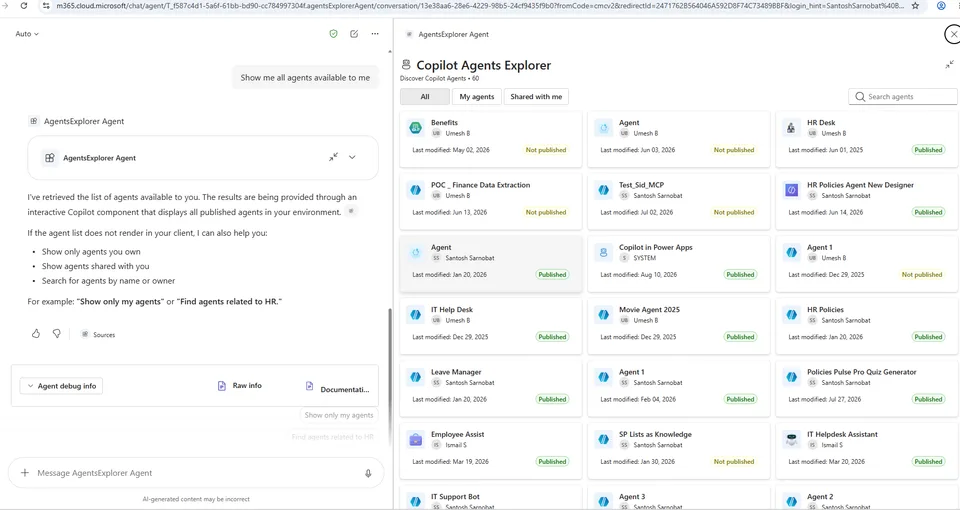
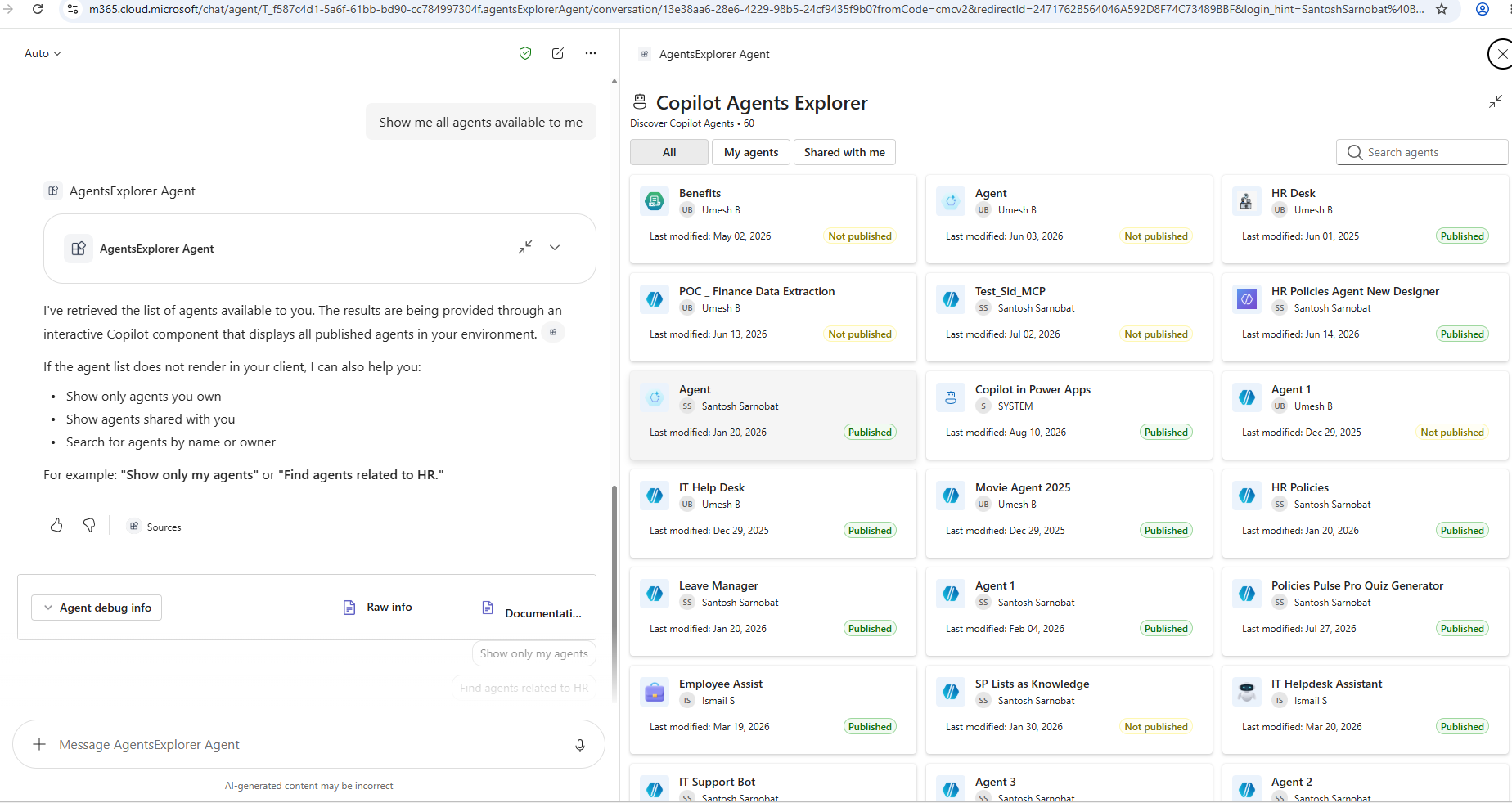
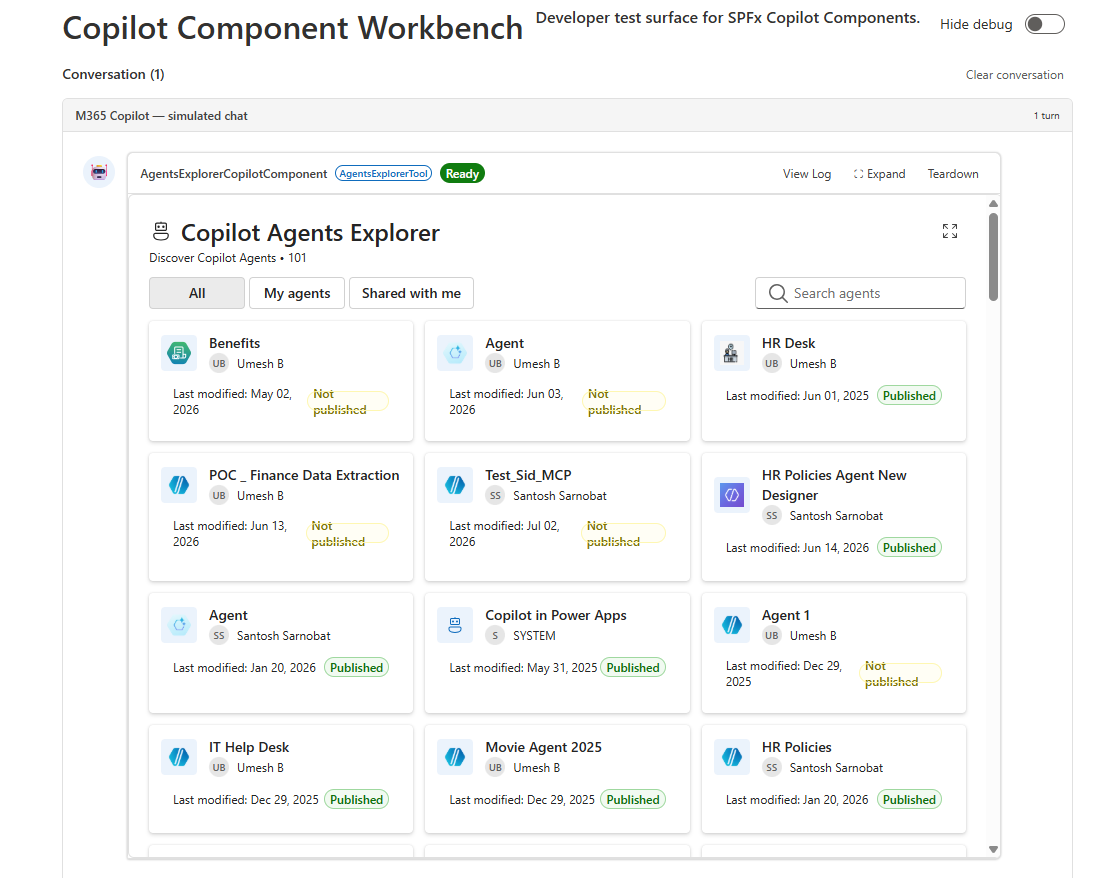
Agents Explorer is an SPFx Copilot Component that brings a tenant-wide view of Copilot Agents (Power Platform / Copilot Studio bots) directly into the Microsoft Copilot canvas. A declarative agent ("AgentsExplorer Agent") calls it as a tool, and it renders a live, interactive grid of agents inline in the conversation or as a fullscreen overview, reading real Dataverse data across every Power Platform environment the signed-in user can reach.
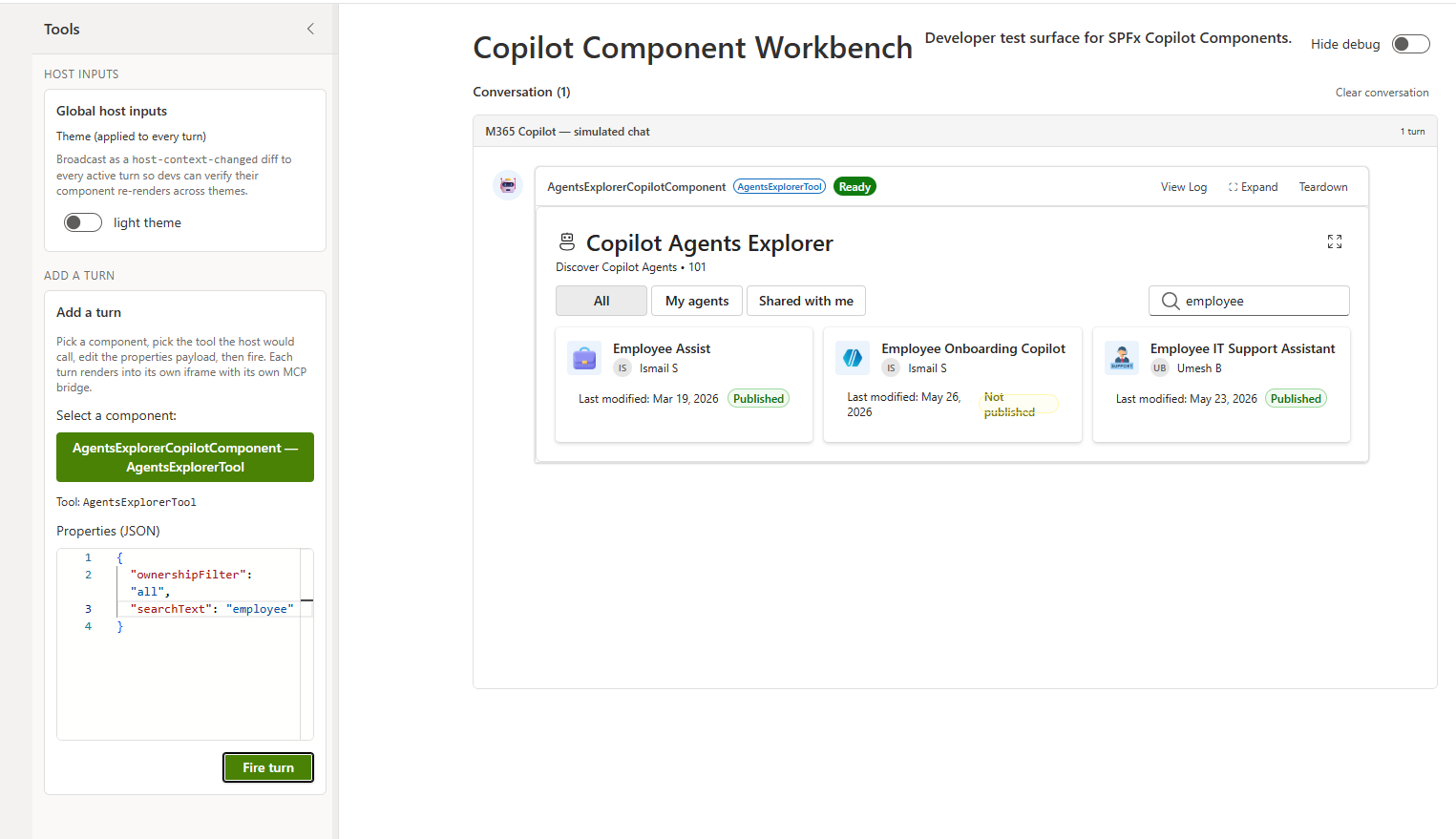
From the rendered UI, the signed-in user can see every Copilot Agent published across all Dataverse environments they have access to (with icon, owner, last-modified date, and published/not-published status), filter to agents they own, agents shared with them, or all agents, search by name/owner/schema name (with the search term extracted automatically from their Copilot request), open any agent directly in Copilot Studio, and expand the inline card to a fullscreen view for browsing larger agent lists.
Gallery
See the component in action


Documentation
Setup and implementation
Summary
Agents Explorer is an SPFx Copilot Component that brings a tenant-wide view of Copilot Agents (Power Platform / Copilot Studio bots) directly into the Microsoft Copilot canvas. A declarative agent ("AgentsExplorer Agent") calls it as a tool, and it renders a live, interactive grid of agents inline in the conversation or as a fullscreen overview, reading real Dataverse data across every Power Platform environment the signed-in user can reach.
From the rendered UI, the signed-in user can:
- See every Copilot Agent published across all Dataverse environments they have access to, with icon, owner, last-modified date, and published/not-published status
- Filter results to agents they own ("My agents"), agents shared with them, or all agents
- Search agents by name, owner, or schema name, with the search term extracted automatically from their Copilot request
- Open any agent directly in Copilot Studio from the result card
- Expand the inline card to a fullscreen view for browsing larger agent lists
Used SharePoint Framework Version

Applies to
- SharePoint Framework 1.24+ (Copilot Component)
- Microsoft Copilot extensibility
- Microsoft 365 tenant
Get your own free development tenant by subscribing to the Microsoft 365 developer program
Prerequisites
This solution discovers Power Platform environments and reads live Dataverse bot records through brokered AAD calls (AadHttpClientFactory), so beyond the usual SPFx tenant setup it needs the API permissions declared in config/package-solution.json approved by a tenant admin:
| Permission | Scope | Why it's needed |
|---|---|---|
| Microsoft Graph | User.Read.All |
Resolves the signed-in user's display name (/me), used to determine which agents count as "my agents" for the ownership filter. |
| PowerApps Service | User |
Calls api.powerapps.com/.../environments to discover every Power Platform environment (Dataverse instance) the signed-in user can reach. |
| Dynamics CRM | user_impersonation |
Queries the Dataverse bot entity (/api/data/v9.1/bots) in each discovered environment, on behalf of the signed-in user, to list Copilot Agents. |
| Azure Service Management | user_impersonation |
Declared for future Azure Resource Manager scenarios; not currently called by this component's code. |
After deploying the .sppkg to the App Catalog, a tenant admin must approve these once in the SharePoint Admin Center → Advanced → API access. Any time a requested scope changes, it needs to be re-approved there before it takes effect.
Solution
| Solution | Author(s) |
|---|---|
| agents-explorer | Siddharth Vaghasia (siddharth-vaghasia) |
Version history
| Version | Date | Comments |
|---|---|---|
| 1.0.0.0 | Sept 06, 2026 | Initial release |
Disclaimer
THIS CODE IS PROVIDED AS IS WITHOUT WARRANTY OF ANY KIND, EITHER EXPRESS OR IMPLIED, INCLUDING ANY IMPLIED WARRANTIES OF FITNESS FOR A PARTICULAR PURPOSE, MERCHANTABILITY, OR NON-INFRINGEMENT.
Minimal Path to Awesome
- Clone this repository
- Ensure that you are at the solution folder
- In the command-line run:
npm install -g @rushstack/heftnpm installnpm run start
- Since SPFx Copilot Components can't be tested in the local workbench,
npm run startserves against a hosted tenant workbench (see.vscode/launch.jsonandconfig/serve.json) - Package and deploy the solution to your App Catalog, grant the API permissions noted under Prerequisites, then invoke the AgentsExplorer Agent in Microsoft Copilot
Other build commands can be listed using heft --help.
Features
Agents Explorer demonstrates how to surface a cross-environment Copilot Agents inventory inside the Copilot canvas using an SPFx Copilot Component, reading live Dataverse data rather than mock content.
This sample illustrates the following concepts:
- Copilot Component UX — a
CopilotComponent(copilotType: "Ux") exposed as a tool (AgentsExplorerTool) that a declarative agent can call, rendering its own React UI inside the Copilot host. - Brokered SSO across two services — environment discovery (PowerApps Service) and per-environment bot queries (Dataverse Web API) both go through the SPFx-brokered
AadHttpClientFactory, with no manual token handling, fanning out to every reachable environment in parallel (AgentsExplorerService.ts). - FetchXML over Dataverse Web API — each environment's
botentity is queried with a FetchXML document (aliased attributes plussystemuserlink-entities for owner/modified-by names) rather than hand-built OData$select/$expand. - Display-mode-aware rendering — a single React component (
AgentsExplorer.tsx) renders a compact inline grid or a fullscreen overview based on the host-advertised display mode (inline/fullscreen), and can request a mode switch through the Copilot bridge. - Tool argument extraction — the tool's
ownershipFilterandsearchTextarguments (defined via Zod inAgentsExplorerCopilotComponentProperties.ts) let Copilot pre-apply a filter (e.g. "my agents") or a search term extracted from the user's natural-language request. - Bridge-mediated navigation — opening an agent in Copilot Studio goes through
bridge.openLinkAsyncrather thanwindow.open, since Copilot Components render inside a sandboxed iframe with no direct access to the host window. - Theme awareness — light/dark theme driven by the Copilot host context, using Fluent UI v9 theme tokens throughout.
Notice that better pictures and documentation will increase the sample usage and the value you are providing for others. Thanks for your submissions advance.
Share your web part with others through Microsoft 365 Patterns and Practices program to get visibility and exposure. More details on the community, open-source projects and other activities from http://aka.ms/m365pnp.
Some Advance Concepts Explored
Adding a new tool parameter that Copilot can populate
The tool's input parameters are defined once, as a Zod schema, in AgentsExplorerCopilotComponentProperties.ts and converted to JSON Schema via zod-to-json-schema:
const propertiesSchema = z.object({
  ownershipFilter: z
    .enum(['all', 'my', 'shared'])
    .optional()
    .describe('Which agents to show: all agents, only mine, or only agents shared with me.'),
  searchText: z.string().optional().describe('Optional text to filter agents by name or owner.')
});
The compiled JSON Schema is referenced by the component's manifest, which is how the Copilot host discovers the tool's parameters and their descriptions. To add a new parameter:
- Add a field to the
z.object({...})above, with a.describe(...)that tells Copilot what to extract and when (mark it required/optional, describe the expected format, and give worked examples of phrases → values). - Read the new field off
this.propertiesinAgentsExplorerCopilotComponent.tsx, pass it through the props inrender(), and use it inAgentsExplorer.tsxto drive the component's behavior (it's used there today to seed the initial search box value and ownership toggle).
References
- Getting started with SharePoint Framework
- Microsoft Copilot extensibility
- Use Microsoft Graph in your solution
- Publish SharePoint Framework applications to the Marketplace
- Microsoft 365 Patterns and Practices - Guidance, tooling, samples and open-source controls for your Microsoft 365 development
- Heft Documentation