
Copilot UX component
Cafeteria - Browse Cafeterias and Menus in Copilot
Browse cafeteria hours, menus, and dish options from Microsoft Copilot.

- Updated
- October 22, 2026
- Built with
- React
- SPFx version
- 1.24.0-beta.5
- Products
- SharePoint, Microsoft Copilot
Overview
What this sample demonstrates
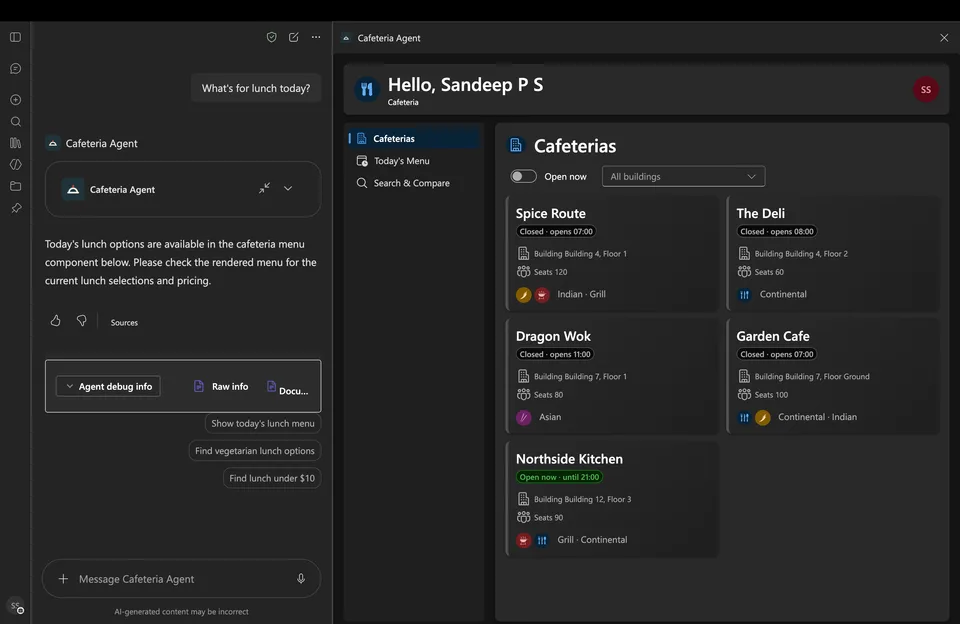
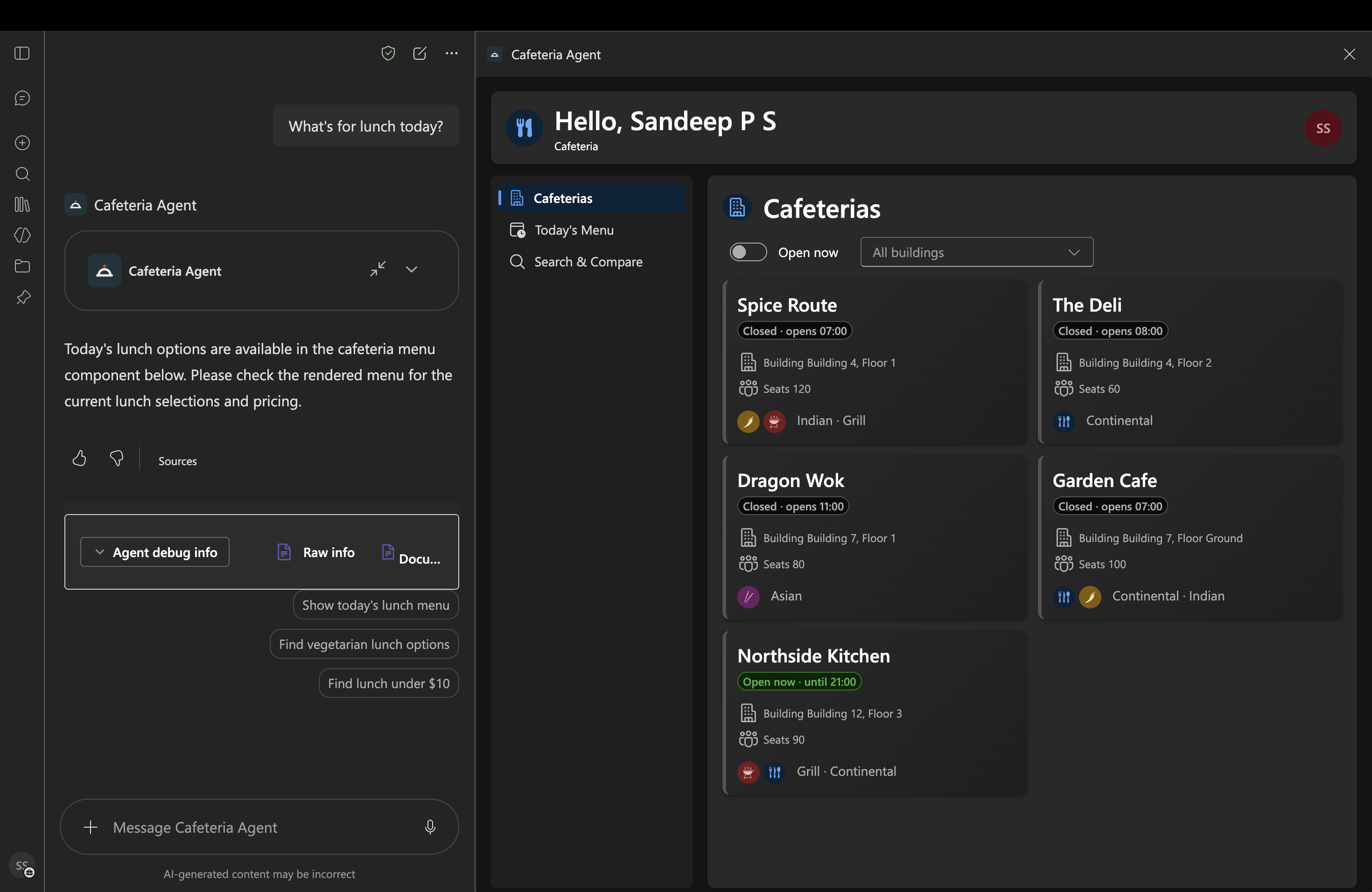
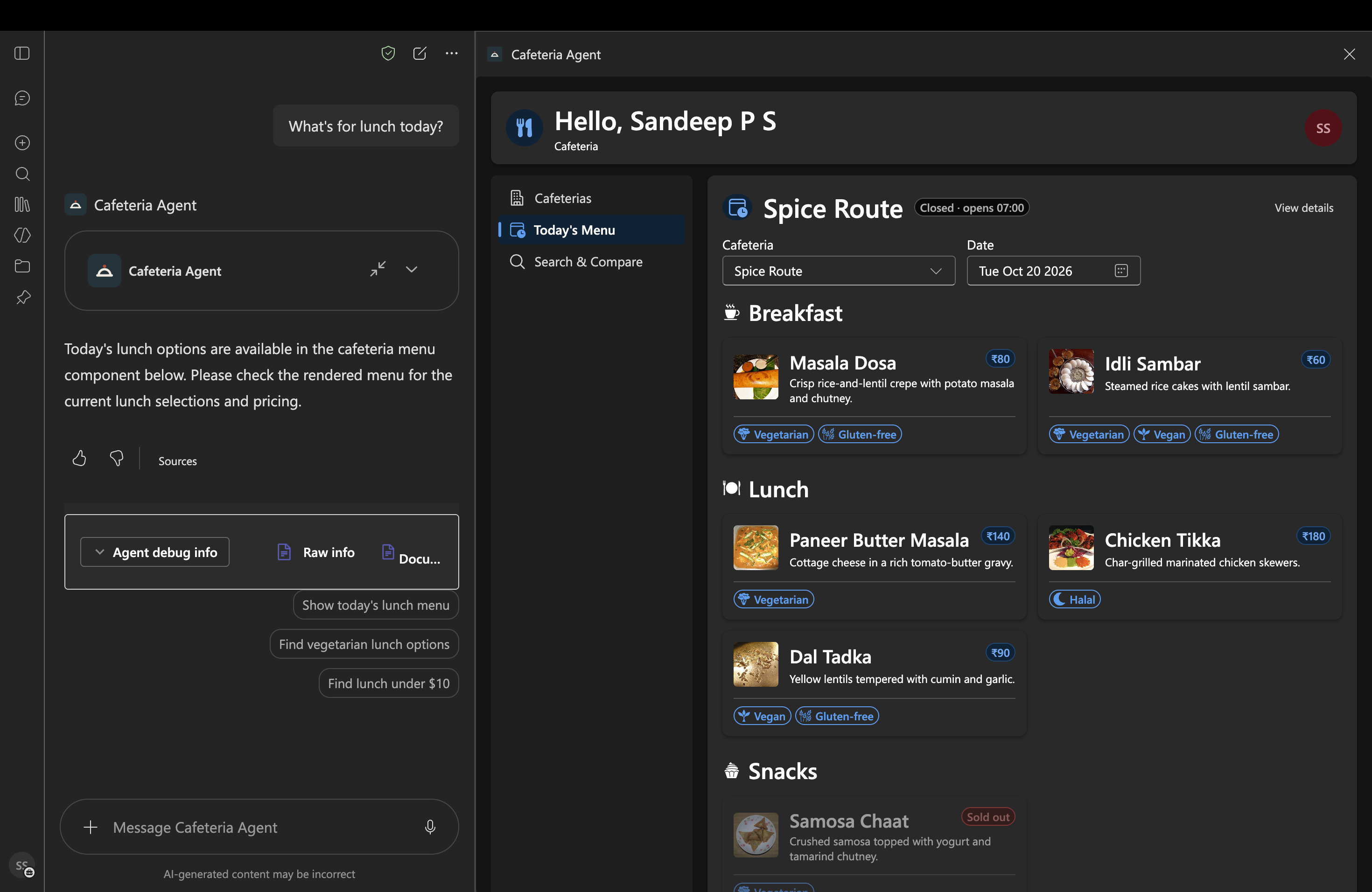
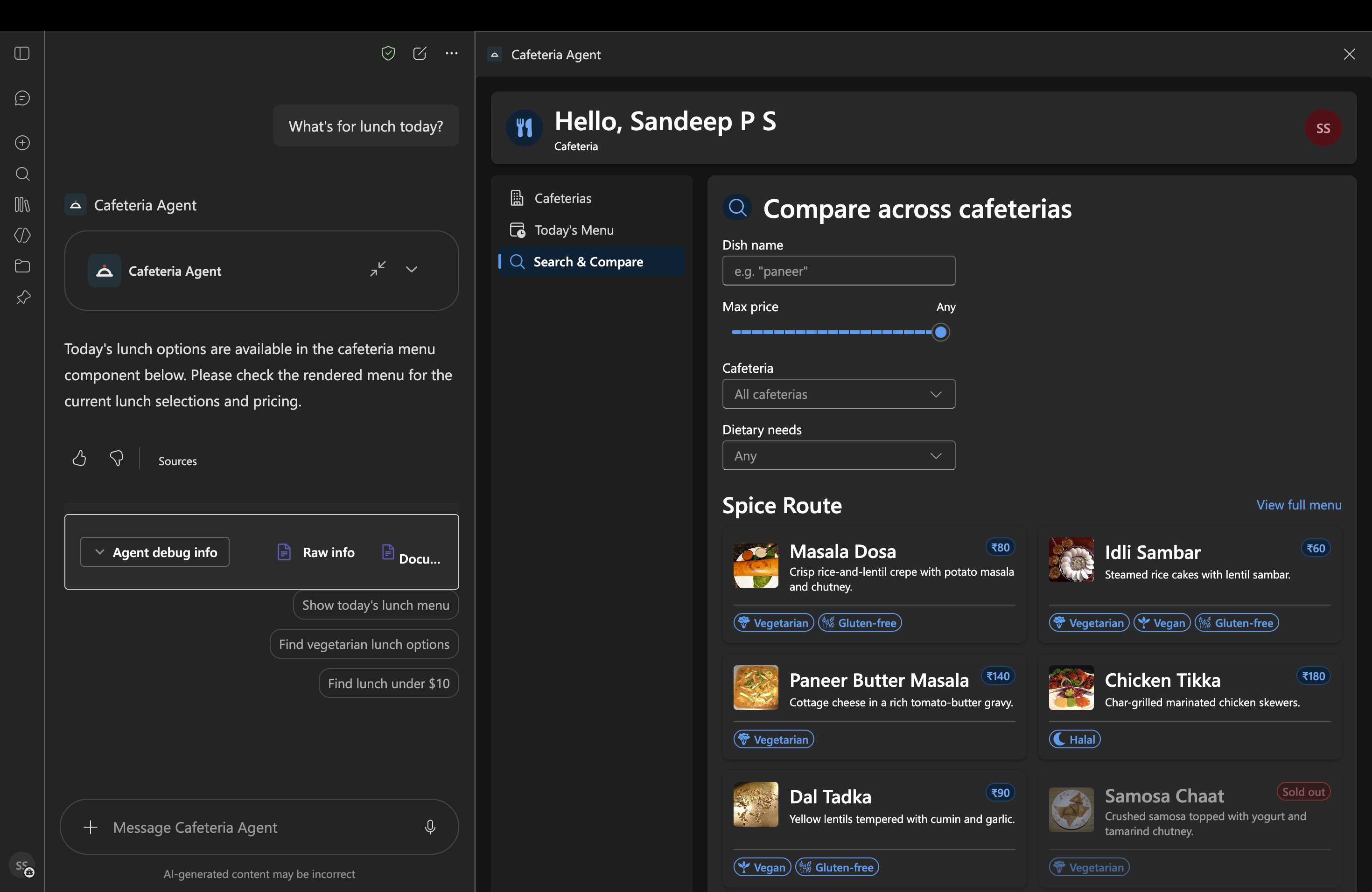
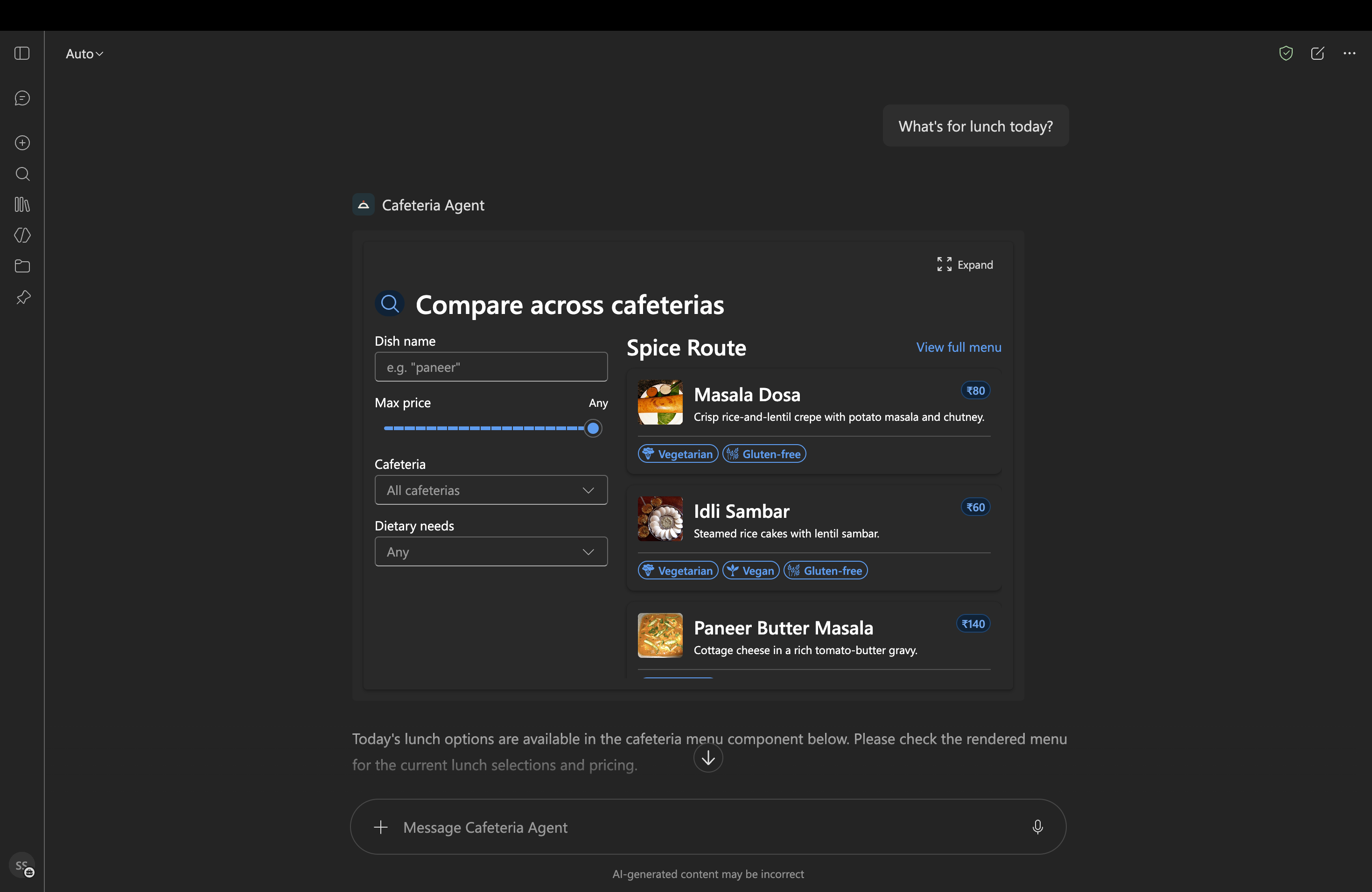
Cafeteria brings cafeteria listings, daily menus, dish search, and cafeteria details into Microsoft Copilot through four SPFx Copilot Component tools. Users can find cafeterias by building or open status, view a menu by cafeteria and date, search dishes by name or dietary and price criteria, and check hours, contact, and payment information.
The sample uses bundled synthetic data, supports inline and full-screen display modes, and requires no live SharePoint or Microsoft Graph connection.
Gallery
See the component in action


Documentation
Setup and implementation
Summary
Cafeteria is an SPFx 1.24 Copilot Component sample that brings cafeteria listings, daily menus, dish search, and cafeteria details into Microsoft 365 Copilot. The Cafeteria Agent selects the matching tool from a natural-language request and renders an interactive result in the Copilot canvas.
The sample includes four tools:
- Browse cafeterias by building or whether they are open now
- Show a menu for a cafeteria and date, grouped by meal period
- Search menu items by dish name, dietary requirements, price, cafeteria, or date
- Show cafeteria details, including hours, floor, contact, payment methods, and closure notices
All tools use bundled synthetic data. No SharePoint lists, Microsoft Graph permissions, or other live data source are required.
Screenshots
Full screen
Inline
Compatibility



SPFx Copilot Components are in preview. APIs and packaging behavior may change.
Applies to
- SharePoint Framework 1.24+ (Copilot Component)
- Microsoft Copilot extensibility
- Microsoft 365 tenant with a SharePoint App Catalog
Get your own free development tenant by subscribing to the Microsoft 365 developer program.
Prerequisites
- Node.js >=22.14.0 and <23.0.0
- A Microsoft 365 tenant with the SPFx Copilot Components preview enabled
- Access to the tenant's SharePoint App Catalog to deploy the solution
- Heft (
npm install -g @rushstack/heft), or run it withnpx heft
The sample uses local synthetic data and does not request additional Microsoft Graph or SharePoint API permissions.
Solution
- Solution:
cafeteria - Agent: Cafeteria Agent
- Component type: SPFx Copilot Component UX (
copilotType: "Ux")
Version history
| Version | Date | Comments |
|---|---|---|
| 1.0.1 | October 22, 2026 | Correct dietary matching, filter accessibility/reset, unpublished-menu messages, date retention, agent IDs, debugger host, and SPFx gallery metadata; regenerate the dependency lockfile and add nine regression tests. |
| 1.0.0 | October 19, 2026 | Initial release |
Minimal path to awesome
Run from source
Clone this repository and change to
samples/cafeteria.Install dependencies:
npm installStart the hosted Copilot workbench:
npm run startThe development server is configured to open the tenant's Copilot workbench. SPFx Copilot Components cannot be tested in the local SharePoint workbench.
To create a production package, run:
npm run buildThis runs the production test/build and packages the solution as
sharepoint/solution/cafeteria.sppkg.
Deploy
- Upload the generated
sharepoint/solution/cafeteria.sppkgto the tenant App Catalog. - Select Enable this app and add it to all sites, then select Enable app to deploy the solution tenant-wide. This is required for Copilot integration.
- In the App Catalog, select the app and choose Add to Teams. This provisions the Cafeteria Agent in Copilot.
- In Microsoft Copilot, add or select Cafeteria Agent and start a new conversation to try its four tools.
Features
- Copilot agent tool routing — the Cafeteria Agent routes requests to the narrowest matching tool:
getListCafeteria,getMenu,searchMenuItems, orgetCafeteriaDetails. - Cafeteria discovery — list active cafeterias, optionally filtered by building or open status.
- Menu browsing — display a cafeteria's menu grouped by breakfast, lunch, and snacks.
- Dish search — filter today's menu by dish name, dietary tags, maximum price, or cafeteria.
- Cafeteria details — display location, hours, contact, payment options, and closure notices.
- Inline and full-screen rendering — each component supports both display modes and follows the Copilot host's theme.
- Synthetic data service — bundled sample data allows offline demos without tenant data connections. The sample menu data represents today's menus only; dates without seeded menus return an unpublished-menu state.
Suggested prompts
- Which cafeterias are open now?
- What is for lunch at the cafeteria in Building 4?
- Find vegan dishes under 150.
- Show me the hours and payment options for the cafeteria in Building 4.
References
- Getting started with SharePoint Framework
- Microsoft 365 Copilot extensibility
- Heft documentation
- Microsoft 365 Patterns and Practices — guidance, tooling, samples, and open-source controls for Microsoft 365 development
Help
We do not provide support for individual samples, but the community is always willing to help improve them. Check issues related to this sample or create a new issue.
Disclaimer
THIS CODE IS PROVIDED AS IS WITHOUT WARRANTY OF ANY KIND, EITHER EXPRESS OR IMPLIED, INCLUDING ANY IMPLIED WARRANTIES OF FITNESS FOR A PARTICULAR PURPOSE, MERCHANTABILITY, OR NON-INFRINGEMENT.