
Copilot UX component
SharePoint Document Submission Form
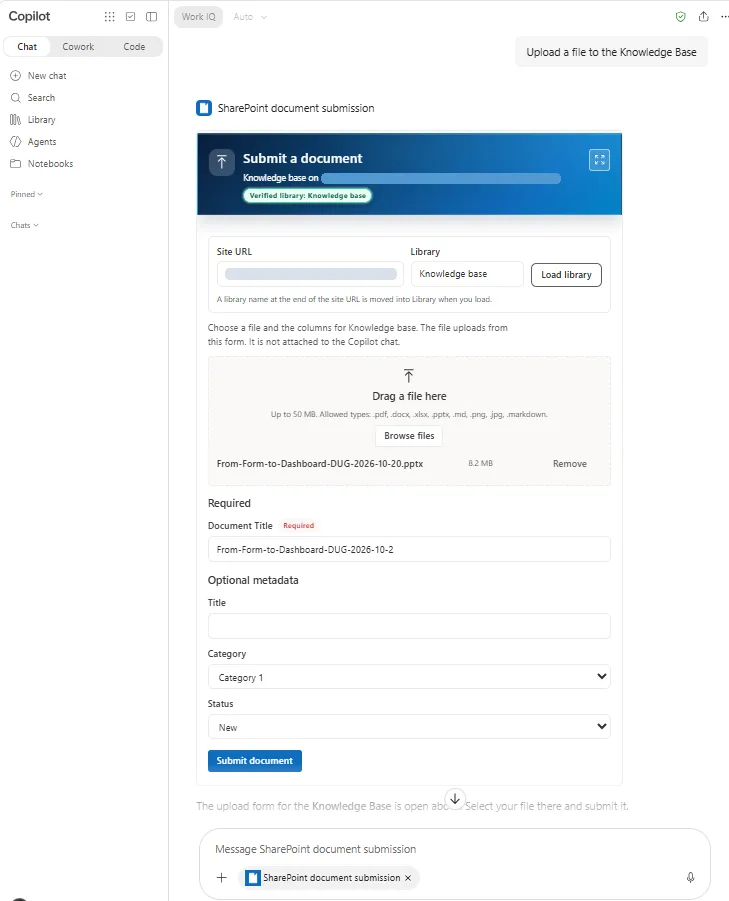
Submit files up to 50 MB and dynamic library metadata directly to a SharePoint document library from an inline Microsoft 365 Copilot chat form or a modern SharePoint page without passing file bytes through the LLM prompt.

- Updated
- October 28, 2026
- Built with
- React
- SPFx version
- 1.24.0-rc.0
- Products
- SharePoint, Microsoft Copilot
Overview
What this sample demonstrates
SharePoint Document Submission Form renders an interactive document-intake form inline in Microsoft 365 Copilot chat (via BaseCopilotComponent) and on modern SharePoint pages (via BaseClientSideWebPart). When a user asks to upload or submit a document, the declarative agent calls OpenDocumentSubmissionForm and opens the SPFx form inline.
The component verifies the target SharePoint document library (BaseTemplate 101), dynamically loads its required and optional editable columns via SharePoint REST, and uploads files up to 50 MB (direct upload up to 10 MB, chunked StartUpload/ContinueUpload/FinishUpload above 10 MB) followed by ValidateUpdateListItem under the signed-in user's delegated SharePoint permissions—without ever placing file bytes into the Copilot prompt or requesting Microsoft Graph admin consent.
Built-in security hardening locks siteUrl overrides to HTTPS on the active SharePoint Online tenant origin and enforces a strict file extension allowlist (.pdf, .docx, .xlsx, .pptx, .md, .png, .jpg).
Gallery
See the component in action


Documentation
Setup and implementation
Summary
SharePoint Document Submission Form (copilot-sharepoint-form-app) is an SPFx 1.24 Copilot UX component and modern SharePoint web part, packaged with a declarative agent, that submits a document (up to 50 MB) and its library metadata columns directly to a SharePoint document library. The SPFx component owns the file picker and streams bytes directly to SharePoint REST (SPHttpClient), so the file is never attached to a Copilot chat message and never passes through the LLM prompt.
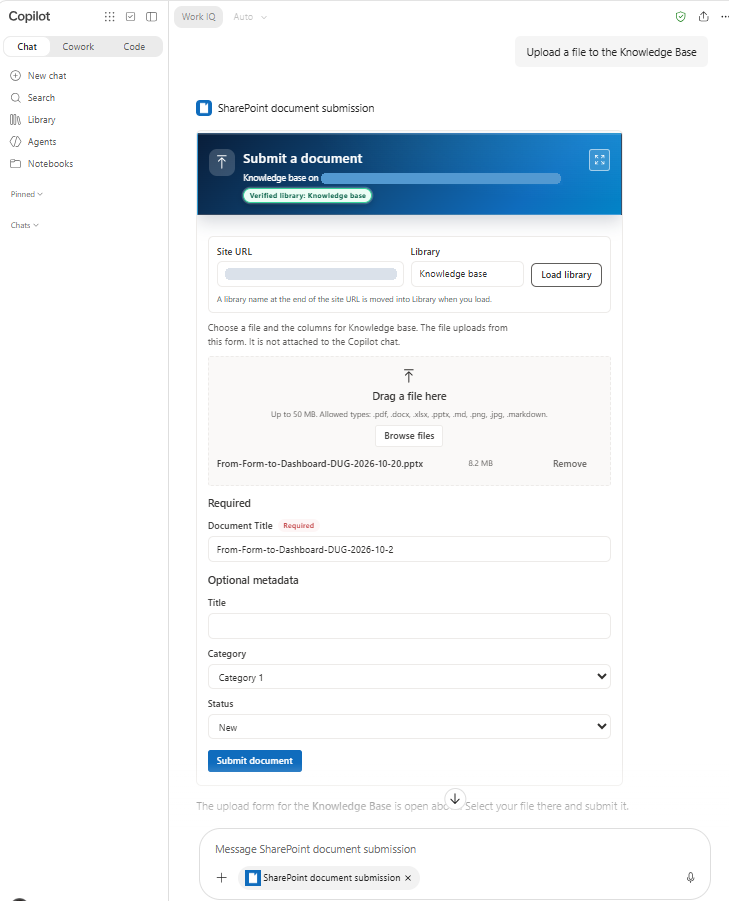
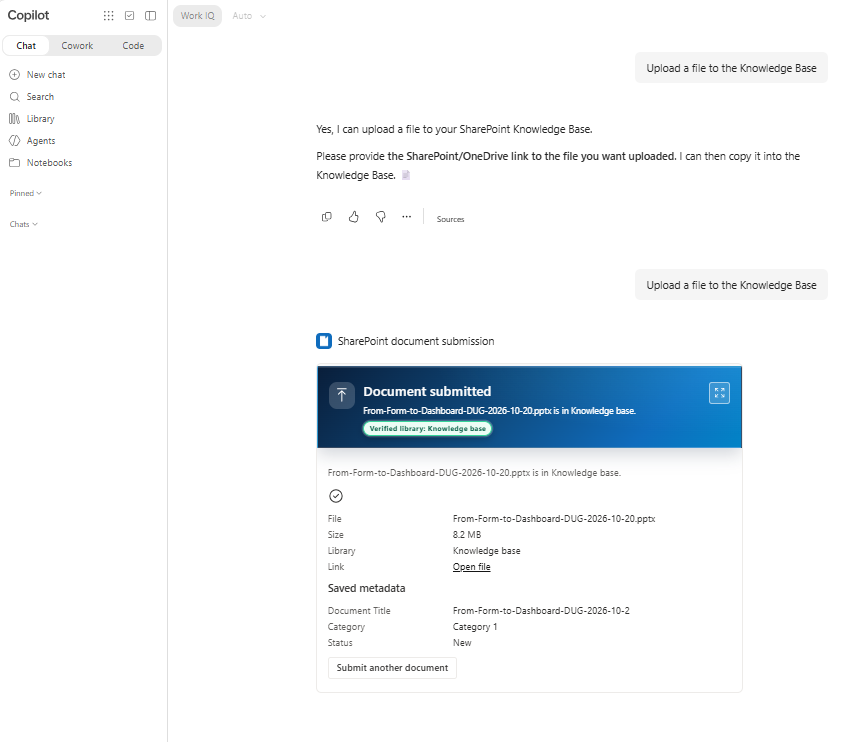
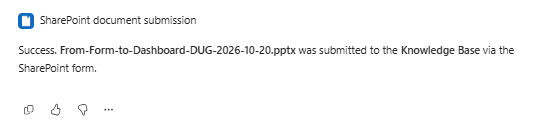
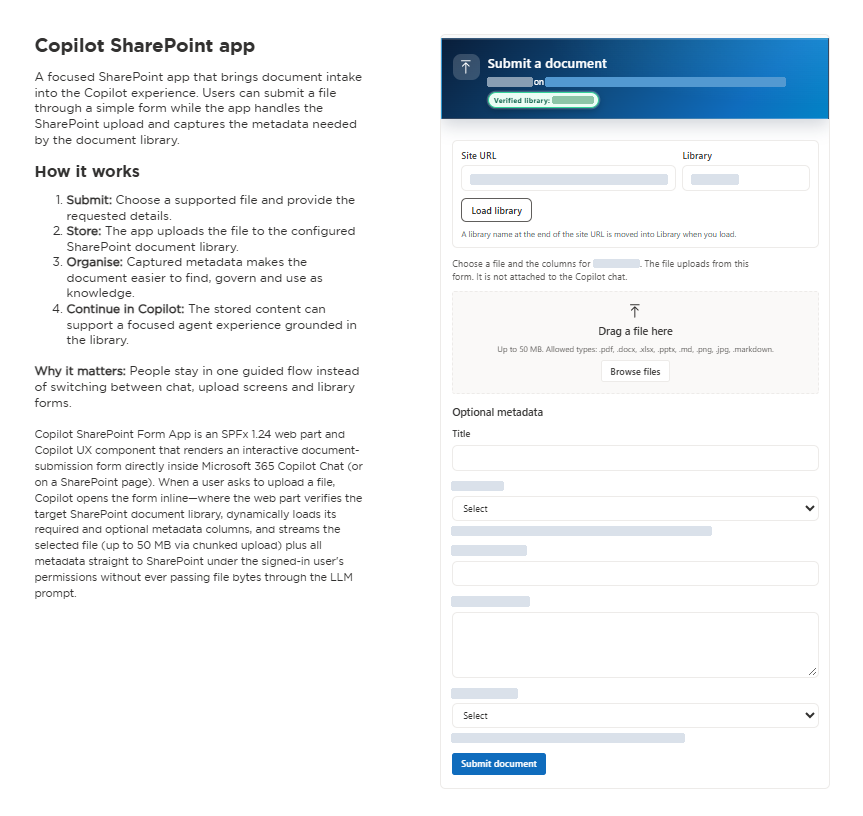
When a user asks in Microsoft 365 Copilot chat to upload or submit a file (or regular Copilot Chat routes the request to the SharePoint document submission agent), the agent calls OpenDocumentSubmissionForm and renders the form inline:
The same React form is also exposed as a SharePoint web part (CopilotSharePointFormWebPart) that can be placed on any modern SharePoint page:
Video walkthrough

Watch the walkthrough on YouTube
Compatibility




Applies to
Get your own free development tenant by subscribing to the Microsoft 365 developer program
Contributors
Version history
| Version | Date | Comments |
|---|---|---|
| 1.0 | October 24, 2026 | Initial release of Copilot SharePoint Form web part and Copilot UX component |
| 1.3.6 | October 28, 2026 | Align Teams (1.29), Declarative Agent (v1.8), and AI Plugin (v2.4) manifests with SPFx 1.24 schemas; add User Guide and Page Owner Guide conversation starters |
| 1.3.7 | October 28, 2026 | Security hardening: lock siteUrl overrides to HTTPS on the active SharePoint tenant origin and enforce .pdf,.docx,.xlsx,.pptx,.md,.png,.jpg extension allowlist |
Prerequisites
- Node.js
>=22.14.0 <23.0.0(or Node 24 / 26 per SPFx1.24.0-rc.0engines) and the Heft toolchain (@rushstack/heft). - SharePoint Online tenant with a tenant App Catalog and permissions to deploy SPFx solutions and sync declarative agents to Teams (Add to Teams).
- Microsoft 365 Copilot add-on license (USL) for Copilot Chat tool execution:
- The modern SharePoint page web part (
CopilotSharePointFormWebPart) and declarative agent registration/prompt-only starters work for any SharePoint user with site access. - However, live
RemoteMCPServertool binding (OpenDocumentSubmissionForm) inside Microsoft 365 Copilot Chat and access to/_layouts/15/copilotworkbench.aspxrequire the signed-in user to have a Microsoft 365 Copilot add-on license (USL) assigned. Without the Copilot USL, MOS3 skipsRemoteMCPServertool resolution (matchedFunctionCandidates: []).
- The modern SharePoint page web part (
- No Microsoft Graph admin consent required:
config/package-solution.jsondeclares zerowebApiPermissionRequests. All SharePoint REST calls run under the signed-in user's delegated session viaSPHttpClient.
Minimal Path to Awesome
- Clone this repository (or download this solution as a .ZIP file then unzip it)
- From your command line, change your current directory to the directory containing this sample (
copilot-sharepoint-form-app, located undersamples) - In the command line run:
npm installnpm run build
- In the SharePoint Admin Center, open More features → Apps → Manage apps:
- Select Upload and choose
sharepoint/solution/copilot-sharepoint-form-app.sppkg. - In Enable app, select Enable this app and add it to all sites (required so the Copilot UX component is available across sites), then select Enable app.
- Select Copilot SharePoint Form App in the app list and click Add to Teams in the toolbar to publish the bundled declarative agent (
ClientSideAssets/copilot-sharepoint-form-app.zip).
- Select Upload and choose
- Open Microsoft 365 Copilot (
https://m365.cloud.microsoft/chat):- Select SharePoint document submission under Agents (or ask regular Copilot Chat to upload a file to a SharePoint library and accept its suggestion to hand off to SharePoint document submission).
- Click the Upload a file to the Knowledge Base conversation starter (or ask "Upload a file to the Documents library").
- Approve the one-time Allow prompt on the first tool call. The interactive SPFx form renders inline in chat—verify or change the Site URL and Library, drop a file up to 50 MB, fill in the library's metadata columns, and click Submit document.
- To also embed the form on a SharePoint page, edit any modern SharePoint page, add the Copilot SharePoint Form web part, set the Library name in the property pane, and republish.
Features
This sample illustrates the following concepts on SPFx 1.24.0-rc.0:
- Dual-host architecture (
BaseCopilotComponent+BaseClientSideWebPart):CopilotSharePointFormCopilotComponent(c7e4a1b8-2d56-4f90-9a33-1e8b6c5d4a27) registers theOpenDocumentSubmissionFormtool in Microsoft 365 Copilot chat and updatesmodelContextwhen a submission completes so the agent can confirm the uploaded file name and target library.CopilotSharePointFormWebPart(3d7a624c-a1da-450a-a786-e3d5ff7cbf5b) hosts the exact same React form on a modern SharePoint page with property pane configuration.
- Direct-to-SharePoint file streaming (up to 50 MB, zero bytes in the LLM prompt):
- Files up to 10 MB upload in a single request via
/_api/web/GetFolderByServerRelativePath(decodedUrl='...')/Files/add(overwrite=true,url='...'). - Files over 10 MB and up to 50 MB stream in 10 MB chunks using
StartUpload,ContinueUpload, andFinishUploadwith live progress reporting andCancelUploadcleanup on cancellation or failure.
- Files up to 10 MB upload in a single request via
- Dynamic library verification and schema discovery:
- Queries
GET /_api/web/lists/getByTitle('...')?$select=Id,Title,BaseTemplate,RootFolder/ServerRelativeUrl&$expand=RootFolderand verifiesBaseTemplate === 101(Document Library) before enabling the file picker. - Queries
GET /_api/web/lists/getByTitle('...')/fields?$filter=Hidden eq false and ReadOnlyField eq false, filters out system/internal columns, splits editable columns into Required and Optional metadata, and writes metadata after upload viaValidateUpdateListItem(bNewDocumentUpdate: true).
- Queries
- Security posture and input hardening:
- Zero privilege escalation: Runs with
isDomainIsolated: falseand nowebApiPermissionRequests; SharePoint enforces all site, library, and item-level ACLs for the signed-in user. - Same-tenant HTTPS
siteUrllock (isUsableSiteUrl): AnysiteUrloverride passed by a user or tool call must usehttps:, contain no embedded credentials, target a SharePoint Online host (.sharepoint.com,.sharepoint.us,.sharepoint.de,.sharepoint.cn), and match the active SharePoint tenant origin (window.location.origin/pageContext.web.absoluteUrl). Cross-tenant or external URLs are rejected before any network call is made. - Strict file extension allowlist (
DEFAULT_ALLOWED_EXTENSIONS): Allowed extensions default to and are intersected against.pdf,.docx,.xlsx,.pptx,.md,.png,.jpg(.mdand.markdownalias each other). Active or executable file types (such as.html,.aspx,.svg, or.exe) are always blocked even if passed in a custom configuration. - OData and filename sanitization: Escapes single quotes via
odataString(), strips directory paths viabaseFileName(), and rejects illegal SharePoint filename characters (["#%*:<>?/\|]) and 0-byte files.
- Zero privilege escalation: Runs with
- Graceful demo mode in local workbench:
- When running in the local workbench (
npm run start) or when no live SharePoint context is available, the form enters demo mode with sample columns (Document Title,Department,Document Category,Effective Date,Confidential,Notes) and simulated chunked progress while clearly indicating that nothing is written to SharePoint. Real HTTP403permission errors remain visible and never fall back to demo mode.
- When running in the local workbench (
Architecture
copilot/                         Declarative agent manifests bundled into the .sppkg
  manifest.json                  Teams app manifest (v1.29) registering the declarative agent
  declarativeAgent.json          Declarative agent (v1.8) with instructions & conversation starters
  ai-plugin.json                 Plugin manifest (v2.4) bound to OpenDocumentSubmissionForm
  instruction.txt                Agent instructions enforcing immediate tool call & no fake cards
config/
  copilot-agent.json             Points copilotAgentPlugin at the Copilot UX component (static discovery)
  package-solution.json          SPFx solution packaging configuration (1.3.7.0)
src/
  copilotComponents/copilotSharePointForm/
    CopilotSharePointFormCopilotComponent.ts            BaseCopilotComponent host for Copilot chat
    CopilotSharePointFormCopilotComponentProperties.ts  Zod tool parameter schema
  webparts/copilotSharePointForm/
    CopilotSharePointFormWebPart.ts                     SPFx web part host for modern pages
    components/                                         Fluent UI v9 React form
    logic/                                              Validation, upload plan, field mapping, URL escaping
    services/                                           SharePointFormSubmissionService & chunked REST upload
Web part & tool properties
| Property | Default | Purpose |
|---|---|---|
siteUrl |
Current SharePoint site | Optional HTTPS SharePoint site URL on the same tenant origin |
libraryName / libraryTitle |
Documents |
Target SharePoint document library (BaseTemplate === 101) |
maxFileSizeMb |
50 |
Maximum file size in MB (1 to 50) |
allowedExtensions |
.pdf,.docx,.xlsx,.pptx,.md,.png,.jpg |
Comma-separated subset of the supported allowlist |
overwriteExisting |
true |
Passed to Files/add(overwrite=...) |
formColumnsJson |
"" (auto-discover from library) |
Optional JSON array of { internalName, label, type, required, choices } |
Testing & validation
Run the unit test suite (61 tests across 16 suites covering validation, same-tenant HTTPS origin enforcement, extension allowlist intersection, direct and chunked upload, CancelUpload, schema filtering, ValidateUpdateListItem, and React UI flows):
npx heft test --clean --production
Build the production solution and agent package:
npm run build
Troubleshooting
| What you see | Why | What helps |
|---|---|---|
Conversation starters 2 and 3 answer in chat, but upload requests do not invoke OpenDocumentSubmissionForm (matchedFunctionCandidates: [] in -developer on debug info) |
The signed-in account does not have a Microsoft 365 Copilot add-on license (USL), so MOS3 skips RemoteMCPServer tool resolution |
Test with a user account assigned a Microsoft 365 Copilot add-on license |
Add to Teams fails with HTTP 409 (SyncSolutionToTeams) after editing copilot/ files |
Teams rejects an equal or lower manifest version | Bump version in both copilot/manifest.json and config/package-solution.json before running npm run build |
The card stays on a loading skeleton right after deploying a new .sppkg |
SharePoint CDN/service worker is still serving the previous manifest map | Wait a few minutes, unregister the SharePoint service worker in browser DevTools → Application → Service Workers, and hard-reload Copilot (Ctrl+Shift+R / Cmd+Shift+R) |
Help
We do not support samples, but this community is always willing to help, and we want to improve these samples. We use GitHub to track issues, which makes it easy for community members to volunteer their time and help resolve issues.
You can try looking at issues related to this sample to see if anybody else is having the same issues.
If you encounter any issues using this sample, create a new issue.
Disclaimer
THIS CODE IS PROVIDED AS IS WITHOUT WARRANTY OF ANY KIND, EITHER EXPRESS OR IMPLIED, INCLUDING ANY IMPLIED WARRANTIES OF FITNESS FOR A PARTICULAR PURPOSE, MERCHANTABILITY, OR NON-INFRINGEMENT.