
Copilot UX component
SharePoint Events Copilot Agent
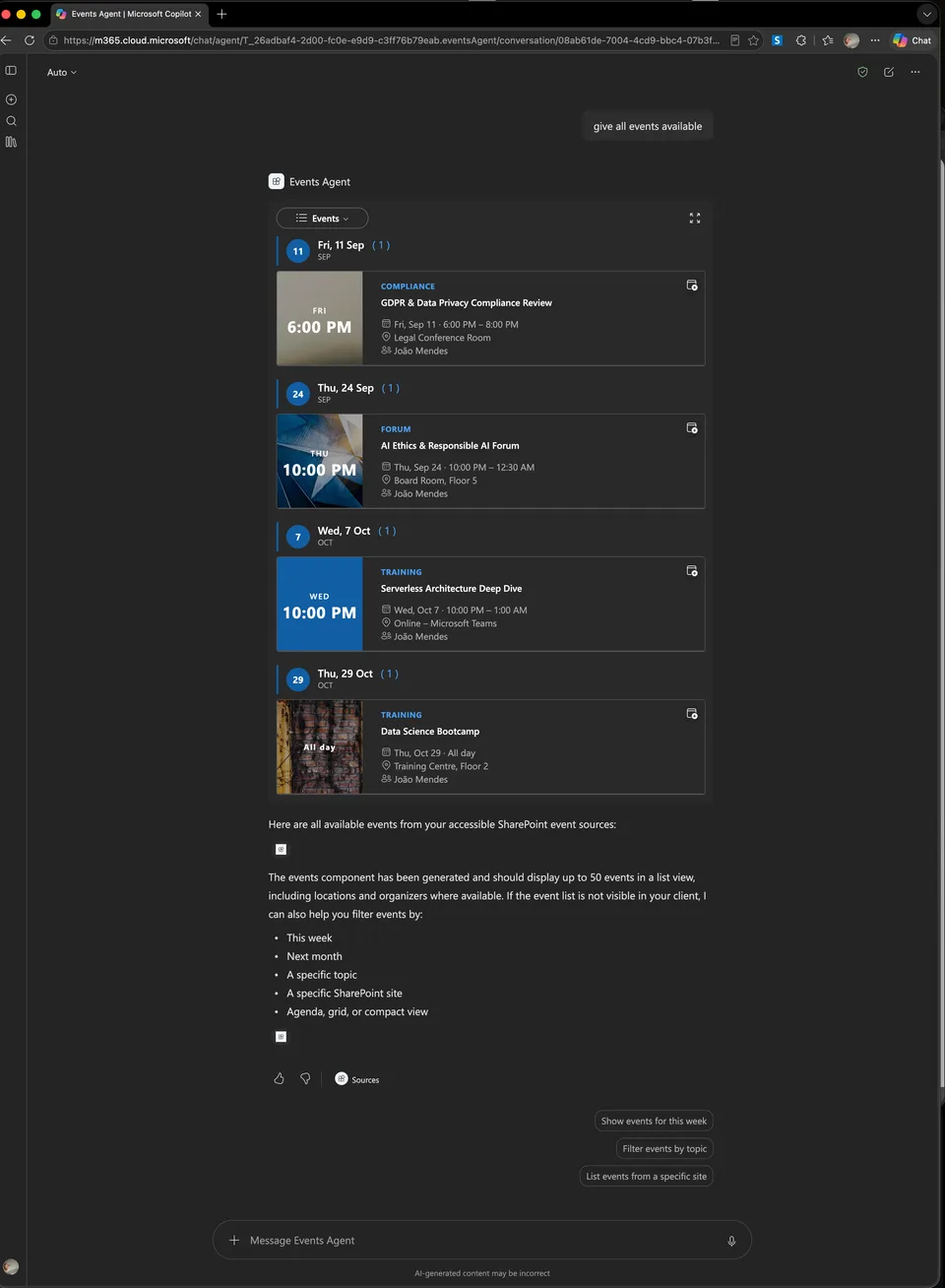
Find SharePoint events from Microsoft Copilot and explore them in an interactive calendar.

- Updated
- August 25, 2026
- Built with
- React
- SPFx version
- 1.24.0-beta.2
- Products
- SharePoint, Microsoft Copilot
Overview
What this sample demonstrates
SharePoint Events Copilot Agent brings natural-language event discovery to Microsoft Copilot.
Gallery
See the component in action


Documentation
Setup and implementation
EventsCopilotComponent is a SharePoint Framework (SPFx) Copilot UX component that finds SharePoint Events list items and renders them as either an event feed or a calendar inside Microsoft Copilot.
The component uses Microsoft Graph Search and respects the signed-in user's SharePoint permissions. It searches SharePoint Events list items; it does not query Outlook calendars or the Microsoft Graph /me/events endpoint.
Features
- Searches all accessible SharePoint sites or one site identified by an absolute SharePoint URL.
- Accepts date ranges, event-topic keywords, result counts, layout requests, and field-visibility preferences extracted from the user's prompt.
- Defaults to the current local day through the end of the day three months later when no date range is supplied.
- Provides an Events view and a Calendar view through
SelectView. - Renders inline events as an agenda and expanded events as feature by default, unless the user explicitly requested another expanded layout.
- Uses
CompactCalendarinline andCalendarControlin fullscreen mode. - Opens the calendar on the first available event instead of the current month.
- Uses paged Graph Search and fullscreen infinite scrolling up to the requested result limit.
- Requests the correct inline host size when content or the selected view changes.
- Calculates fullscreen height from the Copilot owner window and updates it on viewport resize.
- Displays layout-specific loading skeletons for agenda, feature, list, grid, compact-list, and calendar views.
- Formats dates in the user's local timezone and applies the SharePoint date culture and first-day-of-week preference.
- Localizes component and control labels; English and Portuguese (Portugal) resources are included.
- Supports Fluent UI light and dark themes.
- Provides accessible icon-only expand/collapse actions with localized tooltips and labels.
- Is read-only; it does not create, update, or delete events.
Component identity
| Property | Value |
|---|---|
| Class / alias | EventsCopilotComponent |
| Component type | CopilotComponent |
| Copilot type | Ux |
| Component ID | 1b9c5d4d-ff19-419c-9ade-878fa00187c6 |
| Tool | EventsTool |
| Display modes | inline, fullscreen |
| SPFx | 1.24.0-beta.2 |
| React | 17.0.1 |
| Node.js | >=22.14.0 <23.0.0 |
| Data source | SharePoint Events list items indexed by Microsoft Graph |
See the component manifest and tool schema.
Runtime architecture
The main component owns data loading and view state. Rendering responsibilities are composed into focused feed, calendar, toolbar, status, and skeleton components.
User prompt
  -> Copilot extracts EventsTool arguments
  -> EventsCopilotComponent resolves host and regional settings
  -> Events uses useEventsData
  -> Microsoft Graph Search pages SharePoint Events list items
  -> normalize, hydrate, date-filter, deduplicate, sort, and limit
  -> EventsContent
       -> EventsFeedView -> EventFeed
       -> EventsCalendarView -> CompactCalendar or CalendarControl
  -> inline or fullscreen Copilot surface
The data hook protects against stale requests when Copilot supplies new tool arguments. Loading additional pages keeps the existing items visible and reports progress through a non-blocking status overlay.
Tool arguments
Copilot extracts these arguments for every tool invocation. They are not SPFx property-pane settings.
| Property | Type | Default | Behavior |
|---|---|---|---|
startDateTime |
string |
omitted | Inclusive UTC ISO 8601 start boundary. Relative dates must first be resolved in the user's local timezone and then converted to UTC. |
endDateTime |
string |
omitted | Inclusive UTC ISO 8601 end boundary. It cannot be earlier than startDateTime. |
searchQuery |
string |
omitted | Event topic/content keywords only. Dates, site names, layout words, counts, and generic terms such as all do not belong here. |
siteUrl |
string |
omitted | Absolute HTTPS SharePoint site URL used as a Graph Search path restriction. |
layout |
feature | list | grid | agenda | compactList |
feature |
Controls only the expanded Events view. It should be supplied only when the user explicitly requests a layout. |
layoutWasExplicitlyRequested |
boolean |
required | Must be true only when the user explicitly names or describes a layout; otherwise it must be false. |
showLocation |
boolean |
true |
Shows or hides event locations. |
showOrganizer |
boolean |
true |
Shows or hides organizers. |
showDescription |
boolean |
false |
Shows or hides descriptions. |
maxEvents |
integer | 20 |
Final event limit from 1 through 50. Requests for all events use 50. |
Date rules
- With neither boundary supplied, the runtime uses the current local day at midnight through
23:59:59.999three months later. - With only one boundary supplied, the other side remains open-ended.
- Supplied values must be valid UTC ISO 8601 date-times ending in
Z. endDateTimecannot be earlier thanstartDateTime.- An event is included when its interval overlaps the requested range:
event.EndDate >= rangeStartandevent.EventDate <= rangeEnd. - A missing
EndDateis treated as equal toEventDate. - Events with an invalid or missing start date after hydration are discarded.
- Events are sorted by start time before
maxEventsis applied.
The agent instructions describe how relative phrases such as “today,” “next week,” and “this month” are converted from the user's local timezone to inclusive UTC boundaries.
Layout selection rules
layoutWasExplicitlyRequested prevents an inferred or incorrectly supplied layout value from changing the default expanded presentation.
| Tool values | Expanded Events layout |
|---|---|
layoutWasExplicitlyRequested !== true |
feature |
layoutWasExplicitlyRequested: true, layout: feature |
feature |
layoutWasExplicitlyRequested: true, layout: list |
list |
layoutWasExplicitlyRequested: true, layout: grid |
grid |
layoutWasExplicitlyRequested: true, layout: agenda |
agenda |
layoutWasExplicitlyRequested: true, layout: compactList |
EventFeed minilist |
Requests such as “all,” “all available,” “many,” “every,” or “upcoming events” describe the result set, not the layout. They therefore keep the expanded feature layout unless the user also explicitly asks for a different layout.
Views and display modes
The toolbar contains a SelectView control on the left and an icon-only expand/collapse action on the right.
| Host mode | Selected view | Control and behavior |
|---|---|---|
| Inline | Events | EventFeed in agenda, limited to the first four loaded events. |
| Inline | Calendar | CompactCalendar, initialized to the first available event. Remaining result pages are loaded automatically. |
| Fullscreen | Events | EventFeed using the resolved expanded layout. Scrolling loads more pages until the requested limit or the search is exhausted. |
| Fullscreen | Calendar | CalendarControl in month view, initialized to the first available event. Remaining result pages are loaded automatically. |
The component requests fullscreen or inline with requestDisplayModeAsync. The action is shown only when the target display mode is supported by the host.
Calendar behavior
See EventsCalendarView.tsx and calendarEvents.ts.
- The initial calendar date is the first chronologically sorted event start date; the current date is used only when no valid event exists.
- Inline mode uses the responsive
CompactCalendarwith its toolbar, outside days, selected-day event list, and localized labels. - Fullscreen mode uses
CalendarControlwith the month view as its initial view. - Event category and ID produce a stable custom hex color for the day indicator and event bar.
- Inline event selection opens the SharePoint event link in a new tab when a link is available.
- Switching to Calendar automatically continues paging so the calendar can represent the complete requested result set.
The local @spteck/react-controls-v2 dependency exposes the APIs required by this component:
EventFeed:locale,timeZone, andheight.CompactCalendar:localeandfirstDayOfWeek.CalendarControl:defaultDate,locale,timeZone, andfirstDayOfWeek.
Paging, infinite scrolling, and sizing
Graph paging and UI scrolling are separate concerns:
- The first Graph Search request asks for 20 candidate hits.
- Later requests ask for 50 candidate hits.
- Candidate traversal is capped at 500 indexed hits.
- Date filtering can remove an entire candidate page, so the data hook continues until it finds new matching items or exhausts the search.
- Merged events are deduplicated, sorted, and capped by
maxEvents. - Fullscreen infinite scrolling is enabled only for the Events view.
- The next page is requested when the EventFeed scroll area is within 200 pixels of its end.
- Calendar mode loads remaining pages automatically rather than using scroll-triggered paging.
Fullscreen height is calculated by useEventFeedScrollAreaHeight.ts from the owner document's visible window metrics, including visualViewport, clientHeight, innerHeight, outerHeight, and available screen height. A 200-pixel Copilot chrome allowance is removed, and the value is recalculated on window or visual-viewport resize.
In fullscreen mode the component locks the owner document viewport. In the fullscreen Events view, EventFeed owns the scroll area. In inline mode useInlineCopilotContentSize.ts observes the rendered content and calls requestSizeChangeAsync whenever the selected view or measured size changes.
Loading, empty, and error states
Initial loading uses EventsSkeleton.tsx. The skeleton matches the content that will replace it:
- agenda group headers and rows;
- feature cards;
- list rows;
- grid cards;
- compact-list rows; or
- a calendar grid and event list.
Initial errors and empty results replace the content with localized messages. Errors or loading states that occur while more results are being fetched appear in EventsAsyncStatus without removing the events already on screen. ErrorBoundary catches render failures from either view.
Timezone and localization
Regional settings are resolved in EventsCopilotComponent.tsx and userRegionalSettings.ts.
| Setting | Primary source | Fallback |
|---|---|---|
| Date locale | pageContext.cultureInfo.currentCultureName |
Browser locale, then en-US |
| UI locale | pageContext.cultureInfo.currentUICultureName |
Date locale, browser locale, then en-US |
| Timezone | Owner window Intl.DateTimeFormat().resolvedOptions().timeZone |
Runtime browser timezone, then UTC |
| First day of week | pageContext.user.firstDayOfWeek, then pageContext.web.firstDayOfWeek |
Monday |
Event timestamps remain absolute ISO values. They are converted only for display and grouping:
EventFeedreceives its nativelocaleandtimeZoneproperties.CalendarControlreceiveslocale,timeZone, andfirstDayOfWeek.CompactCalendarreceiveslocaleandfirstDayOfWeekand renders in the user's browser timezone.LocalizationProvidersupplies localized internal labels toreact-controls-v2.
Component-owned labels are stored in loc/en-us.js and loc/pt-pt.js. They include Calendar, Events, View, loading, empty, error, expand, and collapse labels. Do not add visible labels directly to React components; add the key to both locale files and to mystrings.d.ts.
Microsoft Graph implementation
See graphEvents.ts.
The component sends paged POST requests to:
/search/query
It searches listItem entities with the restriction:
contentclass:STS_ListItem_Events
When siteUrl is present, a quoted path restriction is added. A blank or omitted searchQuery becomes *; otherwise the free-text query is used as the Graph Search term.
When a search hit lacks EventDate, the component attempts to hydrate it through:
/sites/{siteId}/lists/{listId}/items/{itemId}
The hydration request expands these fields:
Title, EventDate, EndDate, fAllDayEvent, Location,
Description, Category, BannerUrl, BannerImageUrl
SharePoint-to-control mapping
Field lookup is case-insensitive.
| Source | Control field | Notes |
|---|---|---|
webUrl or list item ID |
id |
The SharePoint URL is preferred as the stable identifier. |
Title |
title |
Empty string when missing. |
EventDate / EndDate |
startDate / endDate |
Absolute event timestamps. |
fAllDayEvent |
isAllDay |
Accepts true, 1, or "1". |
Location |
location |
Optional. |
createdBy.user.displayName |
organizer |
Optional. |
Description |
description |
HTML is converted to text with DOMParser. |
Category |
category |
Optional and also contributes to the calendar color. |
BannerUrl / BannerImageUrl |
imageUrl |
Supports plain, JSON, and server-relative image values. |
webUrl |
linkUrl / calendar weblink |
SharePoint event link. |
The feed mapping is implemented in mappers.ts. Calendar events are derived from the same mapped items, so the feed and calendar share one data source.
Permissions and security
The SPFx package requests:
Microsoft Graph — Sites.Read.All
The request is declared in config/package-solution.json and must be approved by a SharePoint administrator. Results remain limited by the signed-in user's effective SharePoint access. Omitting siteUrl searches all accessible sites; supplying it narrows the search.
Runtime validation accepts only absolute HTTPS URLs on supported SharePoint Online hostnames and rejects credentials, query parameters, and fragments. Generated tool metadata marks EventsTool as read-only and non-destructive.
Project structure
src/copilotComponents/events/
├── EventsCopilotComponent.tsx              # SPFx host integration and regional settings
├── EventsCopilotComponentProperties.ts     # Zod tool schema and LLM property descriptions
├── EventsCopilotComponent.manifest.json    # Component and tool registration
├── components/
│   ├── Events.tsx                          # Data loading, view state, display mode, and providers
│   ├── EventsContent.tsx                   # Loading/error/empty state and view composition
│   ├── EventsToolbar.tsx                   # SelectView and display-mode action
│   ├── EventsDisplayModeButton.tsx         # Accessible expand/collapse icon and tooltip
│   ├── EventsFeedView.tsx                  # EventFeed and infinite-scroll composition
│   ├── EventsCalendarView.tsx              # CompactCalendar / CalendarControl composition
│   ├── EventsSkeleton.tsx                  # Layout-specific loading skeletons
│   ├── EventsAsyncStatus.tsx               # Incremental loading/error overlay
│   ├── ErrorBoundary.tsx                   # Render-time fallback
│   └── IEventsProps.ts                     # Runtime props and localized string contract
├── hooks/
│   ├── useEventsData.ts                    # Graph paging, merge, stale-request protection
│   ├── useInfiniteEventFeed.ts             # EventFeed scroll listener
│   ├── useEventFeedScrollAreaHeight.ts     # Fullscreen height calculation
│   ├── useInlineCopilotContentSize.ts       # Inline host size synchronization
│   └── useLockDocumentViewport.ts          # Fullscreen scroll ownership
├── utils/
│   ├── calendarEvents.ts                   # Calendar date, event, and color mapping
│   ├── eventLayout.ts                      # Explicit expanded-layout resolution
│   ├── eventQuery.ts                       # Tool-argument validation and defaults
│   ├── eventView.ts                        # Events / Calendar view model
│   ├── graphEvents.ts                      # Search, hydration, filtering, and paging
│   ├── mappers.ts                          # SharePoint event-to-feed mapping
│   └── userRegionalSettings.ts             # Locale, timezone, and week settings
└── loc/
    ├── en-us.js
    ├── pt-pt.js
    └── mystrings.d.ts

copilot/                                    # Declarative agent source and metadata
teams/events-agent.zip                      # Staged Teams agent package
config/                                     # SPFx build, serve, and packaging configuration
Prerequisites
Node.js 22.14.x through any version lower than 23.
npm.
A Microsoft 365 test/developer tenant with SharePoint and Copilot Workbench access.
Permission to request or approve
Sites.Read.All.The sibling
react-controlsrepository required by the local dependency inpackage.json:../../react-controls/v2
From this project, that path resolves to spteck/react-controls/v2. Build the local controls package after changing its public APIs, then reinstall this project's dependencies so its generated declarations are refreshed.
For HTTPS development, trust the SPFx development certificate when required.
Install and develop
Run from the project root:
npm install
npm run start
npm run start runs heft start --clean. The development URL is configured in config/serve.json:
https://{tenantDomain}/_layouts/CopilotWorkbench.aspx
Replace {tenantDomain} with the test tenant hostname. The component must run in a host that supplies the SPFx Copilot context, Microsoft Graph client factory, owner document, display-mode APIs, and size-change API.
Test, build, and package
Run the production test pipeline without packaging:
npx heft test --clean --production
Build and package the complete solution:
npm run build
The build script runs:
heft test --clean --production
heft package-solution --production
The generated SharePoint package is:
sharepoint/solution/spfx-copilot-app-events.sppkg
The bundle entry point is lib/copilotComponents/events/EventsCopilotComponent.js, configured in config/config.json. The build also stages Copilot metadata and the Teams agent assets.
Deployment
- Run
npm run build. - Upload
sharepoint/solution/spfx-copilot-app-events.sppkgto the tenant App Catalog. - Deploy the package and approve
Microsoft Graph — Sites.Read.All. - Use the SharePoint package's supported Add to Teams flow.
- Test Events and Calendar views in both inline and fullscreen modes.
- Verify date formatting with a user whose culture, timezone, and first-day-of-week settings differ from the developer environment.
Do not upload teams/events-agent.zip directly as a standalone Teams app. Its generated content can contain internal {{TENANT_MCP_URL}} and {{TENANT_ORIGIN}} placeholders that SharePoint resolves during SPPKG deployment.
The optional CDN configuration in config/deploy-azure-storage.json and config/write-manifests.json also contains placeholders and is not production-ready as checked in.
Example prompts
What events do I have today?
Show me all available events.
Show town hall events next week.
Show events as an agenda.
Show the next events as a grid with descriptions.
Find events from https://contoso.sharepoint.com/sites/Events without locations.
Example arguments for an ordinary event request with no explicit layout:
{
  "startDateTime": "2026-08-30T23:00:00Z",
  "endDateTime": "2026-09-06T22:59:59Z",
  "searchQuery": "town hall",
  "layoutWasExplicitlyRequested": false,
  "maxEvents": 20
}
Example arguments for an explicit grid request:
{
  "siteUrl": "https://contoso.sharepoint.com/sites/Events",
  "layout": "grid",
  "layoutWasExplicitlyRequested": true,
  "showDescription": true,
  "showLocation": false,
  "maxEvents": 8
}
The UTC dates are illustrative. Production date boundaries must be calculated from the current date and the user's local timezone.
Troubleshooting
The local controls package cannot be installed
Confirm that ../../react-controls/v2 exists and contains a built package. @spteck/react-controls-v2 is a local file: dependency, not a registry dependency. Reinstall dependencies after changing control interfaces.
“Couldn't load events”
Check the browser console for [useEventsData], then verify the tool arguments, package deployment, Sites.Read.All approval, user/site access, absolute SharePoint siteUrl, and Graph indexing.
“No events found”
Check the date range, topic, and site restriction. Results must be indexed SharePoint Events list items with a parseable EventDate. A missing EndDate is supported.
Inline Events shows fewer items
This is expected. Inline Events shows at most four items. Expand the component to use the requested expanded layout and load additional pages.
Expanded Events unexpectedly shows list or agenda
Verify the extracted arguments. layoutWasExplicitlyRequested must be false for ordinary requests. When it is not true, the expanded resolver intentionally uses feature, even if an LLM supplied another layout value.
Calendar opens on the wrong month
The calendar uses the first sorted event returned by the data pipeline. Verify the event's EventDate, the requested date range, and Graph indexing. It falls back to the current month only when no valid event start exists.
Dates or week boundaries look incorrect
Verify pageContext.cultureInfo, the owner window's IANA timezone, and the SharePoint user/web firstDayOfWeek setting. Feed dates use the native EventFeed locale and timeZone properties; calendar controls receive the equivalent regional properties.
Fullscreen height or scrolling is incorrect
The height hook must receive the Copilot component's owner document. Fullscreen Events expects EventFeed to own the scroll area; the outer document is intentionally locked. Inspect the owner window's viewport metrics and confirm that the installed control version supports the height property.
Generated metadata is stale
lib/, temp/, copilot/, and teams/events-agent.zip contain generated or staged output. Re-run the production build after changing the TypeScript tool schema, agent instructions, or local controls package, and inspect the generated metadata before release.
Implementation notes
- Boolean and number defaults and numeric bounds remain in runtime validation because the declarative-agent validator rejects those JSON Schema members. The string-enum layout default can be represented in the tool schema.
- Runtime validation rejects malformed UTC date-times, reversed ranges, invalid SharePoint URLs, and unsupported result limits before calling Graph.
layoutWasExplicitlyRequestedis the authority for expanded-layout selection; a suppliedlayoutalone is insufficient.- Inline Events always uses agenda. The selected Calendar view is independent of the LLM layout property.
- All view components consume the same fetched and mapped event collection.
- There are no event mutations.
References
- SharePoint Framework
- Microsoft Graph Search API
- Microsoft Graph list items
- RushStack Heft
- Component source
- Tool schema
- Graph pipeline
- SPFx manifest
Disclaimer
THIS CODE IS PROVIDED AS IS WITHOUT WARRANTY OF ANY KIND, EITHER EXPRESS OR IMPLIED, INCLUDING ANY IMPLIED WARRANTIES OF FITNESS FOR A PARTICULAR PURPOSE, MERCHANTABILITY, OR NON-INFRINGEMENT.