
Copilot UX component
Document Intake
A Copilot Component that files invoices and expense reports into a records library with complete, validated metadata, and shows recent filings.

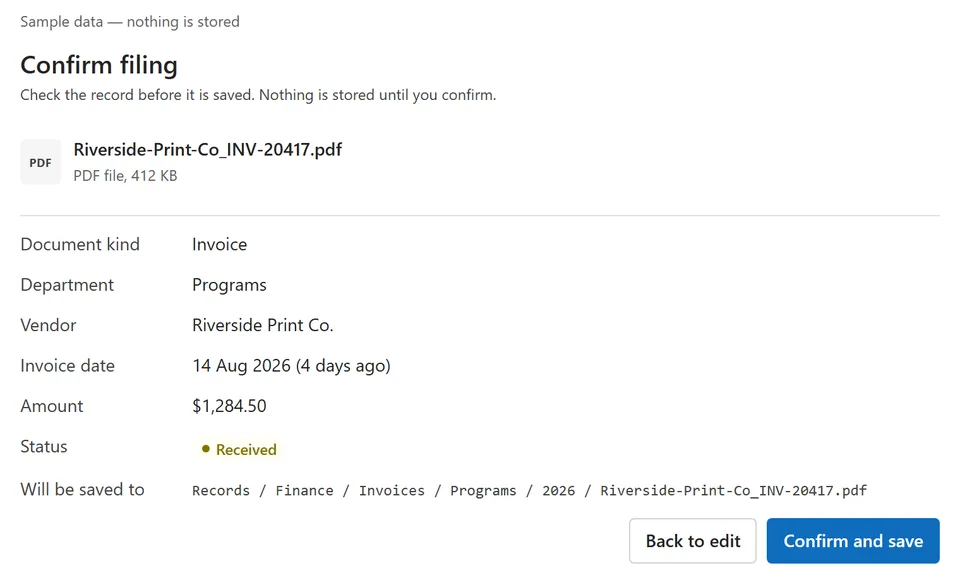
- Updated
- September 24, 2026
- Built with
- React
- SPFx version
- 1.24.0-beta.2
- Products
- SharePoint, Microsoft Copilot
Overview
What this sample demonstrates
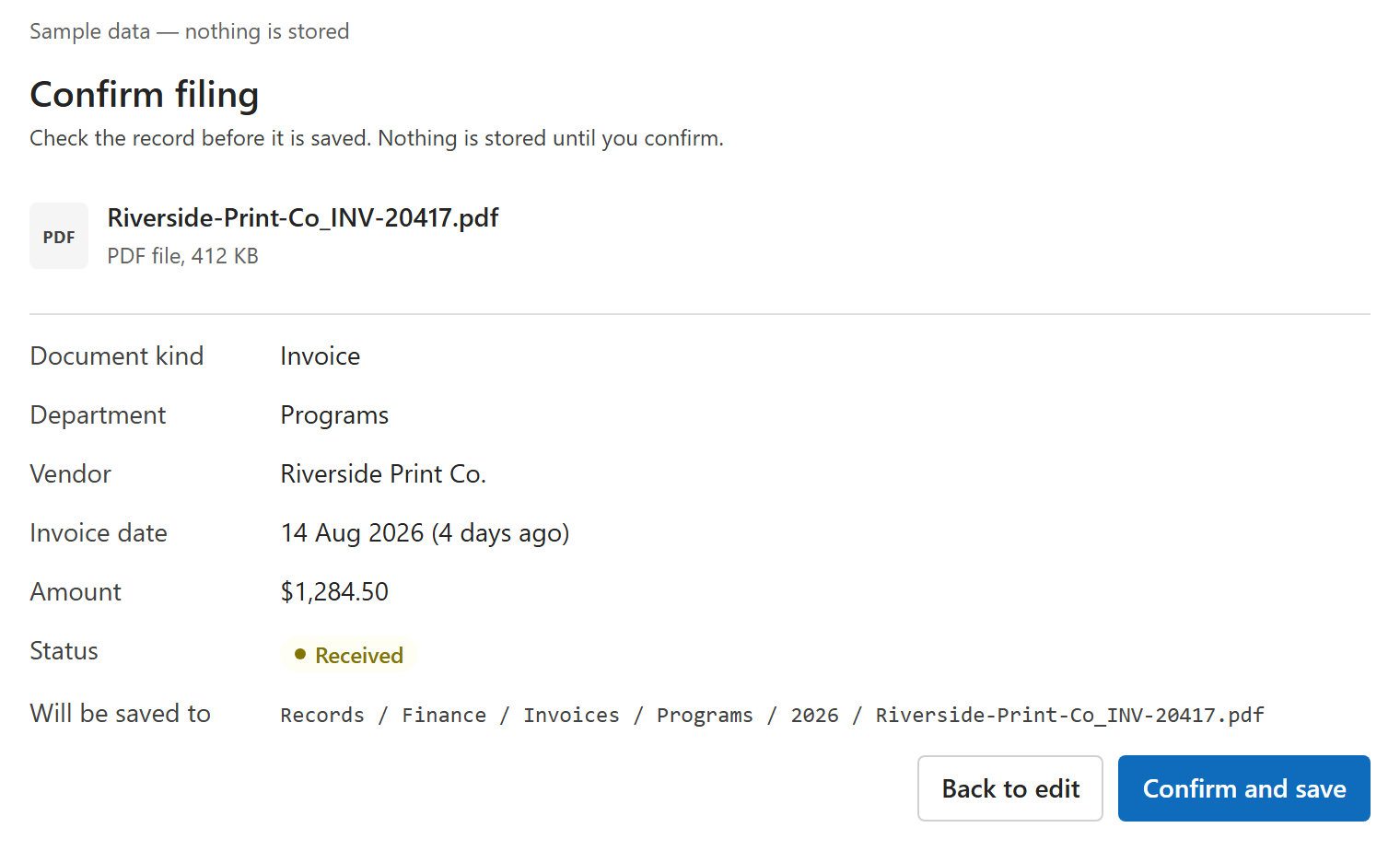
Files a formal document — an invoice or an expense report — into the right document library with complete metadata, from inside a Microsoft 365 Copilot conversation. The user chooses the file, the component asks only for the fields that document kind requires, the destination is derived from kind and department, and nothing is stored until the user confirms. After saving, the user sees exactly what was stored, where, and a receipt.
One manifest tool, fileDocuments, carries an intent discriminator: file (choose, validate, review, confirm — several files at once in a full-screen workspace) or recent (filter recent filings by kind, department, status and period; open any record). Runs on fictional sample data until a tenant admin switches on the live SharePoint store, whose content types supply the required fields; both stores sit behind IDocumentStoreService, so views and mappers are the same for either.
Gallery
See the component in action


Documentation
Setup and implementation
[!IMPORTANT] Ready-made package: deploy file-uploader.sppkg without building the project. Out of the box it runs on fictional sample data and says so on screen; nothing is stored until a tenant admin switches on the live SharePoint store (docs/TENANT-SETUP.md).
Sample type: SPFx Copilot Component with a live SharePoint store behind a tenant setting
Catalog: 1 tool (fileDocuments), 2 intents (file,recent), inline + full screen
Agent: Document Intake, a declarative agent packaged with the component





Summary
Document Intake files a formal document — an invoice or an expense report — into the right SharePoint document library with complete metadata, from inside a Microsoft 365 Copilot conversation. The user chooses the file, the component asks only for the fields that kind of document requires, and nothing is stored until those fields are valid and the user confirms. A text answer can neither accept a file nor enforce a records policy; this does both and hands back a receipt.
The same React component renders in two modes inside the Copilot canvas:
- a compact inline form that files one document end to end, and
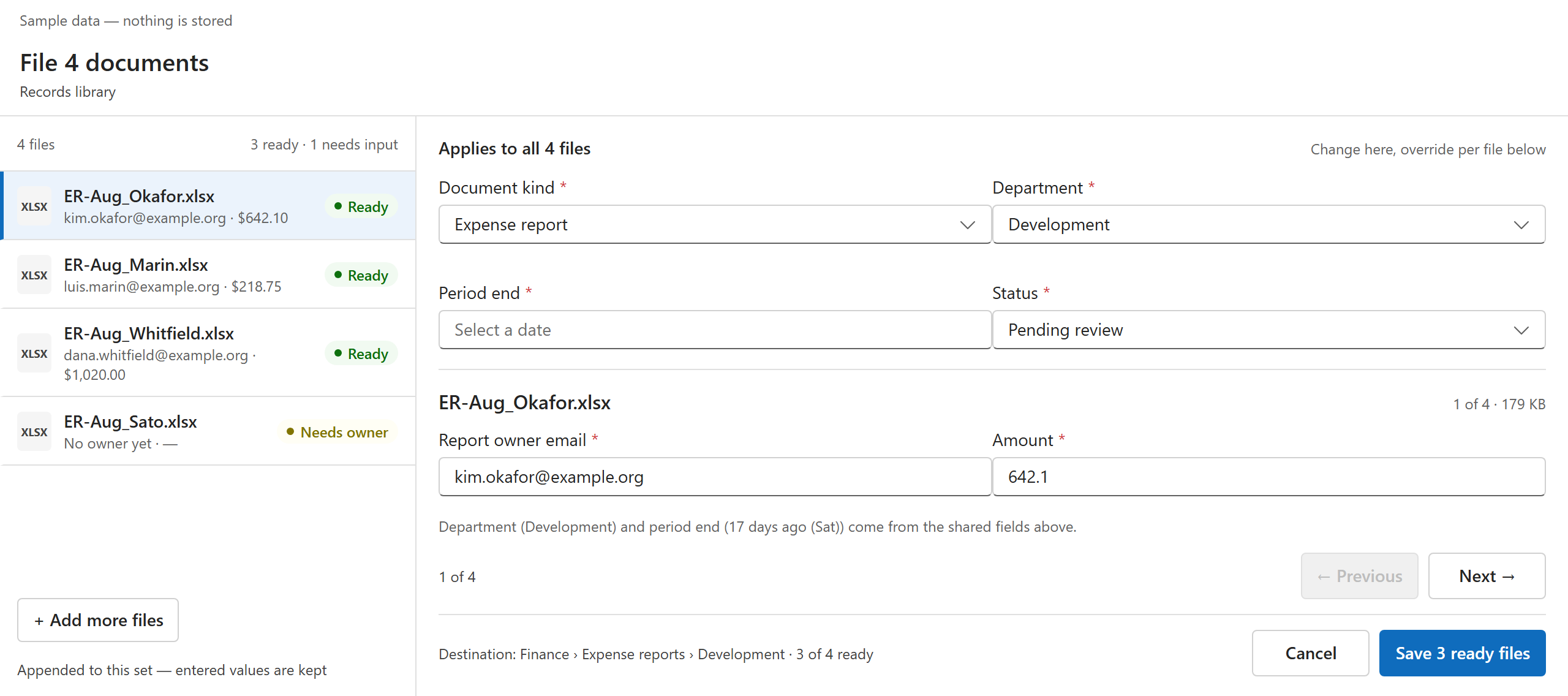
- a full-screen workspace for several documents at once, with shared fields set once and adjusted per file.
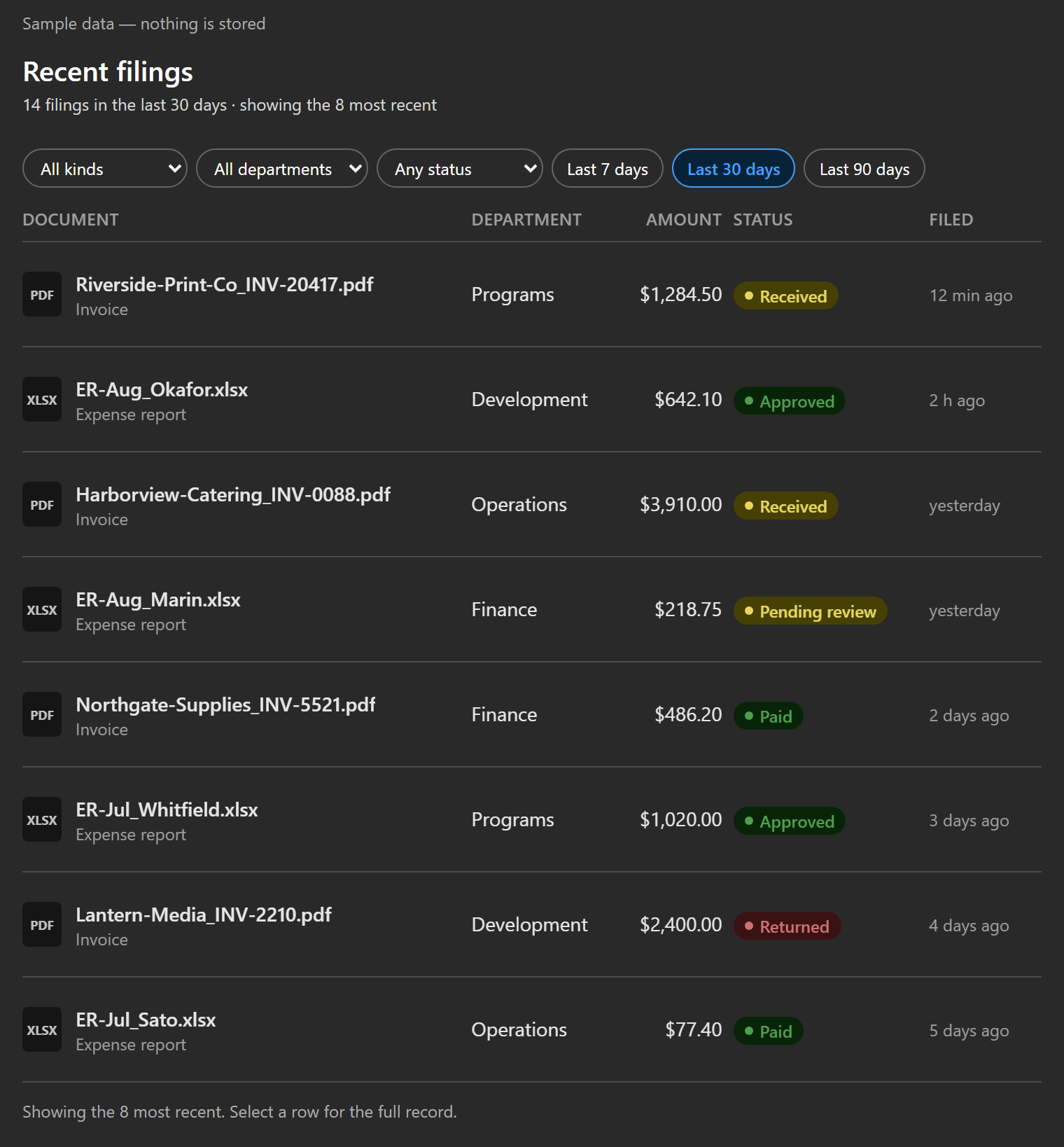
A second intent, recent filings, shows the user's own filings with filters and opens any record in SharePoint.
Screenshots
Inline
Full screen
Recent filings, dark mode
Every layout in light and dark, at narrow width and 200% zoom, is in
assets/, indexed by
assets/visual-evidence.json.
Applies to
- SharePoint Framework
1.24.0-beta.2(Copilot Component) - Microsoft Copilot extensibility — declarative agents and Copilot Components preview
- React
17, Fluent UI v9, PnPjs v4, Node.js>=22.14.0 <23.0.0 - Microsoft 365 tenant with the SharePoint App Catalog
Get your own free development tenant by subscribing to the Microsoft 365 developer program
Prerequisites
- Node.js
>=22.14.0 <23.0.0 - A Microsoft 365 tenant with SPFx 1.24 (dev preview) enabled and a SharePoint App Catalog
- Heft (
npm install -g @rushstack/heft) - For live filing only: PowerShell 7+, PnP.PowerShell 2.x+, and a records site (see docs/TENANT-SETUP.md)
This solution uses the Heft build system (not Gulp) and React 17, aligned with the SPFx 1.24 dev preview.
Contributors
Version history
| Version | Date | Comments |
|---|---|---|
| 1.0 | September 11, 2026 | Initial release: filing (one file inline, several in full screen) and recent filings, on sample data |
| 1.0.5 | September 22, 2026 | Live SharePoint store behind a tenant setting; start-up never guesses between sample and live data |
| 1.0.8 | September 23, 2026 | First real filing from Copilot; agent package keeps its instructions file reference |
| 1.0.9 | September 24, 2026 | Open in SharePoint through Copilot's own link handling |
| 1.0.12 | September 24, 2026 | Files are chosen, not dragged; no Copy link; calendar dates on recent filings. Verified with a real filing in Copilot (receipt F-00174) |
Disclaimer
THIS CODE IS PROVIDED AS IS WITHOUT WARRANTY OF ANY KIND, EITHER EXPRESS OR IMPLIED, INCLUDING ANY IMPLIED WARRANTIES OF FITNESS FOR A PARTICULAR PURPOSE, MERCHANTABILITY, OR NON-INFRINGEMENT.
Minimal Path to Awesome
- Download and deploy file-uploader.sppkg to the tenant App Catalog.
- Approve deployment for all sites when prompted.
- Add the packaged Document Intake agent in Microsoft Copilot (App Catalog → Manage apps → the solution → Add to Teams), then install it to yourself from the Microsoft 365 admin centre → Agents.
- Start with “File this invoice for the Programs team.” Choose a file, review, confirm. On sample data the receipt says so; nothing is stored.
To build locally:
npm ci
npm run build
npm start runs the local Workbench at https://localhost:4321. Use
npm run capture:visual to regenerate the screenshots and visual evidence.
Live filing into SharePoint needs a records site and two tenant settings. The scripted walkthrough — provision, verify, tenant test, deploy, first filing, each step with what “done” looks like — is in docs/TENANT-SETUP.md.
Features
Records staff — finance and operations people at a non-profit — file formal documents every day, where metadata is mandatory and audited. This sample lets them do it from Copilot without leaving the conversation.
- Complete records only. No file reaches the library without every field its document kind requires. The kinds and their required fields come from the library's content types, not from the component.
- The destination is derived, never chosen. Kind and department decide the
folder: an invoice for Programs goes to
Records/Finance/Invoices/Programs/2026. There is no folder picker. - Copilot pre-fills, a person confirms. “File this invoice for Programs, dated last Friday” fills department and date and marks them as pre-filled. The prompt never saves anything by itself: the user reviews a read-only summary with the exact destination and selects Confirm and save, the only step that writes.
- A receipt, not a claim. After saving, the user sees what was stored, where, a receipt number taken from the stored record, and Open in SharePoint. A save that fails partway rolls back and says so; a rollback that cannot finish names the file it left behind.
- Several files at once in the full-screen workspace: shared fields set once, each file's own fields adjusted, per-file readiness shown before saving.
- Recent filings. “What have I filed this week?” shows the user's own filings with filters for kind, department, status and period. Selecting a row shows the full record and opens it in SharePoint.
- Honest sample mode. Until a tenant admin switches it on, the component runs on fictional sample data (Brightwater Community Foundation) and says so on screen. Whether data is sample or live is never a tool argument.
This sample illustrates the following concepts:
- An SPFx 1.24 Copilot Component with one tool serving two intents, inline and full-screen views, and a declarative agent whose instructions tie every “the form is open” claim to an actual tool call
- A submit flow with draft, validation, review, confirm and receipt states, where only an explicit confirmation writes
- A swappable store behind one interface (
IDocumentStoreService): a mock and a live SharePoint store (PnPjs v4) with identical views, selected by a tenant setting read once at start-up. The contract every store keeps is in docs/STORE-CONTRACT.md - Required fields read from SharePoint content types, with a per-kind config map for what content types cannot express
- Three test loops: offline unit and view tests on every build, a tenant test
(
npm run test:tenant) that runs the shipped store against a real library, and the Copilot host last - Scripted provisioning, verification and deployment with pre-flight checks
Conversation starters
| # | Starter | Intent |
|---|---|---|
| 1 | File this invoice for the Programs team | file |
| 2 | Upload these expense reports from last month | file (full screen for several) |
| 3 | What have I filed this week? | recent |
| 4 | Show recent filings for Finance that are still pending | recent |
| 5 | What information does an expense report need before I file it? | text answer, no component |
Validation status
The 24 September 2026 production build completed with zero lint warnings:
- 338 Jest tests passed, 0 failed, including the component lifecycle against the SDK's mock host, and a guard that fails the build on any drag-or-drop wording in the UI, the tool description or the agent instructions.
- 41 Playwright visual captures passed with 0 broken images or horizontal overflow.
- Tenant test (
npm run test:tenant): 17 of 17 scenarios against a real records library, run as a filing user. - In Microsoft 365 Copilot: the agent publishes from the
.sppkg, the tool binds, a file chosen in the canvas is uploaded and filed with a receipt, the recent view reads it back, Open in SharePoint opens the file, and choosing two or more files opens the full-screen workspace in Copilot's side panel. - The generated agent package keeps
$[file('instruction.txt')]; the build fails if it is inlined, because SharePoint registers an inlined package with no callable tool.
All of the above ran in one Microsoft 365 development tenant, the author's. The walkthrough in docs/TENANT-SETUP.md has not yet been run by someone else on another tenant; if a step does not look the way it says, that is a finding — please open an issue.
Screen-reader output in the host remains an environment-specific gate and is not claimed here.
Solution structure
src/copilotComponents/fileUploader/
  FileUploaderCopilotComponent.ts            entry point; resolves the store once, then mounts React
  FileUploaderCopilotComponent.manifest.json component + tool manifest
  FileUploaderCopilotComponentProperties.ts  Zod tool-input schema
  components/                                inline, full-screen and shared blocks
  logic/                                     filing and recent controllers, validation, dates, prefill
  models/                                    view models, seeds (relative time), config
  services/                                  IDocumentStoreService, mock store, SharePoint store, tenant settings
scripts/                                     build gates, visual capture, provisioning, verification, deploy
tenant-tests/                                the tenant test (loop 2) and fixture capture
copilot/                                     declarative agent, plugin stub, instructions, icons
docs/                                        TENANT-SETUP.md, STORE-CONTRACT.md, design sources
assets/                                      screenshots, visual evidence, sample.json
sharepoint/solution/                         ready-to-deploy package
Limitations and support
- Pre-release platform. SPFx 1.24 Copilot Components are in preview: no SLA,
and breaking changes between betas of the same version. This sample is built
on
1.24.0-beta.2because packages from1.24.0-beta.3inline the agent instructions, and SharePoint then registers the agent with no callable tool. Newer betas exist (1.24.0-beta.4andbeta.5on npm as of September 24, 2026); this sample has not been rebuilt on them. Beta.3's release notes describe build-time agent-manifest validation and an automatic Teams manifest version bump on component changes, which may change the two limitations below. - Files are chosen, not dragged. In Copilot, a file dragged onto the component is attached to the chat instead of the form, so the component offers only Choose a file.
- Open in SharePoint goes through Copilot's link check. Copilot may say it could not verify the link; select Continue anyway and the file opens. Copilot's own citation links show the same dialog. There is no Copy link button, because the canvas does not allow clipboard access; the URL is shown as selectable text.
- An agent's instructions cannot be updated after the first deploy (as of
September 2026). A new
.sppkgupdates the component and the tool, but Add to Teams answers “couldn't add” for an agent that already exists, so the agent's instructions, version and description stay as they were at the first add. Deploy the current package first. - The first call in a new chat can fail with Copilot's “Something went wrong” card. Send the request again.
- Report owners are email addresses. The live store resolves them with
SharePoint's
ensureUser, which accepts nothing looser. - Filed records are read-only in the component; corrections happen in SharePoint. No approval or payment routing after filing.
- For sample issues, use the repository issue tracker and include the prompt, host mode (inline or full screen), browser, a screenshot, and whether the problem reproduces in the local Workbench.
Help
We do not support samples, but this community is always willing to help, and we want to improve these samples. We use GitHub to track issues, which makes it easy for community members to volunteer their time and help resolve issues.
You can try looking at issues related to this sample to see if anybody else is having the same issues.
If you encounter any issues using this sample, create a new issue.
References
- Getting started with SharePoint Framework
- Heft documentation
- PnPjs
- Microsoft 365 & Power Platform Community — guidance, tooling, samples and open-source controls for your Copilot, Microsoft 365 & Power Platform development
Share your solution with others through the Microsoft 365 Patterns and Practices program to get visibility and exposure. Learn more from the Microsoft 365 & Power Platform Community.