
Copilot UX component
Holiday Planner - Working Days, Long Weekends, and Regional Holidays in Copilot Chat
Five SPFx Copilot Components and one declarative agent that calculate working days, find long weekends with bridge-day suggestions, list holidays, check dates, and compare office calendars directly in Copilot chat.

- Updated
- September 30, 2026
- Built with
- React
- SPFx version
- 1.24.0-beta.5
- Products
- SharePoint, Microsoft Copilot
Overview
What this sample demonstrates
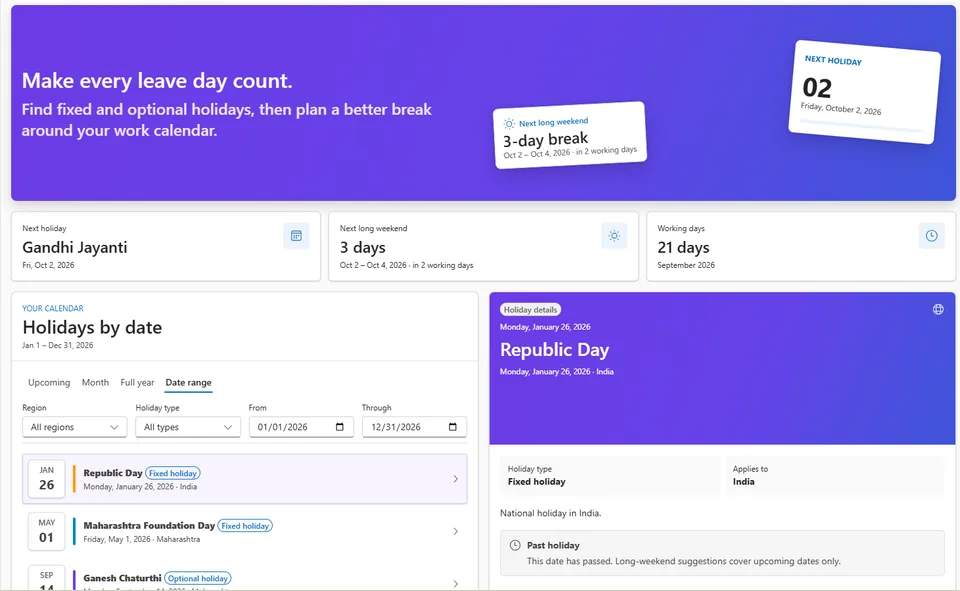
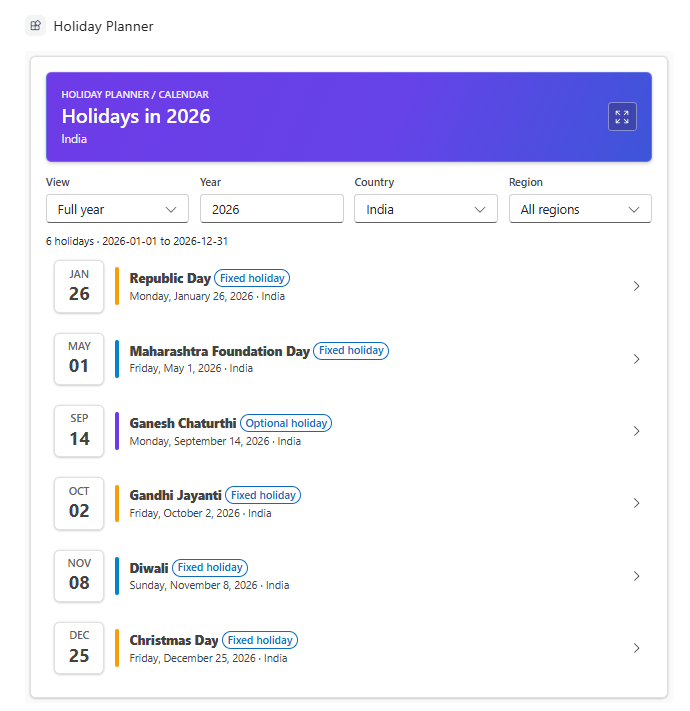
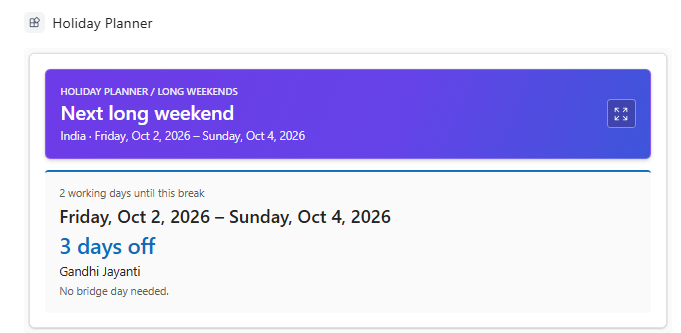
Holiday Planner is a SharePoint Copilot App built as five SPFx 1.24 Copilot Components under a single declarative agent. Each tool renders a live React card in the Copilot conversation: an inclusive working-day count, the next long weekend with the working days until it and any bridge-day suggestion, a full-year, month, or upcoming holiday list, a working-day check for a specific date or named holiday, and a side-by-side comparison of regional calendars.
Expanding a card opens a shared dashboard with calendar tabs, holiday details, and a Vacation Optimizer. Holiday data is read from a SharePoint list under the signed-in user's delegated identity, configured through a tenant storage entity, with demo data as a labelled fallback. The default country resolves from the query, a OneDrive-saved preference, the user's profile, or browser hints, and the pure planning calculations are unit tested.
Gallery
See the component in action


Documentation
Setup and implementation
Summary
Holiday Planner is a set of five SPFx Copilot Components that answer holiday-planning questions directly in Microsoft Copilot. A single declarative agent routes each request to the matching tool, which renders a live React card in the conversation: an inclusive working-day count, the next long weekend with bridge-day suggestions, a full-year or upcoming holiday list, a working-day check for a specific date, or a side-by-side comparison of office calendars.
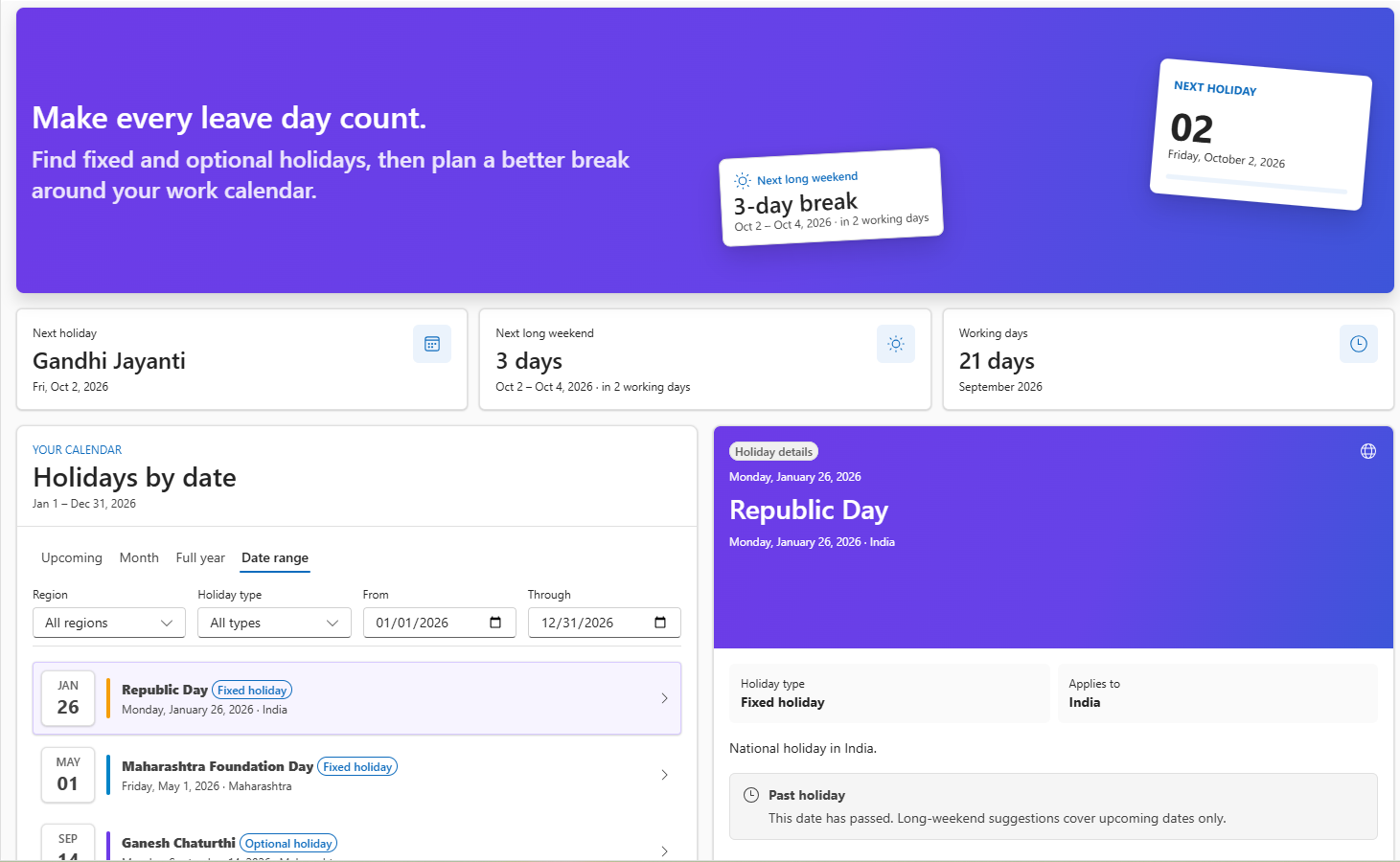
Expanding a card opens the shared Holiday Planner dashboard with a hero summary, calendar tabs (Upcoming, Month, Full year, Date range), holiday details, and a Vacation Optimizer that shows how many days off each number of leave days can buy. Holiday data comes from a SharePoint list under the signed-in user's delegated identity. It is a fixed-calendar planning tool, not a leave-request or balance experience.
| Component | Copilot tool | Primary answer |
|---|---|---|
| Working Day Calculator | CalculateWorkingDays |
Inclusive working-day count and exclusion breakdown |
| Long Weekend Finder | FindLongWeekends |
Next holiday-backed extended break, working days until it, and bridge-day suggestions |
| Upcoming Holidays | GetUpcomingHolidays |
Full-year, month, or date-range holiday lists; next-holiday countdown for upcoming requests |
| Holiday Details | GetHolidayDetails |
Working-day status or details for a named holiday |
| Regional Comparison | CompareRegionalHolidays |
Shared dates, unique dates, and working-day mismatches across locations |
Compatibility







Applies to
- SharePoint Framework 1.24+ (Copilot Component)
- Microsoft Copilot extensibility
- Microsoft 365 tenant with the SharePoint App Catalog
Get your own free development tenant by subscribing to the Microsoft 365 Developer Program.
Contributors
Version history
| Version | Date | Comments |
|---|---|---|
| 1.0.0 | 2026-09-30 | Initial release |
Prerequisites
- Node.js
>=22.14.0 <23.0.0 - SharePoint Online and Microsoft 365 Copilot enabled in the tenant
- Permission to deploy to the SharePoint App Catalog and approve API permissions
- PnP.PowerShell for list provisioning
The solution requests the following delegated Microsoft Graph permissions, declared in config/package-solution.json. A tenant administrator must approve them in SharePoint admin center > Advanced > API access after deployment.
| Permission | Why it is needed |
|---|---|
User.Read |
Reads only the country property of the signed-in user's profile to choose a default calendar when no query country or saved preference exists. |
Files.ReadWrite.AppFolder |
Stores the user's chosen default country in a small JSON file in their OneDrive app folder. No broad Files.ReadWrite.All access is requested. |
Holiday data itself is read from the OrganizationHolidays SharePoint list with SharePoint REST under the signed-in user's identity. The components never use app-only credentials and never modify holiday records.
Minimal path to awesome
- Clone this repository
- From your command line, change your current directory to this solution's root
- Install the dependencies:
npm install
- Start the hosted tenant workbench:
npm run start
SPFx Copilot Components cannot be tested in the local workbench. Use the hosted Copilot Workbench in a tenant where the solution is deployed (see Debug in Copilot Workbench).
- To create the production package, run:
npm run build
Deploy sharepoint/solution/holiday-planner.sppkg to the SharePoint App Catalog and teams/holiday-planner.zip to the Teams/Copilot app catalog, then approve the API permissions, configure the tenant property, and provision the list as described next. Start a new Copilot conversation after every redeploy so the agent picks up the latest tool schema and instructions.
Approve Microsoft Graph permissions
Uploading the .sppkg queues the permission requests declared in config/package-solution.json; they are not granted automatically. A SharePoint or Global administrator must approve them:
- Open the SharePoint admin center and go to Advanced > API access.
- Under Pending requests, select each request from
holiday-planner-client-side-solutionand choose Approve:- Microsoft Graph -
User.Read - Microsoft Graph -
Files.ReadWrite.AppFolder
- Microsoft Graph -
- Confirm both now appear under Approved requests.
Until approval is complete, the components still render and fall back to browser-locale or time-zone country detection, but the profile-country lookup and Save default country to OneDrive action fail with a consent error.
Configure the holiday site
The components read the tenant-scoped SharePoint storage entity HolidayPlannerSite once per session. Set it to the absolute URL of the site that hosts the holiday list:
Set-PnPStorageEntity `
  -Key HolidayPlannerSite `
  -Value "https://contoso.sharepoint.com/sites/hr" `
  -Description "Site hosting the Holiday Planner lists"
Changing the property requires no rebuild or redeploy. If it is unset, the current SharePoint site context is used. If the site or list is unreachable, the components show the bundled India/UK demo dataset and label it as demo data.
Provision the list
cd scripts
Install-Module PnP.PowerShell -Scope CurrentUser
Register-PnPEntraIDAppForInteractiveLogin -ApplicationName "PnP Holiday Planner" -Tenant contoso.onmicrosoft.com
./Provision-HolidayLists.ps1 `
  -SiteUrl "https://contoso.sharepoint.com/sites/hr" `
  -ClientId "00000000-0000-0000-0000-000000000000" `
  -SeedSampleData
-ClientId is required for PnP.PowerShell 2.2 and later. See scripts/README.md for parameters, list fields, and destructive-operation details.
OrganizationHolidays is read by every component. Field internal names are HolidayDate, Country, Region, IsOptional, and Description. IsOptional is the sole classification field: Yes means Optional and No means Fixed. Users need read access to the list.
Try it in Copilot
- "How many working days are left this month?"
- "What is the next long weekend?"
- "What holidays are coming up?"
- "Is next Monday a working day?"
- "Show all holidays this year."
- "Show all holidays in 2026 for India"
- "Compare upcoming holidays across our office locations."
Features
This sample illustrates the following concepts:
- Five single-purpose Copilot Components under one declarative agent - Each tool has its own manifest GUID, Zod-based properties schema, and inline card, so routing stays unambiguous; expanding any dashboard-backed tool opens one shared dashboard.
- Card-first agent instructions -
copilot/instruction.txttreats the rendered component as the primary answer and constrains the agent to a single lead-in sentence with no positional or "information unavailable" language, because Copilot UX tools return no text payload to the model. - Tenant-property configuration - The
HolidayPlannerSitestorage entity lets an administrator repoint the data source without rebuilding, following thetime-off-absencepattern. - Delegated-only data access with resilient fallback - SharePoint REST and Microsoft Graph run in the browser as the signed-in user. Data services never throw; demo data renders when live data is unavailable and is labelled as such.
- Country resolution chain and OneDrive preference - Explicit query country, then a saved OneDrive app-folder preference, then profile country, then browser locale region, then a recognised time zone, then Global. Saving a default is an explicit user action in the dashboard.
- Regional comparison that survives expansion - The side-by-side table, shared and unique counts, and working-day mismatches remain when the card is expanded.
Debug in Copilot Workbench
In PowerShell, set the tenant domain used by config/serve.json, trust the local HTTPS certificate, and start the Heft dev server:
$env:SPFX_SERVE_TENANT_DOMAIN = "contoso.sharepoint.com"
npx heft trust-dev-cert
npx heft start --nobrowser
Open https://contoso.sharepoint.com/_layouts/15/copilotworkbench.aspx and accept the prompt to load debug manifests. Select a Holiday Planner component, enter its properties JSON (all properties are optional, so {} is valid), then select Fire turn. The component is not instantiated until a turn is fired.
In browser developer tools, inspect Network requests for GetStorageEntity and OrganizationHolidays. If requests fail, the component falls back to demo data and logs the SharePoint failure in the console. Heft manages webpack by default; run npm run eject-webpack only if you need a custom webpack configuration.
Scope boundary
Holiday Planner has no leave-plan builder, balances, entitlements, accruals, leave requests, or manager views.
Help
If you encounter issues using this solution, please open an issue in the repository.
Disclaimer
THIS CODE IS PROVIDED AS IS WITHOUT WARRANTY OF ANY KIND, EITHER EXPRESS OR IMPLIED, INCLUDING ANY IMPLIED WARRANTIES OF FITNESS FOR A PARTICULAR PURPOSE, MERCHANTABILITY, OR NON-INFRINGEMENT.