
Copilot UX component
My Planner Projects Agent
An SPFx 1.24 Copilot declarative agent that reads the current user's Microsoft Planner projects and prepares new projects for explicit creation.

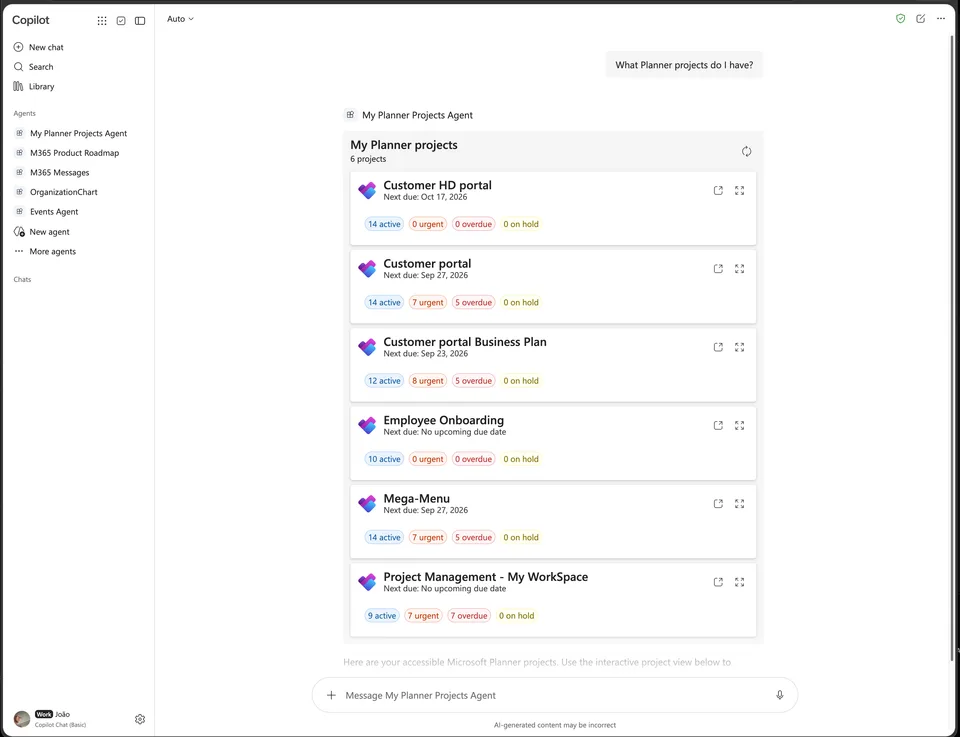
- Updated
- September 21, 2026
- Built with
- React
- SPFx version
- 1.24.0-beta.2
- Products
- SharePoint, Microsoft Copilot
Overview
What this sample demonstrates
My Planner Projects Agent is a Microsoft Copilot declarative agent built with SharePoint Framework 1.24 that helps users discover and manage their Microsoft Planner projects through natural language interactions.
The agent lists accessible Planner projects in an interactive DetailsList when multiple projects match a query, shows a focused summary card when a single project matches, and highlights projects with incomplete tasks that are overdue or due within seven days. It supports filtering by creation date, task activity, and due-date periods, and can find recently active, newly created, or next-due projects with optional result limits.
Beyond project discovery, the agent prepares new projects for explicit creation using natural-language requests. It supports creating blank Basic plans or editable templates including Simple Plan, Project Management, Software Development, Business Plan, and Employee Onboarding. The agent creates the selected plan, buckets, scheduled tasks, and optional self-assignments only after an explicit button click, reporting partial creation progress and continuing remaining setup without duplicating blueprint buckets or tasks.
Gallery
See the component in action


Documentation
Setup and implementation
An SPFx 1.24 Copilot declarative agent that reads the current user's Microsoft Planner projects and prepares new projects for explicit creation.
Features
- Lists accessible Planner projects in a
DetailsListwhen multiple projects match. - Shows a focused summary card when one project matches.
- Highlights projects with incomplete tasks that are overdue or due within seven days.
- Finds active or overdue work assigned to the current user.
- Filters projects by creation, task activity, and due-date periods or custom dates.
- Returns recently active, newly created, or next-due projects with optional result limits.
- Finds incomplete tasks in buckets named
On hold,Hold,In hold, orBlocked. - Opens the selected project in the native Microsoft Planner web part in Copilot fullscreen mode.
- Prepares a blank Basic plan or editable Simple Plan, Project Management, Software Development, Business Plan, and Employee Onboarding templates from natural-language requests.
- Loads the user's Microsoft 365 groups on picker focus, supports debounced search, and continues with infinite-scroll paging.
- Creates the selected plan, buckets, scheduled tasks, and optional self-assignments only after an explicit button click.
- Reports partial creation progress and can continue the remaining setup without duplicating blueprint buckets or tasks.
- Supports light and dark Copilot host themes.
Planner does not expose a native on-hold task status. The on-hold view therefore uses the documented bucket-name convention above.
Prerequisites
- Node.js
>=22.14.0 <23.0.0. - A Microsoft 365 tenant with SharePoint, Copilot, and Planner available.
- Approval of the solution's delegated Microsoft Graph
Tasks.ReadWriteandGroupMember.Read.Allpermissions in SharePoint admin.
Development
npm install
npm start
The local server listens on https://localhost:4321. Replace {tenantDomain} in config/serve.json with the tenant host before opening Copilot Workbench.
Validation
npx tsc --noEmit
npm run build
The production build runs lint, webpack, Copilot package generation, Jest tests, and SharePoint solution packaging. Output packages are written to teams/my-planner-projects-agent.zip and sharepoint/solution/my-planner-projects-agent.sppkg.
Architecture documentation
See docs/architecture.md for the complete Copilot request lifecycle, component responsibilities, Graph data flow, selection persistence, fullscreen navigation, project creation flow, testing strategy, and packaging details.
Disclaimer
THIS CODE IS PROVIDED AS IS WITHOUT WARRANTY OF ANY KIND, EITHER EXPRESS OR IMPLIED, INCLUDING ANY IMPLIED WARRANTIES OF FITNESS FOR A PARTICULAR PURPOSE, MERCHANTABILITY, OR NON-INFRINGEMENT.