
Copilot UX component
Negotiation Lab
Augment SPFx React components with Copilot conversations, structured replies and APVEE-provisioned SharePoint storage.

- Updated
- September 6, 2026
- Built with
- React
- SPFx version
- 1.24.0-beta.3
- Products
- SharePoint, Microsoft Copilot
Overview
What this sample demonstrates
Learn how to provision SharePoint lists with APVEE from an SPFx Copilot component, send messages and structured context to Microsoft Copilot, and display generated answers and proposals inside React. Built with SPFx 1.24.0-beta.3 and React 18.
Negotiation Lab demonstrates the integration through SaaS renewal, total job offer and service recovery scenarios. Users ask questions, edit terms and confirm outcomes, with a saved Cool, Medium or Hard counterpart style and practice state stored in two SharePoint lists.
Gallery
See the component in action


Documentation
Setup and implementation

Summary
This sample demonstrates how to augment an SPFx React component with Microsoft Copilot. Users ask questions, exchange offers and confirm agreements in three fictional scenarios: SaaS renewal, Total job offer and Service recovery.
Features
- Provision SharePoint lists, fields and views from the component using APVEE's
@apvee/m365-actionable-provisioningpackage. - Send messages and structured context from React to Copilot, then display its answers and proposed terms inside the component.
- Validate proposals and let the user confirm before saving the result to SharePoint using PnPjs.
- Resume saved practices and choose a Cool, Medium or Hard counterpart.
- Support light/dark themes and inline/fullscreen views with React 18.
The sample uses the SPFx Copilot bridge and two component tools. No custom backend or direct LLM API calls are required.
Compatibility





SPFx Copilot components and the APIs used here are preview capabilities.
Applies to
Prerequisites
- Node.js
>=22.14.0 <23.0.0. - A SharePoint App Catalog and access to SPFx Copilot components and Microsoft Copilot.
- An existing same-tenant SharePoint site with Manage Lists permission for setup.
- Players need View Items on
NegotiationScenariosand View, Add and Edit Items onNegotiationSessions.
Minimal path to awesome
Clone this repository or download this sample.
Set
targetSiteUrlin config/negotiation-lab.deployment.json to your existing SharePoint site. The default/sites/negotiation-labis an example.From
samples/negotiation-lab, build the package:npm ci npm run buildUpload
sharepoint/solution/negotiation-lab.sppkgto the tenant App Catalog and deploy it.Use Sync to Teams, then install or update the Negotiation Lab agent.
Open the agent in a new Microsoft Copilot chat and say Open Negotiation Lab. Choose Create the two lists if prompted.
Setup provisions NegotiationScenarios for the three scenarios and NegotiationSessions for saved practices. Rebuild if you change the configured site.
npm run build clears previous generated packages, runs the tests and creates the production package.
For local rendering checks, run npx heft trust-dev-cert and npm run start. Test the full Copilot interaction after deployment.
Try it
- Start SaaS renewal with a Medium counterpart.
- Under Ask a question, ask: “What matters most to you in this renewal?”
- Under Make an offer, propose CHF 108,000 / 36 months / 12 support hours and explain the trade.
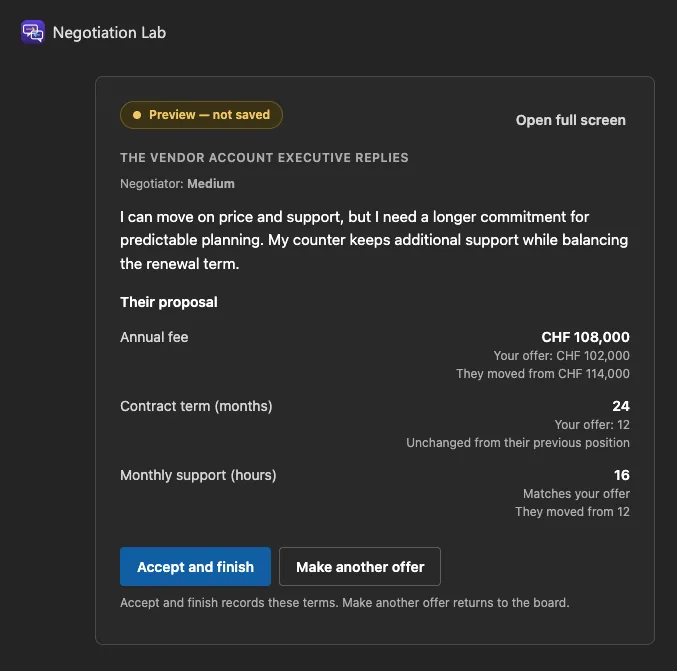
- Review the response. Choose Accept and finish to record the agreement or Make another offer to continue.
Questions also work in Microsoft Copilot chat. Say show my practice to reopen the board.
Negotiation Lab in action
Ask a question
Copilot's answer appears inside the practice board.

Review a proposal
Review the terms before deciding whether to accept or continue negotiating.

Record the agreement
The confirmed agreement shows the same terms as the preview.

Limitations
- Fictional practice only. Do not enter confidential or personal information.
- Copilot responses and tool routing can vary. Validation checks terms, not every claim in the generated wording.
- New conversation turns replace earlier boards. Use one active practice conversation per user.
Further reading
Version history
| Version | Date | Change |
|---|---|---|
| 1.0.0 | 2026-09-06 | Initial public release. |
Contributors
Help
For questions or problems, search the repository issues or open a new issue with reproduction steps.
Disclaimer
THIS CODE IS PROVIDED AS IS WITHOUT WARRANTY OF ANY KIND, EITHER EXPRESS OR IMPLIED, INCLUDING ANY IMPLIED WARRANTIES OF FITNESS FOR A PARTICULAR PURPOSE, MERCHANTABILITY, OR NON-INFRINGEMENT.