
Copilot UX component
Portfolio Carryover Review
Review initiatives carried over between fiscal years, including their status, ownership, and carryover rationale.

- Updated
- October 31, 2026
- Built with
- React
- SPFx version
- 1.24.0
- Products
- SharePoint, Microsoft Copilot
Overview
What this sample demonstrates
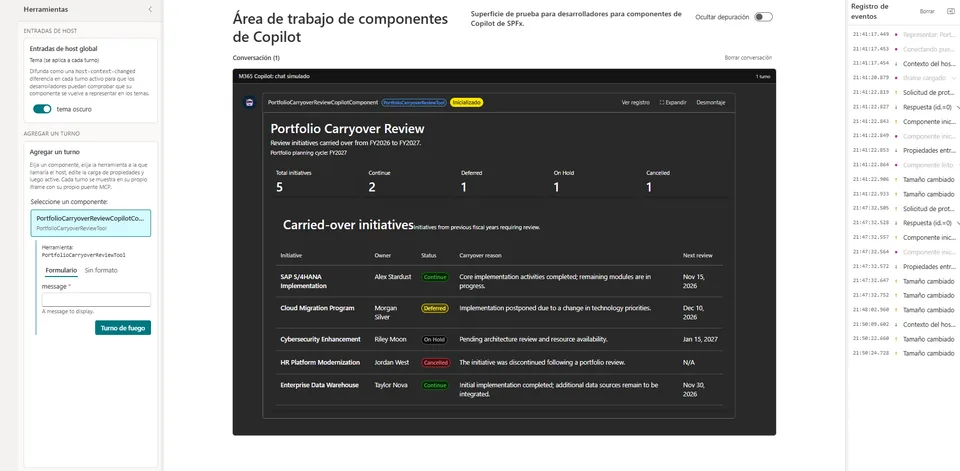
Portfolio Carryover Review helps IT portfolio managers review initiatives carried over from previous fiscal years. It provides a consolidated view of initiative status, ownership, reasons for carryover, and planned review dates. The sample uses mock data to demonstrate how portfolio carryover information can be explored directly in Microsoft Copilot.
Documentation
Setup and implementation
Summary
Portfolio Carryover Review is a Microsoft Copilot component that helps IT portfolio managers review initiatives carried over from one fiscal year to the next.
It provides a consolidated view of initiative status, ownership, carryover reasons, and planned review dates.
The sample is built with the SharePoint Framework (SPFx), React, and Fluent UI. It uses fictitious sample data and does not connect to external systems or services.
Used SharePoint Framework Version

Applies to
Prerequisites
- Node.js compatible with SPFx 1.24.0.
- Access to a Microsoft 365 development tenant.
- SharePoint Framework development environment.
Solution
| Solution | Author |
|---|---|
| portfolio-carryover-review | Antonio Villarruel |
Version history
| Version | Date | Comments |
|---|---|---|
| 1.0 | October 31, 2026 | Initial release |
Minimal Path to Awesome
- Clone this repository or download this sample.
- Navigate to samples/portfolio-carryover-review.
- Install dependencies using npm install.
- Start the local development server using npm start.
- Open SharePoint Copilot Workbench in your Microsoft 365 tenant and load the local debug manifests.
To create a production build, run npm run build.
Features
- Review initiatives carried over between fiscal years.
- View initiative status: Continue, Deferred, On Hold, and Cancelled.
- Identify initiative owners and carryover reasons.
- Review planned follow-up dates.
- Display portfolio summary indicators.
- Adapt the component appearance to light and dark themes.
The sample uses fictitious data for demonstration purposes. It does not implement data persistence, workflow management, or integration with external portfolio systems.
Usage
- Start the local development server using
npm start. - Open SharePoint Copilot Workbench in your Microsoft 365 tenant.
- Load the local debug manifests when prompted.
- Invoke the PortfolioCarryoverReviewTool to explore the sample initiatives and portfolio summary.
Deployment
Run npm run build to generate the production solution package.
The generated SharePoint package is available under sharepoint/solution. Follow the official SharePoint Framework deployment guidance to deploy the solution to a Microsoft 365 tenant.
This sample does not include an automated deployment process.
Support
This is a community sample provided as-is for demonstration and learning purposes. It does not include formal support or maintenance commitments.
Disclaimer
THIS CODE IS PROVIDED AS IS WITHOUT WARRANTY OF ANY KIND, EITHER EXPRESS OR IMPLIED, INCLUDING ANY IMPLIED WARRANTIES OF FITNESS FOR A PARTICULAR PURPOSE, MERCHANTABILITY, OR NON-INFRINGEMENT.