
Copilot UX component
Governance Risk Advisor — Executive Tenant Governance Dashboard
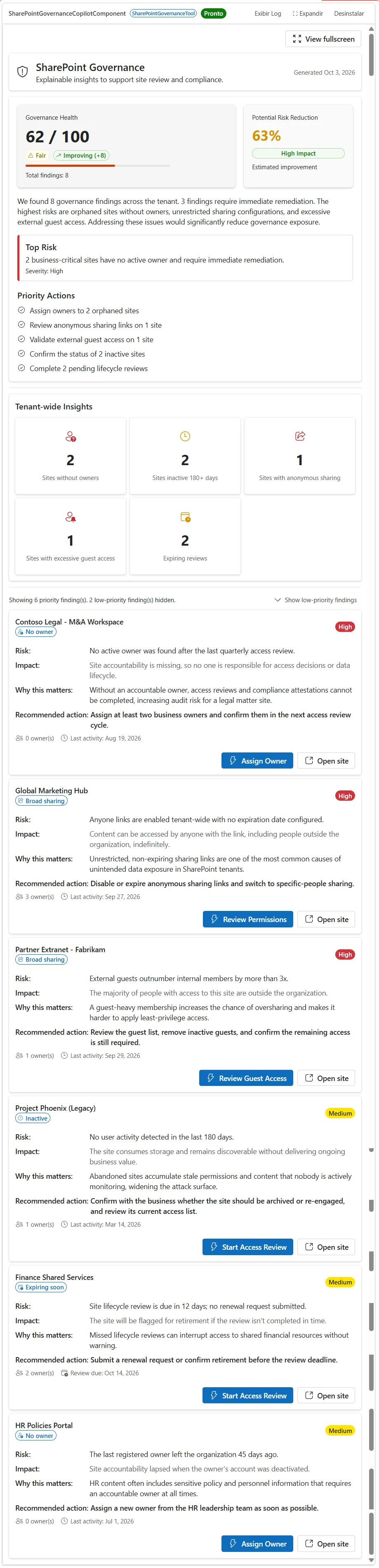
A SharePoint Copilot App (SPFx 1.24 Copilot Component) that turns tenant governance findings into an executive briefing: a governance score with trend, an AI-generated executive summary, prioritized remediation actions, explainable findings, and a tenant-wide insights panel.

- Updated
- October 3, 2026
- Built with
- React
- SPFx version
- 1.24.0-beta.5
- Products
- SharePoint, Microsoft Copilot
Overview
What this sample demonstrates
Governance Risk Advisor is a SharePoint Copilot App built as an SPFx 1.24 Copilot Component (not a classic web part). Instead of a flat list of governance risks, it opens with a 0-100 governance score and a trend indicator (Improving, Stable, Declining), an AI-style executive summary of the tenant's posture, and the top 3-5 prioritized remediation actions ranked by severity-weighted impact.
Findings are shown severity-first: high and medium findings are always visible, while low-priority findings are collapsed behind a 'Show low-priority findings' toggle. Every finding explains the Risk, Impact, Why this matters, and Recommended action in business language, with a primary remediation call-to-action (for example Assign Owner, Review Permissions, Review Guest Access, Start Access Review) that sends a follow-up message back into the Copilot conversation, plus a secondary Open site link.
A tenant-wide insights panel (sites without owners, sites inactive 180+ days, sites with anonymous sharing, sites with excessive guest access, expiring reviews) and an estimated risk reduction projection round out the executive story. The sample ships with mocked data behind a swappable IGovernanceService interface, so a live Microsoft Graph / SharePoint Admin API implementation can be dropped in without touching the UI. Built with the Heft build system, React and Fluent UI v9 with host-driven light/dark theming.
Documentation
Setup and implementation





Summary
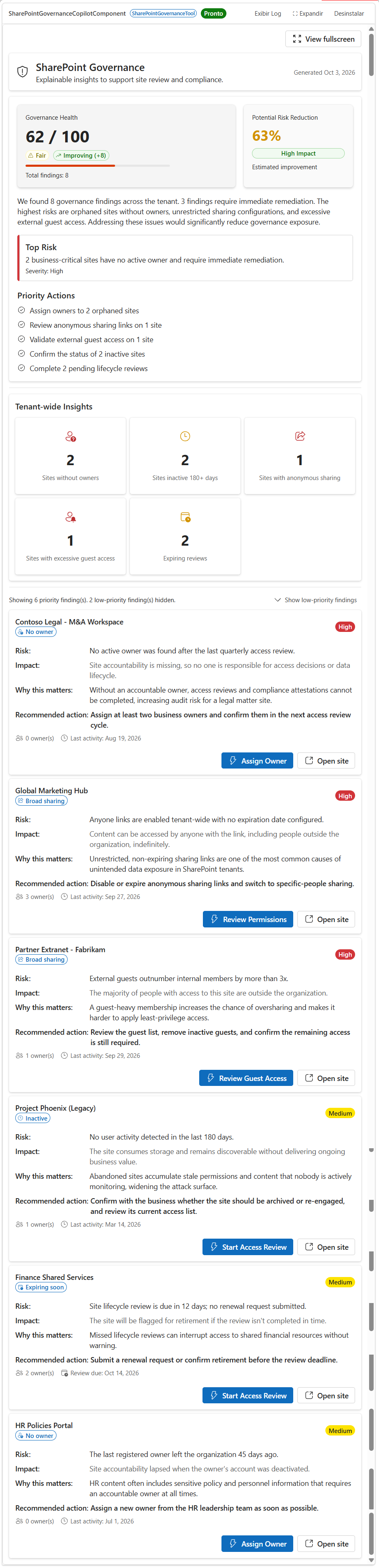
Governance Risk Advisor is an SPFx 1.24 Copilot Component that turns a sprawling SharePoint tenant into a single, explainable governance briefing instead of a flat risk list. Rather than dumping a table of findings on the user, it opens with a governance score, an AI-style executive summary, and a prioritized action list — then lets the user drill into every finding with its business impact, why it matters, and a one-click remediation prompt back into Copilot.
The component is built for the people who actually act on governance data: Governance Managers, Compliance Officers, CIOs, and SharePoint Administrators — not just developers.
Why this sample matters
Many governance solutions focus on reporting findings. This sample demonstrates how Microsoft 365 Copilot and SPFx Copilot Components can transform governance data into actionable recommendations by combining executive summaries, explainable findings, prioritized actions, and remediation workflows directly inside the Copilot canvas.
Sample prompts
Executive governance review
Analyze the tenant and prioritize the top governance risks that require immediate remediation.
Ownership review
Show me sites that don't have active owners and explain the governance impact.
External sharing review
Identify sites with excessive guest access or anonymous sharing links.
Lifecycle management
Show inactive sites that should be archived or reviewed.
Compliance posture
Generate an executive governance briefing for the tenant.
Compatibility
Don't worry if you're unsure about the compatibility details above. We'll verify them when we review your pull request.
Applies to
- SharePoint Framework 1.24+ (Copilot Component)
- Microsoft Copilot extensibility
- Microsoft 365 tenant with the SharePoint App Catalog
Get your own free development tenant by subscribing to the Microsoft 365 developer program
Contributors
Version history
| Version | Date | Comments |
|---|---|---|
| 1.0 | October 3, 2026 | Initial release |
Prerequisites
- Node.js >=22.14.0 <23.0.0
- Heft (
npm install -g @rushstack/heft) - No live Microsoft Graph permissions or app registrations are required — this sample runs entirely on mock data behind a swappable
IGovernanceServiceinterface.
Minimal path to awesome
- Clone this repository (or download this solution as a .ZIP file then unzip it)
- From your command line, change your current directory to
samples/sharepoint-governance-copilot - In the command line run:
npm install -g @rushstack/heftnpm installnpm start— starts the local dev server (https://localhost:4321)
- Invoke the agent in Microsoft Copilot and confirm the governance score, executive summary, priority actions, tenant insights panel, and the expand-to-fullscreen affordance.
Production build, test, and package:
npm run build
Other build commands can be listed using heft --help.
Features
Governance Risk Advisor demonstrates how to turn raw governance findings into an executive-level, action-oriented experience inside the Microsoft Copilot canvas using an SPFx Copilot Component.
This sample illustrates the following concepts:
- Copilot Component UX — a
CopilotComponent(copilotType: "Ux") surfaced as a tool a declarative agent can call, rendering its own React UI inside the Copilot host. - Governance score with trend — a 0-100 tenant governance score, derived from the severity mix of all findings, with an Improving / Stable / Declining indicator compared against a prior-period baseline.
- AI-style executive summary — a narrative paragraph (deterministically generated from the data, no live LLM call) that tells the governance story in one breath: how many findings, how many need immediate attention, and what the highest risks are.
- Prioritized actions, not a flat list — the top 3-5 remediation actions are generated by grouping findings by category and ranking them by severity-weighted impact (for example, "Assign owners to 2 orphaned sites").
- Severity-first findings with progressive disclosure — high and medium findings are always shown; low-priority findings are collapsed behind a "Show N low-priority findings" toggle.
- Explainability for every finding — each finding states the Risk, Impact, Why this matters, and Recommended action in business language, not technical jargon.
- Remediation call-to-action — every finding has a primary action button (for example Assign Owner, Review Permissions, Review Guest Access, Start Access Review) that sends a follow-up message back into the Copilot conversation via
bridge.sendFollowUpMessageAsync, plus a secondary Open site link. - Tenant-wide insights panel — sites without owners, sites inactive 180+ days, sites with anonymous sharing, sites with excessive guest access, and expiring reviews, always computed tenant-wide regardless of the current filter.
- Estimated risk reduction — a one-line projection of how much resolving the top findings would reduce overall tenant risk.
- Swappable data service — all data flows through an
IGovernanceServiceinterface (MockGovernanceServiceships by default), so a live Microsoft Graph implementation (GraphGovernanceService, stubbed in the sample) can be dropped in without touching the UI. - Host context & theming — reads
hostContext.themeandhostContext.displayModeto adapt to the Copilot host environment, using Fluent UI v9 theme tokens. - Filterable tool arguments — the Copilot tool accepts
riskType,minimumSeverity, andmaxResults, so Copilot (or a user prompt) can narrow the findings shown.
Data source
All data is mocked for the sample and served through the IGovernanceService interface (MockGovernanceService), so the UI never calls an API directly. A GraphGovernanceService stub is included (intentionally throwing "not implemented") as the drop-in point for a real Microsoft Graph / SharePoint Admin API implementation — define the approved APIs, permissions, evidence rules, and pagination before enabling tenant data.
The governance score, executive summary, priority actions, and tenant insights panel are always computed from the full tenant dataset, independent of the riskType / minimumSeverity filters — only the detailed findings list below them is filtered and paginated by the tool arguments.
Solution structure
samples/sharepoint-governance-copilot/
  README.md
  assets/                       # preview image + sample.json (gallery metadata)
  config/                       # Heft / SPFx + Copilot agent configuration
  copilot/                      # declarative agent + plugin manifests
  src/
    copilotComponents/
      sharePointGovernance/
        SharePointGovernanceCopilotComponent.ts             # entry point (mounts React)
        SharePointGovernanceCopilotComponent.manifest.json  # component + tool manifest
        SharePointGovernanceCopilotComponentProperties.ts   # Zod tool-input schema
        components/
          SharePointGovernanceApp.tsx         # root shell (theme, bridge, data loading)
          SharePointGovernanceDashboard.tsx    # executive score, summary, actions, findings
        loc/                    # localized UI strings
        mockData/                # static mock governance findings
        models/                  # IGovernanceRisk, IGovernanceResult view models
        services/                # IGovernanceService, mock + Graph-stub services, scoring logic
References
- Getting started with SharePoint Framework
- Build agents for Microsoft Copilot
- Use Microsoft Graph in your solution
- Heft Documentation
- Microsoft 365 & Power Platform Community - Guidance, tooling, samples and open-source controls for your Copilot, Microsoft 365 & Power Platform development
Help
We do not support samples, but this community is always willing to help, and we want to improve these samples. We use GitHub to track issues, which makes it easy for community members to volunteer their time and help resolve issues.
- For questions and comments, please visit the Microsoft 365 & Power Platform Community.
- If you encounter any issues using this sample, create a new issue.
Disclaimer
THIS CODE IS PROVIDED AS IS WITHOUT WARRANTY OF ANY KIND, EITHER EXPRESS OR IMPLIED, INCLUDING ANY IMPLIED WARRANTIES OF FITNESS FOR A PARTICULAR PURPOSE, MERCHANTABILITY, OR NON-INFRINGEMENT.
Share your solution with others through the Microsoft 365 Patterns and Practices program to get visibility and exposure. Learn more from the Microsoft 365 & Power Platform Community.
Part of the Copilot UX components sample gallery - complex UX in the Copilot canvas, powered by SPFx. See aka.ms/spfx.