
Copilot UX component
My Time Off — Time-Off & Absence Copilot App
A SharePoint Copilot App (SPFx 1.24 Copilot Components) that brings the employee time-off (PTO) experience inside the Microsoft Copilot canvas — a personal overview, a request form with an Outlook conflict pre-check, and a team view with manager approvals and a full-screen absence calendar, all powered by delegated, client-side SharePoint REST and Microsoft Graph calls.

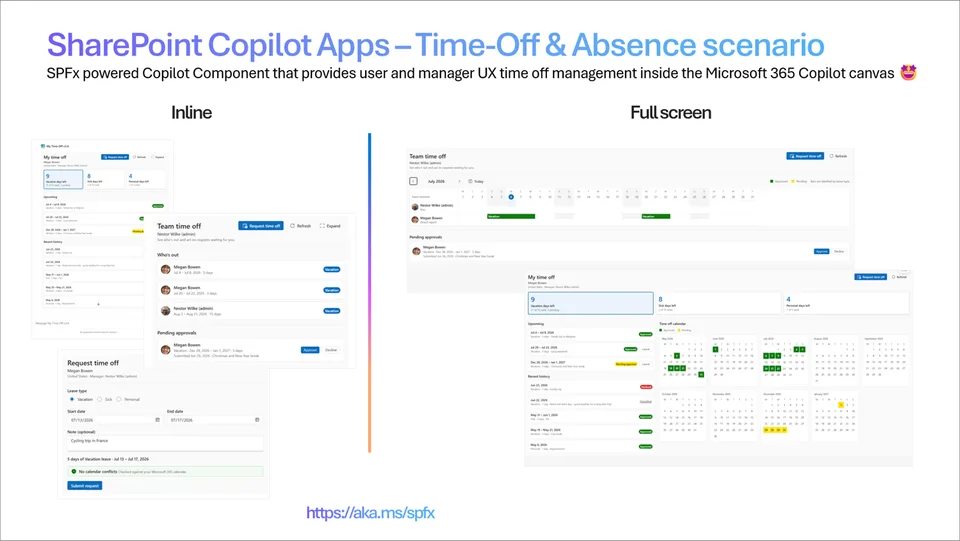
- Updated
- October 28, 2026
- Built with
- React
- SPFx version
- 1.24.0
- Products
- SharePoint, Microsoft Copilot
Overview
What this sample demonstrates
My Time Off is a SharePoint Copilot App built as an SPFx 1.24 Copilot Components sample (not a classic web part). It ships three components that render directly in the Microsoft Copilot chat: timeOffOverview (GetMyTimeOff) shows the signed-in user's balances, upcoming leave and request history; timeOffRequest (RequestTimeOff) is a booking form that checks the user's Outlook calendar for conflicts before writing a new request; and timeOffTeam (GetTeamTimeOff) surfaces who's out, a manager approvals inbox and a full-screen team absence calendar.
The headline capability the sample highlights is authenticated, delegated client-side API calls — something the MCP app specification itself does not provide. Every component reads and writes with the signed-in user's own identity, calling SharePoint REST (three lists: TimeOffRequests, LeaveBalances, CompanyHolidays) and Microsoft Graph (calendar conflict pre-check, manager and team roster resolution, and 48x48 profile photos) directly from the browser — no MCP server, no middle tier, no app-only secrets. New requests are routed to the submitter's line manager resolved via Graph (/me/manager) with a self-approval fallback that keeps single-user demo tenants working.
The data services call SharePoint and Graph live but never throw: on any failure they fall back to an in-memory data set so the components always render, and the team calendar self-heals to a demo roster when User.Read.All is not consented. A PnP PowerShell provisioning script creates and seeds the lists, and a TimeOffSite tenant property lets an admin repoint the components at a different lists site without rebuilding. Built with the Heft build system, React 18.3.1 and Fluent UI v9 with host-driven theming inside Copilot's sandboxed iframe.
Gallery
See the component in action


Documentation
Setup and implementation
SPFx 1.24.0 GA upgrade (October 28, 2026): Build dependencies target GA. React/ReactDOM use 18.3.1. Earlier readiness reports, screenshots, test counts, and tenant evidence remain historical, not fresh GA host certification. Restore was validated using the configured Microsoft npm proxy; npmjs.org did not yet expose all required GA packages. Use an approved registry with 1.24.0 available; do not commit credentials.
Inherited lockfile limitation: Some unchanged third-party tarballs still reference the original OneDrive registry. A clean restore may require access to that feed. Original pinned versions and integrity values are preserved.




Summary
My Time Off is a sample of SPFx 1.24 Copilot components (not classic web parts). It brings an employee's time-off (PTO) experience inside Microsoft Copilot: instead of answering with plain text, Copilot renders three interactive SharePoint components — a personal overview, a request experience, and a team view with manager approvals — directly in the chat canvas.
The point of the sample is to show what makes SPFx Copilot Components different from a generic "MCP app": authenticated, delegated client-side API calls. Every component reads and writes its data with the signed-in user's own identity, calling SharePoint REST and Microsoft Graph directly from the browser — no MCP server, no middle tier, no app-only secrets.
Copilot Components are MCP apps that run as SharePoint Framework code. Because they execute in the SharePoint page context, they can make the same delegated API calls any SPFx web part can — something the MCP app specification itself does not provide. This sample is built to highlight exactly that capability.
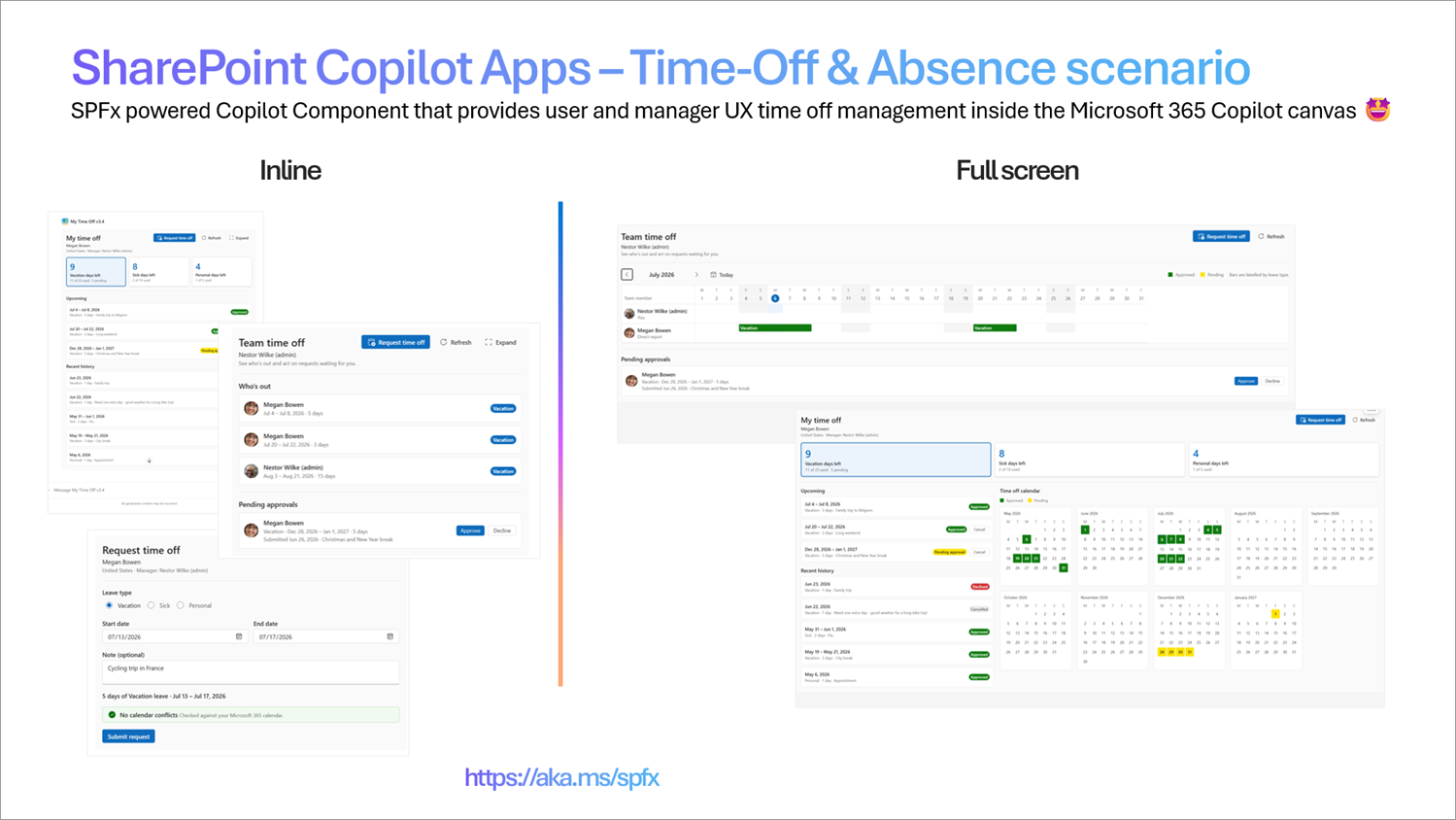
The three components
| # | Component | Copilot tool | What it renders | APIs used |
|---|---|---|---|---|
| A | timeOffOverview |
GetMyTimeOff |
The signed-in user's remaining vacation / sick / personal balances, upcoming booked leave, a recent request history, and (full-screen) an off-work calendar. Optional leaveType highlights one balance. |
SharePoint REST (LeaveBalances, TimeOffRequests, CompanyHolidays) + Microsoft Graph (/me/manager) |
| B | timeOffRequest |
RequestTimeOff |
A request form that checks the user's Outlook calendar for conflicts, then writes a new Pending request routed to the submitter's manager. |
Microsoft Graph (/me/calendarView) + SharePoint REST write |
| C | timeOffTeam |
GetTeamTimeOff |
Who's out across the team, an inline approvals inbox where managers approve/decline pending requests, an embedded Request time off form, and a full-screen team absence calendar (member rows × day columns) built from the user's peers + manager (and direct reports, if the user is a manager), each fronted by their Microsoft 365 profile photo. | SharePoint REST (TimeOffRequests) + Microsoft Graph (/me/manager, /me/directReports, /users/{id}/photo) |
All three are wired into a single declarative agent, "My Time Off", via copilot/declarativeAgent.json.
Architecture
flowchart LR
    User([Employee / Manager]) --> Copilot[Microsoft Copilot]
    Copilot -->|GetMyTimeOff| A[timeOffOverview]
    Copilot -->|RequestTimeOff| B[timeOffRequest]
    Copilot -->|GetTeamTimeOff| C[timeOffTeam]
    subgraph Browser["Runs client-side, signed-in user's identity"]
        A --> SP[(SharePoint lists)]
        A --> Graph[[Microsoft Graph]]
        B --> Graph
        B --> SP
        C --> SP
        C --> Graph
    end
Each component follows the same shape:
ui/— the Fluent UI v9 React component rendered in the Copilot canvas.data/— a live service (SharePoint…DataService.ts) that calls SharePoint REST / Graph with the delegated token and never throws — it falls back to an in-memory data set so the component always renders, online or offline.logic/— pure, unit-tested derivation helpers (balances, working-day math, conflict detection, calendar layout) with no I/O.*Properties.ts— the Zod schema describing the tool's arguments to Copilot.
The Fluent v9 styling shell injects theme tokens twice — through FluentProvider and as inline CSS variables — and points createDOMRenderer / FluentProvider at the iframe's ownerDocument, so components are correctly themed inside Copilot's sandboxed iframe.
Used SharePoint Framework Version
Applies to
- SharePoint Framework (Copilot Component)
- Microsoft Copilot
- Microsoft 365 tenant with the SharePoint App Catalog
Get your own free development tenant by subscribing to the Microsoft 365 developer program
Prerequisites
- Node.js 22 (22.14 or later), 24, or 26
- A Microsoft 365 tenant with SharePoint and Microsoft Copilot enabled
- A SharePoint App Catalog (tenant or site collection) and rights to deploy to it
- Rights to approve API permissions in the SharePoint admin center (for the Microsoft Graph scopes)
- Project-local Heft 1.3.2, restored by
npm install - PnP.PowerShell to provision the SharePoint lists (see
scripts/README.md)
This solution uses the Heft build system (not Gulp) and React 18 functional components, aligned with the SPFx 1.24.0 GA.
Solution
| Solution | Author(s) |
|---|---|
| time-off-absence | Bert Jansen (Microsoft) | GitHub |
Version history
| Version | Date | Comments |
|---|---|---|
| Unreleased | October 28, 2026 | Upgrade to SPFx 1.24.0 GA; React/ReactDOM 18.3.1 and Heft 1.3.2. |
| 1.0 | July 6, 2026 | Initial release |
Disclaimer
THIS CODE IS PROVIDED AS IS WITHOUT WARRANTY OF ANY KIND, EITHER EXPRESS OR IMPLIED, INCLUDING ANY IMPLIED WARRANTIES OF FITNESS FOR A PARTICULAR PURPOSE, MERCHANTABILITY, OR NON-INFRINGEMENT.
Minimal Path to Awesome
Ready-made package included. The repository ships the fully built solution package at sharepoint/solution/time-off.sppkg, so you don't have to build from source to deploy it. Unlike a pure mock sample, this one reads and writes real SharePoint lists and calls Microsoft Graph, so you still need to (1) provision the three lists, (2) point the components at that lists site, and (3) approve the Graph permissions. Prefer to build from source instead? Do steps 2–4 below; otherwise skip straight to provisioning and deployment.
- Clone this repository
- Ensure that you are in the solution folder (
samples/time-off-absence) - In the command line run:
npm install
1. Optionally provision the SharePoint lists (PnP PowerShell)
The components read and write three lists. The full column contract and all script options are in scripts/README.md. The script is idempotent — safe to re-run.
cd scripts
.\Provision-TimeOffLists.ps1 `
    -SiteUrl        https://contoso.sharepoint.com/sites/hr `
    -ClientId       00000000-0000-0000-0000-000000000000 `
    -SeedSampleData `
    -EmployeeUpn    megan@contoso.com `
    -ApproverUpn    adele@contoso.com `
    -TeamMemberUpns alex@contoso.com,jordan@contoso.com,taylor@contoso.com
-ClientId is an Entra ID app registration used for the interactive PnP sign-in (create one once with Register-PnPEntraIDAppForInteractiveLogin). Run the script signed in as the manager who should see the pending approvals.
The
-ApproverUpnonly seeds the sample rows. Live requests created through the components ignore it and route to the submitter's manager resolved from Graph (/me/manager), falling back to self-approval when no manager is found — which keeps a single-user demo tenant fully functional.
2. Optionally Point the components at your lists site
Open src/copilotComponents/shared/listsSiteConfig.ts and set TIME_OFF_LISTS_SITE_PATH to the server-relative path of the site you provisioned (the path part of its -SiteUrl):
export const TIME_OFF_LISTS_SITE_PATH = '/sites/spfx';
The host is taken automatically from the SPFx page context at runtime, so only the site path is configured here — the components follow whichever tenant they run in.
Why this is required: the components read their data with delegated, client-side SharePoint REST calls. Inside Microsoft Copilot / BizChat there is no current SharePoint page, so the host resolves the "current web" to the tenant root site — where the lists don't exist. Every REST call then 404s and the component silently falls back to demo data. Pinning the site path (while taking the host from context) fixes this. (Leave it '' only if the components run on a page that already lives on the lists' own site.)
Runtime override (no rebuild) — the TimeOffSite tenant property. TIME_OFF_LISTS_SITE_PATH is only the compiled-in default. At runtime each component reads a SharePoint tenant property named TimeOffSite (an app-catalog storage entity) with a delegated, client-side call — GET {web}/_api/web/GetStorageEntity('TimeOffSite'), which resolves from any site in the tenant, including the Copilot root web. When that property is present and non-empty its value wins over the constant. This lets an admin repoint every component at a different lists site without rebuilding or redeploying the package. Publish it with the provisioning script's -SetTenantProperty switch:
.\Provision-TimeOffLists.ps1 `
    -SiteUrl  https://contoso.sharepoint.com/sites/hr `
    -ClientId 00000000-0000-0000-0000-000000000000 `
    -SetTenantProperty
…or set it directly: Set-PnPStorageEntity -Key TimeOffSite -Value /sites/hr. Setting a tenant property requires ownership of the tenant app catalog (or a SharePoint / Global admin); if the account lacks that, the script skips it with a warning and list provisioning still succeeds. See scripts/README.md for the one-time property-bag unblock steps.
3. Build the package (only if building from source)
npm run build
This produces:
sharepoint/solution/time-off.sppkg— the SharePoint package.teams/my-time-off.zip— the Copilot/Teams agent package.
Other build commands can be listed using npx --no-install heft --help.
4. Deploy the solution
- Upload
sharepoint/solution/time-off.sppkgto your App Catalog and deploy it (enable it in all sites so the Copilot Components are registered) + choose 'Add to Teams' to deploy the Agent to the Microsoft 365 Agent store
5. Make the components available to Copilot
- Adding the app to the app catalog and calling 'Add to Teams' (previous step) registers the Copilot Components
6. Try it in Copilot
Open Microsoft Copilot, pick the My Time Off agent (or invoke the tools from your own agent), and use the prompts below.
Sample Copilot prompts
Overview (Component A)
- "How many vacation days do I have left?"
- "Show my upcoming time off."
- "What time-off requests have I made recently?"
Request (Component B)
- "Book vacation from July 6 to July 10."
- "Request a sick day for tomorrow."
- "I want to take next Friday off as a personal day."
Team & approvals (Component C)
- "Who's out of office this week?"
- "Show my team's time off." (expand for the full-screen team absence calendar)
- "Show the time-off requests waiting for my approval." (manager)
- "I need to book some time off." (opens the embedded request form)
Features
My Time Off demonstrates how to build a rich, theme-aware, data-connected UX inside the Microsoft Copilot canvas using SPFx Copilot Components.
This sample illustrates the following concepts:
- Delegated client-side API calls from a Copilot Component — SharePoint REST (
/_api/web/lists) and Microsoft Graph (/me/calendarView,/me/manager,/users/{id}/photo) called with the signed-in user's token, no backend. This is the headline capability the MCP app spec itself does not provide. - One tool per component — each component exposes a single, well-described Copilot tool, so the model has an unambiguous reason to invoke it.
- Rich, themed UI in the Copilot canvas — Fluent UI v9 rendered inside Copilot's sandboxed React 18 iframe, with theme tokens injected so the components match the host theme.
- Resilient live data services — each service calls SharePoint / Graph live but never throws: on any failure it falls back to a built-in in-memory data set so the demo always renders.
- Write-back with a Graph pre-check — the request component checks the user's Outlook calendar for conflicts (Microsoft Graph) before a new request is written to SharePoint.
- Manager-as-approver, resolved client-side — a new request is routed to the submitter's line manager, looked up live via Microsoft Graph (
/me/manager) and converted to a site user via/_api/web/ensureuser, with a self-approval fallback that keeps single-user demo tenants working. - Display-mode-aware rendering — inline cards expand to full-screen experiences (the overview's off-work calendar, the team's Gantt-style absence calendar) via
requestDisplayModeAsync('fullscreen'). - People & photos from Graph — team members are fronted by their Microsoft 365 profile photo, fetched client-side as a 48×48 data URL, with an initials fallback.
Data source
The components read and write three SharePoint lists and call Microsoft Graph live. The full list column contract is documented in scripts/README.md; provision the lists with the included scripts/Provision-TimeOffLists.ps1.
SharePoint lists
| List | Holds | Key columns |
|---|---|---|
TimeOffRequests |
Individual leave requests. | Title (request key), Employee, LeaveType, StartDate, EndDate, WorkingDays, Status, Note, Approver, SubmittedOn |
LeaveBalances |
Per-employee, per-leave-type, per-year entitlement. Used / pending days are derived on the fly from TimeOffRequests, not stored. |
Title (key), Employee, LeaveType, EntitledDays, Year |
CompanyHolidays |
Public/company holidays by region (excluded from working-day math). | Title (holiday), HolidayDate, Region |
HolidayDateis used instead ofDatebecauseDateis a reserved internal field name in SharePoint.
Solution structure
samples/time-off-absence/
  README.md
  assets/                         # concept mockup + gallery preview
  config/                         # Heft / SPFx + Copilot agent configuration
  copilot/                        # declarative agent + plugin manifests (declarativeAgent.json, ai-plugin.json, manifest.json, icons)
  scripts/                        # Provision-TimeOffLists.ps1 + scripts/README.md
  sharepoint/solution/time-off.sppkg   # ready-made package
  teams/my-time-off.zip           # Copilot / Teams agent package
  src/
    copilotComponents/
      shared/
        listsSiteConfig.ts        # TIME_OFF_LISTS_SITE_PATH + TimeOffSite runtime override
      timeOffOverview/            # Component A — GetMyTimeOff
        TimeOffOverviewCopilotComponent.tsx
        TimeOffOverviewCopilotComponent.manifest.json
        data/                     # SharePoint + Graph data service (never throws)
        logic/                    # balances, working-day math (pure, unit-tested)
        ui/                       # Fluent v9 inline + full-screen views
      timeOffRequest/             # Component B — RequestTimeOff
        TimeOffRequestCopilotComponent.tsx
        TimeOffRequestCopilotComponent.manifest.json
        logic/                    # calendar conflict detection
        ui/                       # request form
      timeOffTeam/                # Component C — GetTeamTimeOff
        TimeOffTeamCopilotComponent.tsx
        TimeOffTeamCopilotComponent.manifest.json
        data/                     # roster + photos (Graph) + requests (SharePoint)
        logic/                    # team calendar layout
        ui/                       # who's-out list, approvals inbox, absence calendar
References
- Overview of Copilot Components / declarative agents
- Getting started with SharePoint Framework
- Use Microsoft Graph in your SPFx solution
- Heft Documentation
- PnP PowerShell
- Microsoft 365 & Power Platform Community - Guidance, tooling, samples and open-source controls for your Copilot, Microsoft 365 & Power Platform development
Notice that better pictures and documentation will increase the sample usage and the value you are providing for others. Thanks for your submissions in advance.
Share your solution with others through the Microsoft 365 Patterns and Practices program to get visibility and exposure. More details on the community, open-source projects and other activities from http://aka.ms/community/home.
Part of the Copilot UX components sample gallery - complex UX in the Copilot canvas, powered by SPFx. See aka.ms/spfx.