
Copilot UX component
Viva Engage Community Explorer
Discover, search and explore live Viva Engage communities inside Microsoft 365 Copilot.


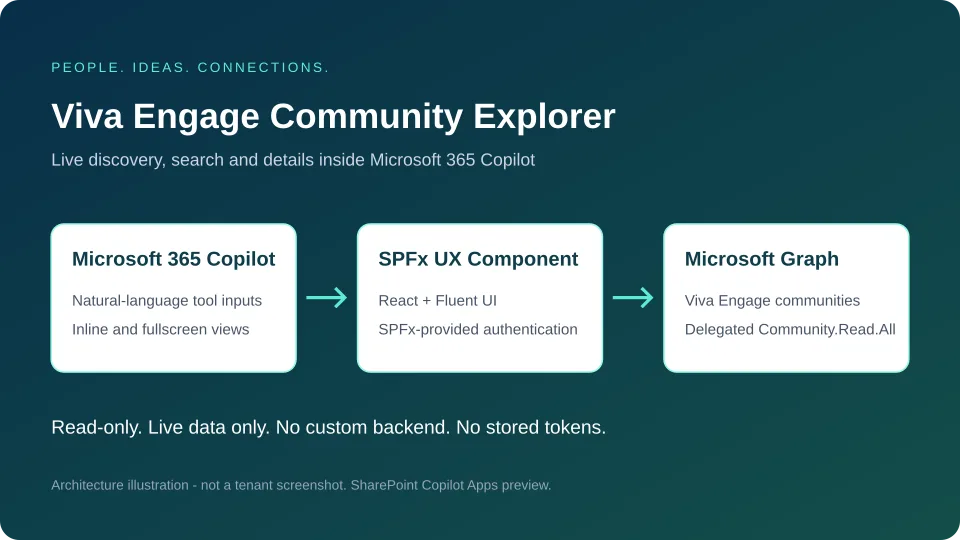
- Updated
- October 19, 2026
- Built with
- React
- SPFx version
- 1.24.0-rc.0
- Products
- SharePoint, Microsoft Copilot
Overview
What this sample demonstrates
A read-only SPFx Copilot UX Component using delegated Microsoft Graph Community.Read.All access.
Includes inline and fullscreen experiences, name and description search, privacy filtering, alphabetical sorting, retrieved community counts and on-demand details.
Uses live Graph data only, with pagination, session caching, explicit refresh and actionable authentication and API error states.
Documentation
Setup and implementation
Summary
A read-only SPFx Copilot UX Component for discovering real Viva Engage communities inside Microsoft 365 Copilot. Employees can search for interests, filter public and private communities, sort names alphabetically and inspect community details without leaving the Copilot canvas.
Only live Microsoft Graph data is used. There are no local community records, invented counts, mock services or fallback datasets. This is not a SharePoint web part.
SharePoint Copilot Apps and SPFx 1.24.0-rc.0 are preview technology. Microsoft currently advises against production use. A production build is provided for evaluation, not a claim of production support.
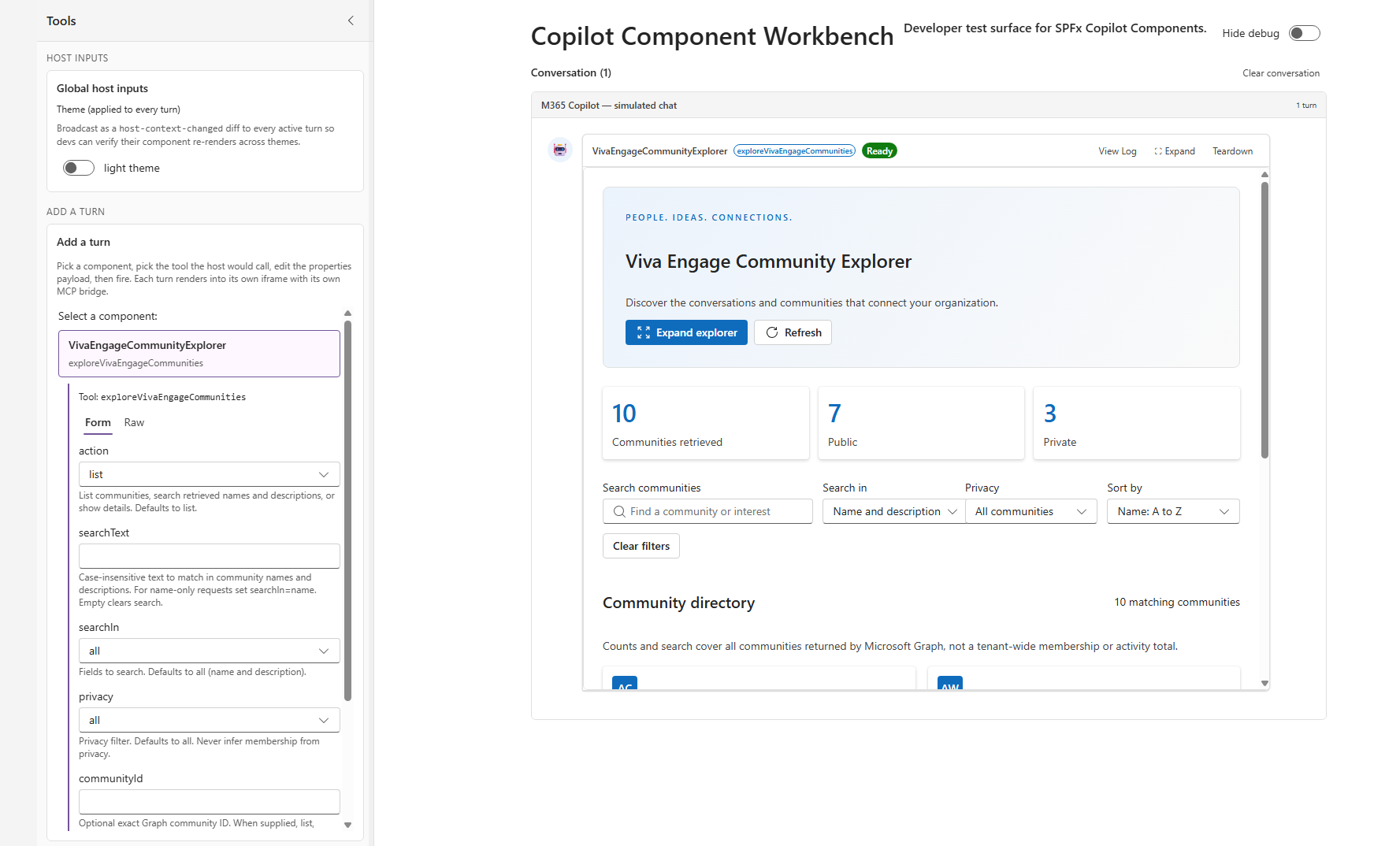
The inline view shows the community explorer embedded in the Copilot Component Workbench.
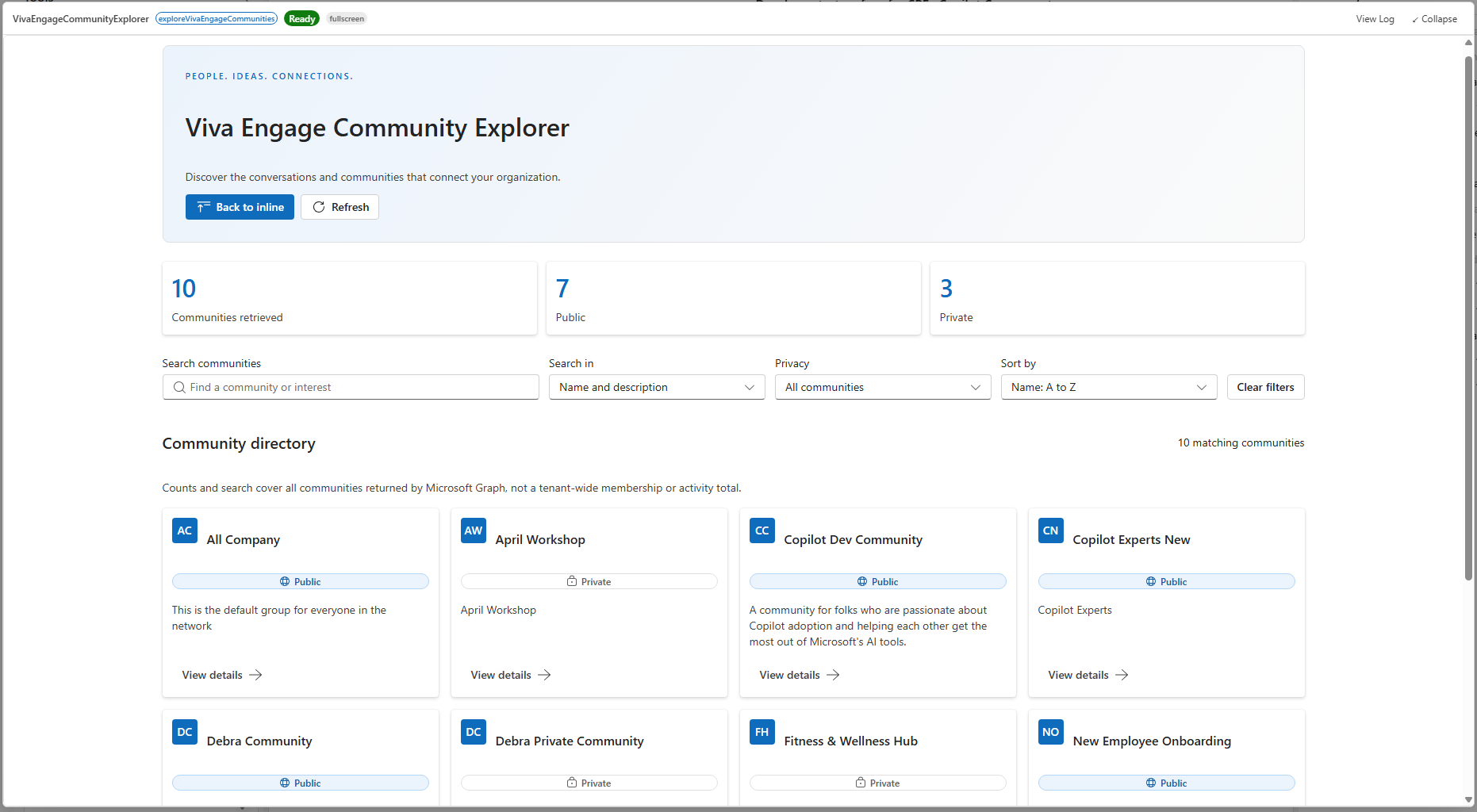
In fullscreen, the directory expands to make browsing and filtering easier.
This architecture illustration summarizes how the component connects Copilot to Microsoft Graph.
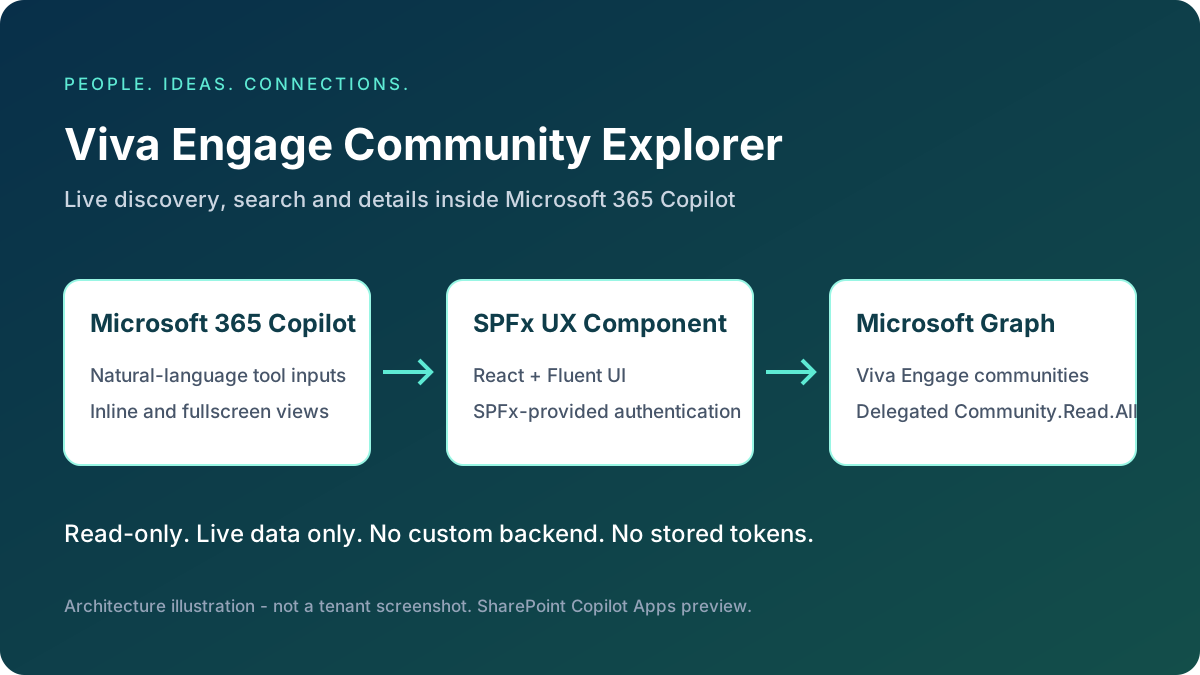
The workbench captures illustrate the inline and fullscreen experiences; they do not verify live tenant execution. Before sharing screenshots of tenant data, capture them from a consented tenant with permission to share its community information. Keep the architecture illustration clearly labeled as an illustration, not a tenant screenshot.
Compatibility
| Technology | Version |
|---|---|
| SPFx | 1.24.0-rc.0 |
| React / React DOM | 18.3.1 |
| TypeScript | 5.8.x |
| Fluent UI | v9; scaffold dependency ^9.70.0 |
| Node.js used for build | 22.14.0 |
| Supported Node.js ranges | >=22.14 <23, >=24 <25, >=26 <27 |
| Host | SharePoint Online / Microsoft 365 Copilot with Copilot Apps preview available |
The existing sample folder, entrypoint paths and registration GUIDs are preserved. The registered component alias and class are VivaEngageCommunityExplorer, with one tool: exploreVivaEngageCommunities.
Applies to
Business scenario and features
Employees often participate in many communities but cannot easily find relevant conversations or interests. The explorer provides:
- Compact inline discovery, with up to four matching community cards.
- A responsive fullscreen dashboard, rendering 24 cards initially with Show more.
- Retrieved community, public community and private community counts from the collection response.
- Debounced, case-insensitive name and description search, including name-only and description-only scopes.
- Public/private filters, ascending/descending alphabetical sorting and clear filters.
- On-demand details with the full description, privacy, community ID and associated Microsoft 365 group ID when returned.
- Light/dark Fluent UI themes from the Copilot host, labeled controls and a keyboard-accessible details drawer.
- Session caching, deduplicated in-flight requests and explicit Refresh.
- Actionable authentication, consent, access, throttling, network and service error notices with Retry.
- Explicit incomplete-collection notices if pagination fails; no fabricated replacement results.
Architecture
Microsoft 365 Copilot
  exploreVivaEngageCommunities (Zod-described tool parameters)
    BaseCopilotComponent -> shared React explorer
      inline / fullscreen / details drawer
        IVivaEngageService -> GraphVivaEngageService
          SPFx AadHttpClientFactory -> AadHttpClient
            Microsoft Graph v1.0 -> Viva Engage communities
onInit constructs the service only after SPFx supplies its context. Authentication is lazy and shared through a single client promise; React rendering does not initialize a separate authentication application. A failed client initialization is retryable. There is no MSAL setup, backend, database, secret, stored token or custom login flow.
The service validates response shapes with Zod, follows @odata.nextLink, rejects unexpected pagination destinations and detects pagination loops. List requests and per-ID details requests are deduplicated. Collection data is cached for the component session; detail data is fetched only when selected and cached independently. Refresh invalidates both caches. Refresh and details generations prevent obsolete detail results from entering the new cache.
React effect cleanup ignores obsolete/unmounted request results. Teardown disposes the service and aborts pending retry delays; an already-dispatched SPFx HTTP request may finish, but cannot update an unmounted UI.
The React root is committed synchronously with flushSync before the SPFx render hook returns. A plain React error boundary, independent of Fluent UI, shows a diagnostic and retry action if a child fails to render instead of leaving a blank component frame.
In inline mode, a ResizeObserver reports content size changes to the Copilot host after data loads or filters change. It disconnects on unmount; rejected resize requests display a notice recommending fullscreen mode.
The Fluent UI ID prefix removes colons from React's useId() value. Fluent uses the prefix in its theme CSS selector; passing the raw React ID causes a browser CSSStyleSheet.insertRule syntax error and prevents the UI from rendering.
All community content is rendered as plain React text, not HTML. The component uses GET requests only and never logs raw authentication errors or tokens.
Relevant source
- Copilot component lifecycle
- Tool input schema
- Shared inline/fullscreen explorer
- Live Graph service
- Client-side filtering and sorting
- English UI resources
- Implementation phases
Microsoft Graph API and permissions
| Operation | Endpoint |
|---|---|
| List | GET https://graph.microsoft.com/v1.0/employeeExperience/communities |
| Details | GET https://graph.microsoft.com/v1.0/employeeExperience/communities/{communityId} |
The collection request uses documented $top=100, $select=id,displayName,description,privacy,groupId and $orderby=displayName. Subsequent requests use the complete next link returned by Graph without rebuilding its paging parameters. Search, privacy filtering and final alphabetical sorting are client-side; no unsupported Graph $filter or $search expressions are sent.
Only the documented properties id, displayName, description, privacy and groupId are modeled. Missing/nullable optional text maps to undefined, not made-up data. Missing or future privacy values display Unknown privacy. Unknown privacy is included in the retrieved total, not the public/private subtotals.
Minimum delegated permission: Community.Read.All, requested in package-solution.json. Administrator approval is required. This sample does not use application permissions.
The service handles 401, 403, 404, 429 and 5xx failures explicitly. For 429 and 5xx responses, it makes at most three attempts per HTTP operation, using Retry-After in seconds or HTTP-date form, otherwise exponential delays. Delays over 15 seconds and exhausted retries are surfaced rather than shortened. Retry controls honor the server's next eligible retry time. Existing permission/access restrictions remain authoritative.
Data scope and navigation
- Counts describe retrieved communities, not active members, activity, membership totals or independently verified tenant totals.
- A successful load follows every returned page. If a later page fails, retrieved pages remain visible and every search/count is marked incomplete.
- Graph v1.0 does not document a navigation URL on
community. Consequently, Open in Viva Engage is deliberately omitted. The component never constructs a community URL from its ID or group ID. - A request to open a community shows details and explains the navigation limitation.
Prerequisites
- A Microsoft 365 work/school tenant with Viva Engage and accessible communities.
- SharePoint Copilot Apps preview available in the tenant.
- A tenant App Catalog and permission to deploy SPFx packages.
- Administrator permission to approve the requested Microsoft Graph delegated scope.
- A supported Node.js version and npm.
- An eligible Microsoft 365 user account. During the Copilot Apps public preview, a separate Microsoft 365 Copilot add-on is not required by the platform guidance; tenant policies and Viva Engage entitlement still apply.
Minimal path to awesome
From this sample folder:
npm ci
npm run typecheck
npm run lint
npm run build
build runs heft build --clean --production followed by heft package-solution --production. It does not invoke the Heft test action. No automated test files, fixtures or frameworks were added, and no automated test cases were run. SPFx's upstream development rig can contain transitive testing utilities; the application does not configure or invoke them.
Generated artifacts:
sharepoint/solution/viva-engage-explorer.sppkg- deployable SPFx package, including client assets and the generated agent package.teams/viva-engage-explorer.zip- generated Microsoft 365 agent package, also embedded by the solution packaging task. Treat this as generated output.
The production package is explicitly included by the sample's ignore rules for contribution. Build staging, dependency directories and generated Teams archives remain ignored.
The dependency lockfile uses public npm registry URLs. Dependency installation reported upstream audit advisories; no potentially breaking dependency upgrades were applied. Review these advisories against the SPFx preview support matrix before any deployment.
Local build verification
Verified on October 15, 2026 with Node.js 22.14.0:
| Command | Result |
|---|---|
npm run typecheck |
Passed |
npm run lint |
Passed, zero warnings |
npm run build |
Passed, production bundle and solution package generated |
The build generates the .sppkg and agent archive at the paths listed above. The agent archive's generated dynamic MCP tool-discovery runtime and the solution's Community.Read.All request were inspected. These are local build/artifact checks, not proof of tenant execution.
Local development
npx heft trust-dev-cert
$env:SPFX_SERVE_TENANT_DOMAIN = "yourtenant.sharepoint.com"
npm start
Alternatively replace {tenantDomain} in config/serve.json with your tenant hostname. Open the tenant's /_layouts/CopilotWorkbench.aspx, allow debug scripts, select this component and use Fire turn with the desired properties JSON. This is a tenant-hosted workbench, not an offline standalone app. Live Graph calls still require the delegated permission to be approved.
Example tool properties:
{
  "action": "search",
  "searchText": "Microsoft 365",
  "searchIn": "all",
  "privacy": "public",
  "sortBy": "nameAsc"
}
The search term above is a query, not a preloaded community record.
Deployment and administrator consent
- Build the sample and upload
sharepoint/solution/viva-engage-explorer.sppkgto Apps for SharePoint in the tenant App Catalog. - Keep Enable this app and add it to all sites selected and choose Enable app. Tenant-wide availability is needed for the Copilot integration; no page web part needs to be added.
- In the SharePoint admin center, open Advanced > API access. Find the pending Microsoft Graph / Community.Read.All request and approve it with an appropriately authorized administrator account. If it is already approved for the SPFx service principal, verify the existing grant rather than requesting broader permissions.
- Return to the App Catalog, select the solution and choose Add to Teams. In the preview this publishes the declarative agent to the tenant agent catalog as well. Allow time for propagation and comply with tenant app/agent policies.
- In Microsoft 365 Copilot, find Viva Engage Explorer under available agents and select Add. An administrator may instead install the agent for selected users through Microsoft 365 administration.
- Ask Show all Viva Engage communities or explicitly Call exploreVivaEngageCommunities. Approve the tool prompt if shown.
- Use Expand explorer, filters, View details and Refresh. Confirm live data access in your tenant before distributing the package.
The scaffold's publisher fields in copilot/manifest.json still identify Contoso. Replace them with your organization's real publisher, website, privacy and terms information before external distribution. Do not invent legal URLs. These manifest fields are not part of the Graph authentication flow.
Copilot prompts and conversational refinement
| Intent | Examples |
|---|---|
| Discovery | Show all Viva Engage communities. Show Viva Engage communities in my organization. |
| Interests | Find communities related to Microsoft 365. Search Viva Engage communities containing SharePoint. Show communities related to employee learning. |
| Privacy | Show public Viva Engage communities. Show private Viva Engage communities. |
| Name-only | Find communities with Technology in their name. |
| Sorting | Sort communities alphabetically. Show communities in descending alphabetical order. |
| Details | Show details of the Microsoft 365 community. What is the description of the IT Helpdesk community? Show information about the Leadership community. |
| Navigation | Open the Microsoft 365 community in Viva Engage. The component shows details and explains that a verified URL is unavailable. |
| Refinement | Show only public communities. Search for Azure instead. Sort by name. Show private communities only. Clear all filters. |
The single tool accepts optional action (list, search, details), searchText, searchIn (all, name, description), privacy (all, public, private), exact communityId and sortBy (nameAsc, nameDesc). Defaults are list, empty search, all fields, all privacy and ascending name order. Unknown properties and invalid enum values are rejected.
communityId is optional. When it is omitted, empty or whitespace-only, the explorer retrieves all accessible communities and applies only the requested search/privacy filters. This also supports clients that send "communityId": "" for an unfilled optional field. A details request without an ID uses name-based lookup only when a nonblank searchText is provided; otherwise it leaves the full directory available without automatically selecting a community.
When a nonblank communityId is provided, every action, including list and search, retrieves only that community through the single-community endpoint. The directory and counts are scoped to that response, with search/privacy filters still applied. A failed ID lookup shows an error, never the full collection as fallback. Refresh refetches that ID; Clear filters removes the ID scope and loads all accessible communities.
To show all accessible communities, the minimal properties are:
{
  "action": "list"
}
Each tool invocation is a new component view. Instructions require Copilot to resend the complete desired parameter set using filters established in the conversation. UI-only changes are not silently copied into a later invocation. For example, after conversationally requesting public communities, "Search for Azure instead" sends action=search, searchText=Azure, privacy=public, and the desired sort/search scope.
Clear all filters sends action=list, searchText="", searchIn=all, privacy=all, sortBy=nameAsc and no communityId. Host theme/display-mode changes within the same mounted component preserve local filters.
For details by name, an exact unique match or a single search result is selected. Multiple matches remain visible for user selection. An exact ID is used only if it is known; IDs are never inferred from names.
Automatic name-based selection waits for a complete collection, including after Retry, so partial results cannot incorrectly imply a unique match.
Authors
Version history
| Version | Date | Comments |
|---|---|---|
| 1.0.0.0 | October 19, 2026 | Pre-merge review: report inline content resizing, defer automatic details until the collection is complete, and correct README links |
| 1.0.0.0 | October 15, 2026 | Initial release |
Help
This community sample is supplied as-is. For sample-specific issues, use the repository issue list. Include the failing operation, sanitized HTTP status, SPFx version and deployment context; never include access tokens or private community content.
References
- Build your first SharePoint Copilot App
- List communities
- Get community
- Community resource properties
- Microsoft Graph permissions reference
- Connect to Microsoft Entra-secured APIs in SPFx
- Microsoft Graph throttling guidance
- Repository contribution guidance
Disclaimer
THIS CODE IS PROVIDED AS IS WITHOUT WARRANTY OF ANY KIND, EITHER EXPRESS OR IMPLIED, INCLUDING ANY IMPLIED WARRANTIES OF FITNESS FOR A PARTICULAR PURPOSE, MERCHANTABILITY, OR NON-INFRINGEMENT.