
Copilot UX component
ZavaCore Procurement Command Center
Evidence-led procurement with value Sankeys, world maps and grounded Copilot continuation.

- Updated
- November 3, 2026
- Built with
- React
- SPFx version
- 1.24.0
- Products
- SharePoint, Microsoft Copilot
Overview
What this sample demonstrates
ZavaCore Procurement Command Center connects natural-language business cases to human review, supplier deal evaluation, governed awards, global investment maps, delivery progress and verified procurement value.
Twenty-one operational components and one capability explorer have 22 named business destinations inside My Requests, Sourcing Workbench, Supplier 360, and Spend Command. Twelve business-language starters, deliberate Copilot continuation and current-view context connect questions to accountable work.
The sample is deterministic, offline, responsive, and explicit that confirmed actions are session-only demonstrations. Reconciled value Sankeys, supplier landscapes, dependency pathways, allocation and investment maps have keyboard interaction and exact-value alternatives. Commitment is never presented as delivery or verified savings.
Gallery
See the component in action


Documentation
Setup and implementation
SPFx 1.24.0 GA upgrade (October 28, 2026): Build dependencies target GA. React/ReactDOM use 18.3.1. Earlier readiness reports, screenshots, test counts, and tenant evidence remain historical, not fresh GA host certification. Restore was validated using the configured Microsoft npm proxy; npmjs.org did not yet expose all required GA packages. Use an approved registry with 1.24.0 available; do not commit credentials.
This release targets SPFx 1.24.0 with React 18.3.1. Use Node.js 22 (22.14 or later), 24, or 26. See the canonical starter targets.
[!IMPORTANT] Status: IMPLEMENTED OFFLINE SHOWCASE. The solution contains 21 operational Copilot Components, one capability explorer, four connected full-screen workspaces, deterministic mock data, D3-derived decision visuals, visual evidence, and an audited deployable SharePoint package. Runtime actions are session-only demonstrations and never write to tenant or external systems.
Sample type: self-contained, offline-first SPFx Copilot Components showcase
Catalog: 21 operational inline components + 1 capability explorer
Full-screen model: 22 named business destinations in 4 connected role workspaces
Reference quality bar: Zava Revenue Deal Room and the local golden rules; ZavaCore branding is unchanged
Screenshots
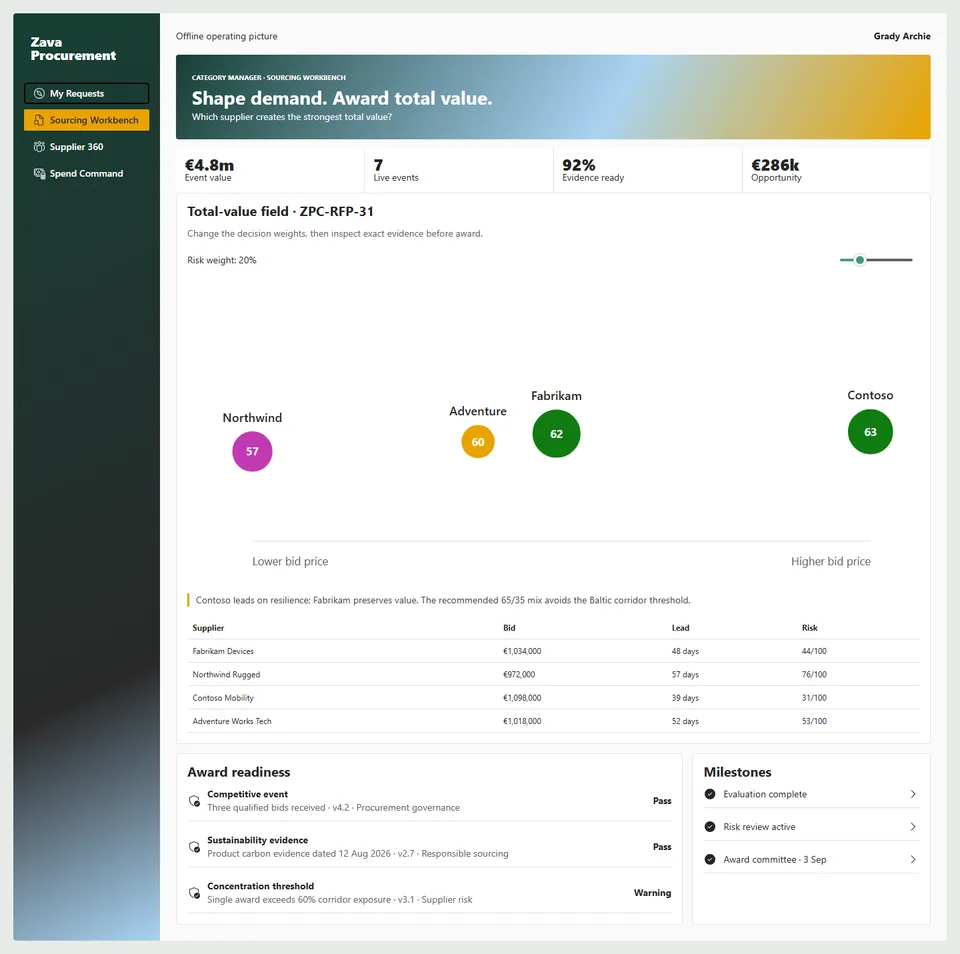
Reconciled procurement value
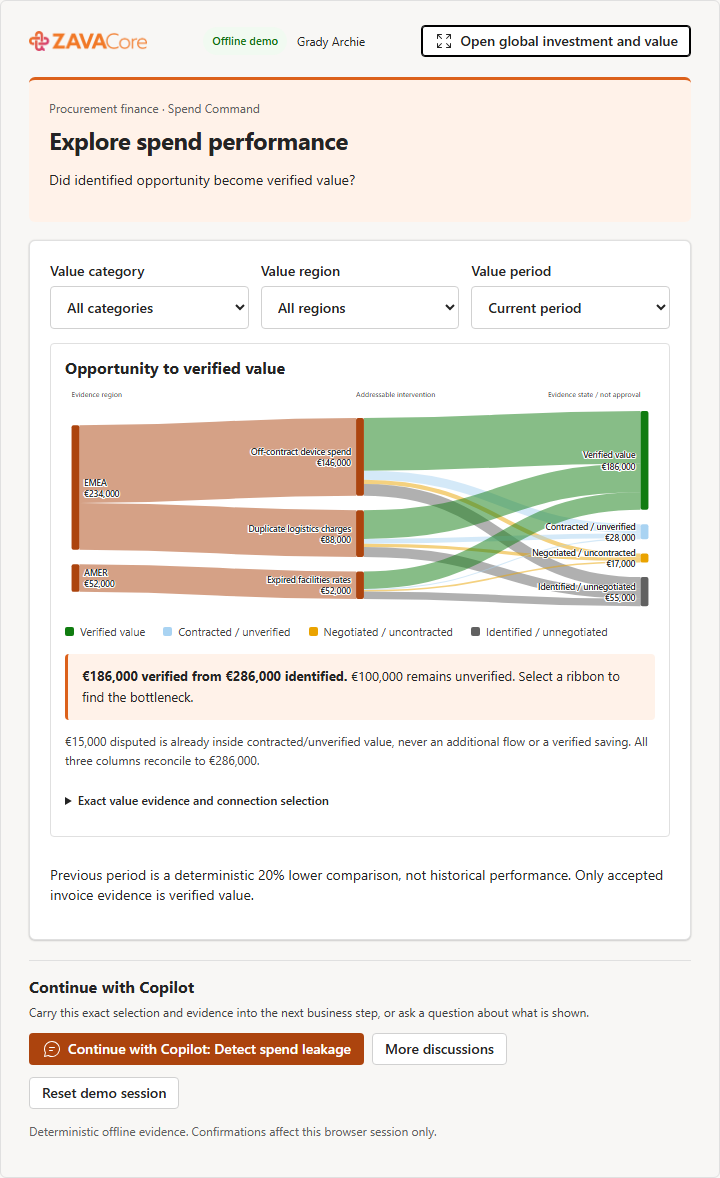
Global investment command
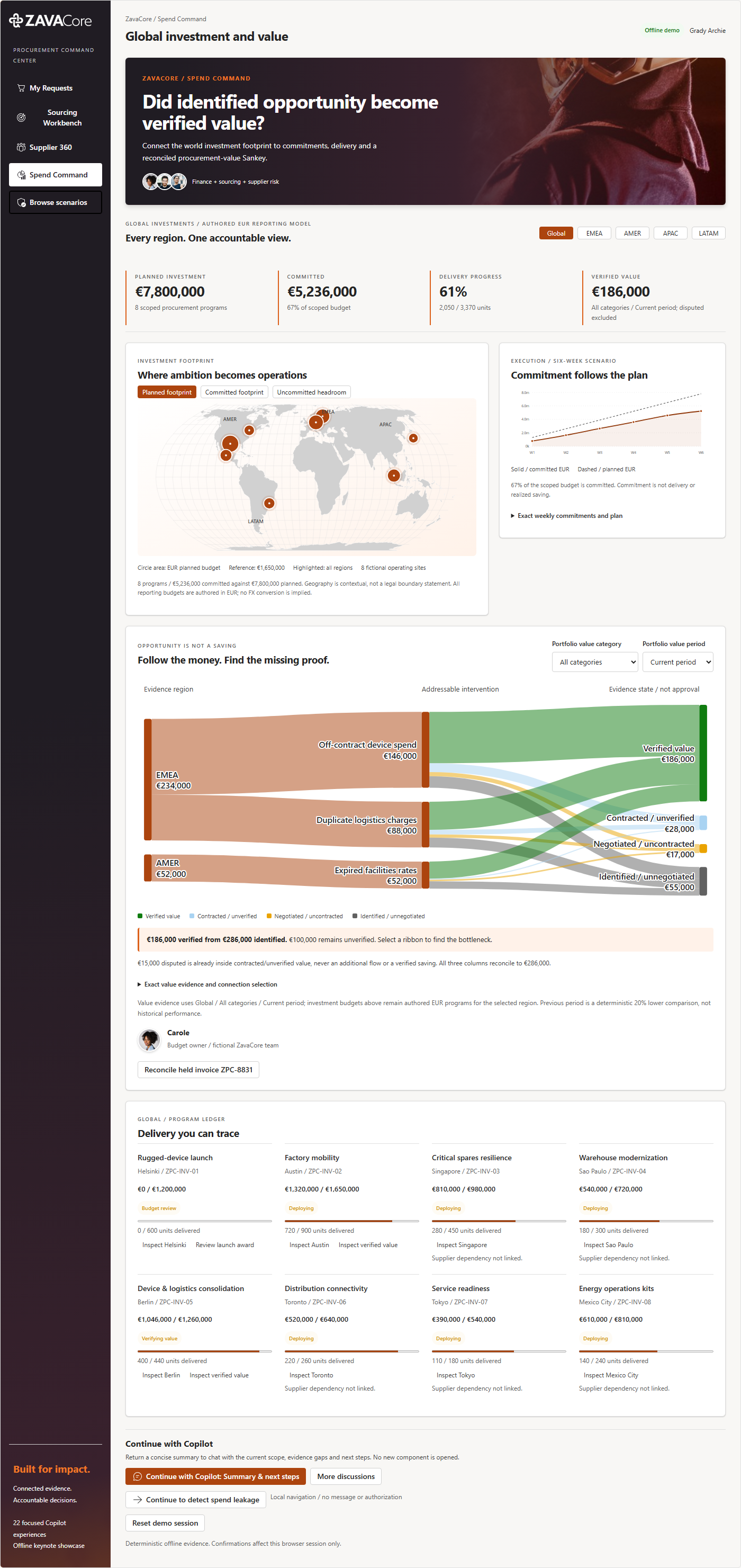
Sourcing Workbench
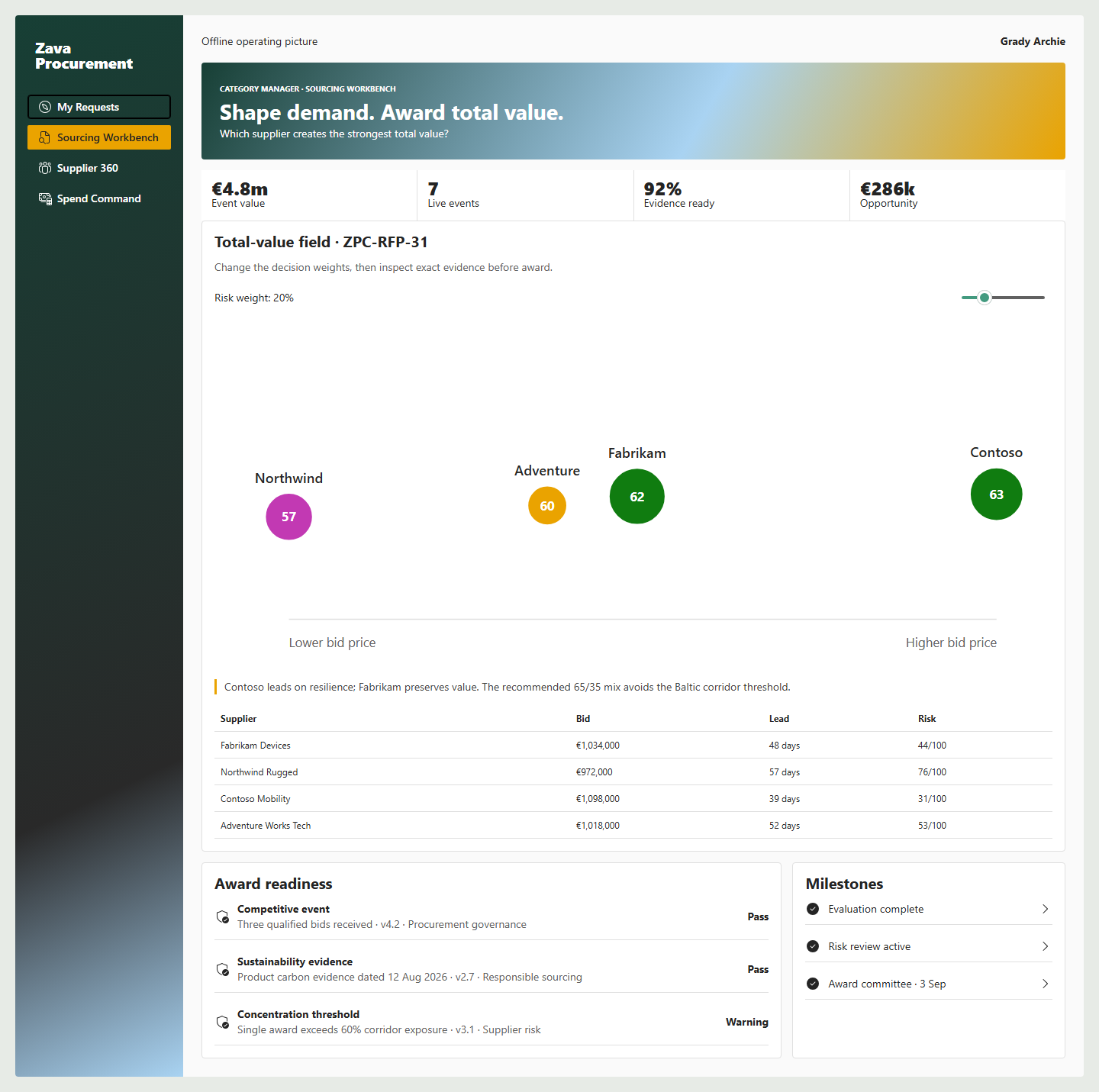
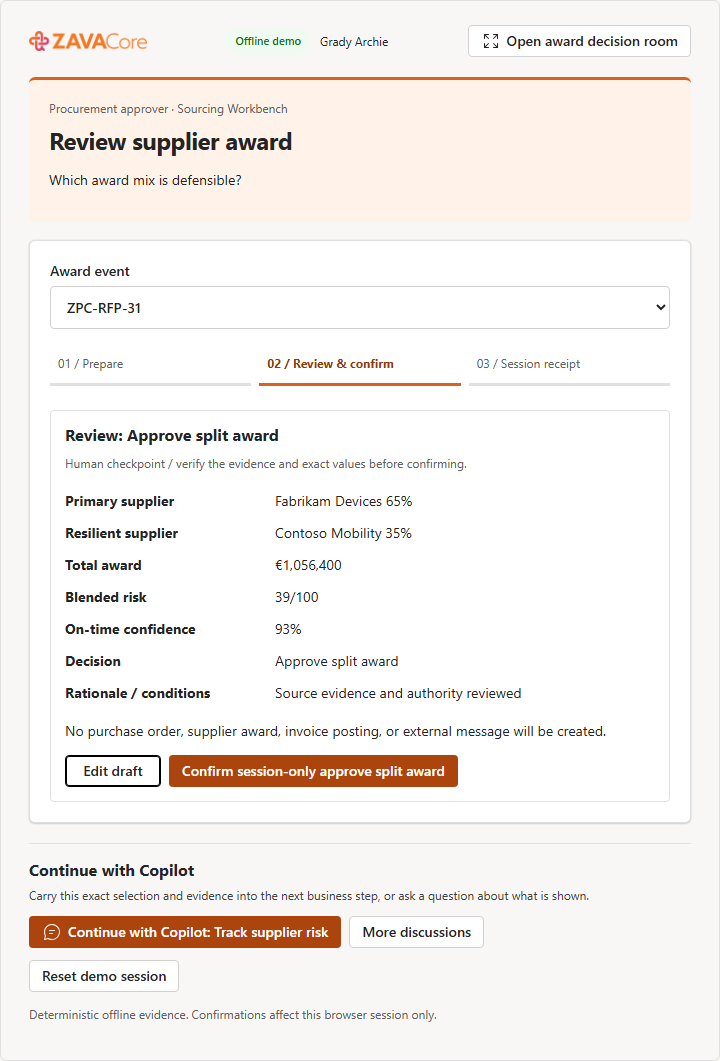
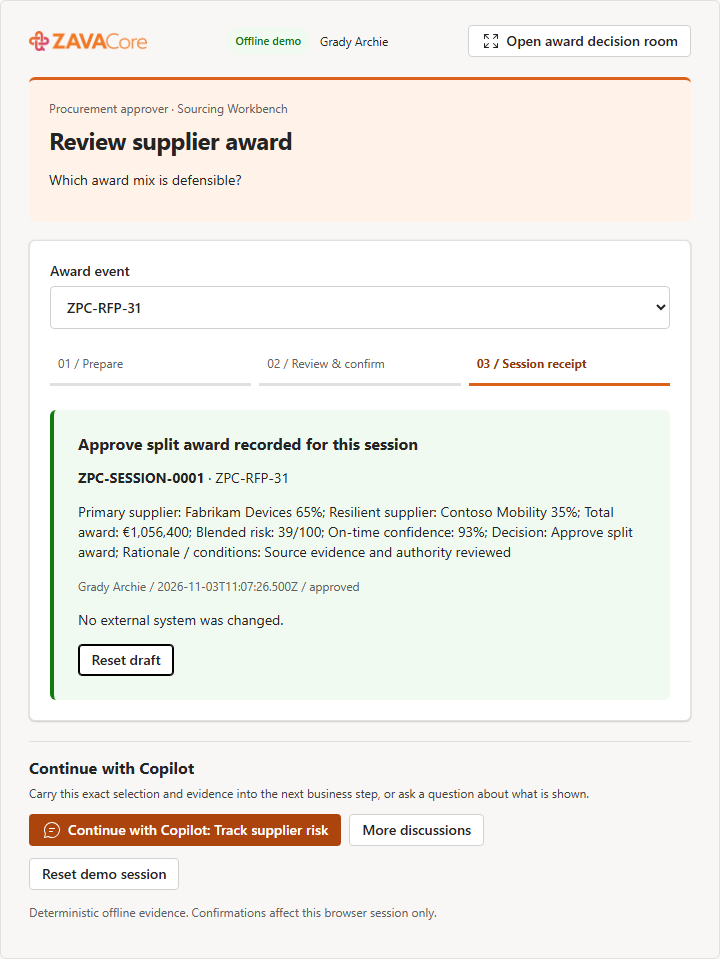
Reviewed split award
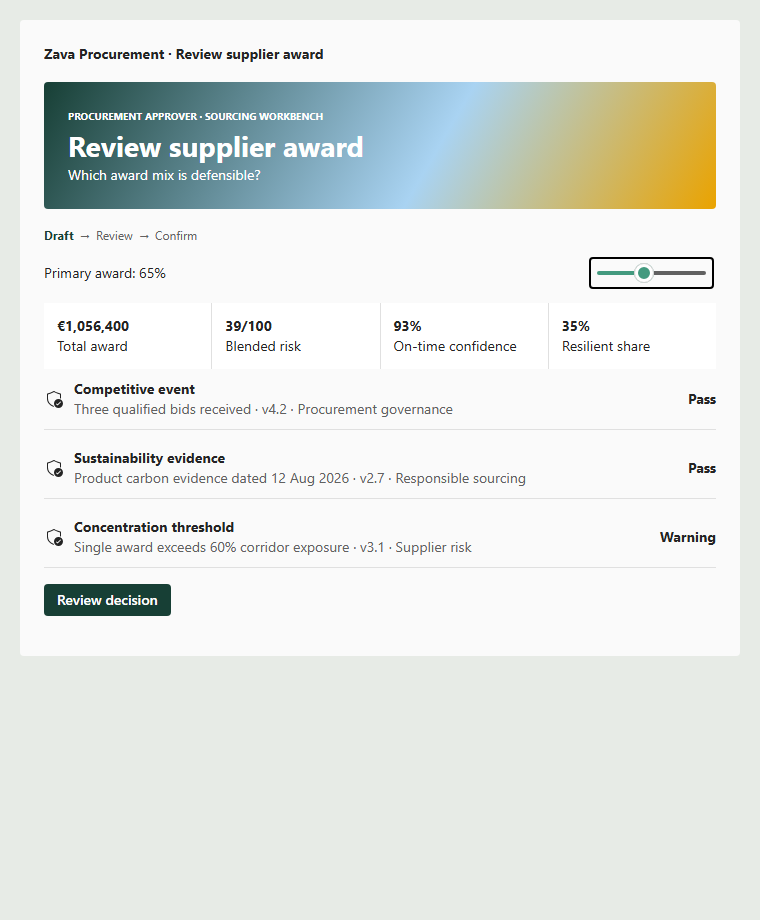
Explicit review and session receipt
Additional captured states cover every inline tool, My Requests, Supplier 360, Spend Command, bid comparison, invoice reconciliation, 390 px mobile, and dark mode. Machine-readable hashes, layouts, runtime, overflow, label, chart, and focus results are in assets/gallery-evidence.json. Gallery publication metadata is in assets/sample.json.
ZavaCore keynote experience
Ignite interaction and visualization update
- A real value Sankey: region -> intervention -> mutually exclusive evidence state, conserving EUR 286k identified across every column. EUR 186k is verified; EUR 100k is not. The EUR 15k freight dispute is already part of contracted/unverified value, not another flow or saving.
- Decision-specific charts: price/risk supplier landscape with true confidence-area bubbles, award-allocation donut, modeled supplier-dependency pathway, ranked leakage, conserved supplier allocation, projected world investments and commitment trends. Controls change actual records, amounts or geometry; keyboard and exact-value alternatives remain available.
- Every component continues the conversation: a specific inline Continue with Copilot next step, explain/challenge discussions and a user-authored question about the visible view. Click-time context is published atomically before the message. Rejection, transport failure and context failure are explicit and retryable.
- Full screen is a business destination: Business case studio, Supplier evaluation room, Award decision room, Invoice reconciliation room, Global investment and value, and the other catalog-owned destinations. Expansion preserves actual edits, filters and selections, adds relevant decision context, and never displays an origin/launcher banner. Workspace navigation remains separate from the focused business view.
- Text means text: full-screen primary continuation returns Summary & next steps in chat, without opening another component. Explicit Continue to buttons navigate locally; an inline scoped handoff requests exactly one advertised tool with supported properties.
- Grounded communication and sizing: every useful activation and material visible change shares a typed snapshot. Hidden tasks and unreviewed business text are excluded; permitted proposed calculations, reviewed values and receipts stay distinct. The complete UTF-8 context envelope is capped at 10,000 bytes with reported omissions. SDK resize notifications measure the committed content root after layout, grow/shrink, coalesce updates and clean up on teardown/disposal.
- 12 natural business starters: eleven distinct operational targets and capability exploration last. Canonical prompts, agent instructions, manifests and packaged metadata are validated together.
The 45 Ignite checkpoints verify every actual expansion, preserved edits, scoped/text-only continuation, user questions, bridge retries, keyboard evidence selection, honest invalid/no-evidence states and real content-root shrink/grow. Together with 84 gallery and 24 connected-journey captures, all visual evidence carries the current runtime source signature. Actual inline heights are recorded; the evidence does not claim a universal fixed-height host allowance or native tenant certification.
This modernization preserves all 22 generated component identities and the four-workspace topology. The supplied ZavaCore logos, orange-to-magenta brand colors, field-operations photography and named team portraits replace the earlier green identity, including the packaged agent and its icons.
- My Requests: outcome-led intake, explicit validation, exact-value review and confirmation, source-backed approval evidence, searchable status queues and a connected human-handoff timeline. A submitted business case becomes a real session record with its original currency, locations, constraints and quantity; its approval consumes that same record.
- Sourcing Workbench: curated
ZPC-RFP-31, budget and award-readiness context, an interactive D3 supplier landscape, and a D3 split-allocation visual. Primary shares above 70% cannot be approved; returning a proposal for evidence remains available. - Supplier 360: selected-supplier scorecard, owned continuity interventions, contract notice windows, qualification and renewal decisions. Missing contracts and unknown suppliers remain explicit.
- Spend Command: a bundled Natural Earth / Equal Earth world map, eight fictional operating sites, region-driven investment totals, selectable planned/committed/uncommitted map measures, commitment trends, unit-delivery progress and a linked, reconciled value Sankey. The baseline is EUR 7.8m planned, EUR 5.236m committed, 2,050 / 3,370 units delivered and EUR 186k verified value. A confirmed 60/40 award changes the curated launch commitment to EUR 1,059,600 and global commitments to EUR 6,295,600, without changing delivery or verified savings. Programs without an explicit supplier dependency do not guess a supplier from geography; the gap remains visible. Invoice follow-up appears only when its freight-evidence intervention is in scope.
The fresh-intake approval journey and the seeded 600-device sourcing-to-value journey are separate rehearsal slices. Approving a new request does not fabricate bids, attach it to the curated sourcing event, create a purchase order or imply delivery. Global programs use authored EUR reporting budgets; source request currencies are never silently aggregated or converted.
Confirmed actions survive reload in browser session storage. Drafts remain transient. If storage is denied, the app explicitly announces the in-memory limitation. Reset clears the overlay and restores the seeded records. Draft model context reports field presence/validation, not unreviewed business text.
The approved design and worldwide capability benchmark draw on official Zip, Ivalua, GEP and JAGGAER product descriptions: guided intake, connected evidence, supplier resilience, clear human authority and analytics that lead to action. This is a differentiated offline Copilot UX showcase, not an enterprise-suite implementation or a vendor-ranking claim.
Brand/geography provenance records source and optimized hashes. Natural Earth geography is public domain. Supplied ZavaCore artwork and portraits remain pending final publisher/redistribution approval. No stock CDN, live geocoding or external data requests run in the application.
The keynote journey evidence adds 24 checkpoints: all four workspaces at 340, 760 and 1920 px, actual Chromium 200% page-scale emulation, invalid inputs, edit/review/confirm, reload restoration, approval queues, authority limits, award-to-investment consequences, regional geometry, keyboard map selection and Reset. Native browser zoom and authenticated host accessibility remain separate checks.
Implementation status
- 22 immutable Yeoman-generated component identities preserved through the RC0 upgrade and emitted in one shared React 18 bundle.
- Deterministic graph scale: 220 requesters, 14 categories, 600 requests, 90 suppliers, and 18 sourcing
events centered on
ZPC-RFP-31and invoiceZPC-8831. - Fluent UI v9 and owner-document Griffel theming with distinct My Requests, Sourcing Workbench, Supplier 360, and Spend Command layouts in light, dark, desktop, and mobile states.
- Focused D3 scale/shape geometry for supplier total value and conserved spend-to-value flow, with keyboard selection, accessible descriptions, visible legends, and exact table equivalents.
- Focused catalog, integrity, calculation, split-award, changed-geometry, and React root lifecycle tests.
- Eighty-four Playwright captures cover all 22 inline tools at standard light, 340 px light, and dark; four full-screen workspaces at desktop, mobile, and dark; plus six explicit review/receipt states. Runtime errors, overflow, labels, broken images, ownership, and focus are checked.
- Audited zava-procurement-command-center.sppkg: one shared JavaScript asset, one current agent ZIP, and 22 source tools discovered dynamically by MCP. Current package sizes and hashes are recorded in the release evidence.
Authenticated tenant validation remains required for Workbench CSP, iframe focus restoration, screen-reader host behavior, actual model routing, and Copilot bridge behavior. Public redistribution also requires final publisher and media-rights approval.
RC0 purpose-specific workflows
The RC0 completion replaces the old generic working-note fallback. Each of the 22 owning React components has a distinct business surface; no tool exposes the former shared 23-field schema. Only the fields consumed by that intent are advertised, with descriptions and portable tool-schema types. Runtime UX enforces numeric bounds and authority thresholds rather than exporting unsupported v2.4 parameter constraints. Unknown IDs remain visible no-match states rather than selecting another record.
- Buying: editable outcome intake; route/cost/deadline comparison; policy/remediation ledger; source-backed request decisions; before/after PO change with a source-bound authority cap.
- Sourcing: currency-coherent demand cohorts; scope/deadline/invitation drafts; weighted bid geometry and evidence; guarded split-award decisions.
- Suppliers: relationship/contract evidence; renewal decisions; continuity scenarios; evidence- attested intake; conditional qualification/expiry; owned mitigation triggers; give/get mandates.
- Value: addressable leakage; held invoice reconciliation; verified recovery decisions; filtered value-stage analysis; transparent device-supplier allocation scenarios.
- Discovery: searchable business scenarios and isolated previews that cannot confirm actions.
All 12 submit/review operations require Draft -> Review -> explicit confirmation -> a typed session receipt. Decisions require at least 12 characters of rationale. Default draft inputs never execute an action. Processed records remain marked in session; Reset demo session restores the invocation. Edits survive passive theme/display changes, and opening a different task warns before discarding an unconfirmed draft. Exact current test totals and archive hashes are in the release evidence.
Minimal path to awesome
- Upload sharepoint/solution/zava-procurement-command-center.sppkg to a SharePoint app catalog and deploy it tenant-wide.
- Enable the packaged ZavaCore Procurement Command Center agent in the target Microsoft Copilot environment.
- Start with: “Compare the final rugged-device bids and show how risk changes the award.”
- Change risk weight from 5% to 35%, inspect the exact table, and use Continue with Copilot to review the same sourcing event. Open its named Award decision room for additional decision context.
- Use Reset between rehearsals. All included data and confirmed actions are offline/session-only mocks.
Build and validation
Use a supported Node.js version and run:
npm ci
npm run capture:visual
npm run check:keynote
npm run check:ignite
npm run generate:assets
npm run build
npm run build validates the 22-tool catalog, runs clean tests, creates a production bundle and
.sppkg, validates the generated API plugin inside the current agent ZIP, and audits the package
archive. npm run capture:visual rebuilds the tenant-free harness and publication evidence.
The build also verifies 22 full-screen destinations, 12 canonical/packaged starters, complete context
budgets and source-linked visual evidence. No new chart dependency or branding replacement is needed.
Demo and review assets
- 4-minute keynote
- 10-minute business demo
- 5-minute technical demo
- Routing matrix
- Designer and rehearsal review
- PnP gallery metadata
- Asset provenance
The scripts include setup, deterministic story values, expected tool routing, human checkpoints, fallback screenshots, and explicit boundaries between local evidence and authenticated tenant proof.
Business story
An employee describes the business outcome, not a purchasing form. The agent assembles compliant options and supplier evidence; procurement and budget owners compare consequences, govern exceptions, and turn intent into an auditable commitment.
Procurement joins demand, catalogs, policy, budgets, contracts, suppliers, bids, risk, sustainability, approvals, purchase orders, receipts, and invoices. The sample demonstrates how agent UX reduces that navigation while preserving controls:
- A requester states the outcome, quantity, timing, location, budget, and constraints in Copilot.
- Copilot selects a bounded intake, analysis, review, or action component.
- Deterministic UX resolves catalog/contract/sourcing paths, calculates total value, explains policy, and exposes evidence and alternatives.
- Requesters, buyers, risk owners, finance partners, and approvers edit assumptions and compare impact.
- Purchase, sourcing, award, renewal, and invoice actions stop for review, authority, and confirmation.
- Full screen continues from the exact request, cohort, supplier, event, scenario, or decision draft.
- Session receipts update the exact request queue and relevant modeled workflow/commitment state. They do not fabricate supplier bids, orders, delivery, invoice evidence or verified savings.
The sample modernizes intake-to-pay and supplier decisions without claiming to replace ERP, source-to-pay, contract, risk, or accounts-payable systems.
Historical scope brief: the product-position, extended portfolio arguments and future requirements below retain the original design proposal. They are not additional shipped tools, live integrations, currency conversions or verified runtime capabilities. The current contract is the implementation sections above, canonical routing matrix, source manifests and creation tracker.
Market-informed product position
Public source-to-pay platform baselines consistently span procurement strategy, guided intake, catalogs, contracts, sourcing, supplier management, risk, buying, invoicing, spend visibility, policy, approvals, and auditability. Current reference surfaces include SAP Spend Management, Coupa Procure-to-Pay, and Microsoft Dynamics 365 procurement and sourcing. Vendor performance claims are directional only and must not be presented as independent evidence.
| Traditional procurement pattern | Copilot Components modernization |
|---|---|
| Employees must know whether to use catalog, contract, purchase request, or sourcing. | The requester states the outcome; an intent-to-path component explains and initializes the compliant route. |
| Policy appears as a late rejection. | Every pass, warning, block, evidence need, threshold, and approver is visible while choices are still editable. |
| Bid evaluation hides complexity in a weighted spreadsheet. | Supplier value, risk, quality, delivery, sustainability, exceptions, and score sensitivity are interactive and inspectable. |
| Supplier risk is viewed separately from award and renewal. | Risk and dependency consequences appear in the current award, contract, and continuity decision. |
| Approval queues show amount and requester. | Review components show need, alternatives, budget, policy, supplier evidence, downstream commitment, and decision consequence. |
| Savings are declared at negotiation. | Leadership views distinguish identified, negotiated, contracted, and realized value with accountable evidence. |
Do not use Gartner branding, proprietary quadrant language, or unsupported market-leadership claims. Industry expectations define lifecycle completeness; this sample proves the agent interaction model.
Showcase objectives
| Objective | GA proof |
|---|---|
| Turn intent into a governed buying path | Request details dynamically select catalog, contract, reuse, sourcing, or exception paths with explainable policy. |
| Make total value more visible than unit price | Supplier comparison combines total cost, lead time, quality, risk, sustainability, terms, and service outcomes. |
| Put policy inside the decision | Rules show source, version, threshold, evidence, owner, remediation, and approval consequence before action. |
| Demonstrate cross-role handoffs | Requester demand becomes buyer sourcing, risk review, finance approval, supplier award, invoice resolution, and realized value. |
| Preserve human accountability | Sourcing launch, purchase approval, supplier award, renewal, and invoice disposition require explicit reviewed decisions. |
| Continue exact context | Expand retains request, cohort, criteria weights, supplier, scenario, evidence, and review step. |
| Deliver distinctive procurement UX | Fulfillment alternatives, total-value landscape, policy ledger, modeled dependency pathway, investment map and reconciled value Sankey are signature visuals. |
End-to-end operating model
| Phase | Business job | Agentic experience | Owner |
|---|---|---|---|
| 1. Express need | Capture outcome and constraints without form hunting. | Natural language becomes a structured, reviewable purchase intent. | CreatePurchaseIntentTool |
| 2. Choose route | Find the fastest compliant fulfillment path. | Catalog, contract, reuse, supplier, source, and exception options compare transparently. | CompareBuyingOptionsTool |
| 3. Govern early | Understand policy before commitment. | Applicable rule, threshold, evidence, pass/warn/block, approver, and remediation are explainable. | CheckPurchasePolicyTool |
| 4. Approve demand | Decide whether need and route justify budget. | Need, alternatives, policy, budget, risk, and downstream commitment precede decision. | ReviewPurchaseRequestTool |
| 5. Shape demand | Combine fragmented requirements. | Similar requests form a reviewable cohort; savings and timing consequences are simulated. | AggregateDemandTool |
| 6. Source | Create a fair, controlled supplier event. | Requirements, weights, suppliers, timetable, safeguards, and review package form a draft event. | BuildSourcingEventTool |
| 7. Evaluate | Compare bids on total value. | Normalized bids respond visibly to criteria weights and sensitivity. | CompareSupplierBidsTool |
| 8. Award | Make an auditable supplier decision. | Score provenance, conflicts, risk, budget, alternatives, and award consequences precede confirmation. | ReviewSupplierAwardTool |
| 9. Understand supplier | Coordinate relationship, contracts, risk, and performance. | Supplier 360 connects spend, obligations, incidents, geography, dependency, and owners. | ExploreSupplier360Tool |
| 10. Renew or exit | Decide before notice deadlines. | Usage, value, benchmark, obligations, risk, alternatives, and negotiation scenarios support review. | ReviewContractRenewalTool |
| 11. Control spend | Find leakage and intervention value. | Off-contract, duplicate, fragmented, price variance, and maverick patterns tie to accountable actions. | DetectSpendLeakageTool |
| 12. Protect continuity | Understand supply risk and dependency. | Geographic, sub-tier, delivery, quality, cyber, financial, and compliance signals form scenarios. | TrackSupplierRiskTool |
| 13. Resolve exceptions | Reconcile invoice evidence and disposition. | PO, receipt, invoice, tax, quantity, price, and tolerance produce bounded reviewed actions. | ResolveInvoiceExceptionTool |
| 14. Realize value | Verify procurement impact. | Leaders connect savings stages, cycle time, compliance, risk, performance, and cash outcomes. | ExploreSpendPerformanceTool |
Audiences and full-screen information architecture
| Lens | Primary persona | First useful state | Work and decisions |
|---|---|---|---|
| My Requests | Megan Bowen, regional operations lead | Active needs, recommended buying path, policy/evidence status, approvals, delivery promise, and next action. | Create/edit request, compare route, supply evidence, and track outcome. |
| Sourcing Workbench | Grady Archie, category manager | Demand cohorts, active sourcing events, supplier landscape, evaluation sensitivity, award readiness, and milestones. | Aggregate, create event, normalize/compare bids, investigate risk, and propose award. |
| Supplier 360 | Nestor Wilke, supplier risk and contract lead | Relationship, contracts, spend, obligations, performance, incidents, geographic/sub-tier dependency, and reviews. | Monitor risk, prepare renewal, assign mitigation, and coordinate supplier action. |
| Spend Command | Miriam Graham, procurement finance leader | Spend-to-value river, compliance, cycle time, leakage, concentration, realized savings, cash impact, and accountable interventions. | Prioritize opportunities, inspect approval/award exposure, and verify value realization. |
My Requests is an outcome tracker, not a requisition list. Sourcing Workbench is the keynote workspace with demand, criteria, supplier evaluation, risk, policy, and award in one coordinated view. Supplier 360 organizes obligations and dependencies around decisions rather than displaying a vendor master record. Spend Command distinguishes identified opportunity from realized value and avoids an equal-weight KPI-card dashboard.
Inline component portfolio
Target: 21 operational components plus one safe capability explorer. The larger count is justified by distinct requester, buyer, category, supplier onboarding, risk, contract, finance, accounts-payable, and executive jobs across source-to-pay and the supplier lifecycle.
| Model | Count | Contract |
|---|---|---|
| Information / interactive analysis | 8 | Immediate answer plus meaningful filtering, selection, comparison, simulation, or chart interaction. |
| Submit / create | 5 | Prompt-prefilled draft -> validation -> review -> confirmation -> session receipt. |
| Review / decision | 8 | Record/queue -> evidence and consequence -> decision draft -> confirmation -> receipt. |
| Education / discovery | 1 | Search/filter every operation and safely preview without confirming decisions. |
| # | Component | Model | Prompt properties | First useful inline state | Material interaction and action | Full-screen continuation |
|---|---|---|---|---|---|---|
| 1 | CreatePurchaseIntentTool |
Submit | outcome, categoryHint, quantity, neededBy, locations, budget, currency, constraints |
Outcome canvas with resolved category, scope, timing, budget, evidence gaps, route recommendation, and policy preview. | Editing need changes catalog/contract/reuse/source/exception route and required evidence. Review/confirm creates request receipt. | my-requests/new; preserves draft, route, evidence, validation, and step. |
| 2 | CompareBuyingOptionsTool |
Information | requestId, category, quantity, neededBy, priorityWeights, selectedOptionId |
Ranked catalog, contract, reuse, and source options with total cost, lead time, policy, risk, and sustainability. | Change priorities/quantity/date; ranking and consequences update with disclosed logic. Select route through reviewed action. | my-requests/options; preserves request, weights, option, and scenario. |
| 3 | CheckPurchasePolicyTool |
Information | requestId, category, amount, currency, region, supplierId, policyDate |
Explainable rule ledger with pass/warn/block, source/version, threshold, evidence, approver, owner, and remediation. | Change scenario and inspect rule source; add missing evidence or open owning request. No policy override here. | my-requests/policy; preserves request/scenario, rule selection, and evidence. |
| 4 | ReviewPurchaseRequestTool |
Review | requestId, proposedDecision, budgetOwnerId, conditionText |
Need, requester, options, budget impact, policy, risk, delivery consequence, approvers, and decision choices. | Approve/return/decline with conditions, authority, rationale, review, confirmation, and receipt. | my-requests/review; preserves request, evidence, conditions, and decision step. |
| 5 | AggregateDemandTool |
Information | category, period, regions, requestIds, similarityThreshold, selectedCohortId |
Similar-request cohort with organizations, timing, volume, spend, overlap, consolidation saving, and launch risk. | Threshold/cohort/date changes rebuild demand and savings/timing scenario; confirmed grouping creates session cohort. | sourcing/demand; preserves filters, threshold, cohort, and scenario. |
| 6 | BuildSourcingEventTool |
Submit | cohortId, category, requirements, criteria, supplierIds, openAt, closeAt |
Event studio with scope, requirements, weighted criteria, invited suppliers, schedule, safeguards, conflicts, and readiness. | Edit weights/requirements/suppliers/dates; validation checks total weights, fairness, conflicts, and evidence. Confirm creates draft event. | sourcing/event-studio; preserves event draft, section, validation, and step. |
| 7 | CompareSupplierBidsTool |
Information | eventId, supplierIds, criteriaWeights, currency, scenarioName, selectedSupplierId |
Normalized bid table and total-value landscape with price, total cost, lead time, quality, risk, sustainability, exceptions, and confidence. | Change weights and scenario; ranking, sensitivity, award mix, and exact values update. No award action. | sourcing/evaluation; preserves event, weights, suppliers, scenario, and selection. |
| 8 | ReviewSupplierAwardTool |
Review | eventId, supplierId, splitPercent, proposedDecision, conditionText |
Recommendation beside score provenance, bid exceptions, conflict checks, supplier risk, budget, alternatives, split scenario, and consequence. | Single/split/no-award/return choices recalculate spend, timing, concentration, and value. Decision requires rationale and confirmation. | sourcing/award; preserves event, supplier mix, evidence, conditions, and step. |
| 9 | ExploreSupplier360Tool |
Information | supplierId, period, region, category, dimension, selectedEventId |
Supplier relationship header plus contracts, spend, obligations, performance, incidents, risk, dependencies, owners, and timeline. | Period/dimension selection coordinates graph, exact evidence, obligations, and accountable owner. | supplier-360/overview; preserves supplier, filters, dimension, and event. |
| 10 | ReviewContractRenewalTool |
Review | contractId, scenario, termMonths, targetValue, proposedDecision, conditionText |
Notice clock, usage/value, obligations, performance, benchmark, supplier risk, alternatives, and negotiation scenarios. | Renew/renegotiate/consolidate/exit changes cost, continuity, leverage, approval, and timeline before confirmed decision. | supplier-360/renewal; preserves contract, scenario, assumptions, evidence, and decision. |
| 11 | DetectSpendLeakageTool |
Information | period, category, region, businessUnit, pattern, threshold, selectedOpportunityId |
Addressable leakage by off-contract, duplicate, fragmentation, price variance, and maverick pattern with evidence and owner. | Filters/threshold rebuild opportunities; selection shows exact transactions and intervention; assigning action is reviewed. | spend-command/leakage; preserves filters, pattern, threshold, and opportunity. |
| 12 | TrackSupplierRiskTool |
Information | supplierId, period, riskTypes, region, tier, scenario, selectedNodeId |
Risk scoreline plus geographic/sub-tier dependency graph, signals, trend, affected commitments, mitigations, and owners. | Change signal/scenario/tier; graph and exposure recalculate. Proposed mitigation requires review; no autonomous risk decision. | supplier-360/risk; preserves supplier, filters, scenario, node, and mitigation draft. |
| 13 | ResolveInvoiceExceptionTool |
Review | invoiceId, exceptionType, proposedDisposition, tolerance, note |
PO/receipt/invoice reconciliation with exact field differences, tax/currency, policy tolerance, supplier history, and cash consequence. | Accept within tolerance/request correction/hold/escalate requires authority, rationale, confirmation, and receipt. | spend-command/invoice-exception; preserves invoice, selected difference, evidence, and decision step. |
| 14 | ExploreSpendPerformanceTool |
Information | period, region, category, businessUnit, metric, valueStage, selectedDriverId |
Spend-to-value river plus cycle time, compliance, supplier performance, risk, cash, and accountable exceptions. | Filters and value stage rebuild visuals; selection traces exact opportunity to contract and realized evidence. | spend-command/performance; preserves filters, stage, metric, visual mode, and driver. |
| 15 | OnboardSupplierTool |
Submit | supplierName, category, regions, contacts, capabilities, evidenceTypes |
Supplier onboarding canvas with identity, ownership, capabilities, bank/contact placeholders, required evidence, regional applicability, duplicates, and readiness. | Editing category/region/capability changes evidence, reviewers, due diligence, and required fields. Confirm creates a supplier candidate receipt, not an approved vendor. | supplier-360/onboarding; preserves supplier draft, evidence checklist, validation, and step. |
| 16 | ReviewSupplierQualificationTool |
Review | supplierId, qualificationScope, category, region, selectedFindingId, proposedOutcome |
Qualification gate with capability, quality, financial, cyber, compliance, sustainability, conflict, capacity, and evidence-freshness findings. | Accept/edit findings and qualify/qualify with conditions/return/decline with owners, expiry dates, authority, confirmation, and receipt. | supplier-360/qualification; preserves supplier, scope, findings, conditions, and decision. |
| 17 | PlanSupplierRiskMitigationTool |
Submit | supplierId, riskIds, scenario, owners, targetDate, selectedActionId |
Mitigation planner connecting each risk to action, owner, due date, trigger, contingency, residual exposure, affected commitments, and verification evidence. | Add/change mitigations to recalculate residual risk, continuity, effort, and dependency. Review creates a mitigation plan receipt. | supplier-360/mitigation; preserves supplier, risks, scenario, actions, and step. |
| 18 | NegotiateContractTermsTool |
Submit | contractId, supplierId, objectives, termScenarios, targetValue, currency, deadline |
Negotiation workspace with objectives, give/get ledger, benchmark evidence, clauses, walk-away points, scenario economics, authority, and meeting plan. | Changing price/term/volume/SLA clauses recalculates total value, leverage, risk, approvals, and fallback. Confirm creates a reviewed negotiation plan. | supplier-360/negotiation; preserves contract, objectives, term scenario, selected clause, and step. |
| 19 | ManagePurchaseOrderChangeTool |
Review | purchaseOrderId, changeType, newValue, newDate, reason, selectedLineId |
Before/after PO comparison for quantity, price, delivery, scope, supplier, tax/currency, budget, contract, receipt, and downstream impact. | Approve/return/reject/cancel change requires authority, supplier/customer consequence, rationale, confirmation, and receipt. | my-requests/po-change; preserves PO, selected lines, differences, evidence, and decision draft. |
| 20 | TrackLeakageRecoveryTool |
Review | opportunityId, interventionType, ownerId, targetDate, targetValue, status |
Leakage intervention workspace with exact pattern, affected spend, root cause, playbook options, effort, expected/realized value, execution milestones, and evidence. | Re-education, contract correction, sourcing, or control changes update timeline/value/user impact. Confirm plan and verify realized value through separate reviewed states. | spend-command/recovery; preserves opportunity, intervention, status, evidence, and value stage. |
| 21 | ExploreSupplierPortfolioBalanceTool |
Information | period, category, region, riskLevel, concentrationThreshold, selectedCategoryId |
Portfolio matrix of category spend concentration versus supplier risk, with bubble size for exposure, contract timing, active mitigations, and exact supplier mix. | Filters and thresholds redraw quadrants; selection reveals concentration trend, alternatives, affected commitments, and action owner. | spend-command/portfolio-balance; preserves filters, thresholds, selected category, and visual mode. |
| 22 | ExploreAgentCapabilitiesTool |
Education | query, audience, operation, featuredIntent |
Searchable catalog with prompts and safe previews for all 21 operations. | Search/filter/copy/preview; submit and review previews stop before confirmation. | Isolated education/capabilities; preserves query, filters, and featured intent. |
Ownership boundaries
- Purchase intent owns need capture; Buying Options owns fulfillment route; Policy Check explains rules; Purchase Review owns the demand decision.
- Aggregate Demand discovers/composes cohorts; Sourcing Event owns the controlled market process.
- Bid Comparison owns normalized analysis and sensitivity; Supplier Award owns the human award decision.
- Supplier 360 owns relationship context; Supplier Risk owns exposure scenarios; Contract Renewal owns one time-bound commercial decision.
- Spend Leakage identifies addressable behavior; Spend Performance verifies portfolio outcomes.
- Invoice Exception owns three-way reconciliation and disposition, not generic approvals.
Role and operation coverage
| Role | Moment in the process | Primary inline components | UX forms that earn separate routing |
|---|---|---|---|
| Business requester / operations lead | Express need, compare route, understand policy, track/change order | CreatePurchaseIntentTool, CompareBuyingOptionsTool, CheckPurchasePolicyTool, ManagePurchaseOrderChangeTool |
Outcome form, route comparator, explainable rule ledger, before/after order review. |
| Budget owner / request approver | Test business need, budget, policy, and delivery consequence | ReviewPurchaseRequestTool, ManagePurchaseOrderChangeTool |
Authority-aware decision with alternatives, conditions, and downstream impact. |
| Buyer / category manager | Aggregate demand, create event, compare bids, propose award | AggregateDemandTool, BuildSourcingEventTool, CompareSupplierBidsTool, ReviewSupplierAwardTool |
Cohort chart, sourcing studio, weighted landscape, award consequence review. |
| Supplier onboarding / governance | Create candidate and determine qualification | OnboardSupplierTool, ReviewSupplierQualificationTool |
Evidence-aware onboarding form and cross-domain qualification gate with expiry/conditions. |
| Supplier and contract lead | Understand relationship, negotiate, renew | ExploreSupplier360Tool, NegotiateContractTermsTool, ReviewContractRenewalTool |
Relationship graph, give/get negotiation ledger, renewal scenario and notice clock. |
| Supplier risk lead | Detect exposure, build mitigation, verify residual risk | TrackSupplierRiskTool, PlanSupplierRiskMitigationTool, ExploreSupplierPortfolioBalanceTool |
Dependency map, action/residual-risk plan, portfolio concentration matrix. |
| Accounts payable | Reconcile and disposition transactional exceptions | ResolveInvoiceExceptionTool, ManagePurchaseOrderChangeTool |
Three-way comparison, exact differences, tolerance, cash and supplier consequence. |
| Procurement finance / CPO | Find leakage, recover value, verify portfolio performance | DetectSpendLeakageTool, TrackLeakageRecoveryTool, ExploreSpendPerformanceTool, ExploreSupplierPortfolioBalanceTool |
Pattern detection, intervention workflow, spend-to-value river, concentration/risk matrix. |
Adaptive UX demo choreography
| Beat | Prompt and role | Component shape | Adaptation that the audience can see |
|---|---|---|---|
| 1 | Requester: “We need 600 rugged devices before launch.” | Outcome intake form | Category, regions, date, and budget change the form's evidence requirements and branch it among catalog, contract, reuse, sourcing, or exception. |
| 2 | Buyer: “Can we combine demand?” | Similarity cohort and scenario | Individual requests become a regional cohort; threshold/date controls alter volume, savings, emissions, and launch risk. |
| 3 | Category manager: “Run a fair event.” | Sourcing studio | Cohort facts become requirements, weighted criteria, suppliers, schedule, safeguards, conflicts, and readiness validation. |
| 4 | Supplier governance: “Can this new supplier participate?” | Onboarding form into qualification gate | Basic identity expands into category/region-specific evidence and then into findings, conditions, expiry dates, and human decision. |
| 5 | Buyer: “Which bid creates total value?” | Weighted supplier landscape | Criteria changes move supplier geometry, ranking, sensitivity, budget, delivery, quality, sustainability, and risk. |
| 6 | Risk lead: “What happens if the top supplier fails?” | Dependency map into mitigation plan | Selecting sub-tier/geography reveals affected commitments; proposed dual-source, inventory, or contract actions change residual exposure. |
| 7 | Procurement leader: “Approve the award.” | Split-award consequence review | Analysis becomes an authority-aware decision; split controls alter cost, timing, concentration, risk, conditions, and approvals. |
| 8 | Contract lead: “Prepare the negotiation.” | Give/get term ledger | Award data becomes objectives, benchmark, clauses, leverage, walk-away points, scenario economics, and negotiation plan. |
| 9 | AP owner: “Why does this invoice not match?” | Three-way reconciliation | Portfolio context collapses to exact PO/receipt/invoice differences, tolerance, cash consequence, and reviewed disposition. |
| 10 | Finance: “Did we realize the value?” | Leakage intervention into value river | An anomalous transaction becomes a root-cause playbook and then moves from identified to negotiated, contracted, and verified value. |
| 11 | CPO: “Where are we too concentrated?” | Portfolio balance matrix | Individual supplier decisions become category-level spend/risk quadrants with alternatives, contract timing, mitigations, and named owners. |
Showcase story - from business intent to verified value
The rugged-device story begins with a request and ends after award, negotiation, delivery, invoice, and value verification. A new supplier can enter through onboarding and conditional qualification; risk can change the award from single to split; the same terms drive PO and invoice checks. Every role receives a different inline composition while request, cohort, event, supplier, contract, PO, invoice, policy, evidence, and receipts remain one connected graph.
Dynamic inline UX contract
- Header: ZavaCore Procurement + literal action + responsive Expand control.
- Inline starts with the business need, supplier, event, contract, or invoice, never prompt echo or a generic “AI procurement insight.”
- Intake and sourcing forms use domain controls, visible validation, policy-in-context, review, confirmation, and receipts.
- Every policy result shows rule source/version, threshold, evidence, applicability, owner, and remediation. Mock evaluation never claims legal or compliance assurance.
- Supplier ranking exposes weights, normalized values, missing data, confidence, exceptions, sensitivity, and alternatives. Lowest price is never equated automatically with best value.
- Review experiences show authority, conflicts, downstream commitments, and scenario consequences.
- Charts include exact values, keyboard selection, visible legends, and table alternatives at 340 px.
- Design no-match, stale policy, currency normalization, missing bid, conflict, partial supplier signal, permission, offline mock, concurrent decision, and failed action states explicitly.
Signature visual and brand system
This product should feel like a global trade atelier: structured, material, transparent, and grounded in movement of value. It must not resemble the service studio, sales editorial room, or Innovation Hub.
- Brand: ZavaCore Procurement, using the supplied ZavaCore logotype and interlocking core mark.
- Palette: official orange
#F17826through magenta#D43B77, warm neutrals and charcoal. Accessible Fluent brand foregrounds/buttons use darker orange variants; status colors retain their standard meaning. The theme boundary owns the colors; components consume semantic/brand tokens. - Typography: sturdy geometric headings with compact operational sans and tabular financial figures.
- Composition: ledger lines, weighted landscapes, split-award geometry, and supply paths; cards only for requests, suppliers, bids, contracts, decisions, and bounded forms.
- Motion: criteria changes rebalance once, supply paths refocus, and value stages flow in 180-300 ms. Reduced motion renders final geometry immediately.
| Question | Signature visual | Implemented decision surface |
|---|---|---|
| Which route is fastest and compliant? | Fulfillment alternatives | Exact route, cost, evidence and deadline comparison; policy is a separate owned tool. |
| Which supplier creates best total value? | Weighted supplier landscape | React SVG bubbles/axes plus normalized comparison table and sensitivity rail. |
| Why is this allowed or blocked? | Policy explainability ledger | Fluent DOM exact records, source/version, and remediation; no decorative chart. |
| Where can disruption propagate? | Modeled dependency pathway | Selectable component/assembly/corridor/field-readiness assumptions; not a verified disruption map. |
| How does an award change exposure? | Split-award allocation | D3 donut plus exact cost, blended risk, timing confidence and authority safeguard. |
| Did identified savings become value? | Reconciled EUR Sankey | Region -> intervention -> disjoint evidence state, selected connection and exact source amounts. |
Hero scenarios
Hero 1 - From urgent need to strategic sourcing
Prompt: “We need 600 rugged devices across Europe before the new-store launch. Find the fastest compliant path within EUR 1.2 million.”
CreatePurchaseIntentTool preserves locations, timing, category, original currency, budget and
constraints in an editable business case. Human confirmation creates a session request; its exact ID
continues to ReviewPurchaseRequestTool. Route alternatives, policy and demand aggregation are
separate explicit tasks. A new intake does not create supplier bids or a purchase order.
Proof: intent-to-form, route decision, policy, demand clustering, live financial/timing scenario, human confirmation, and exact continuation.
Hero 2 - Award for total value, not lowest price
Prompt: “Compare the final bids for the rugged-device event and show how risk changes the award.”
CompareSupplierBidsTool compares authored EUR bids, delivery, quality, risk, sustainability and
confidence. Risk weight 5% -> 35% changes the leader from Northwind (68.4/100) to Contoso (73.3/100).
No FX conversion is implied. A 60/40 award scenario costs EUR 1,059,600; human review confirms only
modeled commitment. It does not prove delivery or create verified value.
Proof: interactive charts and table, explainable weighting, sensitivity, supplier risk, split simulation, governed award, rationale, confirmation, and receipt.
Hero 3 - Resolve the exception and prove the value
Prompt: “Resolve invoice ZPC-8831 and show whether the device sourcing value was realized.”
ResolveInvoiceExceptionTool reconciles the separate seeded PO, accepted receipt and invoice:
EUR 15,000 unmatched against EUR 5,000 tolerance. A reviewed disposition cannot release payment.
ExploreSpendPerformanceTool conserves identified opportunity through its evidence states and excludes
the disputed amount from verification. Neither a new award nor a correction receipt manufactures savings.
Proof: exact reconciliation, policy tolerance, supplier history, cash consequence, human disposition, and honest value realization rather than declared savings.
Conversation starters
| # | Title | Starter | Expected component |
|---|---|---|---|
| 1 | Start a purchase | Find the fastest compliant path for 600 rugged devices within EUR 1.2 million. | CreatePurchaseIntentTool |
| 2 | Choose a buying route | Compare contract, reuse and sourcing options for request ZPC-REQ-1001 against the delivery deadline. | CompareBuyingOptionsTool |
| 3 | Review a business case | Review the budget and business need for purchase request ZPC-REQ-1001. | ReviewPurchaseRequestTool |
| 4 | Compare supplier bids | Compare the final rugged-device bids and show how risk changes the award. | CompareSupplierBidsTool |
| 5 | Supplier risk | Show our concentration and continuity exposure for Fabrikam Devices. | TrackSupplierRiskTool |
| 6 | Award decision | Review the proposed split award for sourcing event ZPC-RFP-31. | ReviewSupplierAwardTool |
| 7 | Understand a supplier | Connect Fabrikam Devices performance, contract obligations and accountable owners. | ExploreSupplier360Tool |
| 8 | Balance supply resilience | Compare a 60 percent primary supplier limit with a regional continuity buffer for EMEA device supply. | ExploreSupplierPortfolioBalanceTool |
| 9 | Spend leakage | Show the largest addressable spend leakage this quarter. | DetectSpendLeakageTool |
| 10 | Reconcile a held invoice | Explain the unmatched freight on invoice ZPC-8831 and the evidence needed to resolve it. | ResolveInvoiceExceptionTool |
| 11 | Prove procurement value | Show where our global procurement investments stand and which value is verified rather than still unproven. | ExploreSpendPerformanceTool |
| 12 | Explore capabilities | Explore what the Procurement agent can do. | ExploreAgentCapabilitiesTool |
Coherent mock data and integrations
The deterministic graph must include at least 220 requesters across AMER, EMEA, APAC, and LATAM; 14 categories; multi-currency budgets; 600 requests over 18 months; catalogs; contracts; policy packs and versions; approvals; 90 suppliers and sub-tier relationships; 18 sourcing events; normalized bids; criteria; conflicts; awards; POs; receipts; invoices; exceptions; obligations; performance; risk signals; emissions/sustainability evidence; leakage; savings stages; cash impact; and realized outcomes. The hero graph centers on Rugged Device Expansion / ZPC-RFP-31 / invoice ZPC-8831.
Dates derive from one invocation clock; values use Intl and retain original plus normalized currency.
Confirmed actions enter a session-only overlay; Reset restores immutable seeds.
| Service contract | Potential live systems |
|---|---|
IProcurementDataService |
Dynamics 365 Supply Chain/Finance, SAP, Coupa, custom ERP/source-to-pay |
ISupplierAndRiskService |
Supplier master/risk networks, contract systems, approved external APIs |
IWorkContextService |
Microsoft Graph, Work IQ, Teams, SharePoint |
IPolicyAndBudgetService |
ERP budgets, procurement policy, Dataverse, rules engines |
IWorkflowService |
Power Automate, ERP/source-to-pay workflows, approvals |
Production authorization, segregation of duties, sanctions screening, tax, legal review, record retention, data residency, supplier confidentiality, financial posting, and audit remain system-of-record responsibilities.
Agentic, global, and responsible requirements
- One typed catalog owns component identity, schemas, prompts, routing exclusions, previews, and routes.
- Generate approved component scaffolds with Yeoman after plan lock; never copy or rename scaffolds.
- Copilot supplies bounded intent; components resolve records and own math, policy display, validation, workflow transitions, review, confirmation, and receipts.
- Never infer supplier diversity, sanctions, corruption, labor practice, protected traits, or legal compliance. Only display governed source evidence with date, scope, and provenance.
- Do not autonomously override policy, launch sourcing, approve requests, award suppliers, renew/exit contracts, dispose invoices, issue POs, or communicate externally.
- Externalize strings; validate English, German expansion, Japanese, Arabic RTL, currencies, tax display, units, addresses, fiscal calendars, time zones, and jurisdiction-specific policy packs.
- Test keyboard, screen reader, forced colors, reduced motion, 200% zoom, narrow inline, mobile full screen, long localization, maps/tables, and missing/conflicting source states.
- The showcase remains offline and labels all actions as session-only mock behavior.
Planned delivery gates
- Gate 0 - Plan lock: approve README, 22-component catalog, routes, hero journeys, identity, market baseline, and non-goals; synchronize to GitHub.
- Gate 1 - Creation plan: copy approved creation rules and produce
todo.md, routing matrix, metadata/GUID plan, demo scripts, provenance plan, and evidence matrix. - Gate 2 - Domain graph: approve typed graph, currency normalization, scoring/sensitivity, policy evaluation, risk, savings stages, workflow transitions, session overlay, reset, and tests.
- Gate 3 - UX proof: implement
CreatePurchaseIntentTool,CompareSupplierBidsTool,ReviewSupplierAwardTool,ResolveInvoiceExceptionTool, and exact Sourcing Workbench continuation first. - Gate 4 - Connected hero: complete rugged devices from intent through demand, event, bids, award, invoice, and realized value across personas.
- Gate 5 - Catalog: generate and implement only 22 approved immutable identities; validate prompt boundaries and capability preview safety.
- Gate 6 - Quality: accessibility, localization/RTL, currency/units, themes, responsive captures, tests, media/data provenance, plugin/package audit, and offline rehearsal pass.
- Gate 7 - GA release: deployable package, screenshots, keynote, business and technical demos, outcome/telemetry plan, limitations, support owner, and release evidence approved.
Explicit non-goals
- Replacing ERP, source-to-pay, supplier network, CLM, accounts payable, treasury, or risk platforms.
- Autonomous sourcing, supplier scoring from ungoverned data, policy override, award, contract, PO, payment, invoice posting, or external communication.
- A purchase-request form, generic approval inbox, spend KPI dashboard, or black-box supplier score.
- Production compliance, audit, tax, sanctions, sustainability, or financial-accuracy claims from mock UX.
Definition of done
The local showcase is complete when all 21 operational inline components and the capability explorer compile from immutable generated identities; all four lenses have distinct useful default states; the rugged-device scenarios run across one coherent graph; policy, normalized value, risk, sensitivity, and savings stages are inspectable; consequential actions stop for review and confirmation; visual evidence passes; and the audited offline package deploys without runtime data dependencies. Those local gates are recorded by the current release evidence, including source-bound visual checks, named expansion routes, starter ownership and deliberate Copilot communication. The original extended-scope proposal is not part of that certification.
GA publication still requires the external authenticated-tenant and publisher/media approvals listed under Implementation status and in todo.md.
Version history
| Version | Date | Comments |
|---|---|---|
| 1.0.0.3 | November 3, 2026 | Preserve ZavaCore branding; add conserved Sankey/decision visuals, grounded continuation, resize lifecycle, 22 named full-screen destinations and 12 starters. |
| Unreleased | October 28, 2026 | Upgrade to SPFx 1.24.0 GA; React/ReactDOM 18.3.1 and Heft 1.3.2. |