

From the contributor
How to use this sample
Summary
This sample creates buttons to approve/reject an item by updating an Approval Status field created using a choice field, and also set the value of a person field to the user who took the action by using the setValue action as seen below:
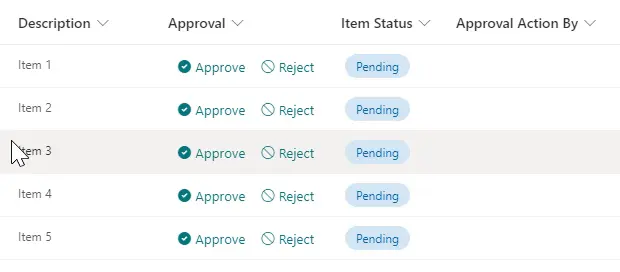
Key points:
- For the buttons, the CSS display property will be set to 'none' when the status is not empty and is different than 'Pending'. And the custom JSON will display a text message stating that the item was already approved or rejected in this case.
- When the item is not approved or rejected yet, the buttons are displayed so the user can take an action (Approve or Reject).
View requirements
| Type | Internal Name | Required | Additional Information |
|---|---|---|---|
| Any (see below) | Approval | Yes | Apply approval-buttons-setValue-status-user.json to this column |
| Choice | ItemStatus | No | Choice values needed: (Pending / Approved / Rejected) Default: Pending |
| Person or Group | ApprovalActionBy | No | Single selection |
- The format can be applied to any column, although it is recommended to add it to a calculated column with a
=""formula
Sample
| Solution | Author(s) |
|---|---|
| approval-buttons-setValue-status-user.json | Michel Mendes |
Version history
| Version | Date | Comments |
|---|---|---|
| 1.0 | November 19, 2021 | Initial release |
Disclaimer
THIS CODE IS PROVIDED AS IS WITHOUT WARRANTY OF ANY KIND, EITHER EXPRESS OR IMPLIED, INCLUDING ANY IMPLIED WARRANTIES OF FITNESS FOR A PARTICULAR PURPOSE, MERCHANTABILITY, OR NON-INFRINGEMENT.