
From the contributor
How to use this sample
Summary
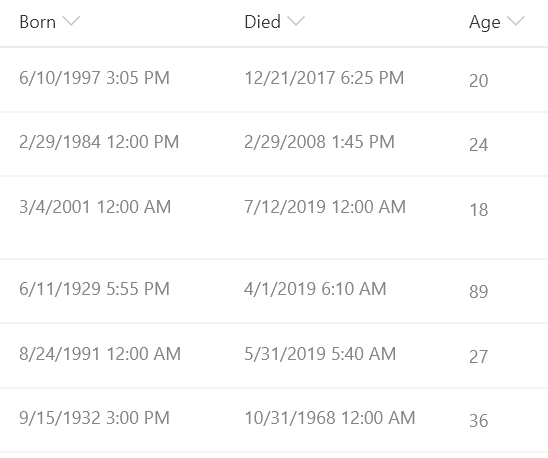
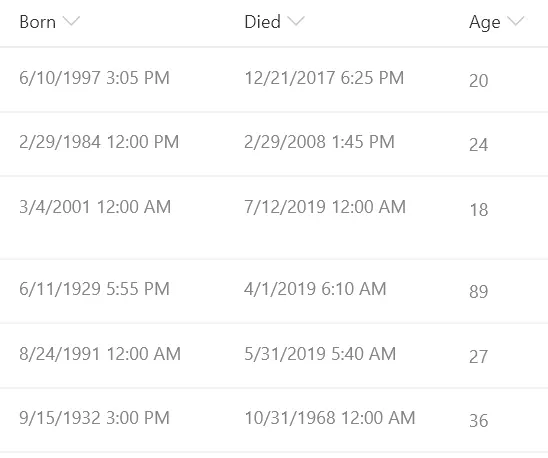
This sample demonstrates calculating the difference between 2 dates. In this sample the age in years is calculated based on the date of birth and the date of death. This format could easily be adjusted to calculate a different unit of time (months, days, hours, minutes, etc.) by adjusting the multiplier.
View requirements
This format can be applied to any column, however it expects the following fields to be present in the view:
| Type | Internal Name | Required |
|---|---|---|
| Date | Born | Yes |
| Date | Died | Yes |
Sample
| Solution | Author(s) |
|---|---|
| date-difference.json | Chris Kent |
Version history
| Version | Date | Comments |
|---|---|---|
| 1.0 | October 2, 2019 | Initial release |
Disclaimer
THIS CODE IS PROVIDED AS IS WITHOUT WARRANTY OF ANY KIND, EITHER EXPRESS OR IMPLIED, INCLUDING ANY IMPLIED WARRANTIES OF FITNESS FOR A PARTICULAR PURPOSE, MERCHANTABILITY, OR NON-INFRINGEMENT.