
Back to column formats
Column formattingSharePoint 2019SharePoint Online

Red-Amber-Green (RAG) Bars Based on Date Ranges

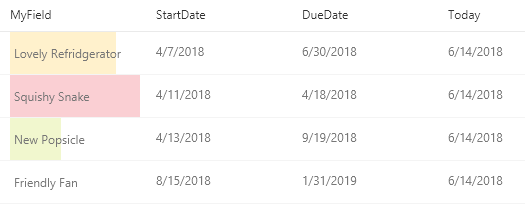
This example creates colored data bars on the current field based on `DueDate` and `StartDate` fields compared to the current date/time.

Red-Amber-Green (RAG) Bars Based on Date Ranges formatting preview
Sample preview · View original image

Copy. Apply. Make it yours.

Get this format

3 definitions

Review the requirements below, then paste this JSON into the matching formatting panel. Show me where.

Use your list's internal column names and replace any tenant-specific URLs or flow IDs. Formatting is presentation, not a way to secure data.

Column formatting
Download JSON
{
  "$schema": "https://developer.microsoft.com/json-schemas/sp/v2/column-formatting.schema.json",
  "elmType": "div",
  "style": {
    "position": "relative",
    "border": "2px solid",
    "border-color": "=if([$DueDate] <= @now, '#ff9362', if(1 - Number([$DueDate] - @now) / Number([$DueDate] - [$StartDate]) >= 0.7) && (1 - Number([$DueDate] - @now) / Number([$DueDate] - [$StartDate]) < 0.9), '#ffd24c', if(1 - Number([$DueDate] - @now) / Number([$DueDate] - [$StartDate]) >= 0.9, '#ff9362', '#bdca73'))"
  },
  "children": [
    {
      "elmType": "div",
      "style": {
        "font-size": "12px",
        "text-align-last": "right",
        "min-height": "inherit",
        "width": "=if([$DueDate] <= @now, '100%', if((Number([$DueDate] - @now))/86400000)>=100,'100%', (1 - Number([$DueDate] - @now) / Number([$DueDate] - [$StartDate])) * 100 + '%')"
      },
	  
      "attributes": {
		"class": "=if([$DueDate] <= @now, 'sp-field-severity--severeWarning', if(1 - Number([$DueDate] - @now) / Number([$DueDate] - [$StartDate]) >= 0.7) && (1 - Number([$DueDate] - @now) / Number([$DueDate] - [$StartDate]) < 0.9), 'sp-field-severity--warning', if(1 - Number([$DueDate] - @now) / Number([$DueDate] - [$StartDate]) >= 0.9, 'sp-field-severity--severeWarning', 'sp-field-severity--good'))"
      }  
    },
    {
      "elmType": "span",
      "txtContent": "@currentField.displayValue",
      "style": {
        "position": "absolute",
        "left": "8px"
      },
      "attributes": {
        "class": "ms-fontColor-neutralSecondary"
      }
    },
    {
      "elmType": "span",
      "txtContent": "='(' + if(floor(Number(Date([$DueDate]) - Date(@now))/86400000)==0,'Today', if(floor(Number(Date([$DueDate]) - Date(@now))/86400000)==1,'Tomorrow', if(floor(Number(Date([$DueDate]) - Date(@now))/86400000)==-1,'Yesterday', if(floor(Number(Date([$DueDate]) - Date(@now))/86400000)>=2,floor(Number(Date([$DueDate]) - Date(@now))/86400000) + ' days', if(floor(Number(Date([$DueDate]) - Date(@now))/86400000)<=2,floor(Number(Date(@now)-Date([$DueDate]))/86400000) + ' days ago',''))))) + ')'",
      "style": {
        "position": "absolute",
        "right": "2px",
        "bottom": "2px",
        "font-size": "9px",
        "color": "black"
      },
      "attributes": {
        "class": "ms-fontColor-neutralSecondary"
      }
    }
  ]
}

From the contributor

How to use this sample

Summary

This example creates colored data bars on the current field based on DueDate and StartDate fields compared to the current date/time.

date-range-rag.json

This example creates colored data bars on the current field based on DueDate and StartDate fields compared to the current date/time. The bar fills towards 100% as "Today" approaches the due date. A percentage width is determined based on the total number of days between the StartDate of the item and the DueDate of the item.
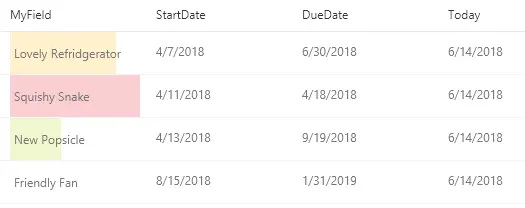
screenshot of the sample

Unlike some of the other examples, this one applies formatting to one field by looking at the value inside other fields. Note that DueDate and StartDate are referenced using the [$FieldName] syntax where FieldName is the internal name of the field. This example also takes advantage of a special value that can be used in date/time fields - @now, which resolves to the current date/time, evaluated when the user loads the list view.

Note that the Today column shown above is not used in the format. It's provided for reference so that you can see how the format was applied with the given dates.

The colors used are determined by the classes applied:

Condition Class
DueDate <= Now sp-field-severity--severeWarning
Number of days passed between StartDate & DueDate > 70% of the total days sp-field-severity--warning
Else sp-field-severity--good

If the DueDate has not yet passed, the width of the bar is determined by calculating the percentage of days that have passed from StartDate and the DueDate.

Additionally, the value of the field (@currentField) is displayed when there is a value.

date-range-rag-days-left.json

In this version of the sample, the days left are displayed within the box:
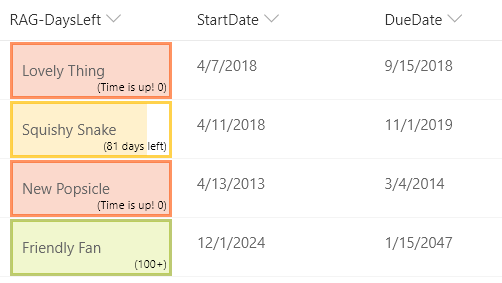
screenshot of the days-left sample

View requirements

  • This format can be applied to any column type
  • An additional DateTime column with an internal name of DueDate is expected
  • An additional DateTime column with an internal name of StartDate is expected

Sample

Solution Author(s)
date-range-rag.json Christopher Parker
date-range-rag-days-left.json Joe Ayre

Version history

Version Date Comments
1.0 June 13, 2018 Initial release
1.1 July 25, 2018 Updated to include amber class
1.2 August 20, 2018 Updated to use Excel-style expressions, add a theme font class, and to simplify the calculations
1.3 August 12, 2019 Added days-left sample
1.4 November 1, 2021 Zylantha simplified days-left calculation

Disclaimer

THIS CODE IS PROVIDED AS IS WITHOUT WARRANTY OF ANY KIND, EITHER EXPRESS OR IMPLIED, INCLUDING ANY IMPLIED WARRANTIES OF FITNESS FOR A PARTICULAR PURPOSE, MERCHANTABILITY, OR NON-INFRINGEMENT.


Additional notes

An additional version using Abstract Tree Syntax (AST) is also provided for environments where the Excel-style expressions are not supported.